Compare commits
| Author | SHA1 | Date | |
|---|---|---|---|
 Thomas Zarebczan |
3f5d54b0c1 | ||
|
Thomas Zarebczan
|
010b73a2c5 | ||
|
Thomas Zarebczan
|
3b87351e1f |
No files matched your search
@@ -1,25 +0,0 @@
|
||||
---
|
||||
title: Claiming LBRY Rewards
|
||||
category: tutorial
|
||||
order: 1
|
||||
---
|
||||
|
||||
Did you know you can earn LBC through the LBRY Rewards program just for watching sweet content and doing other simple actions? If not, today is your lucky day.
|
||||
|
||||

|
||||
|
||||
_On the left, navigating to Rewards in LBRY Desktop and lbry.tv. On the right, navigating to Rewards on LBRY Android._
|
||||
|
||||
You can find the rewards section under the Account menu > Rewards. On Android, click or slide out the menu, and then select Rewards. [Click here to navigate directly to your app](https://open.lbry.com/?rewards).
|
||||
|
||||
In addition to the one time rewards, we have a daily reward for watching content you love on LBRY - so make sure to check back often to keep earning!
|
||||
|
||||
LBC rewards can be used to buy content on the LBRY network, to support your favorite creators, or to publish yourself. Tipping creators also helps creators become discovered on LBRY by boosting their relevance in results.
|
||||
|
||||

|
||||
|
||||
You may need to complete account verification to participate in the rewards program. See our [Rewards](https://lbry.com/faq/rewards) for more information and details about what rewards are available.
|
||||
|
||||
### More Tutorials
|
||||
|
||||
If you’d like to learn more about how to get the most out of LBRY, check out our [other tutorials](https://lbry.com/faq?category=tutorial) or [Frequently Asked Questions](https://lbry.com/faq).
|
||||
@@ -7,7 +7,7 @@ We are listed on several exchanges. You can buy or sell LBRY Credits at one of t
|
||||
|
||||
### Traditional Exchanges
|
||||
- [Bittrex](https://bittrex.com/Market/Index?MarketName=BTC-LBC)
|
||||
- [Poloniex](https://poloniex.com/exchange#btc_lbc) (Currently in maintenance, working with Poloniex team to fix)
|
||||
- [Poloniex](https://poloniex.com/exchange#btc_lbc)
|
||||
- [Upbit](https://upbit.com/exchange?code=CRIX.UPBIT.BTC-LBC)
|
||||
- [Instant Bitex](https://instantbitex.com)
|
||||
- [Coinspot](https://www.coinspot.com.au/buy/lbc)
|
||||
@@ -15,7 +15,7 @@ We are listed on several exchanges. You can buy or sell LBRY Credits at one of t
|
||||
|
||||
### Instant Exchanges
|
||||
- [Shapeshift](https://shapeshift.io) (Currently unavailable, ShapeShift working on it. Requires free membership account now)
|
||||
- [Changelly](https://changelly.com/exchange/BTC/LBC/1) (Currently unavailable)
|
||||
- [Changelly](https://changelly.com/exchange/BTC/LBC/1)
|
||||
- [ChangeNow](https://changenow.io/exchange?amount=1&from=btc&to=lbc)
|
||||
- [Simple Swap](https://simpleswap.io)
|
||||
- [Stealthex](https://stealthex.io/)
|
||||
|
||||
@@ -9,7 +9,4 @@ While the LBRY app is running, it communicates to the network whatever content y
|
||||
|
||||
Think of it like how torrents or any other peer-to-peer (P2P) service works. First, you download a file from the host(s) that have made it available via seeding. When the download has finished, you become a host in the network (seeder) that other people can download from.
|
||||
|
||||
### Deleting hosted content
|
||||
You can delete files from the blob folder directly, or you can also delete them from the My LBRY section of the App - both will get rid of the hosted content and you'll lose the ability to seed it anymore.
|
||||
|
||||
**Please note: Hosting fees are currently disabled on the network as we're currently working on a better way to implement the fee structure.**
|
||||
@@ -5,8 +5,6 @@ category: troubleshooting
|
||||
|
||||
In certain cases, we may ask you to send us your log file(s). The current log file is titled `lbrynet.log` (or just `lbrynet` if you have file extensions hidden) and is archived each time the files reaches 2MB. Older log files are copied to `lbrynet.log.<#>`. Typically only the lbrynet.log file is required, but we may ask for the others depending on the situation. Since each Operating System has its own set of working directories, use the below guide in order to locate the log file(s).
|
||||
|
||||
[Find my logs without opening the app](#manual)
|
||||
|
||||
**lbrynet.log files may contain your IP address. While sharing this is not inherently dangerous, if you desire maximum privacy, please mask it before posting to public websites.**
|
||||
|
||||
### Find Logs via the LBRY App
|
||||
@@ -18,24 +16,24 @@ The folder will be highlighted, so just double click to open and here you will s
|
||||
### Sending log files from Android
|
||||
Navigate to the **About** page and use the **Send Logs** button at the bottom. You can email them to [help@lbry.com](mailto:help@lbry.com)
|
||||
|
||||
### Find Logs Manually {#manual}
|
||||
#### Windows
|
||||
### Find Logs Manually
|
||||
## Windows
|
||||
1. Open File Explorer (Keyboard shortcut: Windows Key + E).
|
||||
2. Type `%localappdata%\lbry\lbrynet` (or `%appdata%\lbrynet` if you originally installed v0.14 or earlier) into the address bar and click Enter.
|
||||
3. Here you will see the `lbrynet.log` file and any archives.
|
||||
|
||||
#### MacOS
|
||||
## MacOS
|
||||
1. Open Finder.
|
||||
2. Click Go in the top menu and choose "Go To Folder".
|
||||
3. Type "~/Library/Application Support/LBRY" and then click go.
|
||||
4. Here you will see the `lbrynet.log` file and any archives.
|
||||
|
||||
#### Ubuntu / Linux *(Exact steps may differ slightly)*
|
||||
## Ubuntu / Linux *(Exact steps may differ slightly)*
|
||||
1. Navigate to your home directory. Ensure hidden files and folders are shown if using a graphical file explorer.
|
||||
2. Navigate to the `.local/share/lbry/lbrynet` folder (or `~/.lbrynet` if you originally installed v0.14 or earlier).
|
||||
3. Here you will see the `lbrynet.log` file and any archives.
|
||||
|
||||
#### Android *(Exact steps may differ slightly)*
|
||||
## Android *(Exact steps may differ slightly)*
|
||||
1. Launch your favorite file explorer.
|
||||
2. Navigate to `Internal storage\android\data\io.lbry.browser->files\lbrynet`.
|
||||
3. Here you will see the `lbrynet.log` file and any archives.
|
||||
@@ -1,42 +0,0 @@
|
||||
---
|
||||
title: Publishing Quickstart
|
||||
category: tutorial
|
||||
order: 3
|
||||
---
|
||||
|
||||
Publishing to LBRY allows anyone else in the world to access your content. You can publish any type of digital file to LBRY. Publishing requires a small amount of LBC, but almost all of this is returned if you decide to later unpublish. We'll cover that later. For now, get those [cat videos](https://beta.lbry.tv/cats:cb) ready!
|
||||
|
||||
This tutorial is meant to provide a quick overview. Our [Publishing FAQ](/faq/how-to-publish) covers publishing in even more detail.
|
||||
|
||||
We'll start with publishing on LBRY Desktop and lbry.tv. Scroll down or [click here](#android) for Android instructions.
|
||||
|
||||
### Publishing on Desktop and lbry.tv
|
||||
1. Click the **Publish** option from the Account drop down. You can also click **New Publish** from the Publishes page (right hand side).
|
||||
1. Select the file you want to publish by clicking **Choose File**. 
|
||||
1. Fill in details for the content you are uploading, including the title, tags, and description.
|
||||
1. For your video thumbnail, you can upload a thumbnail image or take one directly from your video. 
|
||||
1. For the channel section, you can choose to publish anonymously, select an existing channel, or create a new one.
|
||||

|
||||
1. Set a price for your content, if desired.
|
||||
1. Adjust the auto-suggested lbry:// URL and bid, if desired. ([learn more](/faq/naming) about how this works)
|
||||
1. Click **Publish** to submit your upload to the LBRY network! Please leave your app open so that the file can be properly seeded to the network.
|
||||
|
||||
Congratulations on publishing your first piece of content! Have any questions? Please see our [detailed Publishing FAQ](/faq/how-to-publish).
|
||||
|
||||
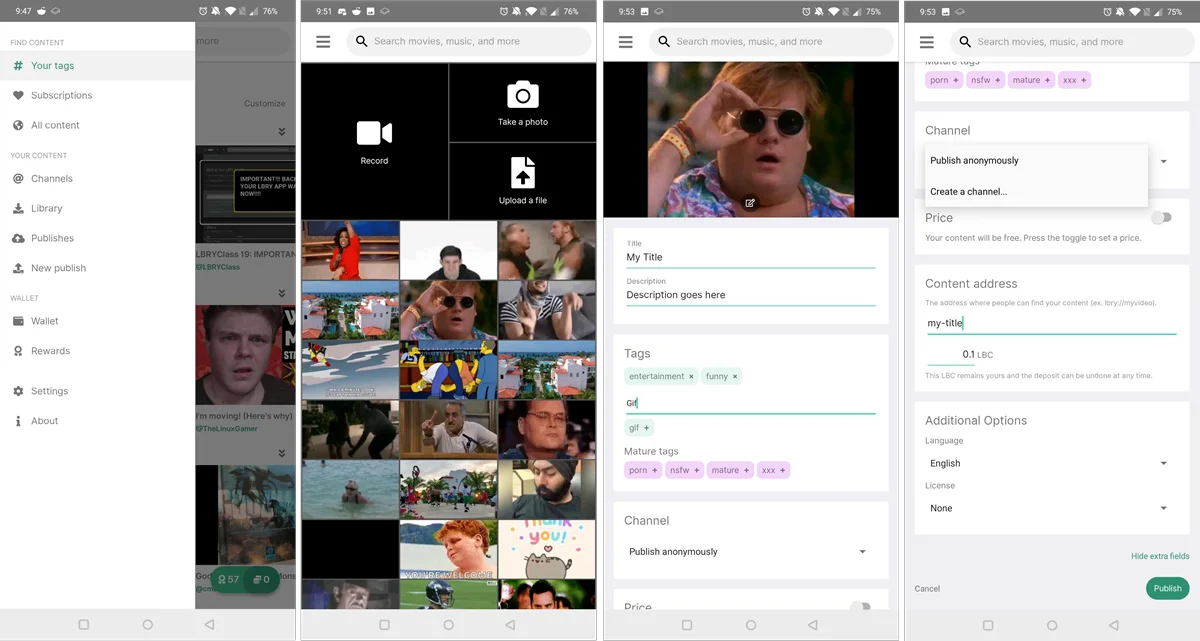
### Publishing on Android
|
||||
1. Select the **New Publish** option from the left hand menu.
|
||||
1. Select from: record a new video, snap a photo, select a file manually, or click an item from the recent videos/GIFs list.
|
||||
1. Fill in details for the content you are uploading, including the title, tags, and description.
|
||||
1. For the channel section, you can choose to publish anonymously, select an existing channel, or create a new one.
|
||||
1. You can adjust the auto-suggested lbry:// URL and bid as needed ([learn more](/faq/naming) and have the option of setting a price for your content.
|
||||
1. Set a price for your content, if desired.
|
||||
1. Adjust the auto-suggested lbry:// URL and bid, if desired. ([learn more](/faq/naming) about how this works)
|
||||
1. click **Publish** to submit your upload to the LBRY network!
|
||||
|
||||
Congratulations on publishing your first piece of content! Have any questions? Please see our [detailed Android FAQ](/faq/android-basics).
|
||||
|
||||
|
||||
|
||||
### More Tutorials
|
||||
|
||||
If you’d like to learn more about how to get the most out of LBRY, check out our [other tutorials](https://lbry.com/faq?category=tutorial) or [Frequently Asked Questions](https://lbry.com/faq).
|
||||
@@ -3,24 +3,24 @@ title: What are LBRY Rewards?
|
||||
category: getstarted
|
||||
---
|
||||
|
||||
To provide a rich user experience and to [distribute](/faq/credit-policy) LBRY Credits (LBC) into the hands of new and returning users, LBRY created a Rewards system where credits are earned by completing tasks throughout the application. Rewards are given to promote application testing, learning certain in-app skills, building the LBRY economy through purchasing and publishing content, and as a small "thank you" gift for being part of a revolutionary digital media platform. For qualified users, Rewards are issued automatically by the LBRY app into each users' [LBRY wallet](/faq/how-to-backup-wallet). **Note: There is a limit of 5 Reward redemptions per day**.
|
||||
To provide a rich user experience and to [distribute](/faq/credit-policy) LBRY Credits (LBC) into the hands of new and returning users, LBRY created a Rewards system where credits are earned by completing tasks throughout the application. Rewards are given to promote application testing, learning certain in-app skills, building the LBRY economy through purchasing and publishing content, and as a small "thank you" gift for being part of a revolutionary digital media platform. For qualified users, Rewards are issued automatically by the LBRY app into each users' [LBRY wallet](/faq/how-to-backup-wallet). **Note: There is a limit of 3 Reward redemptions per day**.
|
||||
|
||||

|
||||
|
||||
### Rewards Approval Requirements
|
||||
### Rewards Approval requirements
|
||||
|
||||
In order to be eligible for LBRY Rewards, users must have an approved account via [phone number](/faq/phone) or [credit card](/faq/identity-requirements) (there's also a manual approval method on [Discord](https://chat.lbry.com)). If users choose not to become approved for rewards, LBRY works with full functionality, but they will not be able to earn any free credits from LBRY. **Rewards will only be granted on a 1 account per household basis and LBRY reserves the right to revoke Rewards privileges on any account if abuse is suspected or if VPN/shared connections are used.**
|
||||
|
||||
### List of Current LBRY Rewards
|
||||
### List of the current LBRY Rewards
|
||||
| Reward | Amount | Description |
|
||||
--- | --- | ---
|
||||
| **Your First Nickel** | 6 LBC | A one-time welcome gift for learning the basics of the application & wallet. Including the purchase of paid content.
|
||||
| **Go for a Stream** | 4 LBC | Rewarded for streaming your very first video on LBRY.
|
||||
| **Channel Surfing** | 6 LBC | A one-time reward for creating a channel on LBRY via the Publish screen.
|
||||
| **First Publish** | 10 LBC | A one-time reward for publishing your first piece of content to LBRY
|
||||
| **Daily View** | 1- 100 LBC | A random daily reward from 1 to 100 LBC, resets every 24 hours!
|
||||
| **Many Views** | 2- ???? LBC | A multi-level reward for watching videos on LBRY. See descriptions in-app for levels/details!
|
||||
| **Sub Sandwich** | 1 -2 LBC | A multi-level reward for subscribing to channels.
|
||||
| **Weekly LBRYCast** | 10 LBC | A weekly award for checking out featured content on LBRY. This content is marked with the red rocket logo and will be announced via email, recurring weekly.
|
||||
| **Welcome Back** | 6 LBC | Return to the LBRY app 24-48 hours following your first use of the app. This reward will self-destruct after that time span.
|
||||
| **Android in Beta** | 20 LBC | Limited time reward for early Android Beta testers.
|
||||
| **Upgrade** | 10 LBC | Rewarded each time the LBRY app updates versions (i.e. 0.27 to 0.28).
|
||||
@@ -32,13 +32,12 @@ Rewards are added to your LBC wallet balance as they are completed. All the rewa
|
||||
|
||||
If you are new to Publishing, check out [our guide](/faq/how-to-publish).
|
||||
|
||||
### Custom Reward Codes {#reward-code}
|
||||
### Custom reward codes {#reward-code}
|
||||
|
||||
Custom reward codes can be claimed via the [Rewards](https://open.lbry.com/?rewards) page in the LBRY app. You may have been given a reward code via email, social media or you stumbled upon it somewhere - whichever way, you can claim it for LBC today! It's simple, just hit `Enter Code`, type it in and press `Redeem`.
|
||||
|
||||

|
||||
|
||||
### Having Trouble?
|
||||
|
||||
|
||||
If you have any questions or problems with receiving the Rewards, feel free to [reach out to us](/faq/support).
|
||||
|
||||
@@ -1,32 +0,0 @@
|
||||
---
|
||||
title: Searching for Content
|
||||
category: tutorial
|
||||
order: 2
|
||||
---
|
||||
|
||||
Searching for content on the LBRY Desktop and Android apps is easy. We'll start with lbry.tv and Desktop first, then cover [Android below](#android).
|
||||
|
||||
### Searching on Desktop and lbry.tv
|
||||
|
||||
Click your cursor into the top bar, and enter a search term. Typically, you'll see at least 3 items at the top:
|
||||
1. **Search** - Default if enter is clicked. This is your typical search option, will return all results matching it.
|
||||
2. **Exact URL** - Select this to navigate directly to the content published at `lbry://comics`
|
||||
3. **Tag** - Select this to navigate to the tag page to browse all content tagged `comics`
|
||||
|
||||

|
||||
|
||||
After performing a search, you'll have access to additional filter to help narrow down the results.
|
||||
- Filtering to _files_ will return content published according to the selected file types.
|
||||
- Filtering to _channels_ will return only channel results.
|
||||
|
||||

|
||||
|
||||
### Searching on Android {#android}
|
||||
|
||||
Select the top bar and begin typing. Once you pause or click enter, the search results will appear. Currently there are no filtering options on this platform.
|
||||
|
||||

|
||||
|
||||
### More Tutorials
|
||||
|
||||
If you’d like to learn more about how to get the most out of LBRY, check out our [other tutorials](https://lbry.com/faq?category=tutorial) or [Frequently Asked Questions](https://lbry.com/faq).
|
||||
@@ -12,9 +12,9 @@ Another common cause of this issue is the lack of access to UDP port 4444. LBRY
|
||||
|
||||
1. Shutdown LBRY and lbrynet-daemon (check running processes using Task Manager on Windows or Activity Monitor on Mac OS.)
|
||||
2. Go to your [lbrynet folder](/faq/lbry-directories).
|
||||
3. If you have a `daemon_settings.yml` file, add this line to it at the end (4444 is an example, can be changed): `dht_node_port: 4444`.
|
||||
3. If you have a `daemon_settings.yml` file, add this line to it at the end (44444 is an example, can be changed): `dht_node_port: 44444`.
|
||||
4. If you don't have the `daemon_settings.yml` file, you can create one or download/copy [this sample](https://goo.gl/a5uJq5) into the `lbrynet` folder.
|
||||
5. Start LBRY and try to download a couple of items from the homepage. Be patient, if it doesn't work, leave the page and try again or a different video.
|
||||
6. Depending on your network, you may need UDP port 4444 (the new port you just set up) forwarded. Also, for file sharing to work properly, you may need TCP port 3333 open/forwarded. This can be verified by using a [port checker tool](http://www.canyouseeme.org) on port 3333. Port 4444 will fail since it's UDP.
|
||||
6. Depending on your network, you may need UDP port 44444 (the new port you just set up) forwarded. Also, for file sharing to work properly, you may need TCP port 3333 open/forwarded. This can be verified by using a [port checker tool](http://www.canyouseeme.org) on port 3333. Port 44444 will fail since it's UDP.
|
||||
|
||||
If you continue to experience issues streaming/downloading content after completing the above steps, please [reach out to us](/faq/how-to-report-bugs) for additional support.
|
||||
@@ -42,16 +42,9 @@ You can delete this channel and any content you published using the transactions
|
||||
|
||||
You won't see your content in the LBRY app under `Publishes` nor have control of the channel until LBRY transfers control of the synced content to you. We're actively working on an automated process for this which will be ready by the end of the northern hemisphere summer. However, your content will be accessible through the LBRY Desktop app and [LBRY.tv](https://beta.lbry.tv) (see the links in your sync email). If you have over 50K subscribers and want to do this via a manual process, see the [wallet claim page](https://lbry.com/claim-wallet)
|
||||
|
||||
### What's the difference between Sync and Transfer? {#transfer}
|
||||
### What's the difference between Sync and Transfer?
|
||||
|
||||
When a channel is synced, it means the content has been mirrored to LBRY and available on the network for anyone to view. YouTubers will get an email once this is completed. The transfer process is described in the important notice above, which is the final step of sending the channel and content to the YouTuber's wallet so they can publish/control the content. This last step is still being actively developed and we'll let you know via email once the content is ready to be transferred. Until then, you won't see the channel/content in your Publishes section, nor be able to publish as that channel outside of the YouTube sync process.
|
||||
|
||||
Feature | Sync | Transfer |
|
||||
:------------ | :-------------| :-------------|
|
||||
Your Youtube publishes will be synced | yes | yes |
|
||||
You have access to content and channel LBC from tips | no | yes |
|
||||
Your content shows up in the app under your Publishes | no | yes |
|
||||
You are responsible for keeping your wallet safe | no | yes |
|
||||
You can use the app to publish to the channel | no | yes |
|
||||
|
||||
If you're having any trouble with the sync process or receiving your credits, please contact [help@lbry.com](mailto:help@lbry.com).
|
||||
@@ -1,7 +1,7 @@
|
||||
---
|
||||
author: brinck-slattery
|
||||
title: 'The Birth Of Entertainment'
|
||||
date: '2018-01-17 15:30:00'
|
||||
date: '2020-11-17 14:00:00'
|
||||
cover: 'muses.jpg'
|
||||
category: content
|
||||
---
|
||||
|
||||
+18
-18
@@ -12,7 +12,7 @@ To read previous updates, please visit our [Development and Community Update arc
|
||||
If you want to see a condensed view of what we have completed recently and what’s planned for LBRY, check out our [Roadmap](https://lbry.io/roadmap).
|
||||
|
||||
First off, let’s start with some GitHub stats across all our repos (some of which are internal only to LBRY) since our last update about 40 days ago:
|
||||
36 repos were updated. 617 issues and pull requests were created, 146 were closed. 18 pull requests were merged. 30 GitHub users outside of LBRY made code contributions, including:
|
||||
36 repos were updated. 617 issues were created, 146 were closed. 18 pull requests were merged. 30 GitHub users outside of LBRY made code contributions, including:
|
||||
- [AlessandroSpallina](https://github.com/AlessandroSpallina)
|
||||
- [Borewit](https://github.com/Borewit)
|
||||
- [btzr-io](https://github.com/btzr-io)
|
||||
@@ -42,22 +42,22 @@ Thanks to everyone who took time out of their busy days to help LBRY out!
|
||||
Since our last development update, the app team shipped our next named release, 0.35, under codename [Franklin](https://lbry.com/news/franklin-is-minted) as well as a few patches. Franklin enhances the app experience with a brand new [videojs-based](https://github.com/videojs/video.js) video player.
|
||||
|
||||
Other new features in Franklin include:
|
||||
- The ability to continue watching videos in pop out mode
|
||||
- Support of range requests (streaming)
|
||||
- The ability to block channels app-wide
|
||||
- the ability to continue watching videos in pop out mode
|
||||
- support of range requests (streaming)
|
||||
- the ability to block channels app-wide
|
||||
|
||||
The patch releases included some new features:
|
||||
- All new features added to the SDK between version 0.38.5 and 0.40, including improved wallet sync behavior, download speeds, and overall connectivity ([more details below](#summary-sdk))
|
||||
- Tipping on channel pages (which gets sent to the channel claim, as opposed to content claims on file pages)
|
||||
- Ability to set the time period for dark mode
|
||||
- Improvements to the display of URLs (now has the [canonical URL](https://lbry.tech/glossary#canonical-url) which uses both channel and claim short IDs)
|
||||
- Support for a new daily watch reward that went live on September 10th (replacing the weekly LBRYCast)
|
||||
- all new features added to the SDK between version 0.38.5 and 0.40, including improved wallet sync behavior, download speeds, and overall connectivity ([more details below](#summary-sdk))
|
||||
- tipping on channel pages (which gets sent to the channel claim, as opposed to content claims on file pages)
|
||||
- ability to set the time period for dark mode
|
||||
- improvements to the display of URLs (now has the [canonical URL](https://lbry.tech/glossary#canonical-url) which uses both channel and claim short IDs)
|
||||
- support for a new daily watch reward that went live on September 10th (replacing the weekly LBRYCast)
|
||||
|
||||
The patches fixed many bugs, including:
|
||||
- Issues with bid amounts required on the publish page (did not show vanity URL bids),
|
||||
- Auto-downloading subscription content
|
||||
- Search bar focus getting stuck
|
||||
- Disabling autoplay on paid content
|
||||
- issues with bid amounts required on the publish page (did not show vanity URL bids),
|
||||
- auto-downloading subscription content
|
||||
- search bar focus getting stuck
|
||||
- disabling autoplay on paid content
|
||||
- DMCA blocking to include entire channels
|
||||
|
||||
We also updated our digital certificate for Windows builds which is an annual maintenance task. We'll explore a better solution for this down the road.
|
||||
@@ -81,11 +81,11 @@ Another area that continues to get attention is internationalization. You may ha
|
||||
On the SDK side of the house, we’ve shipped versions 0.39, with patches, and 0.40.0 with a recent patch. You can review all the changelogs on our [GitHub releases page](https://github.com/lbryio/lbry-sdk/releases).
|
||||
|
||||
The main features include:
|
||||
- Treating multiple accounts inside a wallet to effectively be treated as one (missing a few API calls, to be completed soon)
|
||||
- treating multiple accounts inside a wallet to effectively be treated as one (missing a few API calls, to be completed soon)
|
||||
- ability to connect and synchronize transactions with multiple wallet servers (see screenshot below) which improves wallet sync speed and paves the way to interfacing with community wallet servers
|
||||
- Wallet server monitoring tools to include session information / logging of troublesome claim search queries
|
||||
- A key value store which will be the final location of synced LBRY data.
|
||||
- Added a new function for comments that allows channel owners to moderate comments by hiding them (to be implemented in the app in the next few months)
|
||||
- wallet server monitoring tools to include session information / logging of troublesome claim search queries
|
||||
- a key value store which will be the final location of synced LBRY data.
|
||||
- added a new function for comments that allows channel owners to moderate comments by hiding them (to be implemented in the app in the next few months)
|
||||
|
||||
On SDK startup, we now ping all the wallet servers and select the best main one to connect to based on the peer’s location. The ability to connect/sync with multiple servers proved to be more troublesome than expected, we experienced and fixed reconnection issues which should be resolved with the [0.40.1 patch](https://github.com/lbryio/lbry-sdk/releases/tag/v0.40.1).
|
||||
|
||||
@@ -164,7 +164,7 @@ The SDK team was responsible for exposing the necessary tools to export and upda
|
||||
The result is pretty fascinating and closes the last loop in the sync process: YouTube creators can click a single button in the app, immediately gain access to publish new content via their channel, and their wallet will soon be populated with all their content and channel claims, including all their tips being re-supported on their channel. We’re all super excited for this one!
|
||||
|
||||
### Community Block Explorer {#explorer}
|
||||
A community member by the name of [Alessandro Spallina](https://github.com/AlessandroSpallina) became interested in the LBRY ecosystem and wanted to implement a more modern and fully featured block explorer that exposes important metrics of the LBRY blockchain. You can check out his [GitHub issue](https://github.com/lbryio/block-explorer/issues/67) outlining what he plans on developing or you can go straight to the explorer prototype at [lbryexplorer.tech](https://lbryexplorer.tech/) to give it a shot We’d appreciate any feedback on the GitHub issue and current prototype - you can leave a comment on GitHub or reach out on [Discord](https://chat.lbry.com) #dev channel by tagging @SK3LA.
|
||||
A community member by the name of [Allesandro Spallina](https://github.com/AlessandroSpallina) became interested in the LBRY ecosystem and wanted to implement a more modern and fully featured block explorer that exposes important metrics of the LBRY blockchain. You can check out his [GitHub issue](https://github.com/lbryio/block-explorer/issues/67) outlining what he plans on developing or you can go straight to the explorer prototype at [lbryexplorer.tech](https://lbryexplorer.tech/) to give it a shot We’d appreciate any feedback on the GitHub issue and current prototype - you can leave a comment on GitHub or reach out on [Discord](https://chat.lbry.com) #dev channel by tagging @SK3LA.
|
||||
|
||||

|
||||
|
||||
|
||||
@@ -143,8 +143,6 @@ class Controller
|
||||
|
||||
$router->post('/i18n/set-culture', 'i18nActions::setCulture');
|
||||
|
||||
$router->get('/snapshot/{type}', 'DownloadActions::executeDownloadSnapshot');
|
||||
|
||||
$permanentRedirectsPath = ROOT_DIR . '/data/redirect/permanent.yaml';
|
||||
$tempRedirectsPath = ROOT_DIR . '/data/redirect/temporary.yaml';
|
||||
|
||||
|
||||
@@ -98,7 +98,6 @@ class ContentActions extends Actions
|
||||
$allCategories = [
|
||||
'LBRY 101' => 'Intro to LBRY',
|
||||
'getstarted' => 'Getting Started',
|
||||
'tutorial' => 'LBRY Tutorials',
|
||||
'publisher' => 'Publishers and Creators',
|
||||
'troubleshooting' => 'Help and Troubleshooting',
|
||||
'powerusers' => 'LBRY for Power Users',
|
||||
|
||||
@@ -15,23 +15,6 @@ class DownloadActions extends Actions
|
||||
return Controller::redirect(GitHub::getRepoReleaseUrl($repo, OS::getOsForExtension($ext), $allowPrerelease) ?: '/get', 302);
|
||||
}
|
||||
|
||||
public static function executeDownloadSnapshot(string $type)
|
||||
{
|
||||
if (!in_array($type, ['blockchain', 'wallet'])) {
|
||||
return ['page/404'];
|
||||
}
|
||||
|
||||
$bucketName = "snapshots.lbry.com";
|
||||
$bucket = S3::getBucket($bucketName, "$type/");
|
||||
|
||||
if (!count($bucket)) {
|
||||
return ['page/404'];
|
||||
}
|
||||
|
||||
krsort($bucket);
|
||||
|
||||
return Controller::redirect("http://$bucketName/" . array_keys($bucket)[0], 302);
|
||||
}
|
||||
/*
|
||||
* this is a quick fix to add android, prob not proper design
|
||||
*/
|
||||
|
||||
@@ -26,14 +26,9 @@ class i18nActions extends Actions
|
||||
public static function executeServeTranslationFile(string $project, string $resource, string $language)
|
||||
{
|
||||
if (!Transifex::isConfigured()) {
|
||||
throw new Exception('Please set Config::TRANSIFEX_API_KEY in your configuration.');
|
||||
throw new Exception('Please set Config::TRANSIFEX_API_KEY in your configuration.');
|
||||
}
|
||||
|
||||
$json = Transifex::getTranslationResourceFile($project, $resource, $language);
|
||||
|
||||
Response::setHeader(Response::HEADER_CROSS_ORIGIN, "*");
|
||||
Response::setHeader(Response::HEADER_ETAG, md5($json));
|
||||
|
||||
return View::renderJson($json);
|
||||
return View::renderJson(Transifex::getTranslationResourceFile($project, $resource, $language));
|
||||
}
|
||||
}
|
||||
@@ -20,7 +20,7 @@ class OS
|
||||
'Android',
|
||||
'icon-android',
|
||||
false,
|
||||
"Android",
|
||||
false,
|
||||
"<span class='icon-android icon-fw'></span> Android"
|
||||
];
|
||||
|
||||
@@ -30,7 +30,7 @@ class OS
|
||||
'iOS',
|
||||
'icon-mobile',
|
||||
false,
|
||||
"iOS",
|
||||
false,
|
||||
"<span class='icon-ios icon-fw'></span> iOS"
|
||||
];
|
||||
|
||||
|
||||
@@ -71,7 +71,7 @@ class Response
|
||||
|
||||
public static function getMetaTitle()
|
||||
{
|
||||
return trim(static::$metaTitle);
|
||||
return static::$metaTitle;
|
||||
}
|
||||
|
||||
public static function guessMetaTitle($content)
|
||||
@@ -82,11 +82,11 @@ class Response
|
||||
if ($headerValue == '1' || !$title) {
|
||||
$title = $titleMatches[2][$matchIndex];
|
||||
if ($headerValue == '1') {
|
||||
return trim($title);
|
||||
return $title;
|
||||
}
|
||||
}
|
||||
}
|
||||
return trim($title);
|
||||
return $title;
|
||||
}
|
||||
|
||||
public static function getJsCalls()
|
||||
@@ -192,6 +192,11 @@ class Response
|
||||
]));
|
||||
}
|
||||
|
||||
public static function setContentEtag()
|
||||
{
|
||||
static::setHeader(static::HEADER_ETAG, md5(static::getContent()));
|
||||
}
|
||||
|
||||
public static function enableHttpCache(int $seconds = 300)
|
||||
{
|
||||
static::addCacheControlHeader('max-age', $seconds);
|
||||
|
||||
@@ -6,7 +6,7 @@
|
||||
<section class="hero hero--half-height">
|
||||
<div class="inner-wrap inner-wrap--center-hero">
|
||||
<h1>
|
||||
<?php echo __('download.for-os2', ['%os%' => OS::OS_DETAIL($os)[4]]) ?>
|
||||
<?php echo __('download.for-os2', ['%os%' => OS::OS_DETAIL($os)[5]]) ?>
|
||||
</h1>
|
||||
</div>
|
||||
</section>
|
||||
|
||||
@@ -6,7 +6,6 @@
|
||||
<meta name="viewport" content="width=device-width, initial-scale=1.0, maximum-scale=1.0, user-scalable=no, target-densitydpi=device-dpi"/>
|
||||
|
||||
<?php $title = Response::getMetaTitle() ?: Response::guessMetaTitle($content) ?>
|
||||
<?php $images = Response::getMetaImages() ?>
|
||||
<?php $title = $title ?
|
||||
$title . (strpos($title, 'LBRY') === false ? ' - LBRY' : '') :
|
||||
'LBRY' ?>
|
||||
@@ -40,42 +39,38 @@
|
||||
<link rel="alternate" type="application/rss+xml" title="LBRY News" href="<?php echo ContentActions::URL_NEWS . '/' . ContentActions::SLUG_RSS ?>"/>
|
||||
<?php endif ?>
|
||||
|
||||
<meta property="og:description" content="<?php echo Response::getMetaDescription() ?>"/>
|
||||
<?php foreach ($images as $image): ?>
|
||||
<meta property="og:image" content="<?php echo $image ?>"/>
|
||||
<meta property="og:image:height" content="1125"/>
|
||||
<meta property="og:image:width" content="2000"/>
|
||||
<?php endforeach ?>
|
||||
<meta property="og:site_name" content="LBRY"/>
|
||||
<meta property="og:title" content="<?php echo $title ?>"/>
|
||||
<meta property="og:type" content="article"/>
|
||||
|
||||
<meta name="description" content="<?php echo Response::getMetaDescription() ?>"/>
|
||||
<meta name="msapplication-TileColor" content="#155B4A"/>
|
||||
<meta name="msapplication-TileImage" content="/img/fav/mstile-144x144.png"/>
|
||||
<meta name="theme-color" content="#155B4A"/>
|
||||
|
||||
<meta name="twitter:site" content="@lbryio"/>
|
||||
<meta name="twitter:creator" content="@lbryio"/>
|
||||
<meta name="twitter:card" content="app"/>
|
||||
<meta name="twitter:site" content="@LBRYio"/>
|
||||
<meta name="twitter:description" content="<?php echo Response::getMetaDescription() ?>"/>
|
||||
<?php if ($images): ?>
|
||||
<?php $url = reset($images) ?>
|
||||
<meta name="twitter:image" content="<?php echo $url ?>" />
|
||||
<?php endif ?>
|
||||
|
||||
<?php if (in_array($_SERVER['REQUEST_URI'], ['/', '/android', '/get'])): ?>
|
||||
<meta name="twitter:card" content="app"/>
|
||||
<?php if ($_SERVER['REQUEST_URI'] === '/' || $_SERVER['REQUEST_URI'] === '/android' || $_SERVER['REQUEST_URI'] === '/get'): ?>
|
||||
<meta name="twitter:app:country" content="US"/>
|
||||
<meta name="twitter:app:name:googleplay" content="LBRY beta"/>
|
||||
<meta name="twitter:app:id:googleplay" content="io.lbry.browser"/>
|
||||
<meta name="twitter:app:url:googleplay" content="https://play.google.com/store/apps/details?id=io.lbry.browser"/>
|
||||
<?php else: ?>
|
||||
<meta name=”twitter:card” content=”summary_large_image”>
|
||||
<?php endif ?>
|
||||
|
||||
<!-- Twitter Card data -->
|
||||
<meta name="twitter:site" content="@lbryio">
|
||||
<meta name="twitter:creator" content="@lbryio">
|
||||
|
||||
<meta property="fb:app_id" content="1673146449633983"/>
|
||||
|
||||
<!-- Open Graph data -->
|
||||
<meta property="og:description" content="<?php echo Response::getMetaDescription() ?>"/>
|
||||
<?php foreach (Response::getMetaImages() as $image): ?>
|
||||
<meta property="og:image" content="<?php echo $image ?>"/>
|
||||
<meta property="og:image:height" content="1125"/>
|
||||
<meta property="og:image:width" content="2000"/>
|
||||
<?php endforeach ?>
|
||||
<meta property="og:site_name" content="LBRY"/>
|
||||
<meta property="og:title" content="<?php echo $title ?>"/>
|
||||
<meta property="og:type" content="article"/>
|
||||
|
||||
<meta http-equiv="X-UA-Compatible" content="IE=edge"/>
|
||||
<base target="_parent"/>
|
||||
|
||||
Reference in new issue
Block a user