Compare commits
84
Commits
| Author | SHA1 | Date | |
|---|---|---|---|
 Thomas Zarebczan |
ed2ecfc1eb | ||
|
Jeremy Kauffman
|
194f5d625a | ||
|
Thomas Zarebczan
|
130e855096 | ||
|
Jeremy Kauffman
|
3fe34cce66 | ||
|
Jeremy Kauffman
|
e217181f64 | ||
|
Thomas Zarebczan
|
f4589141ac | ||
|
eatdostacos
|
e198cd4008 | ||
|
eatdostacos
|
761657ab7f | ||
|
eatdostacos
|
0c1ebb3986 | ||
|
eatdostacosandThomas Zarebczan
|
dbb3ee2b8e | ||
|
eatdostacos
|
58a9e9e908 | ||
|
eatdostacos
|
252182aa32 | ||
|
YULIUS KURNIAWAN KRISTIANTO
|
abb5fb7e33 | ||
|
eatdostacosandThomas Zarebczan
|
a4275d67d7 | ||
|
eatdostacosandThomas Zarebczan
|
cfe960f0be | ||
|
hibyemy
|
a707a885f6 | ||
|
Thomas Zarebczan
|
da6ff85fd8 | ||
|
YULIUS KURNIAWAN KRISTIANTO
|
eea5d50f03 | ||
|
hibyemy
|
5e3b5d584b | ||
|
Thomas Zarebczan
|
0dc8ecc2ad | ||
|
Thomas Zarebczan
|
934c994323 | ||
|
Thomas Zarebczan
|
75cba3d613 | ||
|
eatdostacos
|
3b79dbaf58 | ||
|
Josh Finer
|
38e4ecdac0 | ||
|
Josh Finer
|
b3c5bcffce | ||
|
Josh Finer
|
a5611f7a84 | ||
|
Josh Finer
|
1751982333 | ||
|
Jeremy Kauffman
|
8da6c758d0 | ||
|
hibyemy
|
427febca83 | ||
|
Thomas Zarebczan
|
5f0f7cfa40 | ||
|
eatdostacos
|
15c6edcc65 | ||
|
eatdostacos
|
ba3be28f7f | ||
|
Alex Grin
|
cdd86e1440 | ||
|
Niko Storni
|
9ede244748 | ||
|
eatdostacos
|
57b70d0855 | ||
|
eatdostacos
|
fae1c1c365 | ||
|
eatdostacos
|
b6d41a7545 | ||
|
eatdostacos
|
6f735b20fb | ||
|
eatdostacos
|
af396ce13d | ||
|
eatdostacos
|
e157d5f50b | ||
|
eatdostacos
|
2147eb5110 | ||
|
Thomas Zarebczan
|
c0c09fcb67 | ||
|
Josh Finer
|
7561915a50 | ||
|
Josh Finer
|
7eadb2953c | ||
|
Josh Finer
|
f221acbd3c | ||
|
eatdostacos
|
dcc6938dd3 | ||
|
eatdostacosandThomas Zarebczan
|
e702f8f08c | ||
|
eatdostacos
|
2766fb36d6 | ||
|
Thomas Zarebczan
|
2ca931ddca | ||
|
eatdostacos
|
23c5ad99dc | ||
|
Thomas Zarebczan
|
7e632e10a4 | ||
|
mbrixius
|
faac76f398 | ||
|
Thomas Zarebczan
|
040dc33ef8 | ||
|
YULIUS KURNIAWAN KRISTIANTO
|
13c4a7913a | ||
|
Thomas Zarebczan
|
8628c0e2d1 | ||
|
Thomas Zarebczan
|
9003c597b4 | ||
|
Thomas Zarebczan
|
22efebb21a | ||
|
Thomas Zarebczan
|
f7ba162828 | ||
|
sighmanjestah
|
475d9edd27 | ||
|
Thomas Zarebczan
|
cd29f62ad4 | ||
|
Thomas Zarebczan
|
2c62456b61 | ||
|
Jeremy Kauffman
|
d6a1319dd5 | ||
|
Thomas Zarebczan
|
bd45e753a9 | ||
|
Thomas ZarebczanandJeremy Kauffman
|
6bebcca975 | ||
|
Thomas Zarebczan
|
2ed6ea2c7c | ||
|
Thomas Zarebczan
|
7a7529db94 | ||
|
Thomas Zarebczan
|
1558333733 | ||
|
Thomas Zarebczan
|
32ab0508a9 | ||
|
Thomas Zarebczan
|
5efdc28c68 | ||
|
Thomas Zarebczan
|
8bf53b96cf | ||
|
Thomas Zarebczan
|
d197e84696 | ||
|
Thomas Zarebczan
|
80fecbb977 | ||
|
ClementandThomas Zarebczan
|
9baf149051 | ||
|
Thomas Zarebczan
|
429506ac77 | ||
|
Thomas Zarebczan
|
33c4b8a41a | ||
|
Niko Storni
|
3b4e8662d0 | ||
|
Evan McCarter
|
60e3226732 | ||
|
Thomas Zarebczan
|
71d4f3b9ec | ||
|
Julie Sigwart
|
7592ebc9dc | ||
|
Julie Sigwart
|
b8e2e5b36e | ||
|
Preshyon
|
c3b378471b | ||
|
Thomas Zarebczan
|
97b7f001cf | ||
|
Jeremy Kauffman
|
08fc6780a1 | ||
|
Thomas Zarebczan
|
7634c29908 |
No files matched your search
@@ -0,0 +1,43 @@
|
||||
---
|
||||
title: "Quarterly Credit Report: First Quarter 2020"
|
||||
sheet: https://docs.google.com/spreadsheets/d/12_4RFTiEjV1RVdhOOPURa724ZSS8RDBxfnn8MiOvEDQ/edit?usp=sharing
|
||||
category: policy
|
||||
---
|
||||
## Summary
|
||||
This quarter we moved 10MM operational, 20MM community credits, and 3MM institutional credits from master cold storage. We spent 16,026,383 total community credits on line items detailed below. 126,352 operational credits were used for the LBRY team member LBC purchase program. 3MM institutional credits were granted to lbry.org. We anticipate similar community outlays throughout 2020. Operational spending may increase at any time, but is not expected to increase significantly. Institutional spending could be substantial at any time, but would be expected to be coupled with sensible and sensitive distribution rules.
|
||||
|
||||
## Overview By Fund
|
||||
|
||||
### Community Fund
|
||||
|
||||
16,026,383 credits were spent from the community fund, in the following areas:
|
||||
|
||||
| Category | Amount |
|
||||
|---|---|
|
||||
| Bounties | 743,036 |
|
||||
| User Engagement | 9,056,100 |
|
||||
| Community Engagement | 370,847 |
|
||||
| Publishing | 70,100 |
|
||||
| Acquisition | 835,700 |
|
||||
| Testing | 100 |
|
||||
| Swarm | 664,000 |
|
||||
| LBRY funds staked | 4,115,000 |
|
||||
|
||||
As interest has been increasing, we anticipate continuing to reward new users, YouTube channel owners, community contributions, and other beneficial activities.
|
||||
|
||||
Rewards are likely to be adjusted downwards, even if current growth flatlines rather than continues. Swarm funds are from a legacy program and are expected to be zero moving forward, and then removed.
|
||||
|
||||
We are setting 10,000,000 million LBC as the expected spend this quarter, but it could easily be substantially lower or higher.
|
||||
|
||||
It should be noted that LBRY funds staked are recoverable.
|
||||
|
||||
### Operational Fund
|
||||
|
||||
* LBRY sold 2,971,644 LBC on the open market
|
||||
* LBRY issued 126,352 LBC to employees
|
||||
|
||||
LBRY may move credits to market if conditions allow. LBRY is likely to announce new ways to acquire LBC in Q2 2020.
|
||||
|
||||
### Institutional Fund
|
||||
|
||||
3MM Institutional were granted to lbry.org, an independently run and organized entity.
|
||||
@@ -0,0 +1,20 @@
|
||||
---
|
||||
title: LBRY US 2257 Statement
|
||||
category: other
|
||||
---
|
||||
|
||||
## LBRY & US 2257
|
||||
|
||||
18 USC 2257 Statement: LBRY.COM / LBRY.TV
|
||||
|
||||
LBRY.COM / LBRY.TV is not a producer (primary or secondary) of any and all of the content found on the any LBRY INC server or website (LBRY.COM / LBRY.TV). With respect to the records as per 18 USC 2257 for any and all content found on this site, please kindly direct your request to the site for which the content was produced.
|
||||
|
||||
LBRY.COM / LBRY.TV is a video sharing protocol and website which allows for the uploading, sharing and general viewing of various types of adult content and while LBRY.COM / LBRY.TV does the best it can with verifying compliance, it may not be 100% accurate.
|
||||
|
||||
LBRY.COM / LBRY.TV abides by the following procedures to ensure compliance:
|
||||
|
||||
Requiring all users to be 18 years of age to upload videos.
|
||||
When uploading, user must verify the content; assure he/she is 18 years of age; certify that he/she keeps records of the models in the content and that they are over 18 years of age.
|
||||
For further assistance and/or information in finding the content's originating site, please contact hello@lbry.com
|
||||
|
||||
LBRY.COM / LBRY.TV allows content to be flagged as inappropriate. Should any content be flagged as illegal, unlawful, harassing, harmful, offensive or various other reasons, LBRY.COM / LBRY.TV shall remove it from the site without delay.
|
||||
@@ -1,47 +0,0 @@
|
||||
---
|
||||
title: lbry.tv account and wallet syncing
|
||||
category: getstarted
|
||||
order: 3
|
||||
---
|
||||
|
||||
Users expect consistent experiences across devices and sessions. This includes everything from account preferences to subscriptions to account balances. In the land of central servers, this is straightforward, but in blockchain land, it is tricky. This article explains how we provide this functionality, various options in using it, and it's limitations.
|
||||
|
||||
## How it works
|
||||
|
||||
1. Every user, whether on LBRY Desktop, Android, or [lbry.tv](https://lbry.tv), has a single wallet file. This file stores your private keys (like a password) that controls your channels and account balances. The keys in this file are the only way to move or spend LBC or publish to your channel.
|
||||
1. On an ongoing basis, your account preferences and other settings are written to your wallet file.
|
||||
1. If you create a lbry.tv login and turn on account sync (backup), your wallet file will be backed up to and from a LBRY, Inc. server each time you login and at regular intervals.
|
||||
1. Each time this happens, your preferences, channels, subscriptions, and other data will be updated on the new device.
|
||||
1. If your wallet file has a password on it, LBRY, Inc. cannot see into your wallet or do anything with it, including reset your password.
|
||||
|
||||
## Using wallet sync
|
||||
|
||||
### I want to remove my synced data from lbry.tv
|
||||
|
||||
This process is currently manual, please [contact us](/faq/support).
|
||||
|
||||
### Sync limitations
|
||||
|
||||
As of writing, current limitations are:
|
||||
|
||||
- Can't set or change passwords (coming in mid 2020) if you previously did not have one. If you'd like to do this manually, please [contact us](/faq/support).
|
||||
- On Desktop, if you sign out and back in with a different email, these wallets and accounts will be merged. Do not do this unless it's intentional and you expect the new email to be used by the same person. To prevent this, rename/remove the [default_wallet file in the lbryum/wallets folder](/faq/lbry-directories) and quit the app with Ctrl-Q after signing out.
|
||||
|
||||
### Desktop
|
||||
|
||||
1. If running the desktop app for the first time, you will be prompted during the first-run process to opt-in.
|
||||
1. If you want to opt-in later, click the Settings button in the top right and enable Sync.
|
||||
1. If you previously had sync configured with a password (i.e on Android), you'll be prompted for this. If you do not remember, please [reach out to us](mailto:hello@lbry.com) so we can remove the existing synced account.
|
||||
|
||||
### Android
|
||||
|
||||
1. If running the Android app for the first time, you will be prompted during the first-run process to opt-in.
|
||||
1. If you want to opt-in later, click your balance or navigate to the Wallet area and you will see the option to turn this on.
|
||||
|
||||
### lbry.tv
|
||||
|
||||
Syncing is automatically on for lbry.tv users and cannot be disabled. After all, what good would lbry.tv be if you could no longer use it once you signed out! If you have balances on other devices, these will not be reflected at this time.
|
||||
|
||||
## I'm having trouble
|
||||
|
||||
If you have any trouble using or enrolling in account sync, check out this [FAQ article](/faq/how-to-report-bugs) on how to report this to us.
|
||||
@@ -0,0 +1,79 @@
|
||||
---
|
||||
title: lbry.tv accounts and wallet syncing
|
||||
category: getstarted
|
||||
order: 3
|
||||
---
|
||||
|
||||
Users expect consistent experiences across devices and sessions. This includes everything from account preferences to subscriptions to account balances. In the land of central servers, this is straightforward, but in blockchain land, it is tricky. This article explains how we provide this functionality, various options in using it, and it's limitations.
|
||||
|
||||
Users can establish accounts with lbry.tv on all of our applications. You'll be required to create a password when signing up through lbry.tv and confirm the email address. You can sign into existing accounts via the password or via email confirmation.
|
||||
|
||||
## Account passwords and logging in
|
||||
|
||||
lbry.tv users will be prompted to set a password when signing up for a new account and also confirm that the email belongs to them. **It is important to set a strong password to ensure no one else can access your account, LBRY credits, and published content.**. These passwords can be reset via email or changed on the Settings page.
|
||||
|
||||

|
||||
|
||||
If you are logging back in or from another device, you can do so with your account password or via an email confirmation (magic link option).
|
||||
|
||||

|
||||
|
||||
### Existing lbry.tv users without a password
|
||||
Existing lbry.tv users can set a password via the Settings page if password log in is preferred over email confirmation.
|
||||
|
||||

|
||||
|
||||
### Resetting account password
|
||||
|
||||
On the login screen, you'll have the option to reset an account password via email. Once you get the email, click the confirmation link and setup a new password.
|
||||
|
||||

|
||||
|
||||
### Changing account password
|
||||
|
||||
You can update your account password on the Settings page. You'll be prompted for your old password, and the new one. Existing sessions will be kept active. If you need them signed out for security reasons, please [contact us](/faq/support).
|
||||
|
||||

|
||||
|
||||
### Account vs encrypted wallet passwords
|
||||
Account passwords are separate from wallet passwords. Users with encrypted wallets will still be required to enter their wallet password when logging into lbry.tv and about every 2 weeks when the passwords expire. Setting wallet passwords is a [current limitation](#limitations) of our sync process.
|
||||
|
||||
## How syncing of account data works
|
||||
|
||||
1. Every user, whether on LBRY Desktop, Android, or [lbry.tv](https://lbry.tv), has a single wallet file. This file stores your private keys (like a password) that controls your channels and account balances. The keys in this file are the only way to move or spend LBC or publish to your channel.
|
||||
1. On an ongoing basis, your account preferences and other settings are written to your wallet file.
|
||||
1. If you create a lbry.tv login and turn on account sync (backup), your wallet file will be backed up to and from a LBRY, Inc. server each time you log in and at regular intervals.
|
||||
1. Each time this happens, your preferences, channels, subscriptions, and other data will be updated on the new device.
|
||||
1. If your wallet file has a password on it, LBRY, Inc. cannot see into your wallet or do anything with it, including reset your password.
|
||||
|
||||
## Using wallet sync
|
||||
|
||||
### I want to remove my wallet and synced data from lbry.tv
|
||||
|
||||
This process is currently manual, please [contact us](/faq/support).
|
||||
|
||||
### Sync limitations {#limitations}
|
||||
|
||||
As of writing, current limitations are:
|
||||
|
||||
- Can't set or change wallet passwords (coming in mid 2020) if you previously did not have one. If you'd like to do this manually, please [contact us](/faq/support). Wallet passwords are separate from account passwords, and they cannot be reset or changed if lost/forgotten.
|
||||
- On Desktop, if you sign out and back in with a different email, these wallets and accounts will be merged. Do not do this unless it's intentional and you expect the new email to be used by the same person. To prevent this, rename/remove the [default_wallet file in the lbryum/wallets folder](/faq/lbry-directories) and quit the app with Ctrl-Q after signing out.
|
||||
|
||||
### Desktop
|
||||
|
||||
1. If running the desktop app for the first time, you will be prompted during the first-run process to opt-in.
|
||||
1. If you want to opt-in later, click the Settings button in the top right and enable Sync.
|
||||
1. If you previously had sync configured with a password (i.e on Android), you'll be prompted for this. If you do not remember, please [reach out to us](mailto:hello@lbry.com) so we can remove the existing synced account.
|
||||
|
||||
### Android
|
||||
|
||||
1. If running the Android app for the first time, you will be prompted during the first-run process to opt-in.
|
||||
1. If you want to opt-in later, click your balance or navigate to the Wallet area and you will see the option to turn this on.
|
||||
|
||||
### lbry.tv
|
||||
|
||||
Syncing is automatically on for lbry.tv users and cannot be disabled. After all, what good would lbry.tv be if you could no longer use it once you signed out! If you have a wallet on other devices with sync turned on, it will be reflected here as well.
|
||||
|
||||
## I'm having trouble
|
||||
|
||||
If you're having any trouble using or enrolling in account sync, check out this [FAQ article](/faq/how-to-report-bugs) on how to report this to us.
|
||||
@@ -14,32 +14,32 @@ The purpose of this FAQ is to answer questions about some of the basic functiona
|
||||
|
||||
Emails are collected to authenticate a lbry.tv account and [uniquely identify](/faq/phone) users so that they can be eligible for [LBRY Rewards](#rewards), sync wallet data/preferences, and to stay up to date on the latest LBRY happenings.
|
||||
|
||||
No other data is stored with your email login. All other data, including your [wallet](#wallet), [downloads](#data) and published content are stored [locally on your device](/faq/lbry-directories#android). You will be asked to create a [password to secure your account](/faq/account_sync).
|
||||
No other data is stored with your email login. All other data, including your [wallet](#wallet), [downloads](#data), and published content are stored [locally on your device](/faq/lbry-directories#android). You will be asked to create a [password to secure your account](/faq/account_sync).
|
||||
|
||||
## How do I change my LBRY connected email?
|
||||
|
||||
If you ever need to change your LBRY Android App email address or sign out, please see [this guide](/faq/how-to-change-email#android). Clearing data or uninstalling leads to a loss of wallet if you don't have one synced.
|
||||
|
||||
If you sign into a new email and need to transfer your wallet/verification status, you'll need to [reach out to us](mailto:help@lbry.com) in order to link your accounts. Please do not verify again to obtain rewards on a 2nd account; your Rewards account may be disabled for abuse.
|
||||
If you sign in to a new email and need to transfer your wallet/verification status, you'll need to [reach out to us](mailto:help@lbry.com) to link your accounts. Please do not verify again to obtain rewards on a 2nd account; your Rewards account may be disabled for abuse.
|
||||
|
||||
## Syncing of wallets and other data
|
||||
|
||||
The Android app allow syncing of your account/wallet and secures it with a password. Please read the [sync FAQ](/faq/account_sync) in more detail to understand how this works.
|
||||
The Android app allows syncing of your account/wallet and secures it with a password. Please read the [sync FAQ](/faq/account_sync) in more detail to understand how this works.
|
||||
|
||||
## What are LBRY Rewards? {#rewards}
|
||||
|
||||
[LBRY Rewards](/faq/rewards) are used to distribute LBRY Credits (LBC) to new and existing users by allowing them to explore app functions and complete tasks which generate LBC as an award.
|
||||
[LBRY Rewards](/faq/rewards) are used to distribute LBRY Credits (LBC) to new and existing users by allowing them to explore app functions and complete tasks that generate LBC as an award.
|
||||
|
||||
In order to be eligible for Rewards, you need to verify your identity [phone number](/faq/phone) or [chat](https://chat.lbry.com) which uniquely identifies you as an LBRY user.
|
||||
To be eligible for Rewards, you need to verify your identity [phone number](/faq/phone) or [chat](https://chat.lbry.com) which uniquely identifies you as an LBRY user.
|
||||
|
||||
## What is a wallet And how do I find it? {#wallet}
|
||||
|
||||
A wallet is a secure digital file used to store, send and receive cryptocurrencies like LBRY Credits (LBC).
|
||||
A wallet is a secure digital file used to store, send, and receive cryptocurrencies like LBRY Credits (LBC).
|
||||
The LBRY Android App comes with its own wallet and is stored locally on your phone and nowhere else!
|
||||
|
||||
If you do not opt for the [sync program](/faq/account_sync), it is critical that you [backup your own wallet](/faq/how-to-backup-wallet#android) locally or else the credits, channels, and publishes will be lost.
|
||||
|
||||
To find your wallet in the LBRY Android app, click on the 3 horizontal bars at the upper left side of the app next to the Search bar. Clicking on it will open a sidebar and then click on Wallet. This will open the Wallet page which shows your wallet address, balance and recent transactions.
|
||||
To find your wallet in the LBRY Android app, click on the 3 horizontal bars at the upper left side of the app next to the Search bar. Clicking on it will open a sidebar and then click on Wallet. This will open the Wallet page which shows your wallet address, balance, and recent transactions.
|
||||
|
||||

|
||||
|
||||
@@ -62,13 +62,13 @@ The LBRY wallet is different from other wallets - it also stores your shared con
|
||||
|
||||

|
||||
|
||||
3. Choose the option for publishing your content either by recording a live video, taking a picture or picking a file from your gallery.
|
||||
3. Choose the option for publishing your content either by recording a live video, taking a picture, or picking a file from your gallery.
|
||||
|
||||
![Choose an option]https://spee.ch/4/chooses.png)
|
||||

|
||||
|
||||
4. Enter a `Title` and `Description` for your content.
|
||||
|
||||
5. Next you can add tags to your content which will help categorize it for [discovery purposes](https://lbry.com/faq/trending). If it's intended for mature audiences, please add the pink `mature` tag. Next, determine any other tags that relate to the content you are publishing. Please be mindful of accuracy when tagging content as this is currently up to the publisher only and cannot be edited. If incorrect/inappropriate tags are used, your content may be filtered to provide a better user experience. In the future, this will be done through community voting and building a web of trust.
|
||||
5. Next, you can add tags to your content which will help categorize it for [discovery purposes](https://lbry.com/faq/trending). If it's intended for mature audiences, please add the pink `mature` tag. Next, determine any other tags that relate to the content you are publishing. Please be mindful of accuracy when tagging content as this is currently up to the publisher only and cannot be edited. If incorrect/inappropriate tags are used, your content may be filtered to provide a better user experience. In the future, this will be done through community voting and building a web of trust.
|
||||
|
||||

|
||||
|
||||
@@ -76,33 +76,33 @@ The LBRY wallet is different from other wallets - it also stores your shared con
|
||||
|
||||

|
||||
|
||||
7.Under the `Price`, first, determine if you want to make your content free or set a price in LBC per view.
|
||||
7. Under the `Price`, first, determine if you want to make your content free or set a price in LBC per view.
|
||||
|
||||
8. Type in the URL you want the content to be found under, along with a minimum of 0.00000001 LBC deposit for the upload (default amount is higher due to publishing fees). If you are trying to outbid a user-friendly/common URL, the system will suggest a minimum bid to take over the content at that vanity URL. There may be a delay for this takeover. Making your bid higher will result in (better discovery)[https://lbry.com/faq/trending) for your content. For more details regarding the URL or bid, check out our [naming document](/faq/naming).
|
||||
|
||||

|
||||
|
||||
9. Next, there is `Show extra fields` which gives you an option to select language and license. Default language is set to `English`, and the License is set to `None`. If a change is needed, click the dropdown menus and select the appropriate choice.
|
||||
9. Next, there is `Show extra fields` which gives you an option to select language and license. The default language is set to `English`, and the License is set to `None`. If a change is needed, click the dropdown menus and select the appropriate choice.
|
||||
|
||||
*please review our terms of service before publishing [terms of service](/termsofservice)*
|
||||
|
||||
Click `Publish`.
|
||||
|
||||
The file will process in the background and will be added to the LBRY Blockchain. It is a good idea to leave LBRY open for a while after this to make sure the app is able to share your file to at least one peer on the data network. Larger files will take longer to upload depending on your network speed.
|
||||
The file will process in the background and will be added to the LBRY Blockchain. It is a good idea to leave LBRY open for a while after this to make sure the app is able to share your file with at least one peer on the data network. Larger files will take longer to upload depending on your network speed.
|
||||
|
||||
|
||||
Claim related [wallet transactions](/faq/transaction-types) ensure that the blockchain uniquely identifies your content and the payment/tips can be routed appropriately.
|
||||
|
||||
## How do I claim Rewards in the Android app? {#rewards}
|
||||
|
||||
You'll receive daily random rewards just for watching the videos you love! All you need to do is open your LBRY app and start watching. Comeback everyday for a different reward. For other rewards that can be claimed, see the Rewards page.
|
||||
You'll receive daily random rewards just for watching the videos you love! All you need to do is open your LBRY app and start watching. Come back every day for a different reward. For other rewards that can be claimed, see the Rewards page.
|
||||
|
||||
## How do I enable background media playback? {#backgroundmediaplayback}
|
||||
|
||||
When playing anything on the LBRY android app, it will stop playing when you minimize the app or switch to another application. Since we aren't YouTube and won't make you pay for subscription to enable background media playback, you can enable this feature in the app settings.
|
||||
|
||||
1. Swipe your phone screen to the right to reveal the menu, select Settings.
|
||||
2. Tap the `Enable background media playback` toggle on the right hand side, this will change the status of that option from grey to green.
|
||||
2. Tap the `Enable background media playback` toggle on the right-hand side, this will change the status of that option from grey to green.
|
||||
|
||||

|
||||
|
||||
@@ -111,6 +111,6 @@ Now you will be able to keep your media playing in the background without leavin
|
||||
|
||||
## How do I stop the LBRY service from running in the background? {#stoplbryservice}
|
||||
|
||||
You might have noticed the LBRY icon in your notifications with the status, `LBRY service is running in the background`. We keep the app open in the background to stay up-to-date with the blockchain, which helps the app load contents faster as it arrives. In the future, you'll be able to support the LBRY network and earn hosting rewards, but for now, the hosting features are disabled.
|
||||
You might have noticed the LBRY icon in your notifications with the status, `LBRY service is running in the background`. We keep the app open in the background to stay up-to-date with the blockchain, which helps the app load content faster as it arrives. In the future, you'll be able to support the LBRY network and earn hosting rewards, but for now, the hosting features are disabled.
|
||||
|
||||
However, if you do not want the LBRY service to be running in the background, you can disable this in the settings page by tapping `Keep the daemon background service running after closing the app` - this will change the status of that option from green to grey. Now close the LBRY app by clicking back multiple times or swipe the app to close - the notification icon should disappear.
|
||||
@@ -10,4 +10,4 @@ Do you use BitTorrent? Imagine getting paid to seed files into the network. Beca
|
||||
|
||||
Do you shop on the iTunes Store? Imagine paying less for songs, TV episodes, and music videos while having 100% of the cost go directly to the creators.
|
||||
|
||||
LBRY is a digital media library at your fingertips. It can store any kind of content and make it available at low cost on demand. In a few years time, LBRY may become your one-stop-shop for everything digital, from ebooks to video games to movies. One app to rule them all – but still leaving more power in your hands because it is decentralized by design.
|
||||
LBRY is a digital media library at your fingertips. It can store any kind of content and make it available at low cost on demand. In a few years, LBRY may become your one-stop-shop for everything digital, from ebooks to video games to movies. One app to rule them all – but still leaving more power in your hands because it is decentralized by design.
|
||||
@@ -6,14 +6,12 @@ order: 1
|
||||
|
||||
## What is mining?
|
||||
|
||||
Mining is a process where computing power is used to verify transactions on the LBRY network and add them to the public ledger (LBRY blockchain). It is also a process of how additional new LBRY credits (LBC) are created as a reward for the successful miners (see details below). The process uses the mining software to calculate complex mathematical puzzles in order to secure the transactions.
|
||||
Mining is a process where computing power is used to verify transactions on the LBRY network and add them to the public ledger (LBRY blockchain). It is also the process of how new LBRY Credits (LBC) are created as a reward for the successful miners (see details below). The process uses the mining software to calculate complex mathematical puzzles in order to secure the transactions.
|
||||
Both CPU and GPU hardware can be used for mining, but the current market is dominated by GPU and ASIC mining. LBRY uses a mix of SHA512, SHA256 and RIPEMD hash functions in its algorithm. To put it in the most simple terms: mining enables secure and fast LBC transactions.
|
||||
|
||||
## Only trust the source
|
||||
|
||||
The source code, and not this file, is the only true definition of the block rewards. That source file is located here in [`master`]:
|
||||
|
||||
[https://github.com/lbryio/lbrycrd/blob/master/src/validation.cpp](https://github.com/lbryio/lbrycrd/blob/master/src/validation.cpp#L1025)
|
||||
The source code, and not this file, is the only true definition of the block rewards. That source file is located [here](https://github.com/lbryio/lbrycrd/blob/v0.17.3.2/src/validation.cpp#L1025).
|
||||
|
||||
## Mining reward schedule
|
||||
|
||||
@@ -23,17 +21,17 @@ Eventually 1,083,202,000<sup>1</sup> LBRY credits will exist.
|
||||
|
||||
They are awarded on the following schedule:
|
||||
|
||||
* The genesis block creates 400,000,000 credits to be administered by LBRY, Inc. 300,000,000 of these will be strategically allocated to partners, many of whom have a direct interest in the naming layer. It also includes 100,000,000 earmarked for charity. Additionally, some may be given directly to the public in ways that add value and make sense. 100,000,000 are owned by LBRY directly.
|
||||
* The genesis block created 400,000,000 credits to be administered by LBRY, Inc. 300,000,000 of these will be strategically allocated to partners, many of whom have a direct interest in the naming layer. It also includes 100,000,000 earmarked for charity. Additionally, some may be given directly to the public in ways that add value and make sense. 100,000,000 are owned by LBRY directly.
|
||||
|
||||
* The remaining 600,000,000 are mined in 3 stages:
|
||||
|
||||
1. The first stage goes from block 1 to block 5100 and will take roughly 9 days. Every block in this stage has a reward of 1 credit. This is the testing stage, to ensure that there are no glaring problems with the blockchain.
|
||||
1. The first stage went from block 1 to block 5100 and took roughly 9 days. Every block in this stage had a reward of 1 credit. This was the testing stage, to ensure that there were no glaring problems with the blockchain.
|
||||
|
||||
2. The second stage is the ramp-up. It goes from block 5101 to block 55000 (roughly 3 months of mining). During this stage, the block reward increases linearly from 2 to 500. 500 is the largest block reward available.
|
||||
2. The second stage was the ramp-up. It went from block 5101 to block 55000 (roughly 3 months of mining). During this stage, the block reward increased linearly from 2 to 500. 500 was the largest block reward available.
|
||||
|
||||
3. The final stage is the "normal" mining stage. From block 55001 onward, the block reward decreases logarithmically over the course of 20 years.
|
||||
3. The final and current stage is the "normal" mining stage. From block 55001 onward, the block reward decreases logarithmically over the course of 20 years.
|
||||
|
||||
* Block rewards ramp up slowly because we want to ensure that users are given some time to get LBRY up and running, and to avoid unfairly benefiting the earliest users.
|
||||
* Block rewards ramped up slowly because we wanted to ensure that users were given some time to get LBRY up and running, and to avoid unfairly benefiting the earliest users.
|
||||
|
||||
* To see the current block reward, visit the [LBRY Blockchain Explorer](https://explorer.lbry.com) and explore the latest block details.
|
||||
|
||||
|
||||
@@ -0,0 +1,113 @@
|
||||
---
|
||||
title: Buying and selling LBC on exchanges
|
||||
category: getstarted
|
||||
---
|
||||
This guide is meant for informational purposes only and is not financial advice.
|
||||
|
||||
Currently, in order to exchange LBC for traditional currencies (and vice versa), you'll need to use [cryptocurrency exchanges](/faq/exchanges). LBRY is actively working on ways to make this easier right inside our applications, but we don't have an ETA on when this would be available.
|
||||
|
||||
Some exchanges have a US Dollar (USD/USDT) market, whereas others only trade LBC against Bitcoin (BTC). This means you'd need to go through BTC first before being able to obtain traditional currencies like USD. These steps below are an example of how to buy and sell LBC on Bittrex, but the mechanism of using order books will be similar on other exchanges.
|
||||
|
||||
If you are acquiring LBC, you'll need to have BTC deposited into your account, link a bank account to deposit USD, or use a credit card (not available in all locations). If you are selling LBC, you'll need to [deposit the LBC to your Bittrex account first](#Withdrawing-LBC-to-Bittrex).
|
||||
|
||||
## Login or create a Bittrex account
|
||||
1. Login / create a [Bittrex account](https://bittrex.com) (you may need to complete KYC)
|
||||
|
||||
## Depositing funds
|
||||
### Depositing USD {#Depositing-USD}
|
||||
**Please note: This is only available to some customers depending on location**
|
||||
1. [Follow this process to enable USD](https://bittrex.zendesk.com/hc/en-us/articles/360021914672-How-do-I-deposit-USD-into-Bittrex-)
|
||||
1. Click on `Holdings` from the upper right corner.
|
||||
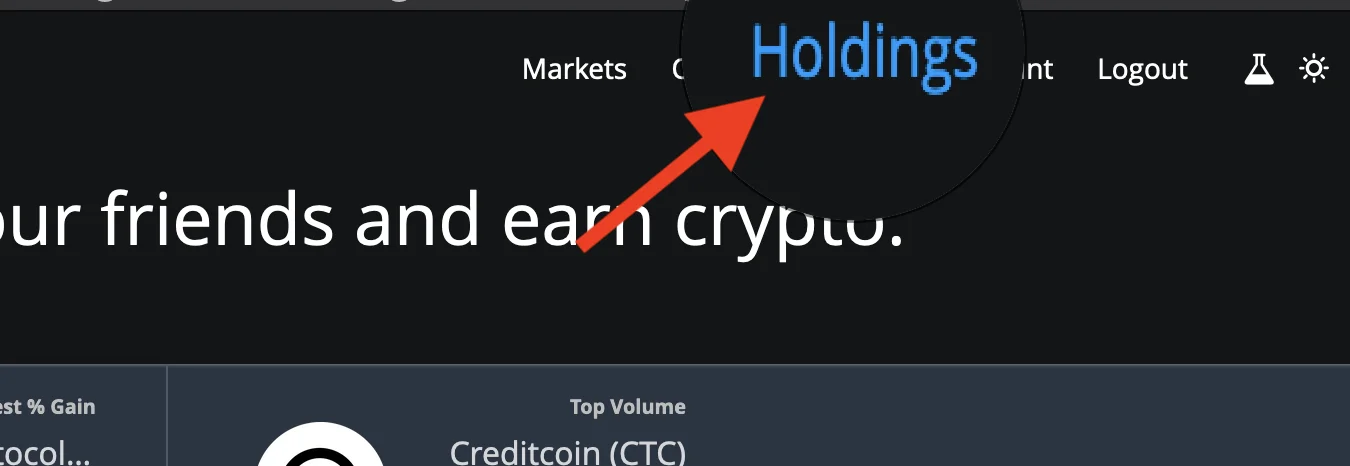
|
||||
1. Once the holdings page loads up, click on **Deposit by bank/wire**
|
||||
1. Click on Wire Transfer and click Get Started.
|
||||
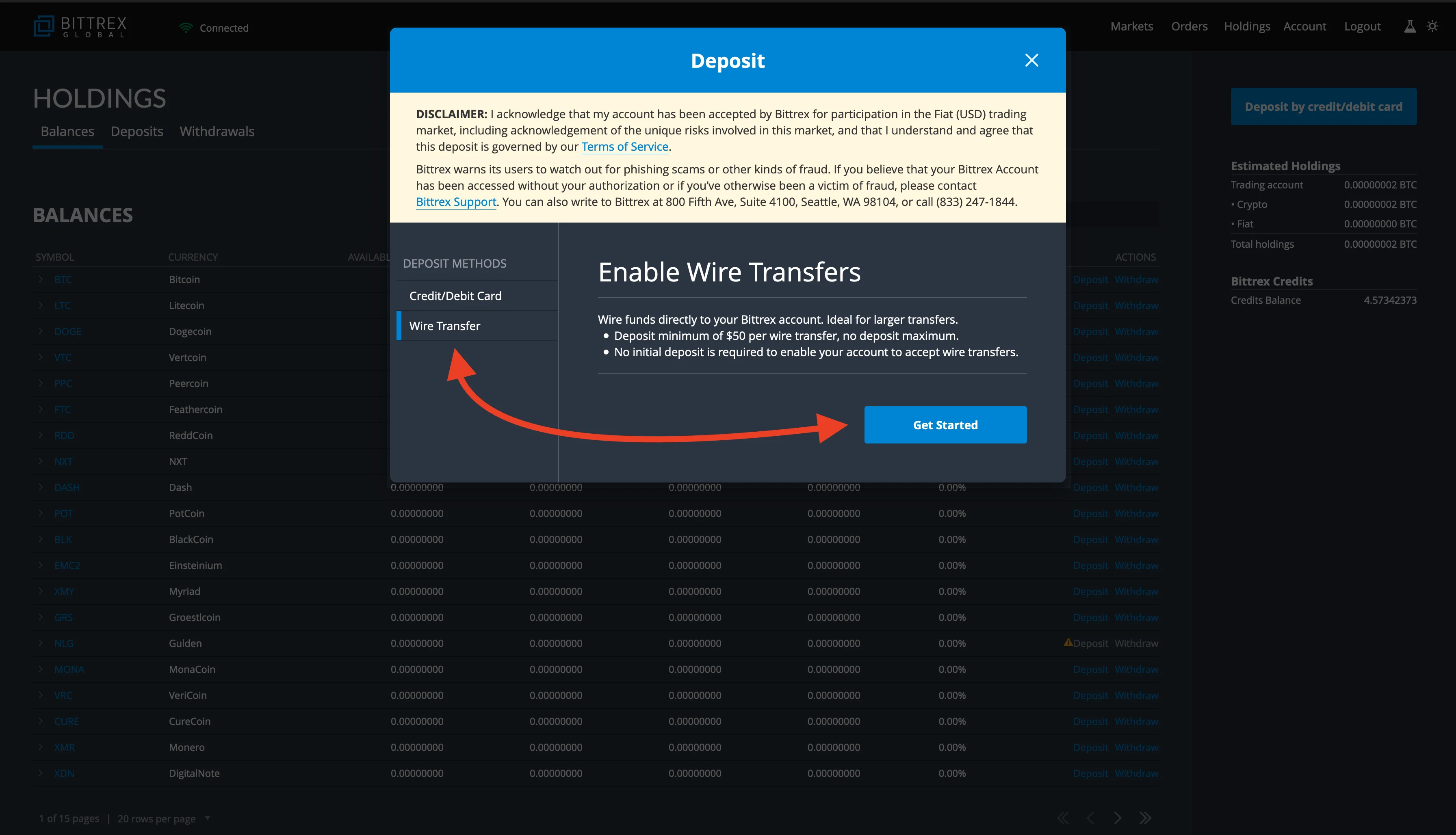
|
||||
1. Finish the process and deposit USD into your account.
|
||||
|
||||
### Purchasing with a debit card from Bittrex
|
||||
**Please note: This is only available to some customers depending on location**
|
||||
1. Click on `Holdings` from the upper right corner.
|
||||

|
||||
1. Once the holdings page loads up, click on **Deposit by credit/debit card**.
|
||||
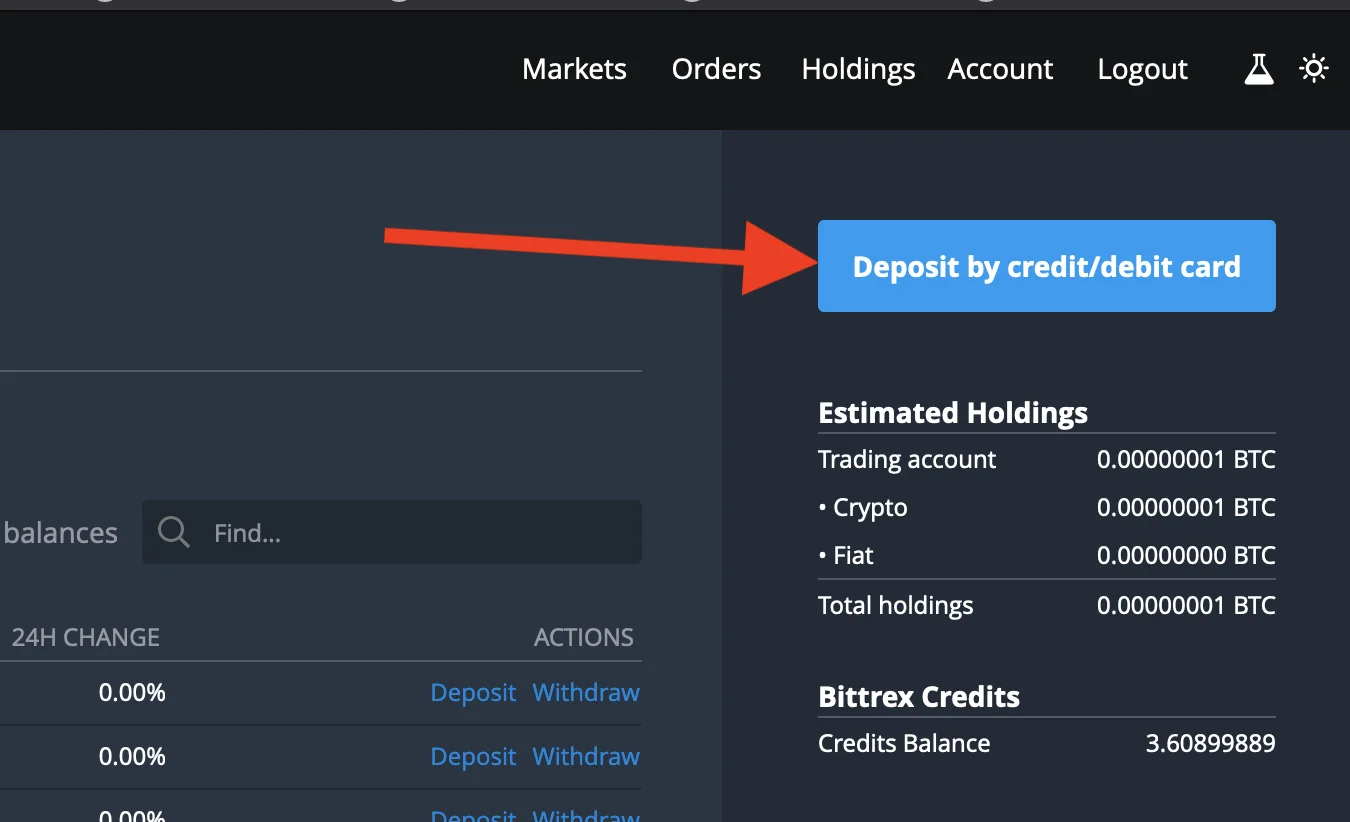
|
||||
1. Enter the amount you'd like to purchase in dollars and click on **Enter card info next**.
|
||||
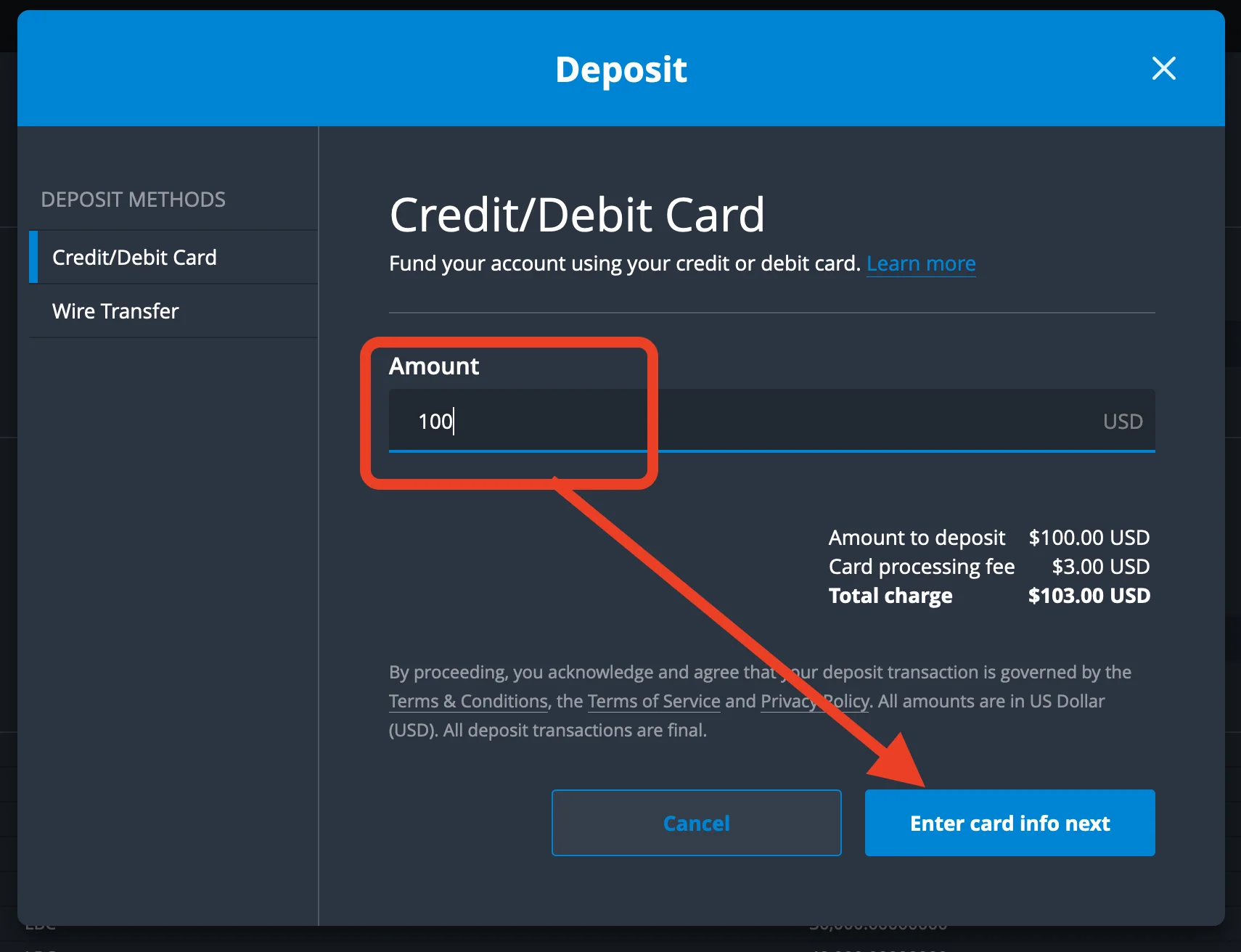
|
||||
1. Enter your card details and any other information and click on pay.
|
||||
1. Once the payment is successful, you should see fiat balance in BTC equivalence
|
||||
|
||||
### Depositing BTC
|
||||
1. Click on `Holdings` from the upper right corner.
|
||||

|
||||
1. Once the holdings page loads up, find BTC and click the deposit button.
|
||||
1. Deposit BTC to your account by sending funds to the address shown.
|
||||
|
||||
## Buying
|
||||
|
||||
### Purchasing BTC with USD
|
||||
**This step is required if your account has a USD balance since LBC does not trade against USD on Bittrex**
|
||||
1. From the Bittrex home page: under USD market, click on USD-BTC
|
||||

|
||||
1. Click on the market price you'd like to buy BTC (usually the first in the sell order book and indicated as red).
|
||||

|
||||
1. Enter how much BTC you want to purchase in dollars or simply click on the percentage to select the amount you'd like to purchase. For example, 50% of your total holdings or 100% of your total holding in USD.
|
||||

|
||||
1. Click on place order, and once the order is executed, you'll now see your BTC holdings instead of USD. You can check this right below the place order button or the holdings page from the upper right screen.
|
||||
|
||||
### Purchasing LBC with BTC.
|
||||
1. From the Bittrex home page: scroll down, under the BTC market, search for LBC and once it comes up, click on BTC-LBC.
|
||||

|
||||
1. Click on the market price you'd like to buy LBC (usually the first in the sell order book indicated as red.)
|
||||
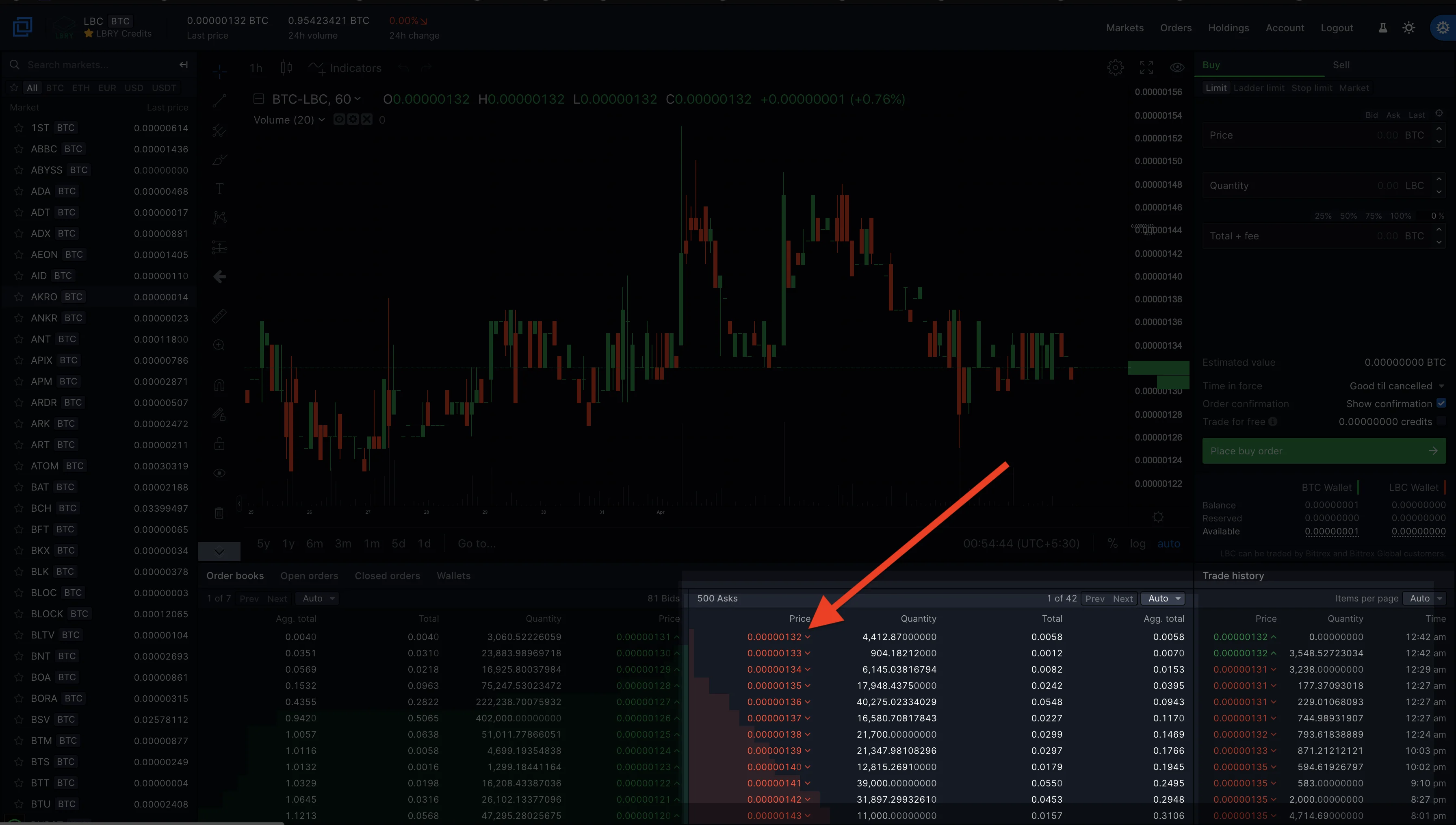
|
||||
1. Enter how much LBC you want to purchase or simply click on the percentage to select the amount you'd like to purchase, for example, 50% of your total holdings or 100% of your total holding in BTC.
|
||||
1. Click on place order, and once the order is executed, you'll now see your LBC holdings. You can check this right below the place order button or the holdings page from the upper right screen.
|
||||
|
||||
## Selling
|
||||
|
||||
### Selling LBC for BTC
|
||||
To sell LBC for BTC, you will have to deposit your LBC to the Bittrex LBC wallet. [See depositing LBC to Bittrex](#Withdrawing-LBC-to-Bittrex)
|
||||
1. Go to the Bittrex home page, scroll down, under the BTC market, search for LBC and once it comes up, click on BTC-LBC.
|
||||

|
||||
1. Click on Sell
|
||||
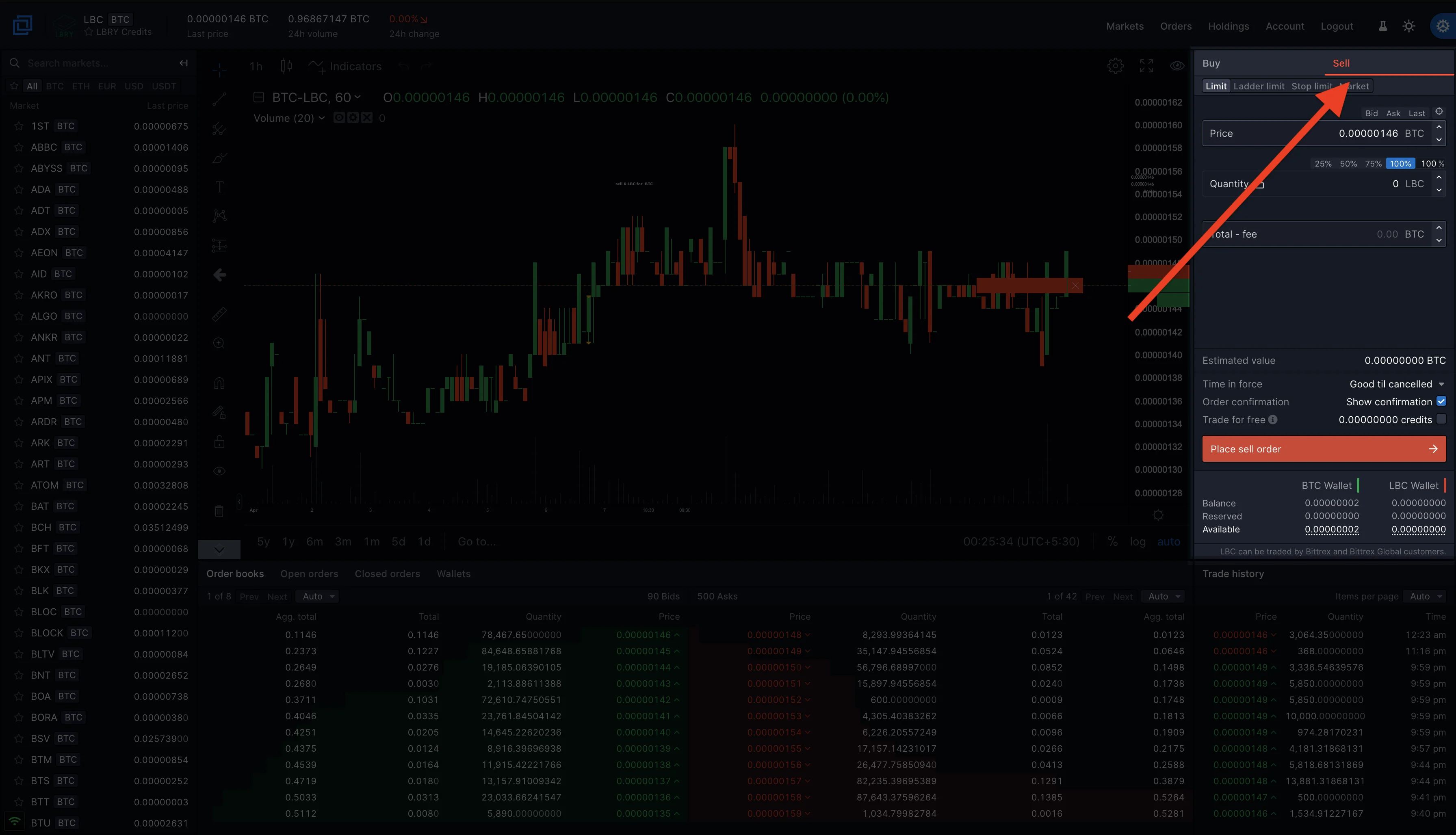
|
||||
1. Click on the market price you'd like to sell LBC (usually the first in the buy order book indicated as green.)
|
||||
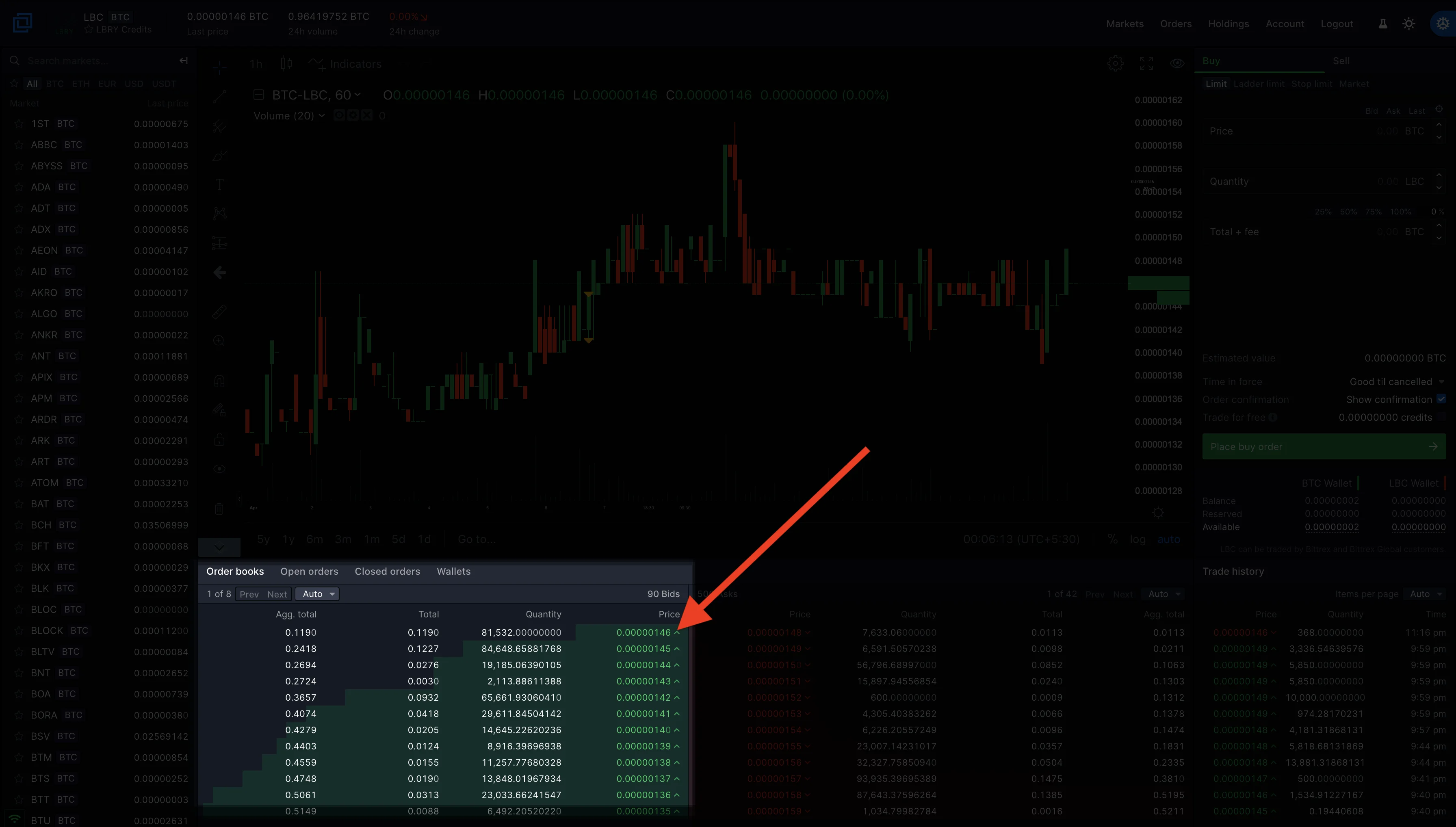
|
||||
1. Enter how much LBC you want to sell or simply click on the percentage to select the amount you'd like to sell. For example, 50% of your total holdings or 100% of your total holding in LBC.
|
||||
1. Click on place sell order, and once the order is executed, you'll now see your BTC holdings. You can check this right below the place order button or the holdings page from the upper right screen.
|
||||
|
||||
### Selling BTC for USD
|
||||
To sell BTC for USD, you may have to submit a Fiat Trading request to Bittrex [See Depositing USD](#Depositing-USD)
|
||||
1. From the Bittrex home page: under USD market, click on USD-BTC.
|
||||

|
||||
1. Click on the market price you'd like to sell BTC (usually the first in the buy order book and indicated as green.)
|
||||

|
||||
1. Enter how much BTC you want to sell or simply click on the percentage to select the amount you'd like to sell. For example, 50% of your total holdings or 100% of your total holding.
|
||||

|
||||
1. Click on place sell order, and once the order is executed, you'll now see your USD holdings instead of BTC. You can check this right below the place order button or the holdings page from the upper right screen.
|
||||
|
||||
## Managing and withdrawing funds
|
||||
|
||||
### Checking Holdings and withdrawing LBC to your LBRY account.
|
||||
1. Click on the holdings on the upper right corner of the Bittrex page.
|
||||

|
||||
1. Toggle the **Show Zero Balances** option to show only wallets with balance or you can use the **find** option to search for LBC.
|
||||
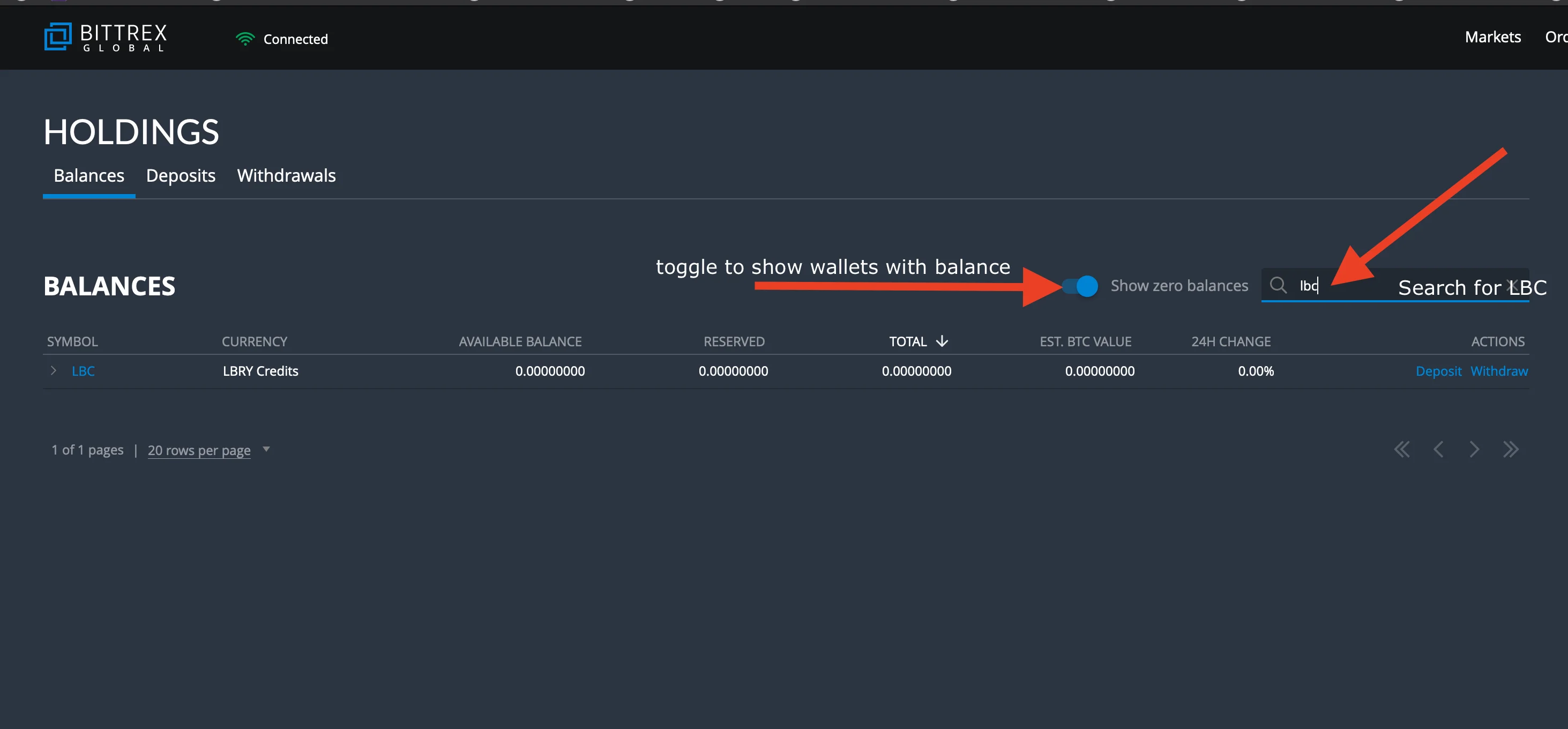
|
||||
1. Click on withdraw.
|
||||
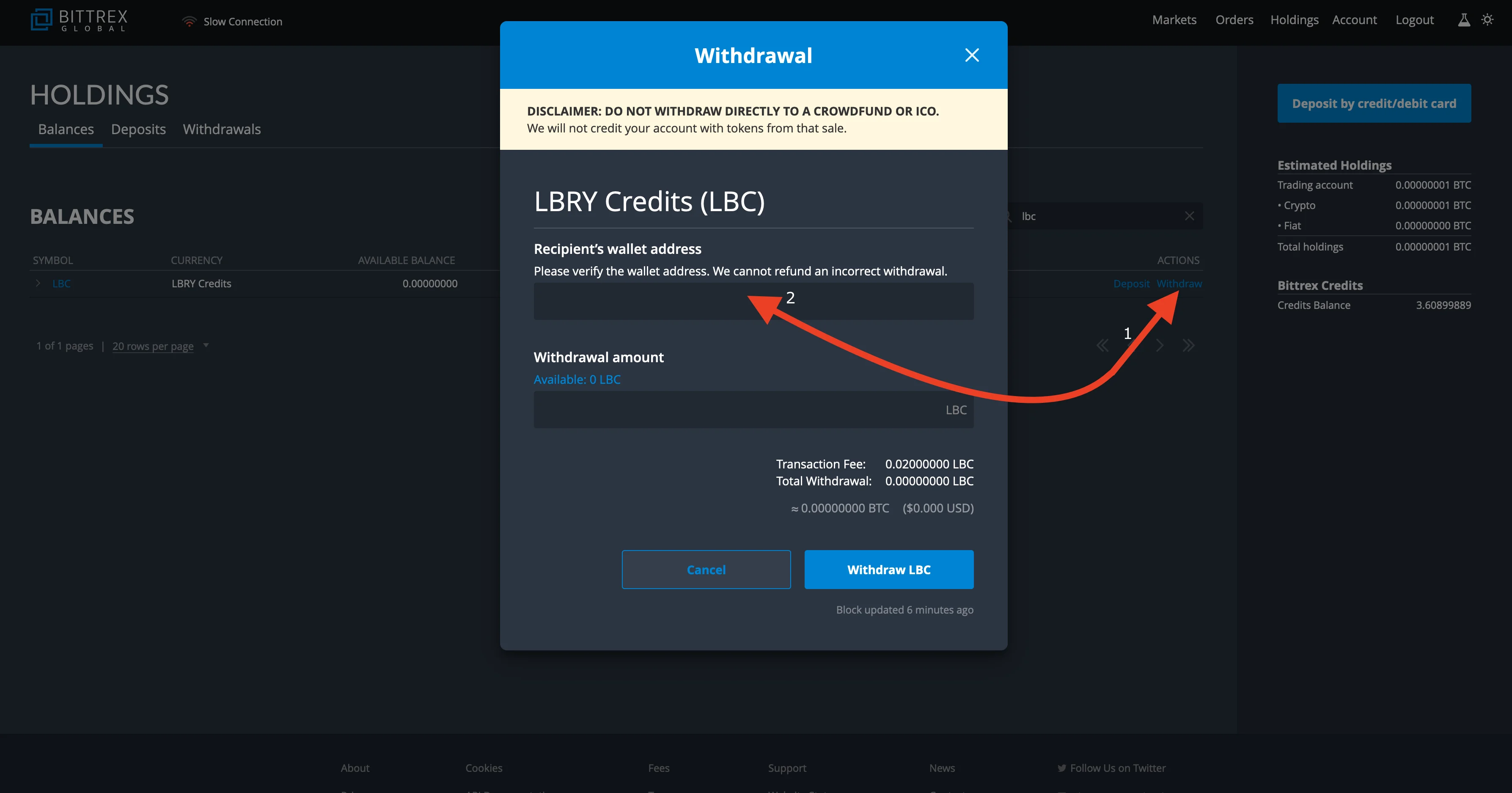
|
||||
1. Go to your LBRY app/lbry.tv page, click on the balance on the top right and click on `your address` to bring up your LBRY address.
|
||||
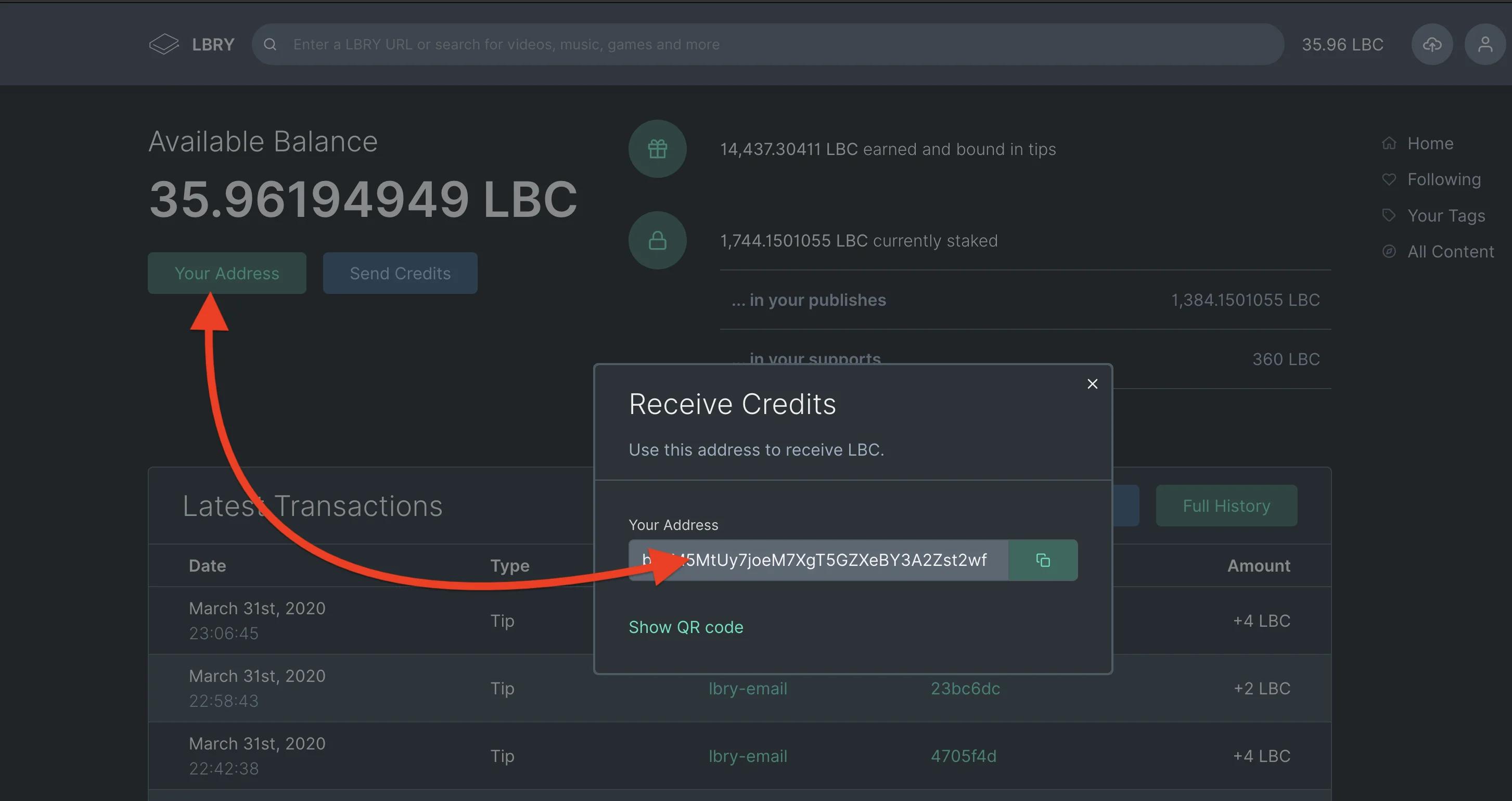
|
||||
1. Copy the address you get from your LBRY account to the address field on the Bittrex withdrawal page.
|
||||
1. Click on **available balance** or enter the total amount of LBC you want to withdraw and click on withdraw.
|
||||
1. Type in your 2FA if necessary and you are done, you should see your balance withdrawn from Bittrex to your LBRY account in minutes.
|
||||
|
||||
### Withdrawing LBC to Bittrex {#Withdrawing-LBC-to-Bittrex}
|
||||
1. Click on the holdings on the upper right corner of the Bittrex page.
|
||||
1. Search for LBC using the **find** option on the Bittrex holdings page.
|
||||
1. Click on the option for deposit.
|
||||
1. Copy your LBC wallet address.
|
||||
1. Open the wallet page on your LBRY app/lbry.tv by clicking on the balance option/wallet page.
|
||||
1. Click the option for send credits.
|
||||
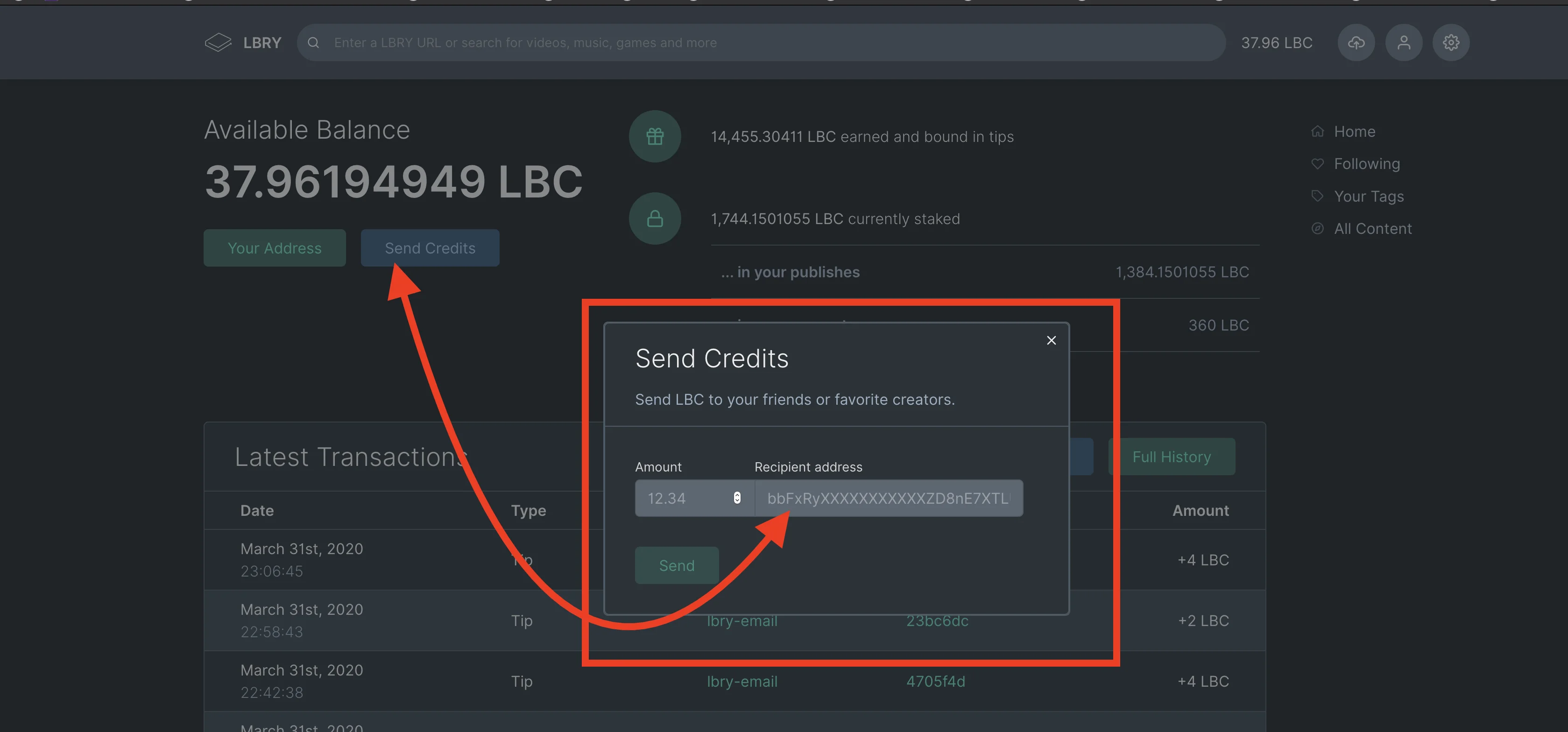
|
||||
1. Paste the address you copied from Bittrex and enter the amount you want to transfer and click send.
|
||||
1. To check the status of your withdrawal, go to the holdings page on Bittrex and click on deposits. This will show pending deposit status.
|
||||
|
||||
**Please note that it may take up to 10 minutes for the status to reflect under the deposit status. Bittrex requires 30 confirmations which can take anywhere from 60-90 minutes.**
|
||||
@@ -11,6 +11,13 @@ This guide provides answers to questions regarding what you may upload to LBRY a
|
||||
You may upload legal content that you own or have obtained permission to use, as long as it does not infringe on the rights of others.
|
||||
This includes Public Domain content, Creative Commons or Open Source content shared according to the license requirements, and Copyrighted content where you have permission from the owner.
|
||||
|
||||
We ask you to follow these simple rules:
|
||||
1) The content is yours, you have permission to post it, or it's public domain / fair use / license allows re-use.
|
||||
1) The content is tagged properly, especially with mature content. Do not abuse tags with ones that don't pertain to your content.
|
||||
1) The content is not illegal in your jurisdiction.
|
||||
|
||||
Failure to follow these rules may result in the filtering of your content/channel and the ability to earn rewards will be revoked.
|
||||
|
||||
## Because LBRY is decentralized, doesn't this mean the content can't be removed?
|
||||
|
||||
It is important to make a distinction between the LBRY protocol and any applications running on top when referring to censorship and the ability to block access to certain content. The LBRY protocol is fully decentralized and censorship-resistant - it provides permissionless access to [claiming of URLs](/faq/naming) and indexing metadata on the blockchain, and facilitates data transfers over a peer to peer (P2P) network which consists of our own content severs and anyone running the LBRY protocol. This means infringing content may be stored on our servers, by the uploader and by anyone else who may have downloaded it.
|
||||
|
||||
@@ -7,7 +7,7 @@ order: 3
|
||||
There are several ways to earn LBRY Credits, or LBC.
|
||||
|
||||
1. LBRY users receive an LBC gift by way of [rewards](/faq/rewards).
|
||||
1. LBRY users get LBC for [referring](/faq/referrals) other users via the LBRY Desktop and lbry.tv (see Account Overview page).
|
||||
1. LBRY users get LBC for [referring](/faq/referrals) other users via the LBRY Desktop app or lbry.tv (see Account Overview page).
|
||||
1. You can earn LBC for helping with various tasks. Talk to us on [Discord Chat](https://chat.lbry.com/) if you're interested in additional testing or helping the community.
|
||||
1. [Contributing](https://lbry.tech/contribute) to the project as a developer/engineer.
|
||||
1. Buy them: see [Exchanges](/faq/exchanges)
|
||||
|
||||
@@ -0,0 +1,42 @@
|
||||
---
|
||||
title: How do I share or embed LBRY videos on other websites?
|
||||
category: publisher
|
||||
order: 3
|
||||
---
|
||||
|
||||
LBRY videos can be embedded on your blog or other sites you want the video to play directly on. This is done via a simple HTML code snippet that includes an iframe to lbry.tv.
|
||||
|
||||
## How to embed a video via an iframe
|
||||
|
||||
1. From the content page, click the Share button.
|
||||

|
||||
2. Click the **<>** icon to show the embed snippet, and click the Copy button.
|
||||

|
||||
3. Paste the embed code into your website. Depending on what platform you are using, this may require an HTML code block.
|
||||
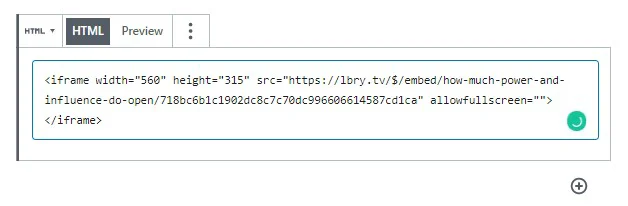
|
||||
|
||||
## What does an embed look like?
|
||||
|
||||
Here's a sample lbry.tv iframe embed, generated by following the above steps for the video [Meet lbry.tv](https://open.lbry.com/@lbry:3f/meetlbrytv:c?r=9PLaAYVfz6NLQa81fdSLpcvVhWm7joNV):
|
||||
|
||||
<iframe width="560" height="315" src="https://lbry.tv/$/embed/meetlbrytv/c6c0a5caa6cc391696e1270e33cd9d24ee7c2d52" allowfullscreen></iframe>
|
||||
|
||||
## Embed videos in markdown posts on LBRY
|
||||
|
||||
You can also embed a LBRY URL in your markdown (.md) posts on LBRY. It can be a vanity, canonical, or permanent URL. See sample markdown on our [lbry.tv blog post about embeds](https://open.lbry.com/@lbry:3f/embedforscience:0). It will open in the pop out player if available, or navigate to video page if not (actual embedding in this case to come later).
|
||||
|
||||
Syntax inside markdown file:
|
||||
|
||||
```
|
||||
<iframe src="lbry://@lbry#3f/befreeonlbry#5"></iframe>
|
||||
```
|
||||
|
||||
## What else do I need to know?
|
||||
|
||||
1. When an embedded video is played, it will count as a view for your content.
|
||||
1. If a user visiting the site has a lbry.tv account, their views may also [count as tips](/faq/rewards#contentview).
|
||||
1. You'll be credited with an invite if the user signs up for a lbry.tv account later (and their first video play was from your embed).
|
||||
|
||||
## I'm in need of some assistance, can you help?
|
||||
|
||||
Of course, we are always here to help! Check out our [help page](/faq/support) on how to reach us.
|
||||
@@ -3,7 +3,9 @@ title: Where can I buy or sell LBC?
|
||||
category: getstarted
|
||||
---
|
||||
|
||||
We are listed on several exchanges. You can buy or sell LBRY Credits at one of these:
|
||||
We are listed on several exchanges. You can buy or sell LBRY Credits at any of the below.
|
||||
|
||||
For a guide on buying/selling, see our [Bittrex purchasing/selling FAQ](/faq/buy-sell-bittrex)
|
||||
|
||||
## Traditional exchanges
|
||||
- [Bittrex](https://bittrex.com/Market/Index?MarketName=BTC-LBC)
|
||||
|
||||
@@ -14,6 +14,8 @@ If you are using lbry.tv only, your wallet will also not be transferred, so plea
|
||||
If you sign out of the Desktop app and back in with a different email, **these wallets and accounts will be merged**. Do not do this unless it's intentional and you expect the new email to be used by the same person.
|
||||
|
||||
## Changing email on Android {#android}
|
||||
**If you need to merge wallets, you need to backup/restore your Android wallet or use the LBRY Desktop app to merge them by signing into both emails. [Android wallet backup instructions](https://lbry.com/faq/how-to-backup-wallet#android).**
|
||||
|
||||
*(Exact steps may differ slightly)*
|
||||
*Before proceeding, please make sure to backup your wallet if there are funds in it*
|
||||
1. Go to phone settings
|
||||
|
||||
@@ -57,15 +57,14 @@ You can continue to use LBRY while the upload completes.
|
||||
|
||||
1. Open LBRY
|
||||
|
||||
2. Click on the LBC balance showing at the top right of the app. You will get a dropdow, select `Publish` from the menu.
|
||||

|
||||
2. Click on the cloud with an arrow pointing into it in the top right corner.
|
||||
|
||||
3. Select a source file and then in the `Channel Name` section, click on the dropdown menu and select `New Channel` and then declare the name you would like for your channel. For more details on different channel types, see our write up on [naming](/faq/naming).
|
||||
3. Select `New Channel` in the dropdown menu.
|
||||
|
||||
4. Once your name is selected, there is a `Deposit` section that is below. It requires a minimum bid of 0.0001 LBC (see more on deposits [here](/faq/naming)). Please ensure that you have enough LBRY credits in your wallet to cover the bid amount. There is also a small network fee associated with the creation of a channel.
|
||||
4. Once your name is selected, there is a `Deposit` section that is below. It requires a minimum bid of 0.00001 LBC (see more on deposits [here](/faq/naming)). Please ensure that you have enough LBRY Credits in your wallet to cover the bid amount. There is also a small network fee associated with the creation of a channel.
|
||||

|
||||
|
||||
5. Click `Create Channel` once you have entered your bid amount. You now own `lbry://@channelnameyoubidon#Claim_ID` and `lbry://@channelnameyoubidon` (the vanity name without a claim id) if you are the highest bidder.
|
||||
5. Click `Create channel` once you have entered your bid amount. You now own `lbry://@channelnameyoubidon` (the vanity name without a claim id) if you are the highest bidder.
|
||||
|
||||
## How do I customize my channel? {#channel}
|
||||
|
||||
@@ -89,7 +88,7 @@ First, you need to access your channel from your Publishes page by clicking on i
|
||||
2. Select the content you want to remove from LBRY
|
||||

|
||||
|
||||
3. Click on the `Delete` icon. If the delete icon does not respond, try downloading the content locally and try again.
|
||||
3. Click on the `Delete` icon.
|
||||
|
||||
4. There will be two options. `Delete this file from my computer` and `Abandon the claim for this URI`. Select the option that applies. Abandoning your claim will release the LBC back into your wallet (99% of the time you want to select this).
|
||||

|
||||
@@ -103,10 +102,8 @@ Click `Remove`. If you abandoned your claim, you should see the deposit back in
|
||||
1. Click on the `Publishes` tab from the right-side of the app.
|
||||
2. Select the content you want to update.
|
||||
3. Click `Edit`.
|
||||
|
||||
4. You can now edit your claim information. No need to re-select the file if it's the same one or has the same url.
|
||||
|
||||
5. When you are done, click `Edit`.
|
||||
5. When you are done, click `Save`.
|
||||
|
||||
## Where is my content stored and shared from? {#blobs}
|
||||
|
||||
@@ -126,7 +123,7 @@ The in-app and lbry.tv video player's streaming capability works best with the H
|
||||
|
||||
## I shared my URL, but others can't download it. What's going on?
|
||||
|
||||
Since LBRY is a Peer-to-Peer network, it requires that your device is accessible to the internet. LBRY also runs servers to assist in content hosting, but this process may fail if your device cannot send it to us or if you didn't wait long enough after the initial publish. Try quitting (ctrl-Q) and restarting the LBRY app if the content is not accessible on [lbry.tv](https://lbry.tv).
|
||||
Since LBRY is a Peer-to-Peer network, it requires that your device is accessible to the internet. LBRY also runs servers to assist in content hosting, but this process may fail if your device cannot send it to us or if you didn't wait long enough after the initial publish. Try quitting (Ctrl-Q) and restarting the LBRY app if the content is not accessible on [lbry.tv](https://lbry.tv).
|
||||
|
||||
## Where is my channel and content saved locally?
|
||||
|
||||
|
||||
@@ -3,7 +3,7 @@ title: How does the invite program work?
|
||||
category: getstarted
|
||||
---
|
||||
|
||||
You can earn LBRY Credits (LBC) for inviting others to use LBRY as well as letting us know who invited you. Invite new users to LBRY via email or a customized link on the [Invites page of LBRY Desktop or lbry.tv](http://open.lbry.com/?invite). This page will also show the status of existing invites.
|
||||
You can earn LBRY Credits (LBC) for inviting others to use LBRY as well as letting us know who invited you. Invite new users to LBRY via email or a customized link on the [Invites page of LBRY Desktop or lbry.tv](http://open.lbry.com/?invite). This page will also show the status of existing invites. Both the inviter and invitee are eligible for the reward.
|
||||
|
||||
*Note: Referral redemptions are typically limited to 20, but increases as your channel grows in popularity on LBRY. See the [limits section below](#limits)*
|
||||
|
||||
@@ -31,11 +31,11 @@ For a limited time, you can claim a reward for being invited and letting us know
|
||||
|
||||
## How many LBRY Credits do I earn?
|
||||
|
||||
New invites are eligible for a 20 LBC reward (subject to change based on our discretion).
|
||||
New invites are eligible for a 15 LBC reward (subject to change based on our discretion).
|
||||
|
||||
## Is there a limit to the credits I can earn? {#limits}
|
||||
|
||||
The default limit for claimable invites is 20. Your limit increases as you use LBRY more and your channel grows in popularity. If you want us to review your account and allow for more redemptions, please first make sure you've claimed your maximum and then [email us](mailto:help@lbry.com) with details about yourself and users you are inviting.
|
||||
The default limit for claimable invites is 20. Your limit increases as you use LBRY more and your channel grows in popularity. If you want us to review your account and allow for more redemptions, please first make sure you've claimed your maximum and then [email us](mailto:help@lbry.com) with details about yourself and users you are inviting. This is typically reserved for creators or influencers.
|
||||
|
||||
## What is the difference between accepted and claimable?
|
||||
|
||||
@@ -43,9 +43,9 @@ Accepted means the user has signed into LBRY. Claimable means they have verified
|
||||
|
||||
## What are the criteria for a claimable invite?
|
||||
|
||||
A claimable invite has the same definition as a Rewards eligible or Verified LBRY user. This means the referred user must have logged into LBRY and verified their account.
|
||||
A claimable invite has the same definition as a Rewards eligible or Verified LBRY user. This means the referred user must have logged into LBRY and validated their account for rewards.
|
||||
|
||||
LBRY users who abuse either the Invite or Rewards system will not be eligible for invite redemption. If you have specific questions about individual invites which are not claimable, please reach out to the [helpdesk](mailto:help@lbry.com) with details.
|
||||
LBRY users who abuse either the Invite or Rewards system will not be eligible for invite redemption. If you have specific questions about individual invites which are not claimable, please reach out to the [helpdesk](mailto:help@lbry.com) with details.
|
||||
|
||||
## I have a clever idea to cheat the invite system
|
||||
|
||||
|
||||
+19
-19
@@ -6,7 +6,7 @@ order: 1
|
||||
|
||||
The LBRY Desktop and lbry.tv allow you to view content, upload your digital media for free or at a set price, tip your favorite creators, send/receive LBRY Credits (LBC) and earn credits through [LBRY Rewards](/faq/rewards). The apps and web version run on top of the [LBRY protocol](/faq/what-is-lbry) which is a peer to peer, decentralized file sharing and payment network secured by blockchain technology.
|
||||
|
||||
The purpose of this FAQ is to answer questions about some of the basic functionality available on LBRY Desktop, LBRY mobile and lbry.tv. Please see our [other FAQ entries](/faq) for additional information.
|
||||
The purpose of this FAQ is to answer questions about some of the basic functionality available on LBRY Desktop, LBRY mobile, and lbry.tv. Please see our [other FAQ entries](/faq) for additional information.
|
||||
|
||||
**Important notes:**
|
||||
|
||||
@@ -22,30 +22,30 @@ The purpose of this FAQ is to answer questions about some of the basic functiona
|
||||
Emails are collected to authenticate a lbry.tv account and [uniquely identify](/faq/identity-requirements) users so that they can be eligible for [LBRY Rewards](#rewards), sync account data, and to stay up to date on the latest LBRY happenings. See our [Privacy FAQ](/faq/privacy-and-data) for more information on what data is collected.
|
||||
|
||||
## How do I change my LBRY connected email?
|
||||
If you ever need to change your LBRY email address or sign out, please see [this guide](/faq/how-to-change-email). If you sign into a new email and need to transfer your verification status and account (lbry.tv only users), you'll need to [reach out to us](/faq/support) in order to link your accounts.
|
||||
If you ever need to change your LBRY email address or sign out, please see [this guide](/faq/how-to-change-email). If you sign in to a new email and need to transfer your verification status and account (lbry.tv only users), you'll need to [reach out to us](/faq/support) to link your accounts.
|
||||
|
||||
## What if I want to run LBRY on multiple computers or different Windows accounts?
|
||||
If you want to run LBRY on multiple PCs or on other platforms like Android, you can sign in with the same email on all devices. Your account data and preferences will be synced as long as it's enabled in Settings.
|
||||
If you want to run LBRY on multiple PCs or other platforms like Android, you can sign in with the same email on all devices. Your account data and preferences will be synced as long as it's enabled in Settings.
|
||||
|
||||
## What are LBRY Rewards? {#rewards}
|
||||
[LBRY Rewards](/faq/rewards) are used to distribute LBRY Credits (LBC) to new and existing users by allowing them to explore app functions and complete tasks which generate LBC as a reward. In order to be eligible for rewards, you need to [verify your identity](/faq/identity-requirements) which uniquely identifies you as an LBRY user.
|
||||
[LBRY Rewards](/faq/rewards) are used to distribute LBRY Credits (LBC) to new and existing users by allowing them to explore app functions and complete tasks which generate LBC as a reward. To be eligible for rewards, you need to [verify your identity](/faq/identity-requirements) which uniquely identifies you as an LBRY user. Not all users or regions may qualify for rewards for various reasons, thank you for respecting this. LBRY can be used without the reward feature.
|
||||
|
||||
## What is a wallet and how do I find it? {#wallet}
|
||||
A wallet is a secure, digital wallet used to store, send and receive cryptocurrencies like LBRY Credits(LBC). LBRY comes with its own wallet and is stored locally on your device and nowhere else unless you enable the Sync feature. **If you do not enable syncing, it is critical that you [backup your wallet data](/faq/how-to-backup-wallet) in case you lose access to your PC or need to [migrate](/faq/backup-data) to a new one.**
|
||||
A wallet is a secure, digital wallet used to store, send, and receive cryptocurrencies like LBRY Credits (LBC). LBRY comes with its own wallet and is stored locally on your device and nowhere else unless you enable the Sync feature. **If you do not enable syncing, it is critical that you [backup your wallet data](/faq/how-to-backup-wallet) in case you lose access to your PC or need to [migrate](/faq/backup-data) to a new one.**
|
||||
|
||||
To find your wallet in LBRY:
|
||||
- in the **Desktop app** or in **lbry.tv** click on your LBC Balance showing at the top right and it should display the wallet overview page which shows your balance, send / receive and recent transactions (balance may show as **`0 LBC`** if you don't have credits or as **`Wallet`** text if in the ***Settings** is enabled the option "***Hide wallet balance in header***").
|
||||
- in the **Desktop app** or **lbry.tv** click on your LBC Balance showing at the top right and it should display the wallet overview page which shows your balance, send/receive and recent transactions (balance may show as **`0 LBC`** if you don't have credits or as **`Wallet`** text if in the ***Settings** is enabled the option "***Hide wallet balance in header***").
|
||||
|
||||
- in the **mobile app** you need to open the main menu and then choose the `Wallet` option, where you can see the address of your wallet, recent transactions, you can send credits and syncronize your wallet.
|
||||
- in the **mobile app**, you need to open the main menu and then choose the `Wallet` option, where you can see the address of your wallet, recent transactions, you can send credits and synchronize your wallet.
|
||||
|
||||
The LBRY wallet is different from other cryptocurrencies because it also stores your shared content's metadata in the form of [claims](/faq/naming) when using the [publishing features](/faq/how-to-publish). Claim related [wallet transactions](/faq/transaction-types) ensure that the blockchain uniquely identifies your content and the payment/tips can be routed appropriately.
|
||||
|
||||
## Where do I find my LBC wallet address?
|
||||
To find your wallet address in LBRY:
|
||||
|
||||
- in the **Desktop app** or in **lbry.tv** click on your LBC Balance showing at the top right (Balance may show as `0 LBC` if you have not credits) and it should display the wallet overview page which shows your balance, send / receive and recent transactions. To see your wallet adress, click on the `Your address` button.
|
||||
- in the **Desktop app** or **lbry.tv** click on your LBC Balance showing at the top right (Balance may show as `0 LBC` if you have no credits) and it should display the wallet overview page which shows your balance, send/receive, and recent transactions. To see your wallet address, click on the `Your address` button.
|
||||
|
||||
- in the **mobile app** you need to access the main menu of the app and then choose the `Wallet` option where you can see the address of your wallet.
|
||||
- in the **mobile app**, you need to access the main menu of the app and then choose the `Wallet` option where you can see the address of your wallet.
|
||||
|
||||

|
||||
|
||||
@@ -58,15 +58,15 @@ You can [earn more LBC](/faq/earn-credits) or [purchase LBC from exchanges](/faq
|
||||
Please see the [LBRY directories FAQ page](/faq/lbry-directories) for more information on where LBRY data is stored. Besides the internal LBRY data, you can also configure your LBRY download directory via the option at the top of the Settings page (gear icon in the top right).
|
||||
|
||||
## Why is content downloaded to my PC even when I stream? {#disk}
|
||||
LBRY is a decentralized peer to peer protocol, meaning there are no centralized servers or a single entity storing all the files (like YouTube). Instead, data is stored on each participant's computer locally (similar to BitTorrent). When you stream or download, LBRY will store the content in encrypted chunks called [blobs files](/faq/lbry-directories) and seed it to the entire network so others can also download from you. It will also store the completed file in your downloads folder. You can configure these storage options on the Settings page.
|
||||
LBRY is a decentralized peer to peer protocol, meaning no centralized servers or a single entity storing all the files (like YouTube). Instead, data is stored on each participant's computer locally (similar to BitTorrent). When you stream or download, LBRY will store the content in encrypted chunks called [blobs files](/faq/lbry-directories) and seed it to the entire network so others can also download from you. It will also store the completed file in your downloads folder. You can configure these storage options on the Settings page.
|
||||
|
||||
## I want to share my content, where do I start? {#publish}
|
||||
Please refer to our [publishing guide](/faq/how-to-publish) as a reference to assist you through the publishing process.
|
||||
|
||||
## Where can I see my downloads?
|
||||
- In the **Desktop app** choose the `Lybrary` option from the right sidebar.
|
||||
- In **lbry.tv** this option is not available yet.
|
||||
- In the **mobile app** open the main menu of the app and then choose the `Lybrary` option.
|
||||
- In the **Desktop app** choose the `Library` option from the right sidebar.
|
||||
- On **lbry.tv** this option is not available yet.
|
||||
- In the **mobile app** open the main menu of the app and then choose the `Library` option.
|
||||
|
||||
## How can I delete my downloads?
|
||||
Access your Library section as mentioned before and then select the item you want to delete. After the page of the content is opened, click on the trash can icon located under the main content published.
|
||||
@@ -74,14 +74,14 @@ Access your Library section as mentioned before and then select the item you wan
|
||||
In the **Desktop app**, if you want to delete faster more or all the files from your download folder, open the folder with a file explorer, select the files and delete them.
|
||||
|
||||
## Where can I see my publishes?
|
||||
- In the **Desktop app** or in **lbry.tv** click the user icon (the middle icon in the top right) and then choose the **`Publishes`** option.
|
||||
- In the **Desktop app** or **lbry.tv** click the user icon (the middle icon in the top right) and then choose the **`Publishes`** option.
|
||||
|
||||

|
||||
|
||||
- In the **mobile app** open the main menu of the app and then choose the **`Publishes`** option.
|
||||
|
||||
## How do I know if I'm sharing content and helping the LBRY network properly?
|
||||
The easiest way to confirm that you are sharing correctly is to determine if the port used for seeding (3333) is open to the rest of the LBRY network. To do so, type 3333 into [this port checking tool](http://www.canyouseeme.org) and check the result. It if shows "Success", you are all set. If it shows "Error", you may need to check your router settings for UPnP options (set to enable) or forward TCP port 3333 and UDP Port 4444 to your local computer running the LBRY Desktop. Firewall and NAT settings may also affect the availability of these ports. Also, when you access the checking tool page, check if in the browser there is no active plug-in or extension that act like a VPN. In this case the result could be false and indeed your Desktop app could have access to these ports, but the browser not.
|
||||
The easiest way to confirm that you are sharing correctly is to determine if the port used for seeding (3333) is open to the rest of the LBRY network. To do so, type 3333 into [this port checking tool](http://www.canyouseeme.org) and check the result. It if shows "Success", you are all set. If it shows "Error", you may need to check your router settings for UPnP options (set to enable) or forward TCP port 3333 and UDP Port 4444 to your local computer running the LBRY Desktop. Firewall and NAT settings may also affect the availability of these ports. Also, when you access the checking tool page, check if in the browser there is no active plug-in or extension that act as a VPN. In this case the result could be false and indeed your Desktop app could have access to these ports, but the browser not.
|
||||
|
||||
## How can I search for content on LBRY?
|
||||
Searching in LBRY is as easy as typing your search term(s) into the address bar at the top and then pressing Enter.
|
||||
@@ -94,11 +94,11 @@ You can subscribe to a channel by clicking the Follow button from the homepage,
|
||||
|
||||

|
||||
|
||||
- To manage channels that you follow, just click on **Following** option from the right sidebar of the app window and view all of your followed channels on one page. Then click on **Manage** option from the upper-right corner of displayed channels list. Then you can choose to unfollow any channel you want.
|
||||
- To manage channels that you follow, just click on the **Following** option from the right sidebar of the app window and view all of your followed channels on one page. Then click on the **Manage** option from the upper-right corner of the displayed channels list. Then you can choose to unfollow any channel you want.
|
||||
|
||||

|
||||
|
||||
- To manage tags that you follow, just click on **Your tags** option from the right sidebar of the app window and view the results for your selected tags. To modify the current followed tags, clic on **Manage** option from the upper-right corner of displayed channels list. Then you can modify the tags you want to follow.
|
||||
- To manage tags that you follow, just click on **Your tags** option from the right sidebar of the app window and view the results for your selected tags. To modify the current followed tags, click on the **Manage** option from the upper-right corner of the displayed channels list. Then you can modify the tags you want to follow.
|
||||
|
||||

|
||||
|
||||
@@ -109,7 +109,7 @@ You can block a channel by clicking the **Block** button from the homepage, chan
|
||||
Please see our [streaming guide](/faq/unable-to-stream) if you consistently cannot download or stream content on LBRY. If you are having intermittent issues with download failures, try closing LBRY Desktop completely (including ending the "lbrynet.exe" process in task manager) and re-initiating the download.
|
||||
|
||||
## Some files don't open in the LBRY Desktop or lbry.tv. What's going on?
|
||||
Currently, the LBRY in-app player supports MP4 videos, MP3 files, images, GIF images, HTML and text files. Even though it doesn't support other formats from within the app or lbry.tv, the files can still be externally opened when using the Desktop app by clicking the **Open file** icon or navigating to the file by clicking the **Downloaded to** file path on the content page.
|
||||
Currently, the LBRY in-app player supports MP4 videos, MP3 files, images, GIF images, HTML, and text files. Even though it doesn't support other formats from within the app or lbry.tv, the files can still be externally opened when using the Desktop app by clicking the **Open file** icon or navigating to the file by clicking the **Downloaded to** file path on the content page.
|
||||
|
||||

|
||||
|
||||
@@ -117,4 +117,4 @@ Currently, the LBRY in-app player supports MP4 videos, MP3 files, images, GIF im
|
||||
Please see [this guide](/faq/how-to-find-lbry-log-file) on how to find your LBRY log files. These may provide you additional information to troubleshoot issues or to provide to the [support team](/faq/support).
|
||||
|
||||
## I need additional help. Where can find it? {#support}
|
||||
Please check our [other FAQ entries](/faq) for more information. We are always here to help as well, and feel free to [reach out to us](/faq/support).
|
||||
Please check our [other FAQ entries](/faq) for more information. We are always here to help as well and feel free to [reach out to us](/faq/support).
|
||||
@@ -3,11 +3,11 @@ title: How does the company behind LBRY make money?
|
||||
category: other
|
||||
---
|
||||
|
||||
The LBRY protocol has a built-in digital currency that allows it to function called LBRY credits (LBC). These credits are very similar to bitcoins. Having a built-in digital currency creates an opportunity for a new kind of business that has never existed: [the protocol-first enterprise](https://medium.com/the-coinbase-blog/app-coins-and-the-dawn-of-the-decentralized-business-model-8b8c951e734f#.6mr8znoiu). LBRY Inc. has reserved 10% of all LBRY credits to fund continued development and provide profit for the founders. Since credits only gain value as the use of the protocol grows, the company has an incentive to continue developing this open-source project, and we can do it all without taking a percentage of anyone's transactions.
|
||||
The LBRY protocol has a built-in digital currency that allows it to function called LBRY Credits (LBC). These credits are very similar to bitcoins. Having a built-in digital currency creates an opportunity for a new kind of business that has never existed: [the protocol-first enterprise](https://medium.com/the-coinbase-blog/app-coins-and-the-dawn-of-the-decentralized-business-model-8b8c951e734f#.6mr8znoiu). LBRY Inc. has reserved 10% of all LBRY credits to fund continued development and provide profit for the founders. Since credits only gain value as the use of the protocol grows, the company has an incentive to continue developing this open-source project, and we can do it all without taking a percentage of anyone's transactions.
|
||||
|
||||
Here's how LBRY Inc. **doesn't** make money:
|
||||
|
||||
- **We do not take a cut of any transactions.** When users purchase content on LBRY, 100% of the listed price goes to the publisher. There is also a fee paid to the decentralized network of hosts that store and deliver the content to you. LBRY Inc. doesn't take any of that unless the company is publishing or hosting content itself. The same rules apply to everyone.
|
||||
- **We do not take a cut of any transactions.** When users purchase content on LBRY, 100% of the listed price goes to the publisher. There is also a small fee added on top that is paid to the decentralized network of hosts that store and deliver the content to you. LBRY Inc. doesn't take any of that unless the company is publishing or hosting content itself. The same rules apply to everyone.
|
||||
- **We do not earn profits from auctioning of names**, nor do we benefit from bidding wars over names. Our goal with the naming system is simply to allocate names most efficiently to benefit users.
|
||||
- **This is not a "pump and dump" scheme or vaporware.** See my essay [$1.2B Valuation and We Don't Care](/news/1.2b-market-cap-we-dont-care). LBRY credits have already experienced a bubble, and we paid it no mind. LBRY is real software with a live blockchain and thousands of active users. Our goal is to increase the long-term value of the protocol, which if adopted globally, will make our reserve many times more valuable than any short-term bubble. We've already invested 10,000 working hours into this project, and it will take many more, but we're patient and focused on the future.
|
||||
|
||||
|
||||
+10
-6
@@ -3,17 +3,19 @@ title: Multisignature and Ledger hardware wallets
|
||||
category: powerusers
|
||||
---
|
||||
|
||||
This guide is meant for power users and those who want to store LBRY Credits on their [Ledger Hardware devices](#HW) before official support is added. If you are participating in the LBRY Swarm program, this solution will allow you to store LBC at a multisignature address which typically requires more than 1 person to sign off on a transaction before it's sent to the network. **It is important to test a single small transaction incoming and outgoing before using the wallet to store larger amounts. Also make sure a backup is taken (see instructions below).**
|
||||
This guide is meant for power users and those who want to store LBRY Credits on their [Ledger Hardware devices](#HW) before official support is added.
|
||||
|
||||
If you are participating in the LBRY Swarm program, this solution will allow you to store LBC at a multisignature address which typically requires more than 1 person to sign off on a transaction before it's sent to the network. **It is important to test a single small transaction incoming and outgoing before using the wallet to store larger amounts. Also make sure a backup is taken (see instructions below).**
|
||||
|
||||
**Please note that the LBRY does not support outgoing transactions to multisignature wallets.**
|
||||
|
||||
Learn more about multisignature wallets and how they work: [Electrum Documentation ](http://docs.electrum.org/en/latest/multisig.html), [Creating a Multisignature Wallet](https://bitcoinelectrum.com/creating-a-multisig-wallet/). This documentation can also be referenced along with the steps below.
|
||||
Learn more about multisignature wallets and how they work: [Electrum Documentation](http://docs.electrum.org/en/latest/multisig.html), [Creating a Multisignature Wallet](https://bitcoinelectrum.com/creating-a-multisig-wallet/). This documentation can also be referenced along with the steps below.
|
||||
|
||||
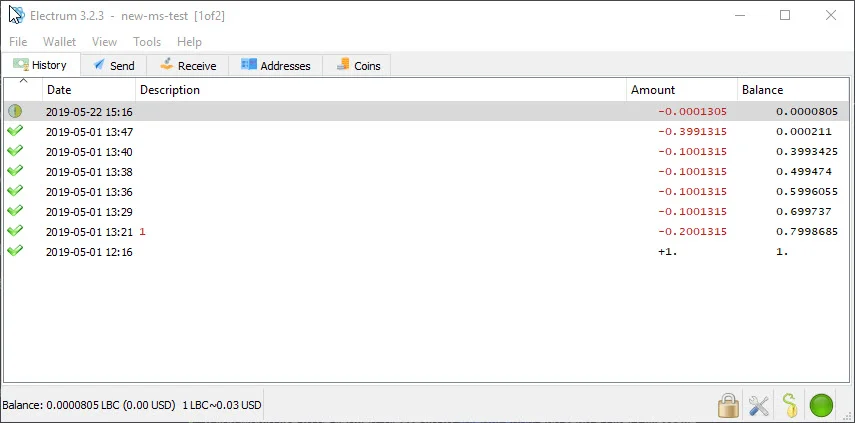
|
||||
|
||||
## Installing and running LBRY Vault for LBRY
|
||||
|
||||
You can find the downloads and setup information for [LBRY Vault on GitHub](https://github.com/kodxana/LBRY-Vault/releases). Windows, Mac, and Linux Appimage installations are provided.
|
||||
You can find the downloads and setup information for [LBRY Vault on GitHub](https://github.com/kodxana/LBRY-Vault/releases). Windows, Mac, and Linux Appimage installations are provided. Additional setup and installation required.
|
||||
|
||||
## Setting up a multisignature wallet
|
||||
|
||||
@@ -23,7 +25,7 @@ On the initial screen, you'll be asked to select a wallet file or create a new o
|
||||
|
||||
At the next prompt, you'll be asked for the wallet type - choose Multi-signature. Next, choose how many people (including the current person/wallet) will be sharing this wallet (from X cosigners) and how many are required to approve the transaction (require X cosigners). For example, if you choose 2 of 3, any 2 people will need to sign off to send the transaction.
|
||||
|
||||
Next, you'll be asked to provide a key for each wallet, including the current one, which is first. If you want to use your LBRY app's key / seed, proceed with "I already have a seed". You can find this seed inside your default_wallet file that's [created as part of your app installation](https://lbry.io/faq/how-to-backup-wallet). Open the default_wallet and you'll see a seed there. The wallet must not be encrypted to view it (you can decrypt temporarily via Desktop App > Settings). Otherwise, you can proceed with a new seed or Hardware device (requires Ledger device, [see below](#HW). Make sure to back up the seed if creating a new one - this can be done by copying the seed phrase or backing up the wallet file that's created.
|
||||
Next, you'll be asked to provide a key for each wallet, including the current one, which is first. If you want to use your LBRY app's key / seed, proceed with "I already have a seed." You can find this seed inside your default_wallet file that's [created as part of your app installation](https://lbry.io/faq/how-to-backup-wallet). Open the default_wallet and you'll see a seed there. The wallet must not be encrypted to view it (you can decrypt temporarily via Desktop App > Settings). Otherwise, you can proceed with a new seed or Hardware device (requires Ledger device, [see below](#HW). Make sure to back up the seed if creating a new one - this can be done by copying the seed phrase or backing up the wallet file that's created.
|
||||
|
||||
You will be given a Master Public Key that will be shared with the other co-signers when they create the same wallet locally. Next, you will be prompted for the next cosigners key. This would come from their PC while setting up the same wallet, or from their [default_wallet file](https://lbry.io/faq/how-to-backup-wallet) by opening it and using the ```"public_key":``` portion (this assumes they will create their Electrum wallet from this LBRY app seed). Proceed with all cosigners until they are all filled out. Lastly, enter a password to encrypt the multisignature wallet.
|
||||
|
||||
@@ -39,9 +41,11 @@ The cosigner has to open the wallet on their PC and go to **Tools > Load Transac
|
||||
|
||||
## Ledger hardware wallet with LBRY Vault {#HW}
|
||||
|
||||
You can use your Ledger device with LBRY Vault to store LBC. Please follow [these directions on how to install it on your device](https://github.com/tzarebczan/ledger-app-btc/releases/tag/lbry) and then use the above directions to setup a new wallet. For a normal account (non-multisignature), you will choose **Standard wallet** when setting up the device, and then **Use a hardware device**, and then follow the prompts.
|
||||
You can use your Ledger device with LBRY Vault to store LBC. Please follow [these directions on how to install it on your device](https://support.ledger.com/hc/en-us/articles/360012122999-LBRY-LBRY-) and then use the above directions to setup a new wallet.
|
||||
|
||||
Official support with Ledger will be coming at a later date.
|
||||
For a normal account (non-multisignature), you will choose **Standard wallet** when setting up the device, and then **Use a hardware device**, and then follow the prompts.
|
||||
|
||||
Official support with Ledger Live is coming at a later date.
|
||||
|
||||
## LBRY Vault wallet file location {#backup}
|
||||
|
||||
|
||||
@@ -8,7 +8,7 @@ order: 4
|
||||
|
||||
Before talking about how names (URLs) in LBRY work, it's important to understand the problem. What is a naming system and why do we have one?
|
||||
|
||||
Names exist so that we can map a human readable and understandable word or term to a more difficult to remember number or ID. In the traditional DNS (domain name system), names are mapped to a numerical IP address. In LBRY, names are mapped to a unique, permanent ID representing a piece of digital content and/or a publisher identity.
|
||||
Names exist so that we can map a human-readable and understandable word or term to a more difficult one to remember like number or ID. In the traditional DNS (domain name system), names are mapped to a numerical IP address. In LBRY, names are mapped to a unique, permanent ID representing a piece of digital content and/or a publisher identity.
|
||||
|
||||
Designing a naming system that works well and fairly assigns names is quite hard! Consider the domain system you are likely using to access this document. LBRY's domain used to be lbry.io for a long time, rather than lbry.com. Is it because lbry.com is providing some unique service? No! It is because a squatter was in possession of it, simply looking to auction the domain name to the highest bidder in demand. We had to negotiate for months (and pay lots of $$$) to get in possession of the lbry.com domain and we don't want LBRY users to go through a similar experience...we'd rather leave it up to incentives and fixed protocol rules.
|
||||
|
||||
@@ -37,10 +37,10 @@ Claims in LBRY are non-consumptive. When you designate a number of credits in a
|
||||
|
||||
LBRY supports several types of URL resolution:
|
||||
|
||||
| Type | Syntax | Resolution |
|
||||
| ---------------- | --- | --- |
|
||||
| Type | Syntax | Resolution |
|
||||
| --------------------- | ----------------------------- | -------------------------- |
|
||||
| **Permanent** | `lbry://<name>#<claim_id>` | This URL consists of a name and randomly assigned ID. This is permanently owned and controlled by the publisher. Permanent URLs support partial, temporal-ordered ID matching, so these can be quite short (e.g. lbry://name#8 or lbry://name#ab) |
|
||||
| **Short** | `lbry://<name>#<short_claim_id>` | This URL consists of a name and one or more characters (first come first serve to preserve uniqueness) from the Permanent URL. This is permanently owned and controlled by the publisher. If a shorter URL is made available, the claim next in line will take over it's resolution.
|
||||
| **Short** | `lbry://<name>#<short_claim_id>` | This URL consists of a name and one or more characters (first come first serve to preserve uniqueness) from the Permanent URL. This is permanently owned and controlled by the publisher. If a shorter URL is made available, the claim next in line will take over its resolution.
|
||||
| **Community** | `lbry://<name>` | Of all of the claims named `<name>`, this returns the publish with the most credits committed towards it, not just by the publisher, but by the entire community. These URLs are not permanent or owned but instead controlled by the community itself, allowing the resolution to settle on that which the community determines most appropriate. |
|
||||
| **Channel** | `lbry://<@channel_name>` | A URL corresponding to a publisher identity. These resolve to the identity of a specific publisher and their publishes. Channel URLs can be specified with or without the `#` modifier. An unmodified URL returns the channel determined by the community.
|
||||
| **Signed** | `lbry://<@channel_name>/<example>` | The piece of content published to the name `<example>` within the channel of `<@channel_name>`.
|
||||
@@ -49,7 +49,7 @@ LBRY supports several types of URL resolution:
|
||||
|
||||
1. **Names aren't bought, only reserved – no credits are lost, only put on deposit.** If you win the auction for a name, your credits are held with that name until you decide to withdraw them (at any time you wish). You aren't buying the name from anyone, and no one profits off of the transfer of names. It's just a test of who is willing to deposit the most credits toward a name. The only downside is that you can't spend the credits on content or withdraw them while they are in reserve.
|
||||
|
||||
2. **The longer a community name is held, the longer it sticks.** Community-controlled URLs don't change instantly if more credits are designated – especially if you've held it for awhile. For every month a name is controlled, 1 day is added to the waiting period, for a maximum of 7 days (after 7 months).
|
||||
2. **The longer a community name is held, the longer it sticks.** Community-controlled URLs don't change instantly if more credits are designated – especially if you've held it for a while. For every month a name is controlled, 1 day is added to the waiting period, for a maximum of 7 days (after 7 months).
|
||||
|
||||
3. **Everyone has a say.** If you claim lbry://bestmovieever and your film lives up to the hype, user tips and purchases are a strong force keeping your content there. If the community feels a URL resolution is incorrect, they can band together to change it anytime. This is a powerful force keeping bad actors at bay that has already proved useful.
|
||||
|
||||
@@ -67,4 +67,4 @@ We're trying to solve a very hard problem in a novel way, and we're committed to
|
||||
|
||||
## Relevance in search and trending/top categories
|
||||
|
||||
Increasing your bid and receiving tips on your content/channel, increases it's relevance in search results and discoverability through the Trending and Top categories on LBRY. Trending calculations are based on how much the LBC bid has increased through any bid updates and tips, compared to all the other claims on LBRY. [Learn more](/faq/trending).
|
||||
Increasing your bid and receiving tips on your content/channel, increases its relevance in search results and discoverability through the Trending and Top categories on LBRY. Trending calculations are based on how much the LBC bid has increased through any bid updates and tips, compared to all the other claims on LBRY. [Learn more](/faq/trending).
|
||||
@@ -18,15 +18,15 @@ We promise to keep any collected data safe and to never share personal, private
|
||||
|
||||
Users can also [choose to use LBRY anonymously](#anonymous) however some features, like [LBRY Rewards](https://lbry.com/faq/rewards), will not be available.
|
||||
|
||||
Additionally, even when not sending data to us, using LBRY typically involves participation in the peer-to-peer LBRY network and certain information like your IP address is likely to be exposed regardless. See [below](#p2p) for more information.
|
||||
Additionally, even when not sending data to us, using LBRY (outside of lbry.tv) typically involves participation in the peer-to-peer LBRY network and certain information like your IP address is likely to be exposed regardless. See [below](#p2p) for more information.
|
||||
|
||||
## What type of data is collected and where?
|
||||
As a first time user of LBRY applications and [lbry.tv](https://lbry.tv), you have the option of providing an email address to create a LBRY account. This allows for a richer user experience by enabling services such as [LBRY Rewards](https://lbry.com/faq/rewards), email notifications, and account synchronization (i.e. subscriptions and user preferences) across multiple devices/platforms. If you do not provide an email, any data collected cannot be associated with your identity, but may still be tied back to other system information like IP addresses.
|
||||
As a first time user of LBRY applications and [lbry.tv](https://lbry.tv), you have the option of providing an email address to create an LBRY account. This allows for a richer user experience by enabling services such as [LBRY Rewards](https://lbry.com/faq/rewards), email notifications, and account synchronization (i.e. subscriptions and user preferences) across multiple devices/platforms. If you do not provide an email, any data collected cannot be associated with your identity, but may still be tied back to other system information like IP addresses.
|
||||
|
||||
See below tables for a break-down of the types of data collected and associated applications.
|
||||
|
||||
Scope of Data | Depends on| Optional | Visibility | Details
|
||||
:------------ |:------------ |:------------ |:------------ |:------------ |
|
||||
Scope of Data | Depends on | Optional | Visibility | Details
|
||||
:------------ |:------------ |:------------ |:---------------- |:------------ |
|
||||
Email addresses | | Yes, if email provided | LBRY | Used to create and authenticate a LBRY account
|
||||
User preferences | Email | Yes, if email provided | LBRY | Subscriptions, tags, blocked channels, and application settings
|
||||
System information | | Yes, if Share Diagnostic Data enabled | LBRY | Operating system, application/SDK versions, and unique install identifier
|
||||
@@ -37,27 +37,27 @@ IP addresses | | No, use VPN to protect | Everyone | Any access to LBRY services
|
||||
Blockchain metadata | Email | Yes, if email provided | LBRY| Wallet addresses and transactions related to Rewards are logged to prevent abuse and comply with tax requirements (above $600 yearly threshold)
|
||||
Blockchain transactions | | No, don’t create transactions | Everyone | Any actions taken that use LBRY credits and create a permanent transaction on the blockchain. Not linked to any Account/User data.
|
||||
|
||||
Scope of Data | LBRY Desktop App | LBRY.tv (Web) | LBRY Android App | LBRY SDK |
|
||||
Scope of Data | LBRY Desktop App | lbry.tv (Web) | LBRY Android App | LBRY SDK |
|
||||
:------------ |:------------ |:------------ | :-------------| :-------------|
|
||||
Email addresses | yes | yes | yes | no |
|
||||
User preferences | yes | yes | yes | no |
|
||||
System information | yes | no | yes | yes |
|
||||
Identity verification | yes | yes | yes | no |
|
||||
Google Analytics | opt-out | yes | yes | no |
|
||||
Google Analytics | opt-in | yes | yes | no |
|
||||
Content access analytics | yes | yes | yes | yes |
|
||||
IP addresses | yes | yes | yes | opt-out |
|
||||
Blockchain metadata | yes | yes | yes | no |
|
||||
Blockchain transactions | yes | yes | yes | yes |
|
||||
|
||||
## What’s the difference between account data and cryptocurrency wallets?
|
||||
Each installable LBRY application also contains a cryptocurrency wallet which is stored locally on the respective device. The wallet allows you to store LBRY Credits and use them to [transact (spend, publish, purchase, and tip) on the network](https://lbry.com/faq/transaction-types). The private information, which is required to perform these actions, is under the sole control of the user.
|
||||
Each installable LBRY application also contains a cryptocurrency wallet That is stored locally on the respective device. The wallet allows you to store LBRY Credits and use them to [transact (spend, publish, purchase, and tip) on the network](https://lbry.com/faq/transaction-types). The private information, which is required to perform these actions, is under the sole control of the user.
|
||||
|
||||
LBRY does provide a wallet syncing and backup mechanism to allow seamless access across multiple devices. The backup service ensures that a wallet can be retrieved by the user through their LBRY account in case they lose access to their local copy. Any storage and exchange of wallet data has end to end encryption, and the user can also provide an additional encryption password if desired.
|
||||
|
||||
## How do I use LBRY anonymously? {#anonymous}
|
||||
To use LBRY in a private way, we recommend the LBRY Desktop application. By default, the LBRY Desktop app will not share account or analytics data with LBRY, Inc. or third-parties without specifically being enabled.
|
||||
To use LBRY privately, we recommend the LBRY Desktop application. By default, the LBRY Desktop app will not share account or analytics data with LBRY, Inc. or third-parties without specifically being enabled.
|
||||
|
||||
For a maximally private experience, you should also use a Virtual Private Network (VPN) to protect your IP address. This will allow you use features like retrieving content data, publishing, purchasing, tipping, and other transactions anonymously. Depending on VPN features and network configuration, hosting data currently may not be possible, but this is an area of active development.
|
||||
For a maximally private experience, you should also use a Virtual Private Network (VPN) to protect your IP address. This will allow you to use features like retrieving content data, publishing, purchasing, tipping, and other transactions anonymously. Depending on VPN features and network configuration, hosting data currently may not be possible, but this is an area of active development.
|
||||
|
||||
Note that if using LBRY anonymously or privately you are not eligible for [lbry.tv rewards](https://lbry.com/faq/rewards).
|
||||
|
||||
@@ -65,10 +65,10 @@ Note that if using LBRY anonymously or privately you are not eligible for [lbry.
|
||||
LBRY stores collected data on its own secured databases and ensures only authorized employees have access to this data. Google Analytics data is anonymized and protected by Google.
|
||||
|
||||
## What information is shared with others in the network? {#p2p}
|
||||
Similarly to other peer to peer protocols like BitTorrent, users in the network share messages (i.e. announcing content availability) and create direct connections to exchange data (i.e. downloads / uploads). While LBRY does not collect this information, other participants of the network can observe and collect the information.
|
||||
Similarly to other peer to peer protocols like BitTorrent, users in the network share messages (i.e. announcing content availability) and create direct connections to exchange data (i.e. downloads/uploads). While LBRY does not collect this information, other participants of the network can observe and collect the information.
|
||||
|
||||
## Can I use a VPN to use and access LBRY?
|
||||
Yes, a VPN can be used with all LBRY services. Major features will work without any problems, but VPN users may not be eligible for [LBRY Rewards](https://lbry.com/faq/rewards) in order to prevent abuse.
|
||||
Yes, a VPN can be used with all LBRY services. Major features will work without any problems, but VPN users may not be eligible for [LBRY Rewards](https://lbry.com/faq/rewards) to prevent abuse.
|
||||
|
||||
## Is any additional data collected if I participate in the YouTube Sync program?
|
||||
When authenticating into the [YouTube Sync program](https://lbry.com/youtube), you provide proof of channel ownership that allows us to link your YouTube channel to a LBRY account. Information about your account is stored and kept by LBRY, Inc.
|
||||
When authenticating into the [YouTube Sync program](https://lbry.com/youtube), you provide proof of channel ownership that allows us to link your YouTube channel to an LBRY account. Information about your account is stored and kept by LBRY, Inc.
|
||||
@@ -4,7 +4,7 @@ category: tutorial
|
||||
order: 3
|
||||
---
|
||||
|
||||
Publishing to LBRY allows anyone else in the world to access your content. You can publish any type of digital file to LBRY. Publishing requires a small amount of LBC, but almost all of this is returned if you decide to later unpublish. We'll cover that later. For now, get those [cat videos](https://lbry.tv/cats:cb) ready!
|
||||
Publishing to LBRY allows anyone else in the world to access your content. You can publish any type of digital file to LBRY. Publishing requires a small amount of LBC, but almost all of this is returned if you decide to later unpublish. We'll cover that later. For now, get those [cat videos](https://lbry.tv/$/top?name=cats) ready!
|
||||
|
||||
This tutorial is meant to provide a quick overview. Our [Publishing FAQ](/faq/how-to-publish) covers publishing in even more detail.
|
||||
|
||||
@@ -17,7 +17,7 @@ We'll start with publishing on LBRY Desktop and lbry.tv. Scroll down or [click h
|
||||
1. For your video thumbnail, you can upload a thumbnail image or take one directly from your video. 
|
||||
1. For the channel section, you can choose to publish anonymously, select an existing channel, or create a new one.
|
||||
1. Set a price for your content, if desired.
|
||||
1. Adjust the auto-suggested lbry:// URL and bid, if desired. ([learn more](/faq/naming) about how this works)
|
||||
1. Adjust the auto-suggested lbry://URL and bid, if desired. ([learn more](/faq/naming) about how this works)
|
||||

|
||||
1. Click **Publish** to submit your upload to the LBRY network! Please leave your app open so that the file can be properly seeded to the network.
|
||||
|
||||
@@ -28,7 +28,7 @@ Congratulations on publishing your first piece of content! Have any questions? P
|
||||
1. Select from: record a new video, snap a photo, select a file manually, or click an item from the recent videos/GIFs list.
|
||||
1. Fill in details for the content you are uploading, including the title, tags, and description.
|
||||
1. For the channel section, you can choose to publish anonymously, select an existing channel, or create a new one.
|
||||
1. Adjust the auto-suggested lbry:// URL and bid, if desired. ([learn more](/faq/naming) about how this works)
|
||||
1. Adjust the auto-suggested lbry://URL and bid, if desired. ([learn more](/faq/naming) about how this works)
|
||||
1. Set a price for your content, if desired.
|
||||
1. Click **Publish** to submit your upload to the LBRY network!
|
||||
|
||||
|
||||
+100
-98
@@ -1,98 +1,100 @@
|
||||
---
|
||||
title: What are LBRY Rewards?
|
||||
category: getstarted
|
||||
---
|
||||
|
||||
Rewards allow LBRY users to earn LBC, the token that powers the LBRY network. You can earn rewards for watching content, creating an identity, and generally learning about and using LBRY.
|
||||
|
||||
**Please note:** Reward amounts are subject to change at any time by LBRY Inc.
|
||||
|
||||

|
||||
_The rewards screen in the LBRY app_
|
||||
|
||||
## Rewards eligibility
|
||||
|
||||
To be eligible for LBRY Rewards, you must:
|
||||
|
||||
- Sign up for an account at [lbry.tv](https://lbry.tv)
|
||||
- Verify your email
|
||||
- Potentially complete an [additional verification step](#additional-verification) (common if using from VPN or a fraud-prone network)
|
||||
|
||||
Rewards are intended to be earnable on a per-person basis (typically limited to 1 rewards account per household / location). LBRY reserves the right to revoke rewards privileges on any account if abuse is suspected, including on the basis of VPN or shared connections. Users on shared connections will typically not be eligible for rewards.
|
||||
|
||||
## Do I need to be eligible for rewards?
|
||||
|
||||
LBRY works with full functionality without rewards and there's never a requirement to earn rewards or sign in to lbry.tv.
|
||||
|
||||
## How do I claim a reward?
|
||||
|
||||
Some rewards will automatically be added when you complete them. Others require an explicit click or acknowledgement to receive.
|
||||
|
||||
All the rewards can always be seen by clicking **Rewards** from the Account drop down menu (top right of the app).
|
||||
|
||||
Rewards that you have earned be marked your [wallet](/faq/transaction-types).
|
||||
|
||||
## What rewards exist?
|
||||
| Reward | Amount | Description |
|
||||
--- | --- | ---
|
||||
| **Your First Nickel** | 3 LBC | A one-time welcome gift for learning the basics of the application & wallet. Including the purchase of paid content.
|
||||
| **Go for a Stream** | 2 LBC | Rewarded for streaming your very first video on LBRY.
|
||||
| **Channel Surfing** | 3 LBC | A one-time reward for creating a channel on LBRY via the Publish screen.
|
||||
| **First Publish** | 5 LBC | A one-time reward for publishing your first piece of content to LBRY.
|
||||
| **Daily View** | 1- 100 LBC | A random daily reward from 1 to 100 LBC, resets every 24 hours!
|
||||
| **Many Views** | 2- ???? LBC | A multi-level reward for watching videos on LBRY. See descriptions in-app for levels/details!
|
||||
| **Faithful Follower** | 1 - 10 LBC | A multi-level reward for following channels.
|
||||
| [**Coveted Creator**](#followers) | 1 - 10K LBC | A multi-level reward for gaining followers on your channel.
|
||||
| [**Content View Tips**](#contentview) | 1 - 5 LBC | A per view reward from verified lbry.tv users
|
||||
| **Welcome Back** | 3 LBC | Return to the LBRY 24-48 hours following your first use of the app. This reward will self-destruct after that time span.
|
||||
| **Android in Beta** | 10 LBC | Limited time reward for early Android Beta testers.
|
||||
| **Upgrade** | 5 LBC | Rewarded each time the LBRY Desktop app updates versions (i.e. 0.27 to 0.28).
|
||||
| **YouTube** | ?? LBC | Rewarded as part of the [YouTube Sync program](/youtube).
|
||||
| **Reward Code** | ?? LBC | [Custom reward codes](#reward-code) given out to users - be on the look out on social media/Discord/Reddit!
|
||||
| **Referral** | 20 LBC | LBRY users can refer their friends via an email invitation and get rewarded when those users are verified. For more information on referrals, click [here](/faq/referrals).
|
||||
|
||||
If you are new to Publishing, check out [our guide](/faq/how-to-publish).
|
||||
|
||||
## Followers reward {#followers}
|
||||
|
||||
You receive additional rewards as you build a following on LBRY. Only verified LBRY users count, so there may be a discrepancy between what you see on your channel page. Share your channel with the world to earn more LBC!
|
||||
|
||||
| Number of followers | Amount |
|
||||
--- | ---
|
||||
| 1 | 2 LBC
|
||||
| 5 | 10 LBC
|
||||
| 20 | 50 LBC
|
||||
| 100 | 100 LBC
|
||||
| 500 | 300 LBC
|
||||
| 1,000 | 1,000 LBC
|
||||
| 5,000 | 5,000 LBC
|
||||
| 10,000 | 10,000 LBC
|
||||
|
||||
_Not seeing this reward despite being eligible? If you created your channel while not signed in to lbry.tv, we might not know about it. Publishing something new while signed in to lbry.tv will restore eligibility._
|
||||
|
||||
## Views reward and tips {#contentview}
|
||||
|
||||
You receive additional rewards for views from verified lbry.tv accounts. You will see these on your wallet page as Tips and they will be summed up monthly on your Rewards page. You may [unlock the tips](https://lbry.com/faq/tipping) to have the show in your balance, but while locked, they help your content be discovered.
|
||||
|
||||
## Custom reward codes {#reward-code}
|
||||
|
||||
Custom reward codes can be claimed via the [Rewards](https://open.lbry.com/?rewards) page on LBRY. You may have been given a reward code via email, social media or you stumbled upon it somewhere - whichever way, you can claim it for LBC today! It's simple, just hit `Enter Code`, type it in and press `Redeem`.
|
||||
|
||||
**Please note:** Reward code sharing is strictly prohibited and rewards privileges will be revoked.
|
||||
|
||||

|
||||
|
||||
## What is the additional verification step? {#additional-verification}
|
||||
|
||||
Accounts created from networks that have above average fraud rates or that make it difficult to detect fraud may require additional verification steps.
|
||||
|
||||
If this step is required, you will be notified when creating an account or entering the rewards area, which will then walk you through it.
|
||||
|
||||
The additional verifications are:
|
||||
- Via [phone number](/faq/phone)
|
||||
- Via [credit card](/faq/identity-requirements)
|
||||
- Via [Discord](https://chat.lbry.com).
|
||||
|
||||
## Having trouble?
|
||||
|
||||
If you have any questions or problems with receiving the Rewards, feel free to [reach out to us](/faq/support).
|
||||
---
|
||||
title: What are LBRY Rewards?
|
||||
category: getstarted
|
||||
---
|
||||
|
||||
Rewards allow LBRY users to earn LBC, the token that powers the LBRY network. You can earn rewards for watching content, creating an identity, and generally learning about and using LBRY.
|
||||
|
||||
**Please note:** Reward amounts are subject to change at any time by LBRY Inc.
|
||||
|
||||
␍
|
||||
_The rewards screen in the LBRY app_
|
||||
|
||||
## Rewards eligibility
|
||||
|
||||
To be eligible for LBRY Rewards, you must:
|
||||
|
||||
- Sign up for an account at [lbry.tv](https://lbry.tv)
|
||||
- Verify your email
|
||||
- Potentially complete an [additional verification step](#additional-verification) (common if using from VPN or a fraud-prone network)
|
||||
|
||||
Rewards are intended to be earnable on a per-person basis (typically limited to 1 rewards account per household / location). LBRY reserves the right to revoke rewards privileges on any account if abuse is suspected, including on the basis of VPN or shared connections. Users on shared connections will typically not be eligible for rewards.
|
||||
|
||||
## Do I need to be eligible for rewards?
|
||||
|
||||
LBRY works with full functionality without rewards and there's never a requirement to earn rewards or sign in to lbry.tv.
|
||||
|
||||
## How do I claim a reward?
|
||||
|
||||
Some rewards will automatically be added when you complete them. Others require an explicit click or acknowledgement to receive.
|
||||
|
||||
All the rewards can always be seen by clicking **Rewards** from the Account drop down menu (top right of the app).
|
||||
|
||||
Rewards that you have earned will be marked in your [wallet](/faq/transaction-types).
|
||||
|
||||
## What rewards exist?
|
||||
|
||||
| Reward | Amount | Description |
|
||||
| ------------------------------------------ | ----------- | --------------------------------------------------------------------------------------------------------------------------------------------------------------------------- |
|
||||
| **Your First Nickel** | 2 LBC | A one-time welcome gift for learning the basics of the application & wallet. Including the purchase of paid content. |
|
||||
| **Go for a Stream** | 1 LBC | Rewarded for streaming your very first video on LBRY. |
|
||||
| **Channel Surfing** | 2 LBC | A one-time reward for creating a channel on LBRY via the Publish screen. |
|
||||
| **First Publish** | 4 LBC | A one-time reward for publishing your first piece of content to LBRY. |
|
||||
| **Daily View** | 1- 100 LBC | A random daily reward from 1 to 100 LBC, resets every 24 hours! |
|
||||
| **Many Views** | 2- ???? LBC | A multi-level reward for watching videos on LBRY. See descriptions in-app for levels/details! |
|
||||
| **Faithful Follower** | 1 - 8 LBC | A multi-level reward for following channels. |
|
||||
| [**Coveted Creator**](#followers) | 1 - 5K LBC | A multi-level reward for gaining followers on your channel. |
|
||||
| [**Content View Tips**](/faq/view-rewards) | 1 - 5 LBC | A per view reward from validated lbry.tv users |
|
||||
| **Welcome Back** | 2 LBC | Return to the LBRY 24-48 hours following your first use of the app. This reward will self-destruct after that time span. |
|
||||
| **Android in Beta** | 6 LBC | Limited time reward for early Android Beta testers. |
|
||||
| **Upgrade** | 4 LBC | Rewarded each time the LBRY Desktop app updates versions (i.e. 0.27 to 0.28). |
|
||||
| **YouTube** | ?? LBC | Rewarded as part of the [YouTube Sync program](/youtube). |
|
||||
| **Reward Code** | ?? LBC | [Custom reward codes](#reward-code) given out to users - be on the look out on social media/Discord/Reddit! |
|
||||
| **Referral** | 15 LBC | LBRY users can refer their friends via an email invitation and get rewarded when those users are verified. For more information on referrals, click [here](/faq/referrals). |
|
||||
|
||||
If you are new to Publishing, check out [our guide](/faq/how-to-publish).
|
||||
|
||||
## Followers reward {#followers}
|
||||
|
||||
You receive additional rewards as you build a following on LBRY. Only verified LBRY users count, so there may be a discrepancy between what you see on your channel page. Share your channel with the world to earn more LBC!
|
||||
|
||||
| Number of followers | Amount |
|
||||
| ------------------- | --------- |
|
||||
| 1 | 2 LBC |
|
||||
| 5 | 10 LBC |
|
||||
| 20 | 20 LBC |
|
||||
| 100 | 100 LBC |
|
||||
| 500 | 250 LBC |
|
||||
| 1,000 | 800 LBC |
|
||||
| 5,000 | 3,000 LBC |
|
||||
| 10,000 | 8,000 LBC |
|
||||
|
||||
_Not seeing this reward despite being eligible? If you created your channel while not signed in to lbry.tv, we might not know about it. Publishing something new while signed in to lbry.tv will restore eligibility._
|
||||
|
||||
## Views reward and tips {#contentview}
|
||||
|
||||
You may receive additional rewards for views from validated lbry.tv accounts. Please see our [view rewards FAQ](/faq/view-rewards) for more details.
|
||||
|
||||
## Custom reward codes {#reward-code}
|
||||
|
||||
Custom reward codes can be claimed via the [Rewards](https://open.lbry.com/?rewards) page on LBRY. You may have been given a reward code via email, social media or you stumbled upon it somewhere - whichever way, you can claim it for LBC today! It's simple, just hit `Enter Code`, type it in and press `Redeem`.
|
||||
|
||||
**Please note:** Reward code sharing is strictly prohibited and rewards privileges will be revoked.
|
||||
|
||||

|
||||
|
||||
## What is the additional verification step? {#additional-verification}
|
||||
|
||||
Accounts created from networks that have above average fraud rates or that make it difficult to detect fraud may require additional verification steps.
|
||||
|
||||
If this step is required, you will be notified when creating an account or entering the rewards area, which will then walk you through it.
|
||||
|
||||
The additional verifications are:
|
||||
|
||||
- Via [phone number](/faq/phone)
|
||||
- Via [credit card](/faq/identity-requirements)
|
||||
- Via [Discord](https://chat.lbry.com).
|
||||
|
||||
## Having trouble?
|
||||
|
||||
If you have any questions or problems with receiving the Rewards, feel free to [reach out to us](/faq/support).
|
||||
@@ -41,11 +41,8 @@ First and foremost, please ensure you are on the [latest version](/get) of LBRY.
|
||||
### Stuck at blockchain sync or wallet issues {#sync}
|
||||
If you are stuck on the blockchain sync step or it shows a block count that doesn't decrease, you may need to clear your blockchain headers and/or synced data. To do so, Shut LBRY down completely by closing it from the system tray (check for running LBRY/lbrynet-daemon processes), delete the `headers` and `blockchain.db` files in the [lbryum/lbc_mainnet folder](/faq/lbry-directories) and then start LBRY again.
|
||||
|
||||
### Linux auth_token requirements {#auth}
|
||||
Currently, LBRY requires an authorization token to be generated using the [keytar](https://github.com/atom/node-keytar) libraries. Please ensure libsecret and keytar are installed. On some distributions, LBRY won't run unless gnome-keyring is also installed/operational. See [GitHub issue](https://github.com/lbryio/lbry-desktop/issues/386) for more information. If you get a GLIBCXX_3.4.2 error, please see [this issue](https://github.com/lbryio/lbry-desktop/issues/423#issuecomment-327519486).
|
||||
|
||||
### SDK could not start because port is in use (IPV6 / debian)
|
||||
If the newly installed or re-installed LBRY has the start up issue with daemon being in use, check the .local/share/lbry/lbrynet folder for `daemon_settings.yml` file.
|
||||
If the newly installed or re-installed LBRY has the start up issue with SDK not being able to bind, check the .local/share/lbry/lbrynet folder for `daemon_settings.yml` file.
|
||||
If the file doesn't exist, create one and settings inside should be:
|
||||
|
||||
api: 127.0.0.1:5279
|
||||
|
||||
@@ -3,13 +3,15 @@ title: How do I get help or report a bug?
|
||||
category: troubleshooting
|
||||
---
|
||||
|
||||
### Live help
|
||||
## Live community help
|
||||
|
||||
For live help, you can join [our chat](https://chat.lbry.com) and post in the #help channel. Please share a detailed message with the issue you are experiencing. LBRY log files are a good source of information for us; you can learn how to [find them here](/faq/how-to-find-lbry-log-file).
|
||||
For live help, you can join [our community chat](https://chat.lbry.com) and post in the #help channel.
|
||||
|
||||
## Help via email
|
||||
|
||||
You can also [email LBRY](mailto:help@lbry.com) with questions or issues. LBRY log files will help us better understand the issue you are experiencing, you can learn how to [find them here](/faq/how-to-find-lbry-log-file) and attach with your email.
|
||||
You can also [email LBRY](mailto:help@lbry.com) with questions or issues.
|
||||
|
||||
If you're using LBRY Desktop, LBRY log files will help us better understand the issue you are experiencing. You can learn how to [find them here](/faq/how-to-find-lbry-log-file) and attach with your email.
|
||||
|
||||
## Reporting issues
|
||||
|
||||
@@ -19,4 +21,4 @@ To report an issue, you can do one of the following:
|
||||
|
||||
2. Go to the "Help" page of the app and then click the "Submit a Bug Report" button.
|
||||
|
||||
3. If you're a developer or otherwise technical and want to interact with LBRY developers directly, you're welcome to open an issue directly on GitHub. Please try to open network or protocol related issues [here](https://github.com/lbryio/lbry/issues) and interface, usability, and other application related issues [here](https://github.com/lbryio/lbry-desktop/issues). The penalty for getting this wrong is a mild shaming. We would appreciate a quick search to see if similar issues already exist, as well.
|
||||
3. If you're a developer or otherwise technical and want to interact with LBRY developers directly, you're welcome to open an issue directly on GitHub. Please try to open network or protocol related issues [here](https://github.com/lbryio/lbry/issues) and interface, usability, and other application related issues [here](https://github.com/lbryio/lbry-desktop/issues). We would appreciate a quick search to see if similar issues already exist, as well.
|
||||
@@ -32,7 +32,7 @@ Displays the balance of your Twitter LBRY wallet.
|
||||
|
||||
- [**Tweet Example:**](https://twitter.com/TomZarebczan/status/1015244426841677826) `@LBC_TipBot balance`
|
||||
|
||||

|
||||

|
||||
|
||||
|
||||
### Deposit
|
||||
@@ -40,7 +40,7 @@ Displays your Twitter LBRY wallet address. Useful if you want to receive LBC dir
|
||||
|
||||
- [**Tweet Example:**](https://twitter.com/TomZarebczan/status/1015244855247888384) `@LBC_TipBot deposit`
|
||||
|
||||

|
||||

|
||||
|
||||
### Tip
|
||||
Want to tip someone? This will send a tip to a chosen username.
|
||||
@@ -56,11 +56,11 @@ Use this to withdraw your balance from your LBRY Twitter wallet to another LBRY
|
||||
- **Arguments:** `@LBC_TipBot withdraw <address> amount`
|
||||
- [**Tweet Example:**](https://twitter.com/TrendsPremium/status/1015251227599364096) `@LBC_TipBot withdraw bP8P5Dr9d3XcH5ibSsjeDYFU8vMWR8HHe3 5`
|
||||
|
||||

|
||||

|
||||
|
||||
### Terms
|
||||
Displays the terms and conditions
|
||||
|
||||
- [**Tweet Example:**](https://twitter.com/TomZarebczan/status/1015245044415156225) `@LBC_TipBot terms`
|
||||
|
||||

|
||||

|
||||
@@ -5,14 +5,14 @@ category: getstarted
|
||||
|
||||
LBRY allows you to tip and support your favorite creators.
|
||||
|
||||
A _tip_ sends credits to a publisher permanently, while also boosting the trust and performance of the content.
|
||||
A _tip_ sends credits to a publisher permanently, while also boosting the trust and performance of the content (while active). Recipient can keep active or unlock (move to wallet balance).
|
||||
|
||||
A _support_ boosts trust and performance, but _does not_ give anything to the publisher permanently.
|
||||
A _support_ boosts trust and performance, but _does not_ give anything to the publisher permanently. Can be revoked anytime via the wallet page.
|
||||
|
||||
In both cases, the amount of credits is stored as associated with (staked against) either the piece of content or the publisher themselves. Either way, the amount staked:
|
||||
|
||||
- Help content perform better in search results
|
||||
- Helps content appear higher in the list of top and [trending](https://lbry.com/faq/trending) publishes
|
||||
- Help content perform better in search results.
|
||||
- Helps content appear higher in the list of [top and trending](https://lbry.com/faq/trending) publishes.
|
||||
- Determines which content is shown at the [community-controlled name](/faq/naming)
|
||||
|
||||
## How do I send a tip?
|
||||
@@ -20,7 +20,7 @@ In both cases, the amount of credits is stored as associated with (staked agains
|
||||
Sending tips via LBRY is easy. Simply go to the page of the content you want to support and click "Tip".
|
||||
|
||||
Next, you'll be prompted for the tip amount in LBRY Credits (LBC). Once you enter a value, click "Send". Mahalo!
|
||||

|
||||

|
||||
|
||||
**Note: This amount will show up in your transaction list and will be deducted from your balance.**
|
||||
|
||||
@@ -38,7 +38,7 @@ You can mass unlock tips from a published item using the LBC Details section of
|
||||
|
||||
You'll have an option choose the amount to unlock, with the default being 25%. Enter an amount or use the slider, and then click Unlock. The remaining LBC is sent back to you as a support on your content.
|
||||
|
||||
**Please note: Mass tip unlocking mail fail if there are over ~500 active tips, we're working on making this possible! If this occurs, you'll need to unlock some via the per tip method below.**
|
||||
**Please note: Mass tip unlocking may fail if there are over ~500 active tips. We're working on making this possible! If this occurs, you'll need to unlock some via the per tip method below.**
|
||||
|
||||

|
||||
|
||||
@@ -48,9 +48,9 @@ You can also unlock tips across all of your publishes in your transaction histor
|
||||
|
||||
This is done by clicking the unlock icon next to `Tip` and then confirming your action on the following screen. Once the transaction is finalized, the icon will disappear.
|
||||
|
||||
Unlock tip: 
|
||||
Unlock tip: 
|
||||
|
||||
Confirmation box: 
|
||||
Confirmation box: 
|
||||
|
||||
## What are the downsides of unlocking tips? Are there any good rules to follow? {#guidelines}
|
||||
|
||||
|
||||
@@ -3,31 +3,30 @@ title: What types of LBRY transactions are there?
|
||||
category: wallet
|
||||
---
|
||||
|
||||
There are a number of transaction types which take place on the LBRY blockchain. LBRY displays these transactions on the Wallet page.
|
||||
There are a number of transaction types which take place on the LBRY blockchain. LBRY displays these transactions on the Wallet page. You can filter on various types and statuses of these transactions using the options provided.
|
||||
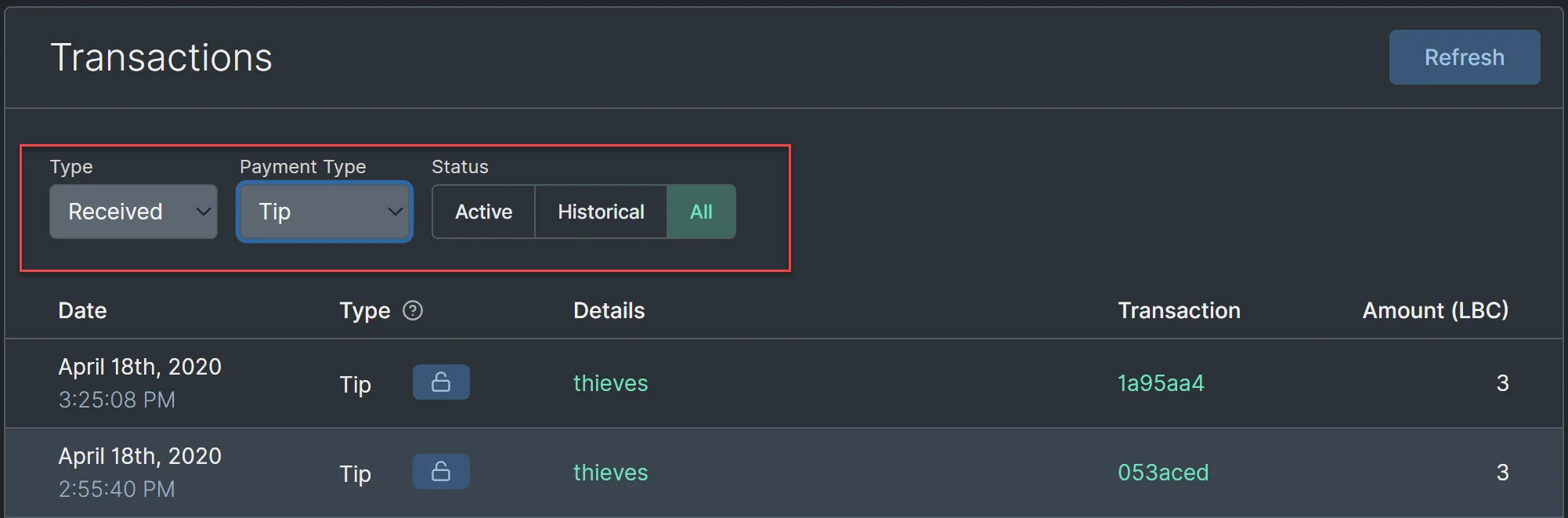
|
||||
|
||||
Many transaction types also have details associated with them such as the claim/channel name or if they came from an LBRY Reward. You can also see additional details by clicking the transaction ID and accessing them in the [LBRY block explorer](https://explorer.lbry.com).
|
||||
|
||||
## Transaction types
|
||||
|
||||
| Type | Details |
|
||||
--- | ---
|
||||
| **Spends** | LBC is sent to another address or used to purchase content.<br/>Also, revoked content/claimed tips show as Spends.
|
||||
| **Receives** | LBC received at wallet address, an incoming content payment or LBRY Reward.
|
||||
| **Publishes** | LBC claim associated with content publication.<br/>Claims can be revoked via trash button<sup>1</sup>.
|
||||
| **Channels** | LBC claim associated with Channel creation.<br/>Channel claims can be revoked via trash button.
|
||||
| **Tips** | Tips sent or received. Received tips can be claimed via the unlock button in order to be reflected in your balance.
|
||||
| **Supports** | Claim support sent or received. Support claims can be revoked via trash button.
|
||||
| **Updates** | Update to previously published content<sup>2</sup>. Updated claims can be revoked via trash button.
|
||||
| **Abandons** | Transaction that results after revoking a claim or tip. The amount shown is the LBC returned to your wallet.
|
||||
| Type | Details |
|
||||
------------- | ---------------
|
||||
| **Sent** | LBC is sent to a wallet address - sent LBC, outgoing tips, or content purchases.
|
||||
| **Receive** | LBC received at a wallet address - received LBC, incoming tips, or content purchases.<br/>***Active** = currently supporting your content. **Historical** = claimed into your balance.*
|
||||
| **Publish** | LBC claim associated with content publication.<br/>Claims can be revoked via trash icon<sup>1</sup>. Historical records are previous updates<sup>2</sup>.
|
||||
| **Channel** | LBC claim associated with Channel creation.<br>Channel claims can be revoked via trash button. Historical records are previous updates<sup>2</sup>.
|
||||
| **Repost** | Link to another LBRY claim <br/>Reposts can be revoked via trash icon<sup>1</sup>.
|
||||
| **Support** | LBC used to support your own or other content. Support claims can be revoked via trash icon<sup>1</sup>. <br/>***Active** = currently locked. **Historical** = revoked.*
|
||||
|
||||
<sup>1</sup> If the revoke icon is not available, the claim may have already been revoked, or there may be an update to the claim (which can be revoked).
|
||||
<sup>1</sup> If the revoke icon is not available, the claim may have already been revoked, or it may be a historical record.
|
||||
|
||||
<sup>2</sup> Amount shown does not reflect balance taken out of wallet - the update process uses the original bid amount, and the resulting transaction may result in a positive or negative balance to your wallet based on the updated bid amount.
|
||||
|
||||
## Additional Actions
|
||||
|
||||
Certain transactions allow you to take additional actions directly from the transaction screen, such as claiming an incoming tip via the unlock button and revoking a claim via the trash button. Once the action is taken, the action icon will disappear, and the resulting transaction will appear in your history.
|
||||
Certain transactions allow you to take additional actions directly from the transaction screen, such as claiming an incoming tip via the unlock button and revoking a claim via the trashcan button. Once the action is taken, the action icon be greyed out, and LBC will be returned to your wallet.
|
||||
|
||||
## What About Purchases?
|
||||
## What about purchase details?
|
||||
|
||||
Content purchases and incoming content payments are not currently available but are planned for a future release. Currently these show as spends.
|
||||
Content purchases and incoming content payments do not currently show which content they are linked to. This is coming in a future release.
|
||||
@@ -12,7 +12,7 @@ LBRY apps support dynamic trending and top discovery based on your interests and
|
||||
|
||||
## How do I use it?
|
||||
|
||||
At the top of your Home area, you can toggle between Trending, Top, and New for either your channels, videos,audio, document or the whole LBRY network. When Top is selected, you can also choose the relevant time frame. You can also browse these same options for specific tags by clicking on the tag name anywhere on the screen or by searching for one.
|
||||
At the top of your Home area, you can toggle between Trending, Top, and New for either your channels, videos, audio, images, text or the whole LBRY network. When Top is selected, you can also choose the relevant time frame. You can also browse these same options for specific tags by clicking on the tag name anywhere on the screen or by searching for one.
|
||||
|
||||

|
||||
|
||||
@@ -20,7 +20,7 @@ At the top of your Home area, you can toggle between Trending, Top, and New for
|
||||
|
||||
| View | What It Shows |
|
||||
| --- | --- |
|
||||
| _Trending_ | Trending shows the content that has had the greatest increase in tips and supports over the last 24 hours, compared to its baseline performance, and that of other content, over the last 7 days. |
|
||||
| _Trending_ | Trending shows the content that has had the greatest increase in tips and supports over the last few hours and days, compared to its baseline performance, and that of other content. |
|
||||
| _Top_ | Top shows the content published within the selected period that has received the largest total amount of tips and supports. |
|
||||
| _New_ | New shows the newest content by time. |
|
||||
|
||||
@@ -42,23 +42,23 @@ There are two ways to follow channels:
|
||||
|
||||

|
||||
|
||||
2. Click "Following" from your home screen to discover and follow new channels using the `Discover New Channels` option. Suggested channels include those most subscribed on LBRY, Top channels and those who have been featured creators. More suggested channel options will be added in a future release.
|
||||
2. Click "Following" from your home screen to discover and follow new channels using the `Discover New Channels` option. Suggested channels include those most subscribed on LBRY, Top channels, and those who have been featured creators. More suggested channel options will be added in a future release.
|
||||
|
||||

|
||||

|
||||
|
||||
### Exploring tags
|
||||
|
||||
You can also explore each individual tag by clicking on it from anywhere on the screen or using the search function. Once you are on a tag page, you can click the follow button to add it to your customized list of tags.
|
||||
You can also explore each tag by clicking on it from anywhere on the screen or using the search function. Once you are on a tag page, you can click the follow button to add it to your customized list of tags.
|
||||
|
||||

|
||||
|
||||
## How does content make it into top or trending?
|
||||
|
||||
Top content is based on calculations around the total LBC value of content, which is accumulated through the claim bid amount plus any community [tipping and supports](https://lbry.com/faq/tipping). Trending is similar, but does not take into account any initial bids, and is based on tip/support changes over time. The Top category is normally instant - the highest ranked LBC content will appear at the top when published in the time periods specified. Trending takes some time to update (about 1 day) and it ranked against how all other content on LBRY also trended up or down.
|
||||
Top content is based on calculations around the total LBC value of content, which is accumulated through the claim bid amount plus any community [tipping and supports](https://lbry.com/faq/tipping). Trending is similar and is based on tip/support changes over a period of time. The Top category is normally instant - the highest-ranked LBC content will appear at the top when published in the time periods specified. Trending takes some time to update and larger tips/supports may see a delay to avoid abuse.
|
||||
|
||||
## How is this different from YouTube?
|
||||
|
||||
YouTube uses obscured, secret algorithms that are designed to be biased in favor of the mainstream media and other creators they prefer, rather than being neutral to all content ([See Veritasium's take on this](https://lbry.tv/@veritasium:f/my-video-went-viral-here-s-why:e)).
|
||||
|
||||
LBRY creates open-source code that allows all of the world to see precisely how our features work. We can then write articles like this one that try to spell it out in plain language. The source code for the Trending/Top/New functionality is viewable [here](https://github.com/lbryio/lbry-sdk/tree/master/lbry/wallet/server/db/trending).
|
||||
LBRY creates open-source code that allows all of the world to see precisely how our features work. We can then write articles like this one that tries to spell it out in plain language. The source code for the Trending/Top/New functionality is viewable [here](https://github.com/lbryio/lbry-sdk/tree/master/lbry/wallet/server/db/trending).
|
||||
@@ -4,19 +4,19 @@ category: publisher
|
||||
order: 2
|
||||
---
|
||||
|
||||
Even though LBRY does not enforce any file size, resolution, or quality of video content, we still encourage publishers to adhere to web optimized bitrates/sizes to ensure a good overall experience for lbry.tv and app users. LBRY does not currently transcode on upload or when viewing automatically, but an option in available on LBRY Desktop to do so during the publish process. If you are publishing on Android or lbry.tv, please follow the manual instructions for Handbrake/ffmpeg below.
|
||||
Even though LBRY does not enforce any file size, resolution, or quality of video content, we still encourage publishers to adhere to web optimized bitrates/sizes to ensure a good overall experience for lbry.tv and app users. LBRY does not automatically transcode on upload or when viewing, but an option is available on the LBRY Desktop app to do so during the publish process. If you are publishing on Android or lbry.tv, please follow the manual instructions for Handbrake/ffmpeg below.
|
||||
|
||||
See our [Publishing FAQ](/faq/how-to-publish) for more information about the publishing process.
|
||||
|
||||
## Recommended settings and bitrate
|
||||
|
||||
We recommend uploading videos at 720P in an MP4 container, H264 video encoding, and AAC audio with a maximum bitrate of 5Mbps (check file properties to see current rate). It's also helps if the moov atom is at the front of the file - this is sometimes referred to as Fast Start (ffmpeg) or Web Optimized (Handbrake). If the content is not compatible or over 5Mbps, you'll be given a warning on the publish page.
|
||||
We recommend uploading videos at 720P in an MP4 container, H264 video encoding, and AAC audio with a maximum bitrate of 5 Mbps (check file properties to see current rate). It's also helps if the moov atom is at the front of the file - this is sometimes referred to as Fast Start (ffmpeg) or Web Optimized (Handbrake). If the content is not compatible or over 5 Mbps, you'll be given a warning on the publish page.
|
||||
|
||||
If you prefer 1080P, please try to keep the bitrate at or below 8Mbps. You'll be given a warning on the publish page, but you can still proceed.
|
||||
If you prefer 1080P, please try to keep the bitrate at or below 8 Mbps. You'll be given a warning on the publish page, but you can still proceed.
|
||||
|
||||
## Automated transcoding in LBRY Desktop {#automatic}
|
||||
|
||||
The LBRY Desktop application supports local transcoding of videos during the publish process. This will require ffmpeg (automated process coming later) to be installed and will create a transcoded copy alongside your original file.
|
||||
The LBRY Desktop application supports local transcoding of videos during the publish process. This will require ffmpeg (automated process coming later) to be installed and will create a transcoded copy alongside your original file (**_fixed** appended to the filename).
|
||||
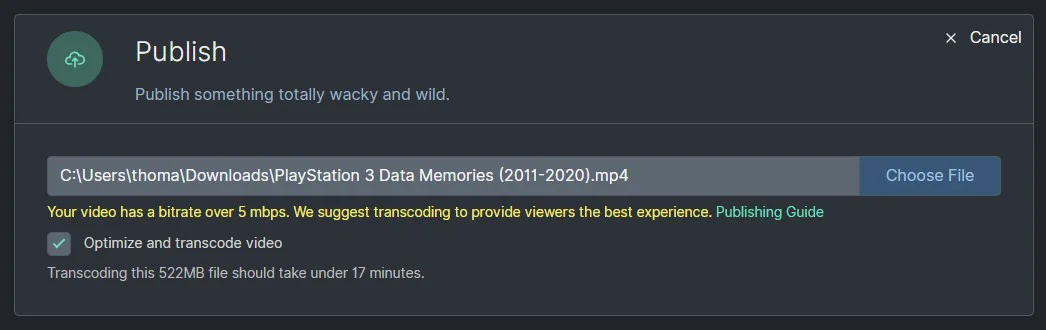
|
||||
|
||||
ffmpeg will automatically be found from your system path or [lbrynet folder](/faq/lbry-directories), or you can also use a custom path.
|
||||
@@ -35,7 +35,7 @@ If using Handbrake, we recommended the following settings:
|
||||
|
||||
- Preset of Fast 720P30.
|
||||
- Enable Web optimized.
|
||||
- Disable Align AV/Start.
|
||||
- Disable Align A/V Start.
|
||||
- Save as .mp4 extension.
|
||||
|
||||
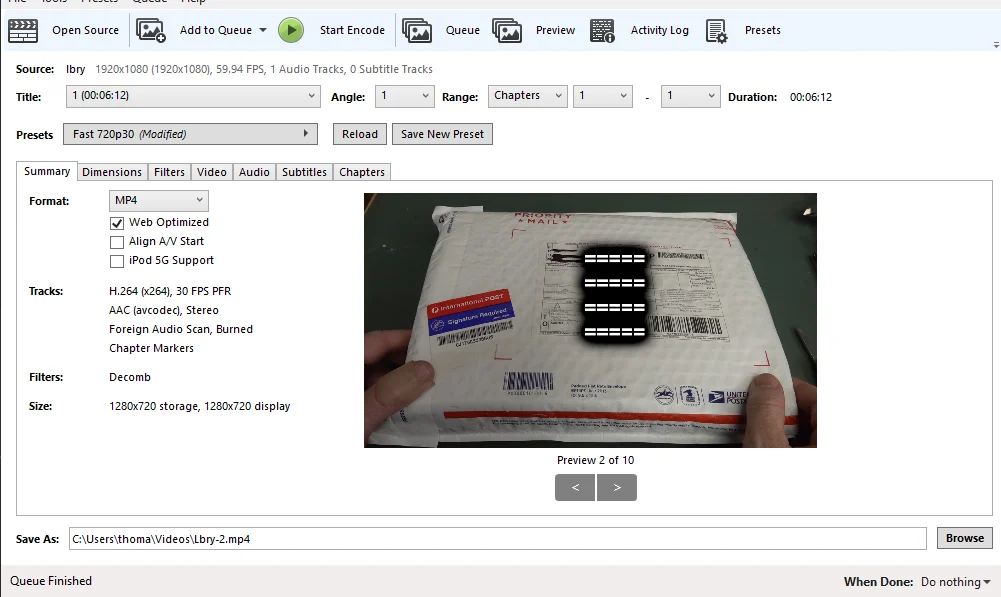
|
||||
|
||||
@@ -0,0 +1,48 @@
|
||||
---
|
||||
title: What are creator view rewards? What do creators earn for views?
|
||||
category: publisher
|
||||
order: 2
|
||||
---
|
||||
|
||||
We want creators to create quality content that other LBRY users will enjoy and to be able to earn at a comparable or greater amount to alternatives.
|
||||
|
||||
If you publish quality original content, you may be eligible to receive additional rewards for views from validated lbry.tv accounts on behalf of us.
|
||||
|
||||
## How creator view rewards work
|
||||
|
||||
LBRY tracks views from lbry.tv users and other clients. When a user views your content that is reward-verified, we will automatically send an LBC tip for each of their daily first ten views.
|
||||
|
||||
Creators will see these on their wallet page as Tips (filter on Received + Tips) and they will be summed up monthly on the Rewards page under `Content View Tips: Month Year`. You may [unlock the tips](https://lbry.com/faq/tipping) to have the show in your balance, but while locked, they help your content be discovered.
|
||||
|
||||

|
||||
|
||||
These tips are separate from tips your followers may issue independently.
|
||||
|
||||
## Requirements and disqualifications
|
||||
|
||||
Not all accounts are eligible for tips.
|
||||
|
||||
Existing YouTube synced channels with over 500 subscribers and other established creators on LBRY are automatically opted in.
|
||||
|
||||
In order for your account to qualify for view rewards, it must meet the following requirements:
|
||||
|
||||
- The majority of the content must be original content in video or audio form (we will expand to other formats later).
|
||||
- The content and channel must be properly tagged.
|
||||
- The account must be at least a week old.
|
||||
|
||||
Typical disqualifications include:
|
||||
|
||||
- Spamming LBRY comments with your channel / content.
|
||||
- Participation in follow-for-follow / view-for-view activity on LBRY and other public/private chats.
|
||||
- Non-original, spam, manipulative, abusive, or other quality issues with your content.
|
||||
- Majority of content is non video/audio.
|
||||
|
||||
**LBRY reserves the right to disable view rewards on any account, similar to other rewards.**
|
||||
|
||||
## I'm eligible but not receiving tips, what can I do?
|
||||
|
||||
We will monitor for new channels to opt in automatically. If you've met the above requirements and are not getting tips for viewed content, [please reach out to via email](mailto:hello@lbry.com) and tell us more about your channel and content. This will be later be made clearer in the app and automated via an opt in process.
|
||||
|
||||
## I'm in need of some assistance, can you help?
|
||||
|
||||
Of course, we are always here to help! Check out our [help page](/faq/support) on how to reach us.
|
||||
@@ -14,3 +14,7 @@ Instead, view and subscriber counts are currently provided by LBRY, Inc., not th
|
||||
Currently, users who opt-out of analytics (more on how to use [LBRY anonymously here](https://lbry.com/faq/privacy-and-data#anonymous)) are not counted in view or subscriber figures.
|
||||
|
||||
In the future, LBRY will look to improve the accuracy of this feature as well as by adding it to the protocol itself (for example, by allowing wallet servers to share aggregated statistics and allowing subscriptions to occur via a special transaction).
|
||||
|
||||
## LBC value of content
|
||||
You'll notice an LBC value next to the view count. This value includes the [original bid amount for the URL](/faq/naming), [tips, and supports](/faq/tipping). Content owners can see how much belongs to them via the LBC details section by clicking the unlock button.
|
||||

|
||||
@@ -7,7 +7,7 @@ For most users, LBRY will be a place where they can find great videos, music, eb
|
||||
|
||||

|
||||
|
||||
First and foremost, LBRY is a new *protocol* which allows anyone to build apps that interact with digital content on the LBRY network. Apps built using the protocol allow creators to upload their work to the LBRY network of hosts (like BitTorrent), to set a price per stream or download (like iTunes) or give it away for free (like YouTube without ads). The work you publish could be videos, audio files, documents, or any other type of file.
|
||||
First and foremost, LBRY is a new *protocol* that allows anyone to build apps that interact with digital content on the LBRY network. Apps built using the protocol allow creators to upload their work to the LBRY network of hosts (like BitTorrent), to set a price per stream or download (like iTunes) or give it away for free (like YouTube without ads). The work you publish could be videos, audio files, documents, or any other type of file.
|
||||
|
||||
Traditional video (or other content) sites such as YouTube, Instagram, and Spotify store your uploads on their servers and allow viewers to download them. They also allow creators to make some money through advertising or other mechanisms. However, there are some well-known drawbacks, especially for people whose material is perceived as not being advertiser-friendly.
|
||||
|
||||
|
||||
@@ -6,7 +6,7 @@ order: 4
|
||||
|
||||
**Please note:** Our queue is currently backed up due to an influx of content creators syncing their channels. It may take a few days to process your channel, thank you for your patience and syncing to LBRY!
|
||||
|
||||
LBRY offers an easy way for YouTubers to republish their content to the LBRY network, engage with LBRY users, and earn LBC. This program is available to new and existing LBRY users - installing or using our platform is not a prerequisite to syncing your channel. LBRY provides a one-click sync process that gathers your channel and video metadata (i.e. covers, thumbnails, etc), creates a channel for you on LBRY, and publishes your videos to it. Creators are eligible for [monthly LBC rewards](#reward) if they have over 1K subscribers.
|
||||
LBRY offers an easy way for YouTubers to republish their content to the LBRY network, engage with LBRY users, and earn LBC. This program is available to new and existing LBRY users - installing or using our platform is not a prerequisite to syncing your channel. LBRY provides a one-click sync process that gathers your channel and video metadata (i.e. covers, thumbnails, etc.), creates a channel for you on LBRY, and publishes your videos to it. Creators are eligible for [monthly LBC rewards](#reward) if they have over 1K subscribers.
|
||||
|
||||
To sync your existing YouTube channel to LBRY and learn more about the program, use [lbry.com/youtube](/youtube).
|
||||
|
||||
@@ -55,7 +55,7 @@ Once the channel and content is transferred, you'll be able to publish, comment,
|
||||
|
||||
If you are signing into the LBRY for the first time, you'll be presented with an option to claim your channel. If the channel is still queued, you'll be able to claim it from the Channels page (right hand side above Publishes) after its synced. Existing app users can also claim their channels via the Channels page. If you created any channels or published content locally before initiating this step, see the [cleanup section](#cleanup).
|
||||
|
||||
**Note: if you choose not enable wallet sync during your sign up process, it is vital that you have a [backup of your wallet](/faq/how-to-backup-wallet) after the transfer process is initiated.**
|
||||
**Note: if you choose not to enable wallet sync during your sign up process, it is vital that you have a [backup of your wallet](/faq/how-to-backup-wallet) after the transfer process is initiated.**
|
||||
|
||||

|
||||
|
||||
@@ -79,7 +79,7 @@ You are responsible for keeping your wallet safe | no | maybe\* |
|
||||
- Videos longer than 2 hours will not be synced
|
||||
- Videos bigger than 2GB will be synced at lower quality (1080p, 720p, 480p, ...)
|
||||
- Only your 1000 most recent videos will be synced
|
||||
- Due to large demand, only if you have at least 100 subscribers you will be synced
|
||||
- Due to high demand, you will be only be synced if you have at least 100 subscribers
|
||||
- Private or unlisted videos will not be published, but everything else will
|
||||
|
||||
Exceptions can be discussed. Contact us at hello@lbry.com
|
||||
|
||||
@@ -30,15 +30,15 @@ Jeremy is a great follow for prompt coverage of hot topics in gaming, culture, a
|
||||
|
||||
#### [Warcraft 3: Reforged Is A Total DISGRACE & Blizzard's New RIDICULOUS Policy!](https://open.lbry.com/@TheQuartering:1/warcraft-3-reforged-is-a-total-disgrace:2)
|
||||
|
||||
<video controls poster="https://thumbnails.lbry.com/w6b78tyr0nQ" src="https://player.lbry.tv/content/claims/warcraft-3-reforged-is-a-total-disgrace/29663cf285a45cad897ebfa7e4a9fe2663121e01/stream"></video>
|
||||
<video controls poster="https://thumbnails.lbry.com/w6b78tyr0nQ" src="https://lbryplayer.xyz/content/claims/warcraft-3-reforged-is-a-total-disgrace/29663cf285a45cad897ebfa7e4a9fe2663121e01/stream"></video>
|
||||
|
||||
#### [Youtube Just DESTROYED An ENTIRE Genre Of Videos! Please Help! (watch this and tell them about LBRY!)](https://open.lbry.com/@TheQuartering:1/youtube-just-destroyed-an-entire-genre:2)
|
||||
|
||||
<video controls poster="https://thumbnails.lbry.com/IFhz7MyiRQA" src="https://player.lbry.tv/content/claims/youtube-just-destroyed-an-entire-genre/2450dc4320d99fbad58e2c6b4d8717e483b71a1f/stream.mp4"></video>
|
||||
<video controls poster="https://thumbnails.lbry.com/IFhz7MyiRQA" src="https://lbryplayer.xyz/content/claims/youtube-just-destroyed-an-entire-genre/2450dc4320d99fbad58e2c6b4d8717e483b71a1f/stream.mp4"></video>
|
||||
|
||||
#### [Calm Down On China Coronavirus! Media Profits From Fear](https://open.lbry.com/@TheQuartering:1/calm-down-on-china-coronavirus-media:8)
|
||||
|
||||
<video controls poster="https://thumbnails.lbry.com/F9gtmIzk_-g" src="https://player.lbry.tv/content/claims/calm-down-on-china-coronavirus-media/8956d003cb5f6c262ffb6b83a2dccb1e27cd0081/stream.mp4"></video>
|
||||
<video controls poster="https://thumbnails.lbry.com/F9gtmIzk_-g" src="https://lbryplayer.xyz/content/claims/calm-down-on-china-coronavirus-media/8956d003cb5f6c262ffb6b83a2dccb1e27cd0081/stream.mp4"></video>
|
||||
|
||||
### The Greatest Hits
|
||||
|
||||
|
||||
@@ -31,6 +31,7 @@
|
||||
/what-is-lbry: /faq/what-is-lbry
|
||||
/youtube/sync: /faq/youtube
|
||||
/faq/referrals: /faq/invites
|
||||
/faq/account-sync: /faq/accounts-and-sync
|
||||
|
||||
# Get
|
||||
/dl/lbry_setup.sh: /get
|
||||
|
||||
Vendored
+3
@@ -7,6 +7,9 @@ class Github
|
||||
public static function isAssetForOs(array $asset, string $os)
|
||||
{
|
||||
$ext = pathinfo($asset['name'], PATHINFO_EXTENSION);
|
||||
if (strpos($asset['name'], 'latest') === 0) { //never match on
|
||||
return false;
|
||||
}
|
||||
switch ($os) {
|
||||
case OS::OS_LINUX:
|
||||
return
|
||||
|
||||
@@ -58,7 +58,7 @@
|
||||
if ($error_message): echo "<p class='error-block'>" . "The following error occurred: ". $error_message . " For support please send an email to <a href='mailto:hello@lbry.com' title='Email LBRY for help'>hello@lbry.com</a>." . "</p>";
|
||||
endif;?>
|
||||
|
||||
<p hidden id="lbry_error" class="error-block">YouTube channel name is either not valid (only letters, numbers and - allowed, no spaces) or your input is blank</p>
|
||||
<p hidden id="lbry_error" class="error-block">LBRY channel name is either not valid (only letters, numbers and - allowed, no spaces) or your input is blank</p>
|
||||
|
||||
<h2>Connect with your fans while earning rewards</h2>
|
||||
<form id="youtube_claim" method="post" action="/youtube/token">
|
||||
@@ -69,7 +69,7 @@
|
||||
<input
|
||||
id="lbry_channel_name"
|
||||
name="desired_lbry_channel_name"
|
||||
placeholder="Enter your channel name"
|
||||
placeholder="Enter desired LBRY channel name"
|
||||
type="text"
|
||||
/>
|
||||
<input
|
||||
@@ -90,7 +90,7 @@
|
||||
</form>
|
||||
|
||||
<small class="meta">
|
||||
This will verify you are an active YouTuber. Instructions about how to claim credits, and technical details about your channel, will be emailed to you after you are verified.
|
||||
This will verify you are an active YouTuber. Channel names cannot be changed once chosen, please be extra careful. Instructions about how to claim credits, and technical details about your channel, will be emailed to you after you are verified.
|
||||
<a href="/faq/youtube">Learn more</a>
|
||||
</small>
|
||||
</div>
|
||||
@@ -173,7 +173,7 @@
|
||||
Views on LBRY
|
||||
</h4>
|
||||
<p>Receive 1-5 LBC (<span class="lbc-to-usd" data-lbc-amount="1"></span> - <span class="lbc-to-usd" data-lbc-amount="5"></span>) per view from verified lbry.tv accounts.
|
||||
<small> <em>These reward amounts may change at LBRY Inc's discretion.</em></small>
|
||||
<small> <em>These reward amounts may change at LBRY Inc.'s discretion.</em></small>
|
||||
</p>
|
||||
|
||||
<h4>
|
||||
|
||||
@@ -38,7 +38,8 @@
|
||||
<?php if (preg_match('/^[A-Za-z0-9._%+-]+@plusgoogle.com$/', $statusData['email'])): ?>
|
||||
<p class="error-block" id="email-google-plus-error">
|
||||
Your email address is set as <?php echo $statusData['email']; ?>.<br/>
|
||||
If this is not your email address, please change it below.
|
||||
If this is not your email address, please change it below.<br/>
|
||||
If you have a LBRY Account, please use that email here so the accounts are merged.
|
||||
</p>
|
||||
<?php endif ?>
|
||||
|
||||
@@ -143,7 +144,7 @@
|
||||
You need to provide an email
|
||||
</p>
|
||||
<p <?php echo ($statusData['has_verified_email']===false && $statusData['email']!=="") ? "" : "hidden"?> class="error-block">
|
||||
You need to verify your email! <a href="https://lbry.com/yt/resend_verification_email?status_token=<?php echo $token ?>&email=<?php echo $statusData['email'] ?>">Click here to resend a verification email</a>
|
||||
You need to verify your email! <a href="https://api.lbry.com/yt/resend_verification_email?status_token=<?php echo $token ?>&email=<?php echo $statusData['email'] ?>">Click here to resend a verification email</a>
|
||||
</p>
|
||||
|
||||
<fieldset-group>
|
||||
@@ -158,7 +159,7 @@
|
||||
</fieldset-section>
|
||||
|
||||
<fieldset-section>
|
||||
<label for="email">Preferred Email</label>
|
||||
<label for="email">Email (use existing LBRY account if signed up)</label>
|
||||
<input
|
||||
type="text"
|
||||
id="email"
|
||||
|
||||
@@ -1,3 +1,3 @@
|
||||
<figure class="video">
|
||||
<video controls poster="https://spee.ch/3/DVFysUg8wSz8ksuVseaI2Z2B.png" src="https://player.lbry.tv/content/claims/meetlbrytv/c6c0a5caa6cc391696e1270e33cd9d24ee7c2d52/stream.mp4"></video>
|
||||
<video controls poster="https://spee.ch/3/DVFysUg8wSz8ksuVseaI2Z2B.png" src="https://lbryplayer.xyz/content/claims/meetlbrytv/c6c0a5caa6cc391696e1270e33cd9d24ee7c2d52/stream.mp4"></video>
|
||||
</figure>
|
||||
@@ -116,7 +116,7 @@
|
||||
/-->
|
||||
|
||||
<drawer-child>
|
||||
<a href="/news">
|
||||
<a href="/roadmap">
|
||||
<strong>Roadmap</strong>
|
||||
<span>The next steps in our journey</span>
|
||||
</a>
|
||||
|
||||
@@ -11,7 +11,7 @@
|
||||
<section>
|
||||
<div class="inner-wrap">
|
||||
<h3>New School</h3>
|
||||
<p>We're available on a number of social networks</p>
|
||||
<p>We're available on a number of social networks.</p>
|
||||
|
||||
<ul>
|
||||
<li><a href="https://chat.lbry.com" title="LBRY's Discord channel">Discord</a></li>
|
||||
|
||||
@@ -20,8 +20,8 @@
|
||||
poster="https://spee.ch/f/2019-08-lbry-interface-poster.jpg"
|
||||
playsinline
|
||||
>
|
||||
<source src="https://spee.ch/b/2019-09-lbry-interface-webm-2.webm" type="video/webm"/>
|
||||
<source src="https://spee.ch/0/2019-09-lbry-interface-mp4-2.mp4" type="video/mp4"/>
|
||||
<source src="https://cdn.lbryplayer.xyz/content/claims/2019-09-lbry-interface-mp4-2/0/stream.mp4" type="video/mp4"/>
|
||||
<source src="https://cdn.lbryplayer.xyz/content/claims/2019-09-lbry-interface-webm-2/b/stream.webm" type="video/webm"/>
|
||||
</video>
|
||||
</a>
|
||||
</figure>
|
||||
|
||||
@@ -11,7 +11,7 @@
|
||||
|
||||
<section>
|
||||
<div class="inner-wrap">
|
||||
<p><strong>Last Updated: Februar 2020</strong></p>
|
||||
<p><strong>Last Updated: February 2020</strong></p>
|
||||
|
||||
<p><strong>PLEASE READ THESE TERMS OF SERVICE CAREFULLY. NOTE THAT SECTION 16 CONTAINS A BINDING ARBITRATION CLAUSE AND CLASS ACTION WAIVER, WHICH AFFECT YOUR LEGAL RIGHTS. IF YOU DO NOT AGREE TO THESE TERMS OF SERVICE, DO NOT ACCESS OR USE THE SERVICES.</strong></p>
|
||||
|
||||
|
||||
@@ -92,7 +92,7 @@ ul {
|
||||
list-style-position: inside;
|
||||
|
||||
> li {
|
||||
list-style-position: inside;
|
||||
list-style-position: inherit;
|
||||
}
|
||||
}
|
||||
|
||||
|
||||
@@ -137,8 +137,6 @@
|
||||
}
|
||||
|
||||
p {
|
||||
display: inline-block;
|
||||
|
||||
&.join-us-fix {
|
||||
margin-top: -2rem;
|
||||
padding-left: 1.25rem;
|
||||
@@ -157,13 +155,6 @@
|
||||
}
|
||||
}
|
||||
|
||||
ol {
|
||||
padding-left: 0.15rem;
|
||||
|
||||
> li {
|
||||
list-style-position: inside;
|
||||
}
|
||||
}
|
||||
|
||||
ul {
|
||||
&:not(.bulletless) {
|
||||
|
||||
Reference in new issue
Block a user