Compare commits
1
Commits
| Author | SHA1 | Date | |
|---|---|---|---|
 jessopb |
fa4cd3bd55 |
No files matched your search
@@ -1,11 +0,0 @@
|
||||
# To get started with Dependabot version updates, you'll need to specify which
|
||||
# package ecosystems to update and where the package manifests are located.
|
||||
# Please see the documentation for all configuration options:
|
||||
# https://docs.github.com/github/administering-a-repository/configuration-options-for-dependency-updates
|
||||
|
||||
version: 2
|
||||
updates:
|
||||
- package-ecosystem: "composer" # See documentation for possible values
|
||||
directory: "/" # Location of package manifests
|
||||
schedule:
|
||||
interval: "daily"
|
||||
@@ -0,0 +1,3 @@
|
||||
[submodule "web/scss/color"]
|
||||
path = web/scss/color
|
||||
url = https://github.com/lbryio/color
|
||||
+7
-5
@@ -1,12 +1,13 @@
|
||||
# Installation
|
||||
|
||||
## Prerequisites
|
||||
To run this project, you'll need PHP 8.5 or newer, Composer, and macOS or Linux.
|
||||
To run this project, you'll need to have either PHP7.2.5 or Docker installed, and be using either macOS or Linux.
|
||||
|
||||
## Development
|
||||
- Install [PHP 8.5 or newer](https://www.php.net/downloads.php)
|
||||
- Install the PHP extensions `curl`, `dom`, `intl`, `mbstring`, `pdo_mysql`, and `xml`
|
||||
- Check out the project
|
||||
- Install [PHP 7.2.5 and up](http://php.net/downloads.php)
|
||||
- Possibly install additional PHP extensions: `curl` / `dom` / `mbstring` / `xml`
|
||||
- Checkout the project and install submodules: `git submodule update --init`
|
||||
- If you have already cloned the project, be sure to update submodules: `git submodule update --recursive --remote`
|
||||
- Run `./dev.sh` from the project root
|
||||
- Access [localhost:8000](http://localhost:8000) in your browser
|
||||
|
||||
@@ -16,4 +17,5 @@ If `localhost:8000` returns the lbry.com website, it's running correctly.
|
||||
## Additional Notes
|
||||
- The `dev.sh` script will initialize a configuration based on `data/config.php.example` if `data/config.php` does not exist.
|
||||
- Some pages and interactions rely on API keys that will not be available to you in your install.
|
||||
- For production, configure Nginx and PHP-FPM to use `web/index.php` as the front controller.
|
||||
- To run remotely, simply install PHP and configure Apache or your server of choice to serve `web/index.php`.
|
||||
- If `dev.sh` fails to start with missing php extensions, please install `php-xml`, `php-curl`, and `php-mbstring` according to your OS instructions.
|
||||
@@ -70,7 +70,7 @@ We take security seriously. Please contact [security@lbry.com](mailto:security@l
|
||||
[Our PGP key is here](https://lbry.com/faq/pgp-key) if you need it.
|
||||
|
||||
## Contact
|
||||
The primary contact for this project is [@lyoshenka](https://github.com/lyoshenka) (grin@lbry.com).
|
||||
The primary contact for this project is [@netoperatorwibby](https://github.com/netoperatorwibby) (paul+github@lbry.com).
|
||||
|
||||
## Additional Info and Links
|
||||
- [https://lbry.com](https://lbry.com) - The live LBRY website
|
||||
|
||||
+72
-1
@@ -1,2 +1,73 @@
|
||||
<?php
|
||||
require_once ROOT_DIR . '/vendor/autoload.php';
|
||||
class Autoloader
|
||||
{
|
||||
public static $classes = [];
|
||||
|
||||
public static function autoload($class)
|
||||
{
|
||||
if (class_exists($class, false) || interface_exists($class, false)) {
|
||||
return true;
|
||||
}
|
||||
|
||||
$class = strtolower($class);
|
||||
$path = static::$classes[$class] ?? false;
|
||||
|
||||
if ($path) {
|
||||
require_once $path;
|
||||
return true;
|
||||
}
|
||||
|
||||
return false;
|
||||
}
|
||||
|
||||
public static function reload($reload = false)
|
||||
{
|
||||
$key = 'lbry-classes-5';
|
||||
if (ini_get('apc.enabled') && !$reload) {
|
||||
$classes = apcu_fetch($key, $success);
|
||||
if ($success) {
|
||||
static::$classes = $classes;
|
||||
return;
|
||||
}
|
||||
}
|
||||
|
||||
static::$classes = [];
|
||||
|
||||
$dir = new RecursiveDirectoryIterator(ROOT_DIR, RecursiveDirectoryIterator::SKIP_DOTS);
|
||||
$ite = new RecursiveIteratorIterator($dir);
|
||||
$pathIterator = new RegexIterator($ite, '/.*\.php$/', RegexIterator::GET_MATCH);
|
||||
foreach ($pathIterator as $paths) {
|
||||
foreach ($paths as $path) {
|
||||
static::$classes += static::parseFile($path);
|
||||
}
|
||||
}
|
||||
|
||||
if (ini_get('apc.enabled')) {
|
||||
apcu_store($key, static::$classes);
|
||||
}
|
||||
}
|
||||
|
||||
protected static function parseFile($path)
|
||||
{
|
||||
$mapping = [];
|
||||
$classes = [];
|
||||
|
||||
preg_match_all('~^\s*(?:namespace)\s+([^;]+)~mi', file_get_contents($path), $namespaces);
|
||||
preg_match_all('~^\s*(?:abstract\s+|final\s+)?(?:class|interface)\s+(\w+)~mi', file_get_contents($path), $classes);
|
||||
|
||||
if (isset($namespaces[1]) && count($namespaces[1]) > 2) {
|
||||
throw new RuntimeException('Autoloader cannot handle 2 namespaces in the same file');
|
||||
}
|
||||
|
||||
$prefix = isset($namespaces[1]) && count($namespaces[1]) ? reset($namespaces[1]) . '\\' : '';
|
||||
|
||||
foreach ($classes[1] as $class) {
|
||||
$mapping[strtolower($prefix . $class)] = $path;
|
||||
}
|
||||
return $mapping;
|
||||
}
|
||||
}
|
||||
|
||||
ini_set('unserialize_callback_func', 'spl_autoload_call');
|
||||
spl_autoload_register('Autoloader::autoload');
|
||||
Autoloader::reload(true);
|
||||
+6
-27
@@ -1,42 +1,21 @@
|
||||
{
|
||||
"name": "lbry/lbry.com",
|
||||
"description": "Official website for the LBRY protocol",
|
||||
"license": "MIT",
|
||||
"require": {
|
||||
"php": "^8.5",
|
||||
"php": ">=7.2",
|
||||
"ext-curl": "*",
|
||||
"ext-dom": "*",
|
||||
"ext-iconv": "*",
|
||||
"ext-intl": "*",
|
||||
"ext-mbstring": "*",
|
||||
"ext-xml": "*",
|
||||
"ext-pdo": "*",
|
||||
"ext-pdo_mysql": "*",
|
||||
"ext-json": "*",
|
||||
"scssphp/scssphp": "^2.1",
|
||||
"erusev/parsedown": "^1.8",
|
||||
"erusev/parsedown-extra": "^0.9",
|
||||
"pelago/emogrifier": "^8.2",
|
||||
"scssphp/scssphp": "^1.4",
|
||||
"erusev/parsedown": "^1.7",
|
||||
"erusev/parsedown-extra": "^0.8",
|
||||
"pelago/emogrifier": "^5.0",
|
||||
"mustangostang/spyc": "^0.6.3",
|
||||
"masterminds/html5": "^2.10"
|
||||
"masterminds/html5": "^2.7"
|
||||
},
|
||||
"require-dev": {
|
||||
"roave/security-advisories": "dev-latest"
|
||||
},
|
||||
"autoload": {
|
||||
"classmap": [
|
||||
"controller/",
|
||||
"lib/",
|
||||
"model/",
|
||||
"view/"
|
||||
]
|
||||
},
|
||||
"scripts": {
|
||||
"test": "@php tests/smoke.php"
|
||||
},
|
||||
"config": {
|
||||
"platform": {
|
||||
"php": "8.5.0"
|
||||
}
|
||||
}
|
||||
}
|
||||
Generated
+248
-1952
File diff suppressed because it is too large.
Load diff
Binary file not shown.
@@ -68,7 +68,7 @@ The LBRY wallet is different from other wallets - it also stores your shared con
|
||||
|
||||
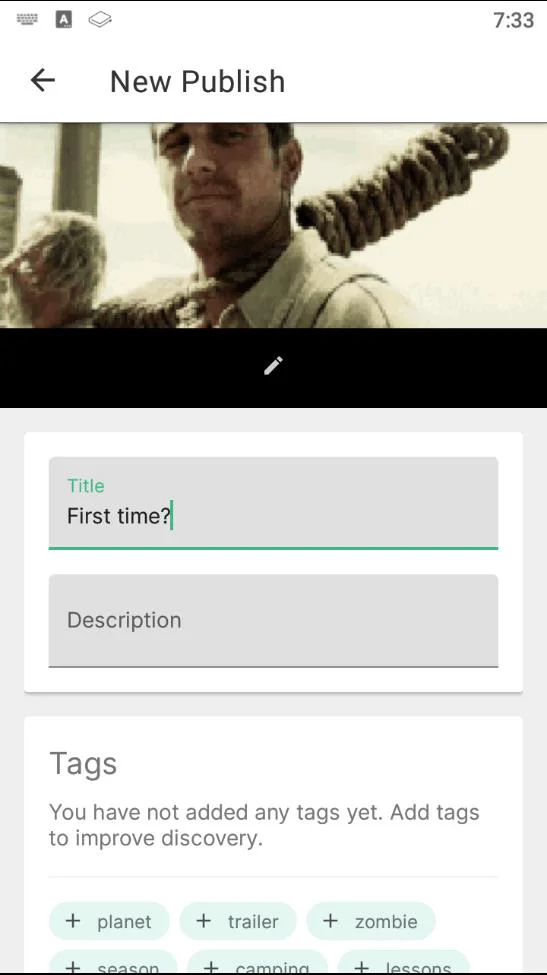
4. Enter a `Title` and `Description` for your content.
|
||||
|
||||
5. Next, you can add `tags` to your content which will help categorize it for [discovery purposes](https://lbry.com/faq/trending). If it's intended for mature audiences, please add the pink `mature` tag. Next, determine any other tags that relate to the content you are publishing. Please be mindful of accuracy when tagging content as this is currently up to the publisher only and cannot be edited. If incorrect/inappropriate tags are used, your content may be filtered to provide a better user experience. In the future, this will be done through community voting and building a web of trust.
|
||||
5. Next, you can add tags to your content which will help categorize it for [discovery purposes](https://lbry.com/faq/trending). If it's intended for mature audiences, please add the pink `mature` tag. Next, determine any other tags that relate to the content you are publishing. Please be mindful of accuracy when tagging content as this is currently up to the publisher only and cannot be edited. If incorrect/inappropriate tags are used, your content may be filtered to provide a better user experience. In the future, this will be done through community voting and building a web of trust.
|
||||
|
||||
|
||||
|
||||
|
||||
@@ -7,7 +7,7 @@ order: 3
|
||||
There are several ways to earn LBRY Credits, or LBC.
|
||||
|
||||
1. LBRY users receive an LBC gift by way of [rewards](/faq/rewards).
|
||||
1. LBRY users get LBC for [referring](/faq/referrals) other users via the LBRY Desktop app or odysee.com (see Account Overview page).
|
||||
1. LBRY users get LBC for [referring](/faq/referrals) other users via the LBRY Desktop app or lbry.tv (see Account Overview page).
|
||||
1. You can earn LBC for helping with various tasks. Talk to us on [Discord Chat](https://chat.lbry.com/) if you're interested in additional testing or helping the community.
|
||||
1. [Contributing](https://lbry.tech/contribute) to the project as a developer/engineer.
|
||||
1. Buy them: see [Exchanges](/faq/exchanges)
|
||||
|
||||
@@ -3,22 +3,28 @@ title: Where can I buy and sell LBC?
|
||||
category: getstarted
|
||||
---
|
||||
|
||||
We are listed on several cryptocurrency exchanges. You can buy or sell LBRY Credits at any of the below, or swap crypto into credits via the wallet page of your app.
|
||||
We are listed on several cryptocurrency exchanges. You can buy or sell LBRY Credits at any of the below, or swap crypto into creddits via the wallet page of your app.
|
||||
|
||||
For a more in depth guide on buying/selling, see our [Bittrex FAQ](/faq/buy-sell-bittrex).
|
||||
|
||||
## Buy or convert crypto to Credits in-app
|
||||
You can also [purchase LBC directly with credit card on the app and Odysee.com][certain regions excluded](/faq/buy-lbc) or swap other cryptos (BTC, BCH, ETH, LTC, DAI, and USDC) to Credits via your wallet page.
|
||||
|
||||
## Traditional crypto exchanges
|
||||
- [Bittrex - International Only, US Trading Disabled](https://bittrex.com/Market/Index?MarketName=BTC-LBC) ([USD](https://bittrex.com/Market/Index?MarketName=USD-LBC), [ETH](https://bittrex.com/Market/Index?MarketName=ETH-LBC), [USDT](https://bittrex.com/Market/Index?MarketName=USDT-LBC))
|
||||
- [MXC](https://www.mxc.la/trade/easy#LBC_USDT)
|
||||
- [BitMart](https://www.bitmart.com/trade/en?symbol=LBC_USDT&layout=basic) / [USDT](https://www.bitmart.com/trade/en?symbol=LBC_USDT&layout=basic)
|
||||
- [Lbank](https://www.lbank.me/exchange/lbc/btc) / [USDT](https://www.lbank.me/exchange/lbc/usdt)
|
||||
- [Hotbit](https://www.hotbit.io/exchange?symbol=LBC_BTC) / [USDT](https://www.hotbit.io/exchange?symbol=LBC_USDT)
|
||||
- [CoinEx](https://www.coinex.com/exchange?currency=btc&dest=lbc) / [USDT](https://www.coinex.com/exchange?currency=usdt&dest=lbc)
|
||||
- [CoinSpot](https://www.coinspot.com.au/chart/lbc)
|
||||
- [BigONE](https://big.one/cn/trade/LBC-BTC) / [USDT](https://big.one/cn/trade/LBC-USD)
|
||||
|
||||
## Instant exchanges - Crypto Only (currently under maintenance and not available)
|
||||
- [Simple Swap](https://simpleswap.io)
|
||||
- [Stealthex](https://stealthex.io/)
|
||||
- [SwapSpace](https://swapspace.co)
|
||||
- [Swapzone](https://swapzone.io)
|
||||
|
||||
## Decentralized exchanges (DEX)
|
||||
- [Bisq](https://bisq.network)
|
||||
- [BlockDX](https://blockdx.com/)
|
||||
- [AtomicDEX](https://atomicdex.io)
|
||||
|
||||
## Cross-Chain Exchanges
|
||||
- [pNetwork](https://dapp.ptokens.io/swap?asset=lbc&from=lbc&to=bsc)
|
||||
@@ -3,9 +3,9 @@ title: How does content hosting work?
|
||||
category: getstarted
|
||||
---
|
||||
|
||||
Right now, it's simple: you host what you download and publish on the LBRY Desktop app (hosting not available on odysee.com or Android). The hosted data is stored in the [lbrynet/blob files folder](https://lbry.com/faq/lbry-directories). On publish, the content is also sent to LBRY in order to help re-host content so your PC does not need to remain available.
|
||||
Right now, it's simple: you host what you download and publish on the LBRY Desktop app (hosting not available on lbry.tv, odysee.com or Android). The hosted data is stored in the [lbrynet/blob files folder](https://lbry.com/faq/lbry-directories). On publish, the content is also sent to LBRY in order to help re-host content so your PC does not need to remain available.
|
||||
|
||||
While LBRY Desktop is running, it communicates to the network whatever content you're making available. For proper communication to occur, your router must have UPNP enabled or you have to manually port forward 4444 TCP / 4444 UDP (see router on how to do so, each one is different).
|
||||
While LBRY Desktop is running, it communicates to the network whatever content you're making available. For proper communication to occur, your router must have UPNP enabled or you have to manually port forward 3333 TCP / 4444 UDP (see router on how to do so, each one is different).
|
||||
|
||||
Think of it like how torrents or any other peer-to-peer (P2P) service works. First, you download a file from the host(s) that have made it available via seeding. When the download has finished, you become a host in the network (seeder) that other people can download from.
|
||||
|
||||
@@ -19,7 +19,7 @@ To set ports manually, set values for following options in [lbrynet/daemon_setti
|
||||
udp_port: <udp_port>
|
||||
tcp_port: <tcp_port>
|
||||
```
|
||||
_Note:_ If the TCP port falls between port numbers 3333 and 3399 (inclusive), the UDP port should be set to 1111 higher than the TCP port. Otherwise, the UDP port should be set to the same port number as the TCP port.
|
||||
_Note:_ If the tcp port falls between port numbers 3333 and 3399 (inclusive), the UDP port should be set to 1111 higher than the TCP port. Otherwise, the UDP port should be set to the same port number as the TCP port.
|
||||
|
||||
## Moving hosted content
|
||||
Currently, this process is manual and you can see our [FAQ on how to move the hosted content](/faq/how-to-change-lbry-blob-files) to another drive.
|
||||
@@ -27,7 +27,7 @@ Currently, this process is manual and you can see our [FAQ on how to move the ho
|
||||
## Deleting hosted content
|
||||
You can delete files from the blob folder directly, or you can also delete them from the My LBRY section of the App - both will get rid of the hosted content and you'll lose the ability to seed it anymore.
|
||||
|
||||
## Web app (odysee.com)
|
||||
Currently, the web application takes advantage of LBRY Inc hosted reflector servers to provide a high bandwidth and availablity solution to casual web users. All content is still available on the P2P network via the Desktop application regardless of where it's uploaded. In the future, we'll be looking into ways of providing the power of P2P over the web.
|
||||
## Web apps (lbry.tv / odysee.com)
|
||||
Currently, the web applications take advtange of LBRY Inc hosted reflector servers to provide a high bandwidth and availablity solution to casual web users. All content is still available on the P2P network via the Desktop application regardless of where it's uploaded. In the future, we'll be looking into ways of providing the power of P2P over the web.
|
||||
|
||||
**Please note: Hosting fees are currently disabled on the network as we're currently working on a better way to implement the fee structure.**
|
||||
@@ -3,7 +3,32 @@ title: How do I change my LBRY connected email?
|
||||
category: troubleshooting
|
||||
---
|
||||
|
||||
Email change is currently done manually by us. To change the email used with your account, email us at help@lbry.com from your current email and let us know what you want to change it to.
|
||||
(If you are coming from Odysee, email to their support at help@odysee.com)
|
||||
In certain cases, you may want to change the email connected to your account. Changing email for Odysee.com and LBRY is actually process of merging accounts and deleting access from old one. You'll need to merge accounts yourself, by using the LBRY desktop app https://lbry.com/get
|
||||
|
||||
## Changing email on the desktop app
|
||||
1. Sign in with the old email, and make sure that you have "Backup your account and wallet data" checked.
|
||||
1. Sign out.
|
||||
1. Sign in with the new email, and make sure that you have "Backup your account and wallet data" checked.
|
||||
1. Your accounts are now merged. You can confirm this by login in to odysee.com with the new email. You should be able to control your channels from the new account.
|
||||
1. Send email to us, and we will do the clean up on our side, moving verification status to the new email, deleting access from old email, etc.
|
||||
**Example:** "I've merged my accounts. Please delete the access from my old account \<old-email\> and move my verification status to the account \<new-email\>."
|
||||
|
||||
*Note:* To prevent users from causing harm to other users, we require the email to be sent from the **old email**.
|
||||
|
||||
### Important:
|
||||
If you sign out of the LBRY desktop app and back in with a different email, **these wallets and accounts will be merged**. Do not do this unless it's intentional and you expect the new email to be used by the same person.
|
||||
|
||||
## Changing email on Android {#android}
|
||||
**If you need to merge wallets, you need to backup/restore your Android wallet or use the LBRY Desktop app to merge them by signing into both emails. [Android wallet backup and restore instructions](https://lbry.com/faq/how-to-backup-wallet#android).**
|
||||
|
||||
*(Exact steps may differ slightly)*
|
||||
*Before proceeding, please make sure to backup your wallet if there are funds in it. Channels and publishes on account are also actually tied to the wallet*
|
||||
1. Go to phone settings
|
||||
1. Select Apps/Applications
|
||||
1. Scroll down to find `LBRY Browser`
|
||||
1. Click on it and select storage. Click `Clear data`
|
||||
1. Launch the LBRY app. It should ask for your new email
|
||||
1. Close app and backgorund services and [restore](https://lbry.com/faq/how-to-backup-wallet#android) the backed up wallet.
|
||||
1. Send email to us, and we will do the clean up on our side, moving rewards status to the new email, deleting access from old email, etc.
|
||||
|
||||
*Note:* To prevent users from causing harm to other users, we require the email to be sent from the **old email**.
|
||||
@@ -10,80 +10,56 @@ To see our recommended video upload format and settings, please see our [video p
|
||||
|
||||
If you are a YouTube Sync user, please make sure to [read our FAQ](https://lbry.com/faq/youtube) on how this process works.
|
||||
|
||||
If you don't have LBRY yet, download it [here](/get). You can also publish files up to 4 GB from the web at [Odysee.com](https://odysee.com). Please note that Odysee is a separate company. For specific instructions regarding publishing to the LBRY blockchain via Odysee, [refer to Odysee.com](https://odysee.com/$/help).
|
||||
If you don't have LBRY yet, download it [here](/get). You can also publish files up to 4 GB from the web at [Odysee.com](https://odysee.com).
|
||||
|
||||
For instructions on how to publish to Android, please check out our [publishing quickstart guide](/faq/publish-quickstart#android) or our more comprehensive [LBRY for Android basics](/faq/android-basics#publish).
|
||||
|
||||
**IMPORTANT NOTE: Only use appropriate tags when publishing content. Tag abuse and follow-for-follow/view-for-view type activity is prohibited and will not be tolerated.**
|
||||
**IMPORTANT NOTE: Only use appropriate tags when publishing content. Tag abuse and follow for follow/view for view type activity is prohibited and will not be tolerated.**
|
||||
|
||||
## How do I publish content?
|
||||
|
||||
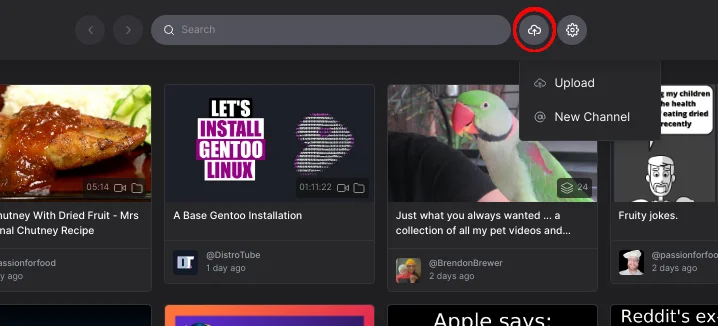
1. Click on the `Publish` button next to the search bar to the right. You will get a dropdown, select `Upload` from the menu.
|
||||
|
||||
|
||||
1. Click on the Publish button next to the search bar to the right. You will get a dropdown, select `Upload` from the menu.
|
||||

|
||||
|
||||
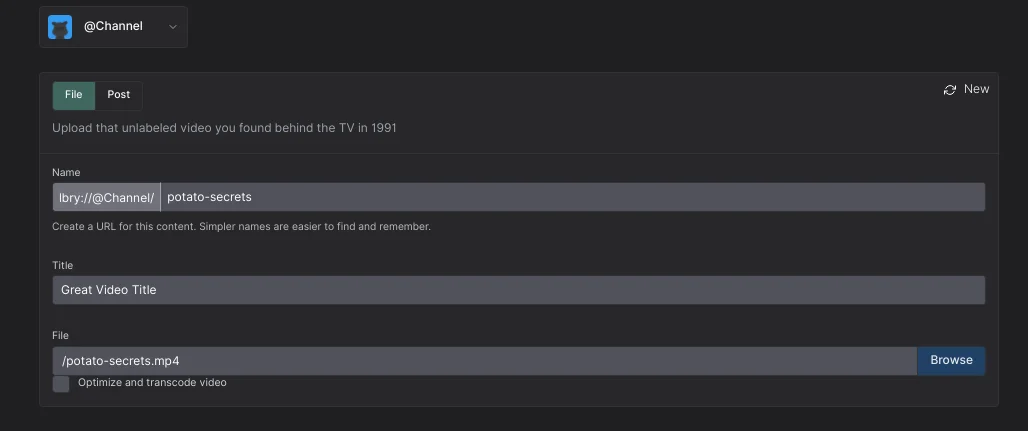
2. Under the `Upload` section, you have the option to select/create the channel you would like to publish the content under. If no channel is selected, it will be posted anonymously.
|
||||
|
||||
|
||||

|
||||
|
||||
3. Give your content a name which could be the same as your title but with no spaces. You can use `-` in place of the space.
|
||||
4. Next, type the title for your content.
|
||||
5. After entering the title, click `Browse` to browse the content you want to publish.
|
||||
5. After entering the title, click browse to browse the content you want to publish.
|
||||
|
||||
6. On your local machine, select the content you wish to upload to LBRY. For video content, LBRY works best with MP4 files in H264/AAC format which support proper streaming (see [video publishing guide for details](/faq/video-publishing-guide)). Besides videos, other popular formats supported are MP3s, text documents like markdown (md)/HTML, PDF, CSV, and comic books (cbr, cbz). In the future, the in app player may support additional formats.
|
||||
6. On your local machine, select the content you wish to upload to Odysee. For video content, Odysee works best with MP4 files in H264/AAC format which support proper streaming (see [video publishing guide for details](/faq/video-publishing-guide)). Besides videos, other popular formats supported are MP3s, text documents like markdown (md)/HTML, PDF, CSV, and comic books (cbr, cbz). In the future, the in app player may support additional formats.
|
||||
|
||||
Other file types can also be uploaded, but may not be streamable via third-party frontends (like Odysee). However, they can be opened via the LBRY Desktop/Android apps.
|
||||
Other file types can also be uploaded, but won't be streamable via Odysee directly. They can be opened externally for viewing on the Desktop/Android apps.
|
||||
|
||||
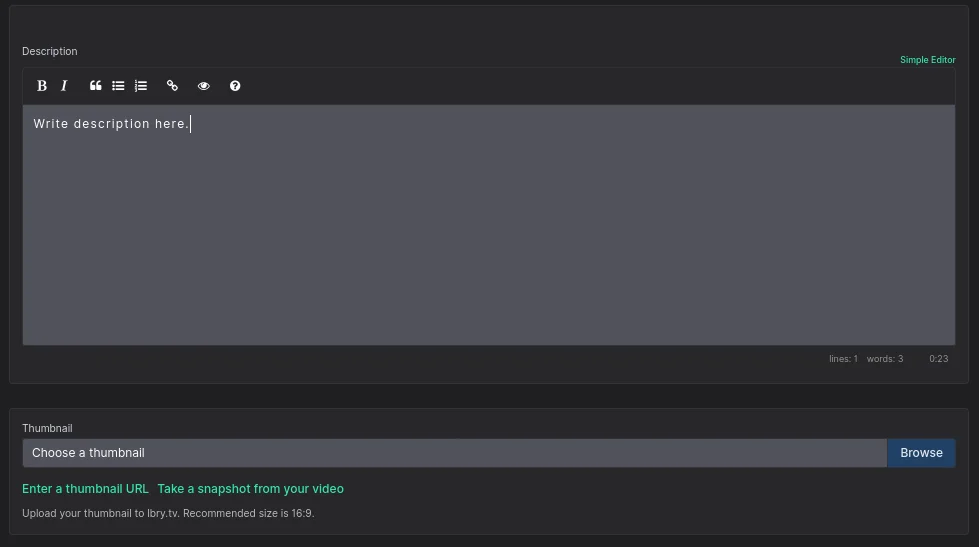
7. Enter a `Description` for your content.
|
||||
|
||||
|
||||
|
||||
8. Choose a `Thumbnail` or `Thumbnail URL` for your content. The `Thumbnail URL` is a hyperlink to an image file which will serve as a preview for your content. It can be any image/GIF URL. The default pixel size is 800x450, but the app will scale it up/down. Images uploaded directly from your local machine as `Thumbnail` will be uploaded to [spee.ch](https://www.spee.ch).
|
||||
|
||||
9. Next you can add `Tags` to your content which will help categorize it for [discovery purposes](https://lbry.com/faq/trending). If it's intended for mature audiences, please add the pink `mature` tag. Next, determine any other tags that relate to the content you are publishing. Please be mindful of accuracy when tagging content as this is currently up to the publisher only and cannot be edited. If incorrect/inappropriate tags are used, your content may be filtered to provide a better user experience. In the future, this will be done through community voting and building a web of trust.
|
||||
|
||||
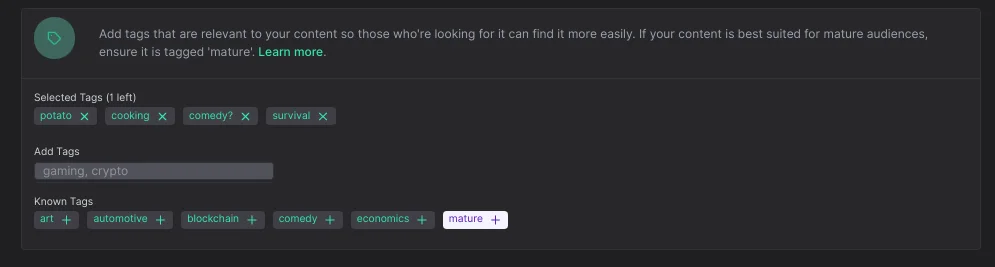
|
||||
|
||||
10. Right below the tags, you will be able to check, disable, or enable viewers to leave a comment on your content.
|
||||
9. Next you can add tags to your content which will help categorize it for [discovery purposes](https://lbry.com/faq/trending). If it's intended for mature audiences, please add the pink `mature` tag. Next, determine any other tags that relate to the content you are publishing. Please be mindful of accuracy when tagging content as this is currently up to the publisher only and cannot be edited. If incorrect/inappropriate tags are used, your content may be filtered to provide a better user experience. In the future, this will be done through community voting and building a web of trust.
|
||||
10. Right below the tags, you will be able to check disbale or enable viewers to leave a comment on your content.
|
||||
|
||||
11. Type in a minimum of 0.0001 LBC deposit for the upload (default amount is higher due to publishing fees). If you are trying to outbid a user-friendly/common URL, the system will suggest a minimum bid to take over the content at that vanity URL. There may be a delay for this takeover. Making your bid higher will result in [better discovery](https://lbry.com/faq/trending) for your content. For more details regarding the URL or bid, check out our [naming document](/faq/naming).
|
||||
|
||||
12. You should have an option to set a price on on your content or make it free.
|
||||
|
||||
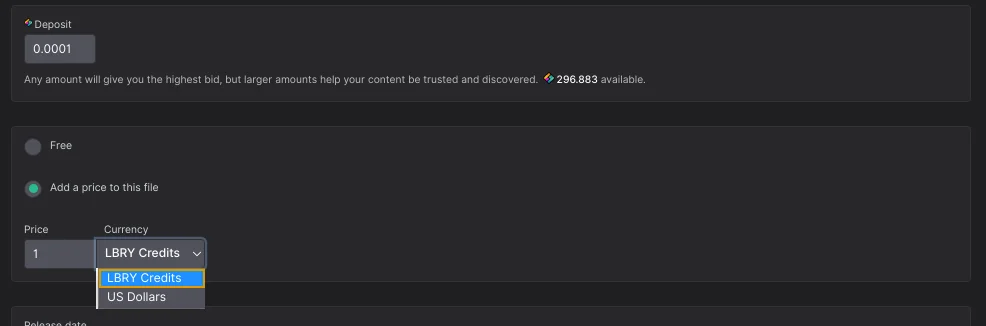
|
||||
13. Next, there is `Additional Option` which gives you an option to select language and license. Default language is set to `English`, and the License is set to `None`. If a change is needed, click the dropdown menus and select the appropriate choice.
|
||||
|
||||
13. Next, there is `Additional Option` which gives you an option to select language and license. Default language is set to `English`, and the license is set to `None`. If a change is needed, click the dropdown menus and select the appropriate choice.
|
||||
_please review our terms of service before publishing [terms of service](/termsofservice)_
|
||||
|
||||
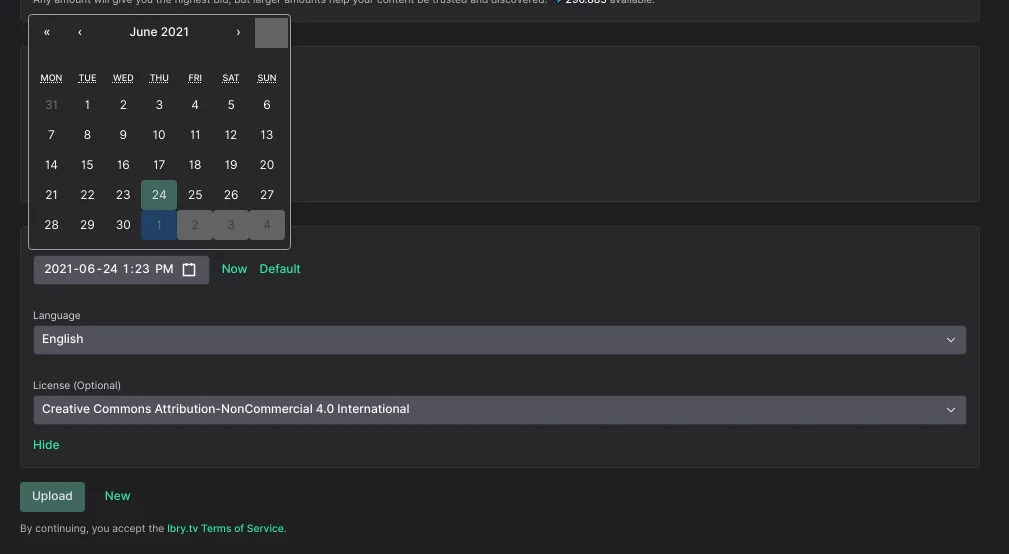
|
||||
13. Click `Upload`.
|
||||
|
||||
14. Please review our [terms of service](/termsofservice) before publishing.
|
||||
|
||||
15. Click `Upload`
|
||||
|
||||
16. Read the summary in the `Confirm Upload` box to make sure the data is accurate. If you want to change anything, then click `Cancel`, otherwise, if you are satisfied with what you see, click `Upload`.
|
||||
|
||||
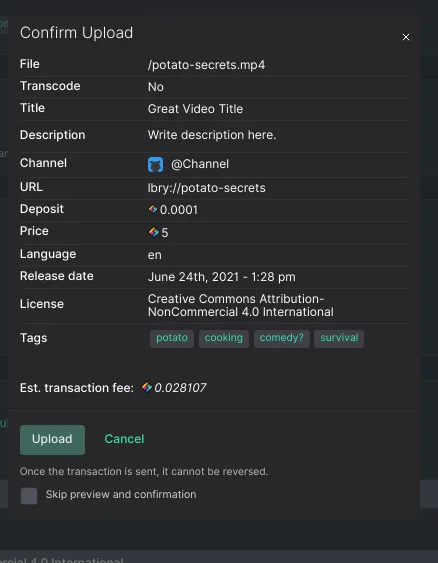
|
||||
|
||||
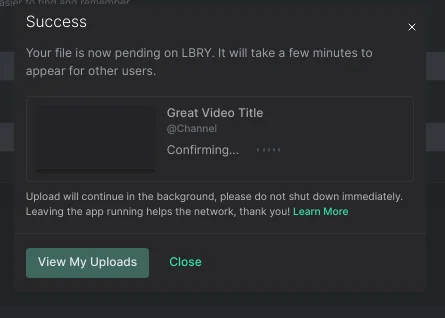
The file will process in the background and will be added to the LBRY Blockchain. Please leave LBRY open while your content is in the "pending confirmation" mode. This page will automatically refresh and you will be notified when the publish is completed. After this, your content will be available to other LBRY users.
|
||||
|
||||
|
||||
|
||||
*It is a good idea to leave LBRY open for a while after this to make sure the app is able to share your file to at least one peer on the data network. Larger files will take longer to upload depending on your network speed.
|
||||
The file will process in the background and will be added to the LBRY Blockchain. Please leave LBRY/ Odysee.com open while your content is in the "pending confirmation" mode. This page will automatically refresh and you will be notified when the publish is completed. After this, your content will be available to other Odysee users. *It is a good idea to leave LBRY open for a while after this to make sure the app is able to share your file to at least one peer on the data network. Larger files will take longer to upload depending on your network speed.
|
||||
|
||||
*You can continue to use LBRY while the upload completes.
|
||||
|
||||
## How do I create a channel?
|
||||
|
||||
The following images show the user interface for Odysee.com. Never fear! The process and appearance is almost identical to LBRY Desktop (as of December 2021).
|
||||
|
||||
1. Open the LBRY app.
|
||||
1. Open Odysee.com
|
||||
|
||||
2. Click on the cloud with an arrow pointing into it in the top right next to the search bar.
|
||||
|
||||
3. Select `New Channel` in the dropdown menu.
|
||||
|
||||
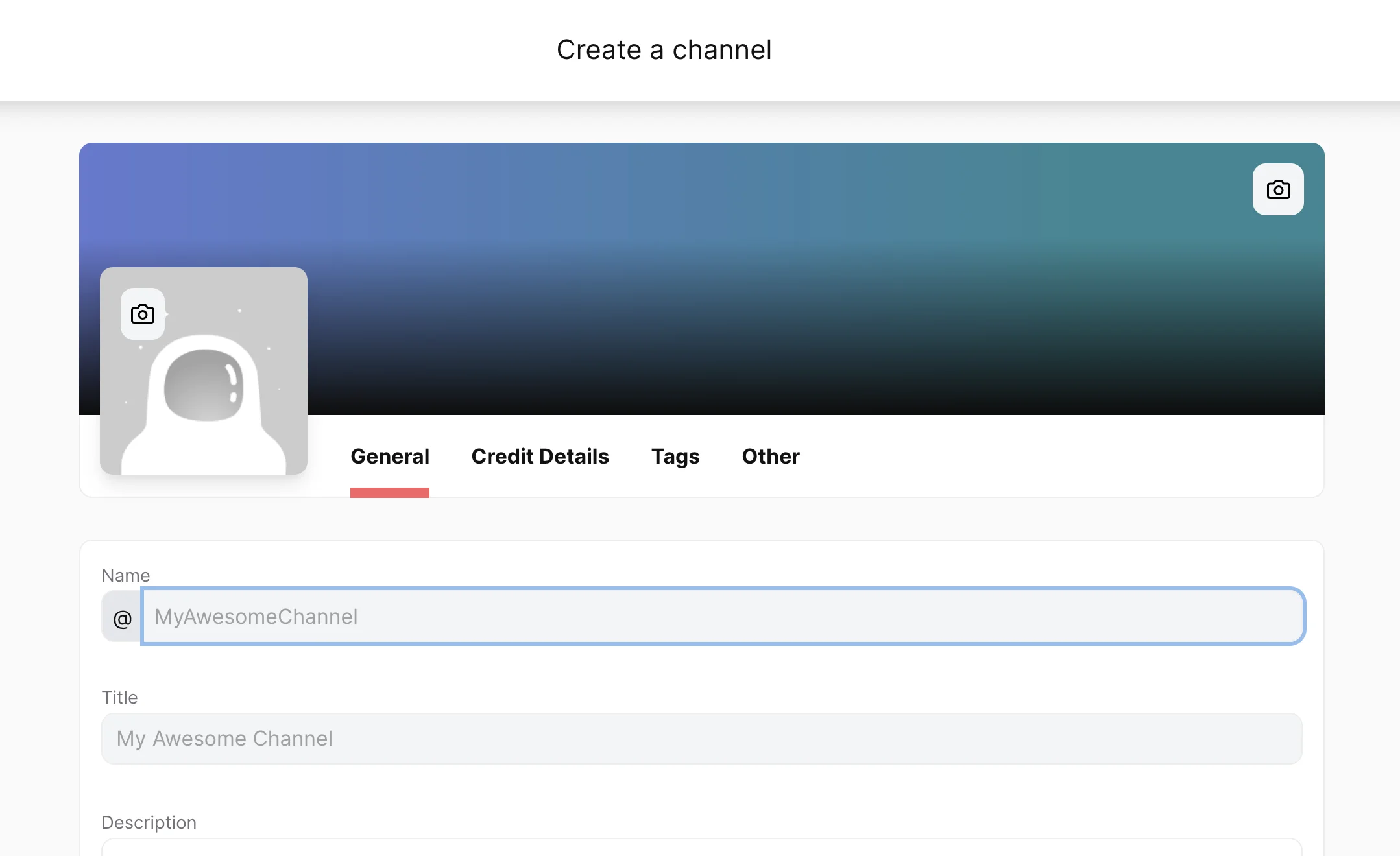
4. Fill in your your preffered channel name, title and description. Please ensure that you have enough LBRY Credits in your wallet to cover the bid amount. There is also a small network fee associated with the creation of a channel.
|
||||
|
||||
|
||||
|
||||
5. Click `Submit` once you have entered your bid amount. You now own `lbry://@channelnameyoubidon` (the vanity name without a claim id) if you are the highest bidder.
|
||||
@@ -91,14 +67,12 @@ The following images show the user interface for Odysee.com. Never fear! The pro
|
||||
## How do I customize my channel? {#channel}
|
||||
|
||||
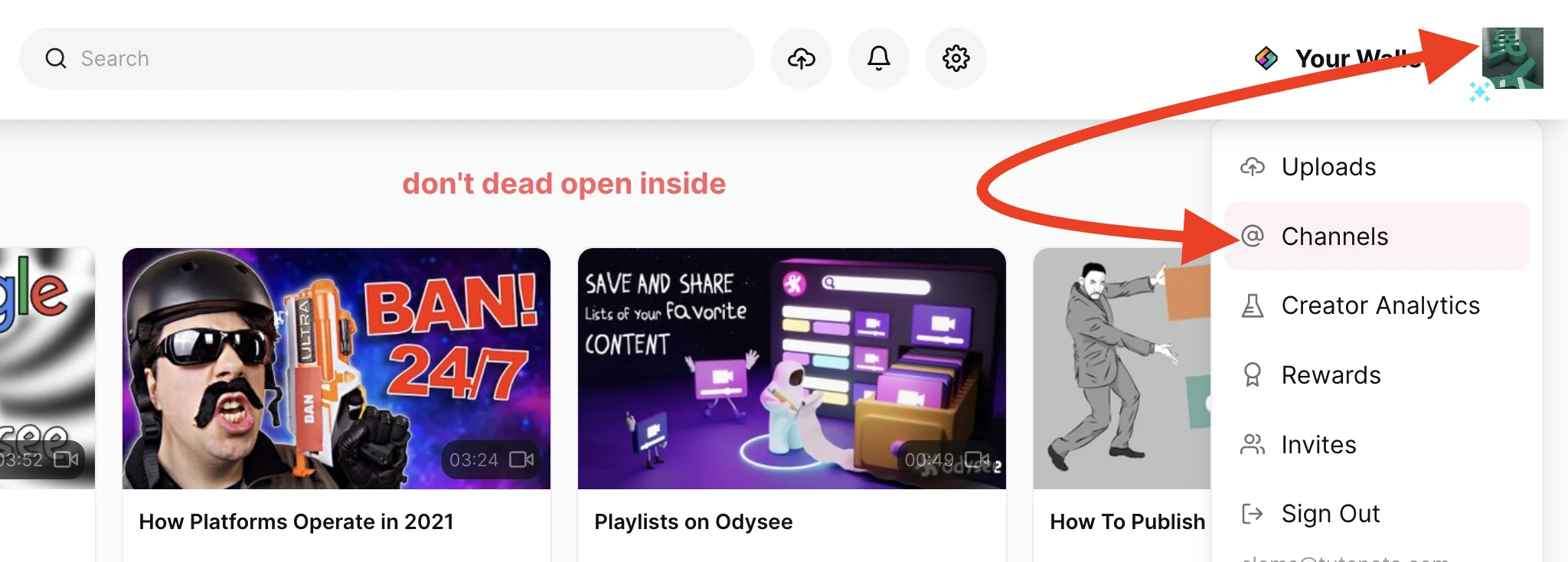
First, you need to access your channel by clicking on the channel art or the astronaught icon on the upper right corner.
|
||||
|
||||
|
||||
|
||||
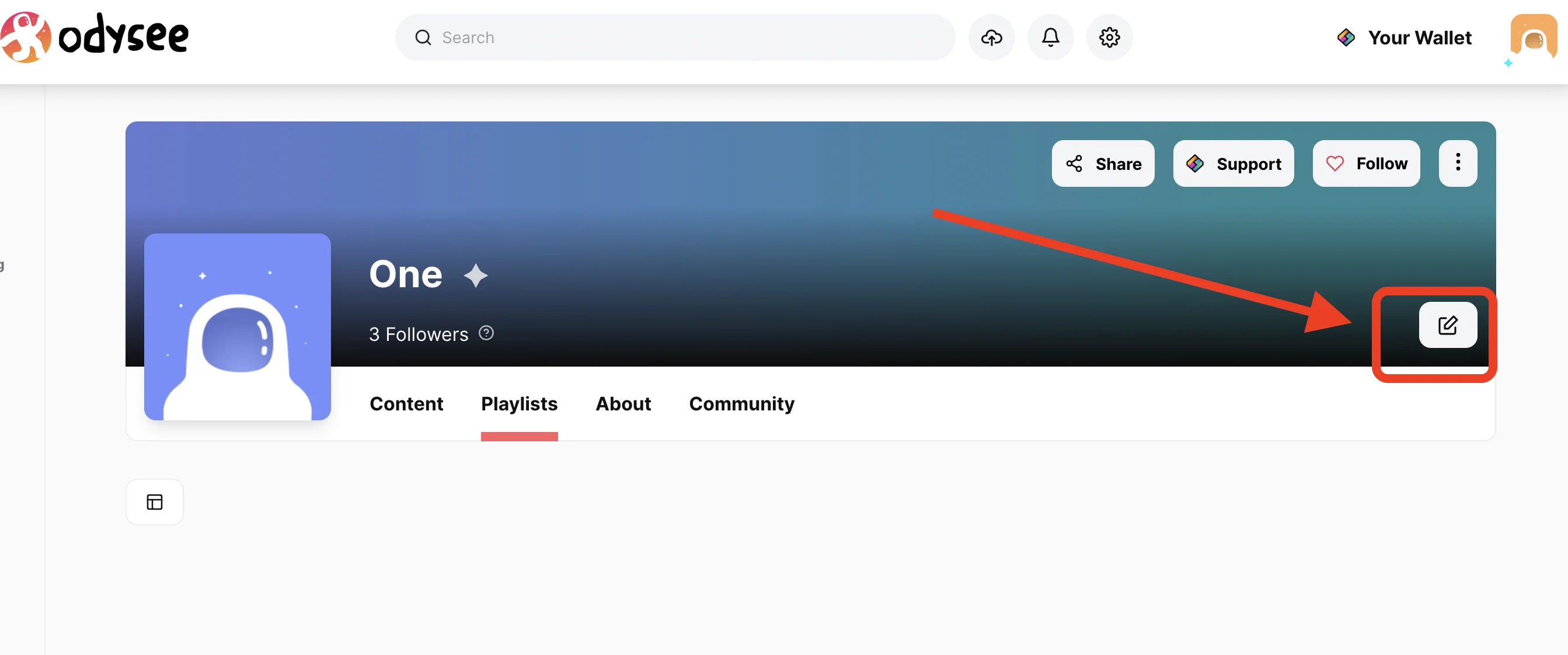
1. You will now see an edit button next to the name. Click the button to proceed to the edit page.
|
||||
|
||||
|
||||
|
||||
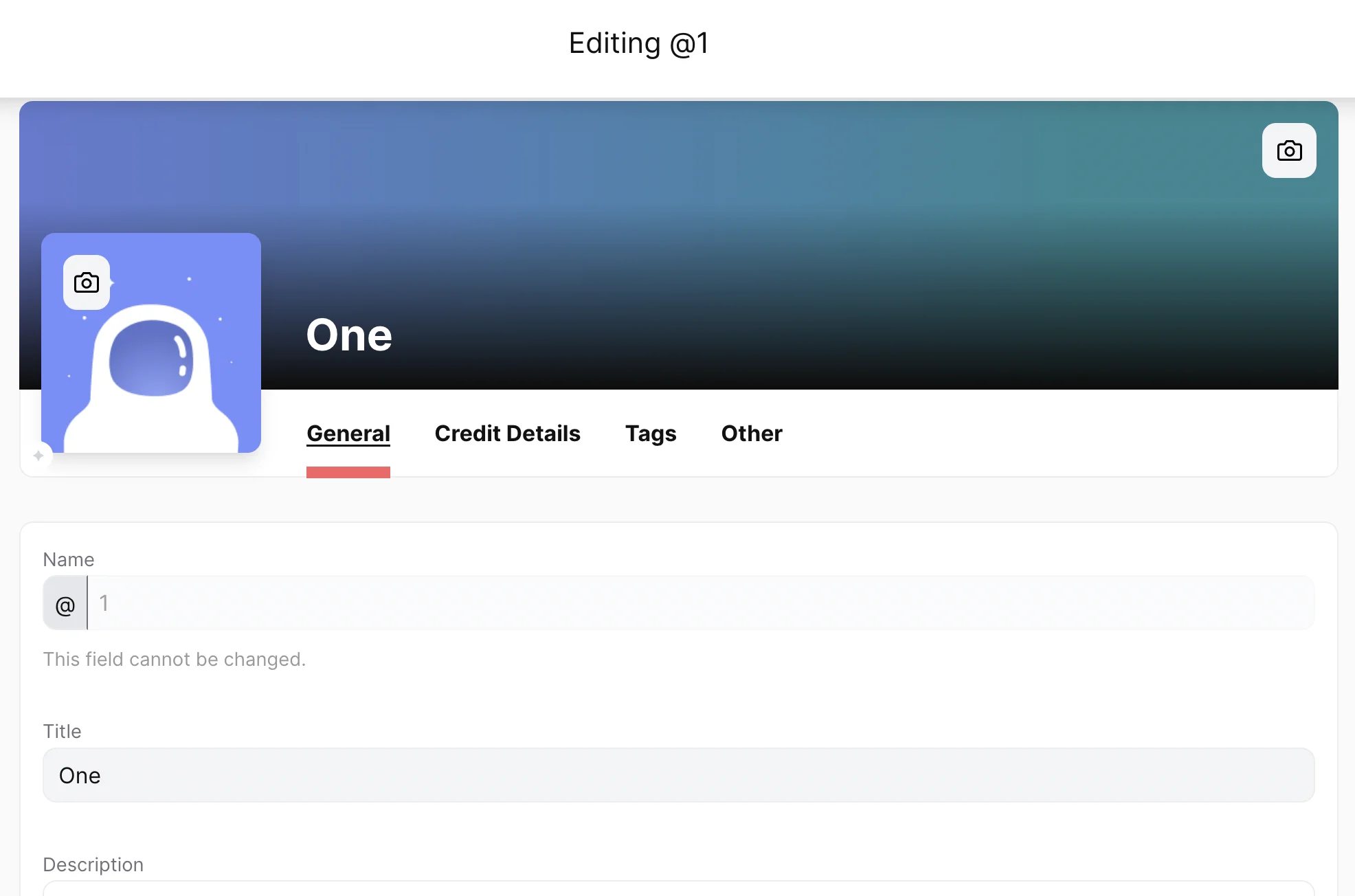
2. You can now upload your thumbnail and cover image by clicking the `camera icon`, select `Browse` to choose the thumbnail or banner for your channel or use the option for url to add an image link. The page will update once a valid URL is available.
|
||||
2. You can now upload your thumbnail and cover image by clicking the camera icon, select browse to choose the thumbnail or banner for your channel or use the option for url to add an image link. The page will update once a valid URL is available.
|
||||
|
||||
|
||||
|
||||
@@ -107,12 +81,11 @@ First, you need to access your channel by clicking on the channel art or the ast
|
||||
|
||||
## How do I delete my content and reclaim my deposit?
|
||||
|
||||
1. Click on the `channel logo` on the upper right corner and select `Uploads`.
|
||||
1. Click on the channel /astronaut logo on the upper right corner and select Uploads
|
||||
|
||||
2. This should display all uploads. Click on the content you want to remove from LBRY.
|
||||
2. This should display all uploads. Click on the content you want to remove from Odysee
|
||||
|
||||
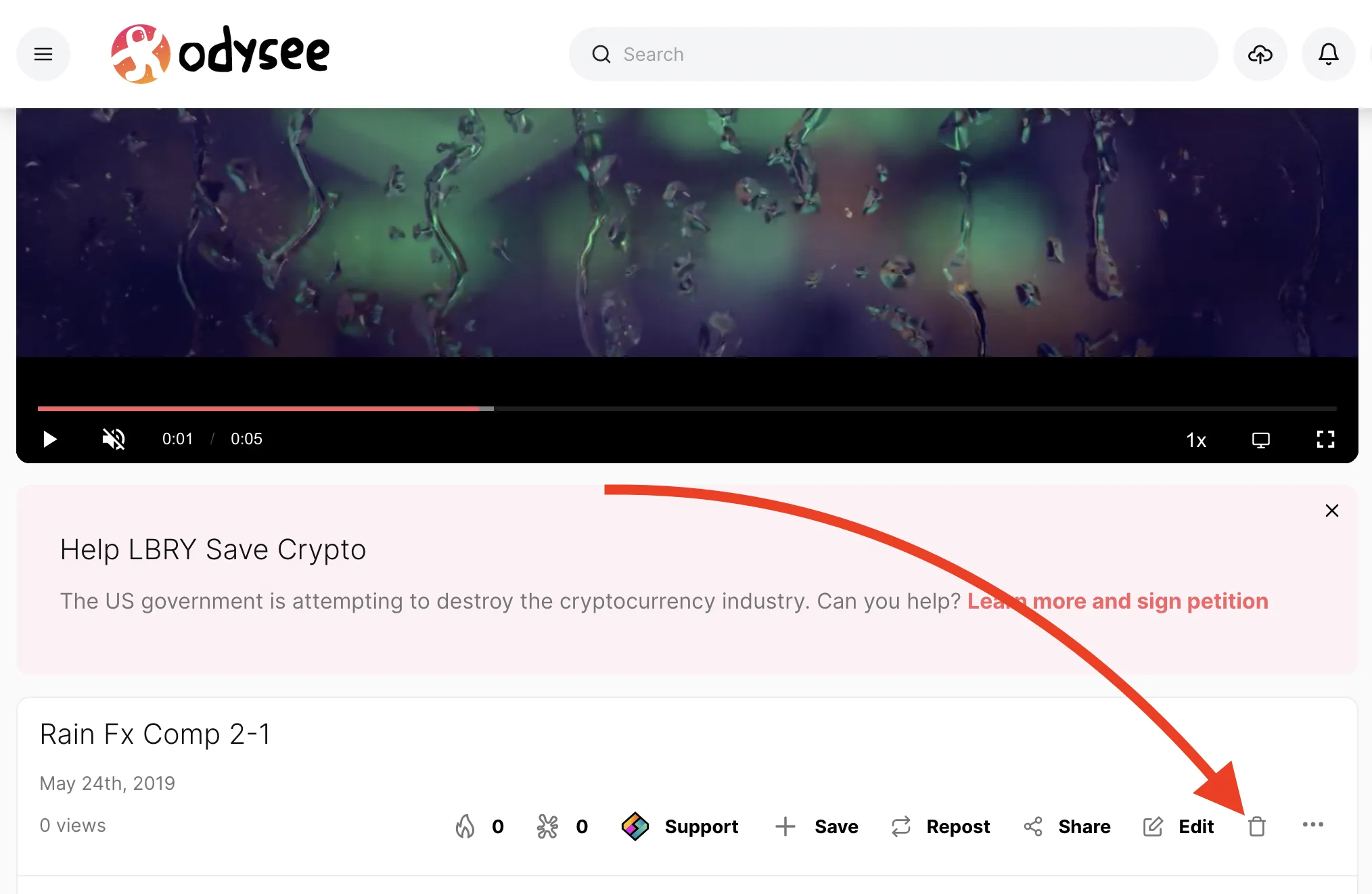
3. Click on the `Delete` icon.
|
||||
|
||||
|
||||
|
||||
4. There will be an option for `Abandon on blockchain (reclaim your LBC)`. Check if that applies. Abandoning your claim will release the LBC back into your wallet (99% of the time you want to select this).
|
||||
@@ -123,7 +96,7 @@ First, you need to access your channel by clicking on the channel art or the ast
|
||||
|
||||
## How do I edit my existing published content?
|
||||
|
||||
1. Click on the `channel logo` on the upper right corner and select `Uploads`.
|
||||
1. Click on the channel /astronaut logo on the upper right corner and select Uploads
|
||||
2. Select the content you want to update.
|
||||
3. Click `Edit`.
|
||||
4. You can now edit your claim information. No need to re-select the file if it's the same one or has the same url.
|
||||
@@ -131,7 +104,7 @@ First, you need to access your channel by clicking on the channel art or the ast
|
||||
|
||||
## Where is my content stored and shared from? {#blobs}
|
||||
|
||||
Content uploaded is chunked up into 2MB files called blobs, and stored in your [lbrynet/blob files folder](/faq/lbry-directories).
|
||||
Content uploaded is chunked up into 2MB files called blobs, and stored in your [lbrynet/blob files folder](https://lbry.com/faq/lbry-directories). These can be deleted if the video is fully streamable on [https://odysee.com](https://odysee.com).
|
||||
|
||||
## Can someone tip me for my content?
|
||||
|
||||
@@ -141,13 +114,13 @@ Yes, check out how tipping in LBRY works by going [here](/faq/tipping).
|
||||
|
||||
Yes, the claim can be edited to increase the bid amount or you can also send a Support to your own content. The Support button will appear instead of the tip button for your own claims. See the [FAQ](/faq/tipping) to learn more.
|
||||
|
||||
## My video doesn't stream in the app; what's wrong?
|
||||
## My video doesn't stream in the app or on odysee.com, what's wrong?
|
||||
|
||||
The in-app video player's streaming capability works best with the H264/AAC format, typically in an MP4 container but others like M4V will also work. Other non-streaming video types like AVI/WMV/MOV file formats are not supported by the in-app player, but they can be shared/downloaded and will play outside of the app.
|
||||
The in-app and odysee.com video player's streaming capability works best with the H264/AAC format, typically in an MP4 container but others like M4V will also work. Other non-streaming video types like AVI/WMV/MOV file formats are not supported by the in-app player, but they can be shared/downloaded and will play outside of the app.
|
||||
|
||||
## I shared my URL, but others can't download it. What's going on?
|
||||
|
||||
Since LBRY is a Peer-to-Peer network, it requires that your device is accessible to the Internet. LBRY also runs servers to assist in content hosting, but this process may fail if your device cannot send it to us or if you didn't wait long enough after the initial publish. Try quitting (Ctrl-Q) and restarting the LBRY app if the content is not accessible.
|
||||
Since LBRY is a Peer-to-Peer network, it requires that your device is accessible to the internet. LBRY also runs servers to assist in content hosting, but this process may fail if your device cannot send it to us or if you didn't wait long enough after the initial publish. Try quitting (Ctrl-Q) and restarting the LBRY app if the content is not accessible on [odysee.com](https://odysee.com).
|
||||
|
||||
## Where is my channel and content saved locally?
|
||||
|
||||
@@ -155,7 +128,7 @@ Channels and content claims are saved to your LBRY Wallet along with your LBRY C
|
||||
|
||||
## How and where can I share my content?
|
||||
|
||||
LBRY URLs can be shared with anyone - users can view it in their Desktop app or on a third-party frontend like [Odysee.com](https://odysee.com) (see Share button in app). If the content is free and public, it can also be retrieved. You can also share the content on our on [Discord](https://chat.lbry.com) where we have a vibrant community with thousands of users.
|
||||
LBRY URLs can be shared with anyone - users can view it in their Desktop app or on [odysee.com](https://odysee.com) (see Share button in app). If the content is free and public, it can also be retrieved. You can also share the content on our on [Discord](https://chat.lbry.com) where we have a vibrant community with thousands of users.
|
||||
|
||||
## I'm an advanced user, is there more I can poke around with?
|
||||
|
||||
|
||||
@@ -81,7 +81,7 @@ In the **Desktop app**, if you want to delete faster more or all the files from
|
||||
- In the **mobile app** open the main menu of the app and then choose the **`Publishes`** option.
|
||||
|
||||
## How do I know if I'm sharing content and helping the LBRY network properly?
|
||||
The easiest way to confirm that you are sharing correctly is to determine if the port used for seeding (3333 TCP) is open to the rest of the LBRY network. To do so, type 3333 into [this port checking tool](http://www.canyouseeme.org) and check the result. If it shows "Success", you are all set. If it shows "Error", you may need to check your router settings for UPnP options (set to enable) or forward TCP port 3333 and UDP Port 4444 to your local computer running the LBRY Desktop. Firewall and NAT settings may also affect the availability of these ports. Also, when you access the checking tool page, check if in the browser there is no active plug-in or extension that act as a VPN. In this case the result could be false and indeed your Desktop app could have access to these ports, but the browser not. For more details see [this](/faq/host-content).
|
||||
The easiest way to confirm that you are sharing correctly is to determine if the port used for seeding (3333 TCP) is open to the rest of the LBRY network. To do so, type 3333 into [this port checking tool](http://www.canyouseeme.org) and check the result. It if shows "Success", you are all set. If it shows "Error", you may need to check your router settings for UPnP options (set to enable) or forward TCP port 3333 and UDP Port 4444 to your local computer running the LBRY Desktop. Firewall and NAT settings may also affect the availability of these ports. Also, when you access the checking tool page, check if in the browser there is no active plug-in or extension that act as a VPN. In this case the result could be false and indeed your Desktop app could have access to these ports, but the browser not. For more details see [this](/faq/host-content).
|
||||
|
||||
## How can I search for content on LBRY?
|
||||
Searching on LBRY is as easy as typing your search term(s) into the address bar at the top and then pressing enter.
|
||||
|
||||
@@ -0,0 +1,16 @@
|
||||
---
|
||||
title: How does the company behind LBRY make money?
|
||||
category: other
|
||||
---
|
||||
|
||||
The LBRY protocol has a built-in digital currency that allows it to function called LBRY Credits (LBC), similar to Bitcoin. A built-in digital currency creates an opportunity for a new kind of business that has never existed: [the protocol-first enterprise](https://medium.com/the-coinbase-blog/app-coins-and-the-dawn-of-the-decentralized-business-model-8b8c951e734f#.6mr8znoiu).
|
||||
|
||||
LBRY Inc. has reserved 10% of all LBRY Credits to fund continued development and provide profit for the founders. Since Credits only gain value as the use of the protocol grows, the company has an incentive to continue developing this open-source project, and we can do it all without taking a percentage of anyone's transactions.
|
||||
|
||||
Here's how LBRY Inc. **doesn't** make money:
|
||||
|
||||
- **We do not take a cut of any LBC transactions.** When users purchase content on LBRY, 100% of the listed price goes to the publisher. There is also a small fee added on top that is paid to the decentralized network of hosts that store and deliver the content to you. LBRY Inc. doesn't take any of that unless the company is publishing or hosting content itself. The same rules apply to everyone.
|
||||
- **We do not earn profits from auctioning of names**, nor do we benefit from bidding wars over names. Our goal with the naming system is simply to allocate names most efficiently to benefit users.
|
||||
- **This is not a "pump and dump" scheme or vaporware.** LBRY Credits have already experienced a bubble, and we paid it no mind. LBRY is real software with a live blockchain and hundreds of thousands active users. Our goal is to increase the long-term value of the protocol, which if adopted globally, will make our reserve many times more valuable than any short-term bubble. We're patient and focused on the future.
|
||||
|
||||
LBRY, Inc. also makes or will make money through financial exchanges, optional advertising, providing value-added services to LBRY users and/or consulting content producers who want to harness the power of LBRY. But remember, by design, **we are not able** to single-handedly change the rules on users of the network.
|
||||
@@ -11,11 +11,10 @@ However, some pools are in a partnership with the independent community initiati
|
||||
The current breakdown of mining hash rates can be found on [Mining Pool Stats](https://miningpoolstats.stream/lbry)
|
||||
|
||||
## Pools
|
||||
- [LBRYpool](https://lbrypool.net/) ⬅ Support the LBRY community with this pool!
|
||||
- [zPool](https://www.zpool.ca/) ⬅ minority pool, no signup needed!
|
||||
- [Luxor](https://mining.luxor.tech/coins/lbry) ⬅ Support the LBRY community with this pool!
|
||||
- [Mining Dutch](https://www.mining-dutch.nl/pools/lbrycredits.php)
|
||||
- [ViaBTC](https://support.viabtc.com/hc/en-us/articles/900001529806)
|
||||
- [DX Pool](https://www.dxpool.com/)
|
||||
- [SuprNova](https://lbry.suprnova.cc/index.php?page=gettingstarted) (Does not work with new LB1 Asic)
|
||||
- [CoinMine](https://www2.coinmine.pl/lbc/index.php?page=gettingstarted)
|
||||
- [Lbrypool.de](https://lbrypool.de)
|
||||
@@ -1,5 +1,5 @@
|
||||
---
|
||||
title: What moderation tools are available?
|
||||
title: What moderation tools are avaialble?
|
||||
category: publisher
|
||||
order: 5
|
||||
---
|
||||
|
||||
@@ -15,7 +15,7 @@ We'll start with publishing on LBRY Desktop and Odysee.com. Scroll down or [clic
|
||||

|
||||
1. From top left dropdown menu, you can choose channel you want to use for current publish.
|
||||
1. Choose *Name* for your publish. (This will become part of the URL of your publish and can't be edited later, learn more from here: [Naming](/faq/naming))
|
||||
1. Set *Title* for your publish. (This is the title shown with thumbnail, when browsing the website or apps, and it can be edited later.)
|
||||
1. Set *Title* for your publish. (This is the title shown with thumbnaile, when browsing the website or apps, and it can be edited later.)
|
||||
1. Select the file you want to publish by clicking **Browse**. On desktop app you may have option to  video for better streaming performance.
|
||||

|
||||
1. Fill in other details for the content you are uploading, including description, tags, thumbnail, possible price, etc.
|
||||
|
||||
+44
-1
@@ -11,6 +11,10 @@ Not all users are eligible for rewards, but you can still use LBRY without earni
|
||||
|
||||
If you're not eligible for rewards but want LBC to publish content or support other content creators, [learn about other ways to obtain LBC.](/faq/earn-credits)
|
||||
|
||||

|
||||
|
||||
_The rewards screen in the LBRY app._
|
||||
|
||||
## Rewards eligibility {#eligibility}
|
||||
|
||||
A reward is intended to be earned no more than one time by each real person. As such, eligibility restrictions are in place to prevent one person from earning rewards under multiple accounts.
|
||||
@@ -32,12 +36,49 @@ All rewards can be seen by clicking your [Rewards page](https://open.lbry.com/?r
|
||||
|
||||
Rewards that you have earned will be marked in your [wallet](/faq/transaction-types).
|
||||
|
||||
[Learn more about **Referrals**.](/faq/referrals). |
|
||||
## What rewards exist?
|
||||
|
||||
**Reward amounts are subject to change at any time.**
|
||||
|
||||
| Reward | Amount | Description |
|
||||
| ------------------------ | ----------- | ------------------------------------------------------------------------------------------------------------------------------------------------------------- |
|
||||
| **Your First Nickel** | 0.5 LBC | One-time welcome gift for learning the basics of the application & wallet. |
|
||||
| **Go for a Stream** | 0.5 LBC | One-time reward for streaming your very first video. |
|
||||
| **Welcome Back** | 1 LBC | One-time reward for returning to LBRY 24-48 hours following your first use of the app. (This reward cannot be earned after 48 hours.) |
|
||||
| **Daily View** | 0.2 - 100 LBC | Repeatable reward for viewing any content. Earn a random reward of 0.2 to 100 LBC. Reward may be earned once every 23 hours. |
|
||||
| **Many Views** | 0.25+ LBC | Multi-level reward for watching videos that increases with the number of videos you watch. |
|
||||
| **Faithful Follower** | 0.25 - 1 LBC | Multi-level reward for following channels. |
|
||||
| **First Publish** | 1 LBC | One-time reward for publishing your first content on LBRY. If you are new to publishing, [learn how to publish](/faq/how-to-publish). |
|
||||
| **Channel Surfing** | 0.5 LBC | One-time reward for creating a channel on LBRY. |
|
||||
| **Coveted Creator** | 0.5 - 6K LBC | Multi-level reward for gaining followers on your channel. [Learn more about **Coveted Creator** rewards below.](#followers) |
|
||||
| **Content View Tips** | varies | Variable reward based on content views from other validated lbry.tv users. [Learn more about **Content View Tips**.](/faq/view-rewards) |
|
||||
| **Repost - Favorite Five** | 20 LBC | Repost content from different creators on the channel that qualifies.
|
||||
| **Android in Beta** | 1 LBC | Limited-time reward for early Android Beta testers. |
|
||||
| **Upgrade** | 2 LBC | Repeatable reward each time the LBRY Desktop app updates versions (i.e. 0.27 to 0.28). |
|
||||
| **YouTube (legacy)** | ?? LBC | Legacy reward as part of the [YouTube Sync program](/youtube). |
|
||||
| **Reward Code** | ?? LBC | [Custom reward codes](#reward-code) given out to users - be on the look out on social media/Discord/Reddit! |
|
||||
| **Invitee** | 3 LBC | Reward for being invited by someone on LBRY [Learn more about **Referrals**.](/faq/referrals). |
|
||||
| **Inviter** | 8 LBC | LBRY users can refer their friends via an email invitation and get rewarded when those users are verified. [Learn more about **Referrals**.](/faq/referrals). |
|
||||
|
||||
## Followers reward {#followers}
|
||||
|
||||
You receive additional rewards as you build a following on LBRY. Only verified LBRY users count, so there may be a discrepancy between what you see on your rewards page and on your invites page. Share your channel with the world to earn more LBC!
|
||||
|
||||
**Reward amounts are subject to change at any time.**
|
||||
|
||||
| Number of followers | Amount |
|
||||
| ------------------- | --------- |
|
||||
| 1 | 0.5 LBC |
|
||||
| 5 | 1 LBC |
|
||||
| 20 | 3 LBC |
|
||||
| 100 | 10 LBC |
|
||||
| 500 | 25 LBC |
|
||||
| 1,000 | 100 LBC |
|
||||
| 5,000 | 250 LBC |
|
||||
| 10,000 | 500 LBC |
|
||||
| 25,000 | 1000 LBC |
|
||||
|
||||
_Not seeing this reward despite being eligible? If you created your channel while not signed in to lbry.tv, we might not know about it. Publishing something new while signed in to lbry.tv will restore eligibility._
|
||||
|
||||
## Views reward and tips {#contentview}
|
||||
|
||||
@@ -49,6 +90,8 @@ Custom reward codes can be claimed via the [Rewards](https://open.lbry.com/?rewa
|
||||
|
||||
**Please note:** Reward code sharing is strictly prohibited and rewards privileges will be revoked.
|
||||
|
||||

|
||||
|
||||
## What is the additional verification step? {#additional-verification}
|
||||
|
||||
Accounts created from networks that have above average fraud rates or that make it difficult to detect fraud may require additional verification steps. Even after this step, some users and regions may not qualify for rewards.
|
||||
|
||||
@@ -3,7 +3,7 @@ title: Is there a standalone wallet?
|
||||
category: wallet
|
||||
---
|
||||
|
||||
Yes, please visit [Coinomi](http://www.coinomi.com) to download their excellent and easy to use wallet, and [ViaWallet](https://viawallet.com/) which is powered by ViaBTC, the owner of CoinEx. You can also use the [LBRY Desktop App](https://lbry.com/get) or [Odysee](https://odysee.com) as a wallet.
|
||||
Yes, please visit [Coinomi](http://www.coinomi.com) to download their excellent and easy to use wallet, and [ViaWallet](https://viawallet.com/) which is powered by ViaBTC, the owner of CoinEx. You can also use the [LBRY Desktop App](https://lbry.com/get) or [lbry.tv](https://lbry.tv) simply as a wallet.
|
||||
|
||||
For technical users, we have
|
||||
|
||||
|
||||
@@ -4,9 +4,7 @@ category: troubleshooting
|
||||
order: 1
|
||||
---
|
||||
|
||||
**If you are on an Ubuntu 16 kernel on Linux, the latest app update will not work and we're not sure if future updates will either. You can download the previous working version from [Github](https://github.com/lbryio/lbry-desktop/releases/tag/v0.51.2) and ignore the upgrade message for now.**
|
||||
|
||||
**If you are having issues on Linux, please see this [workaround](https://github.com/electron/electron/issues/17972#issuecomment-487375700) until we can get it patched. Run in terminal: sudo sysctl kernel.unprivileged_userns_clone=1**
|
||||
**If you are having issues on Linux with the latest version, please see this [workaround](https://github.com/electron/electron/issues/17972#issuecomment-487375700) until we can get it patched. Run in terminal: sudo sysctl kernel.unprivileged_userns_clone=1**
|
||||
|
||||
Proper network connectivity, visibility, and access is a necessity for usage of the LBRY Desktop app, as it is a decentralized peer-to-peer protocol that requires clients to see and communicate with each other. Since individual local network configurations, firewalls, and other security settings vary greatly, LBRY may require some basic network/PC troubleshooting in order to function properly. Since LBRY is in beta, there are certain configurations which we don't support yet, but can offer workarounds (see below) or offer [one-on-one troubleshooting](/faq/how-to-report-bugs).
|
||||
|
||||
|
||||
@@ -56,10 +56,10 @@ You can also explore each tag by clicking on it from anywhere on the screen or u
|
||||
|
||||
## How does content make it into top or trending?
|
||||
|
||||
Top content is based on calculations around the total LBC value of content, which is accumulated through the claim bid amount plus any community [tipping and supports](https://lbry.com/faq/tipping). Trending is similar and [is based on tip/support changes over a period of time](https://raw.githubusercontent.com/lbryio/hub/master/docs/trending%20algorithm.pdf). The Top category is normally instant - the highest-ranked LBC content will appear at the top when published in the time periods specified. Trending takes some time to update and larger tips/supports may see a delay to avoid abuse.
|
||||
Top content is based on calculations around the total LBC value of content, which is accumulated through the claim bid amount plus any community [tipping and supports](https://lbry.com/faq/tipping). Trending is similar and is based on tip/support changes over a period of time. The Top category is normally instant - the highest-ranked LBC content will appear at the top when published in the time periods specified. Trending takes some time to update and larger tips/supports may see a delay to avoid abuse.
|
||||
|
||||
## How is this different from YouTube?
|
||||
|
||||
YouTube uses obscured, secret algorithms that are designed to be biased in favor of the mainstream media and other creators they prefer, rather than being neutral to all content ([See Veritasium's take on this](https://lbry.tv/@veritasium:f/my-video-went-viral-here-s-why:e)).
|
||||
|
||||
LBRY creates open-source code that allows all of the world to see precisely how our features work. We can then write articles like this one that tries to spell it out in plain language. The source code for the Trending/Top/New functionality is viewable [here](https://github.com/lbryio/hub/blob/master/hub/elastic_sync/service.py#L190).
|
||||
LBRY creates open-source code that allows all of the world to see precisely how our features work. We can then write articles like this one that tries to spell it out in plain language. The source code for the Trending/Top/New functionality is viewable [here](https://github.com/lbryio/lbry-sdk/tree/master/lbry/wallet/server/db/trending).
|
||||
@@ -35,7 +35,7 @@ While there is a company behind LBRY called _LBRY Inc._, we attempt to tie our o
|
||||
|
||||
Blockchain technology like Bitcoin and LBRY enables people to create databases that no single entity controls.
|
||||
|
||||
With Bitcoin, when you send money to someone, your computer broadcasts "hey, the person with this particular secret (a private key) is sending money to that person over there" to the network, and the mining algorithm ensures everyone agrees that indeed, you sent that money, so your balance goes down and the recipient's goes up. For more on this, check out this [great video](https://odysee.com/@3Blue1Brown:b/ever-wonder-how-bitcoin-and-other:1) by LBRYian @3Blue1Brown.
|
||||
With Bitcoin, when you send money to someone, your computer broadcasts "hey, the person with this particular secret (a private key) is sending money to that person over there" to the network, and the mining algorithm ensures everyone agrees that indeed, you sent that money, so your balance goes down and the recipient's goes up. For more on this, check out this [great video](https://beta.lbry.tv/@3Blue1Brown:b/ever-wonder-how-bitcoin-and-other:1) by LBRYian @3Blue1Brown.
|
||||
|
||||
In LBRY, the same mechanism is used to store *an index of what content is available* and *how to download it*, as well as financial transactions (such as tips, and purchases of paid content) using the Bitcoin-like currency LBC (LBRY Credits). When a creator publishes something on LBRY, an entry is made on the LBRY blockchain. You can think of it as an announcement: *hey everyone, I've published this file, here's some information about it, and instructions for how to download it from the peer-to-peer network*.
|
||||
|
||||
@@ -45,4 +45,4 @@ For the same reasons that nobody can prevent a Bitcoin transaction from taking p
|
||||
|
||||
We have bad news for you, you can use LBRY for free.
|
||||
|
||||
[Download the LBRY app](/get?auto=1) or visit [odysee.com](https://odysee.com) for free and experience content freedom. Then [let us know what you think](https://chat.lbry.com)!
|
||||
[Download the LBRY app](/get?auto=1) or visit [lbry.tv](https://lbry.tv) for free and experience content freedom. Then [let us know what you think](https://chat.lbry.com)!
|
||||
@@ -1,7 +1,7 @@
|
||||
---
|
||||
title: Backend Engineer
|
||||
order: 6
|
||||
status: closed
|
||||
status: active
|
||||
location: remote (global)
|
||||
---
|
||||
|
||||
|
||||
@@ -1,7 +1,7 @@
|
||||
---
|
||||
title: Application Engineer
|
||||
order: 4
|
||||
status: closed
|
||||
status: active
|
||||
location: remote (global)
|
||||
---
|
||||
|
||||
|
||||
@@ -1,7 +1,7 @@
|
||||
---
|
||||
title: Protocol Engineer
|
||||
order: 3
|
||||
status: closed
|
||||
status: active
|
||||
location: remote (global)
|
||||
---
|
||||
|
||||
|
||||
@@ -17,6 +17,7 @@ We tip our hat to the liberty movement and welcome two of the biggest podcasts t
|
||||
|
||||
Stefan Molyneux's Freedomain Radio has grown from a part-time podcast to a full-fledged, daily radio show with millions of monthly downloads and views. Interviews with leading economists, academics, authors along with a hard-hitting philosophical analysis of current events make Freedomain Radio the essential counter-culture podcast.
|
||||
|
||||

|
||||
|
||||
**The Schiff Report**
|
||||
|
||||
|
||||
@@ -84,8 +84,6 @@ class Controller
|
||||
case 'chat':
|
||||
case 'slack':
|
||||
return static::redirect('https://discord.gg/SJMUq8EjXB');
|
||||
case 'verify-chat':
|
||||
return static::redirect('https://discord.gg/C3ZFqV3btX');
|
||||
}
|
||||
|
||||
/*
|
||||
|
||||
@@ -118,11 +118,7 @@ class Request
|
||||
|
||||
public static function isSSL(): bool
|
||||
{
|
||||
$https = static::getHeader('HTTPS');
|
||||
$forwardedProto = static::getHttpHeader('X-Forwarded-Proto', '');
|
||||
|
||||
return ($https && strtolower((string) $https) !== 'off') ||
|
||||
strtolower($forwardedProto) === 'https';
|
||||
return static::getHeader('HTTPS') || strtolower(static::getHttpHeader('X_FORWARDED_PROTO')) == 'https';
|
||||
}
|
||||
|
||||
public static function getReferrer(string $fallback = '/')
|
||||
|
||||
@@ -40,7 +40,7 @@ class ContentActions extends Actions
|
||||
}
|
||||
//
|
||||
|
||||
public static function executeNews(?string $slug = null): array
|
||||
public static function executeNews(string $slug = null): array
|
||||
{
|
||||
Response::enablePublicImmutableCache();
|
||||
|
||||
@@ -82,7 +82,7 @@ class ContentActions extends Actions
|
||||
]];
|
||||
}
|
||||
|
||||
public static function executeFaq(?string $slug = null): array
|
||||
public static function executeFaq(string $slug = null): array
|
||||
{
|
||||
Response::enablePublicImmutableCache();
|
||||
|
||||
@@ -132,7 +132,7 @@ class ContentActions extends Actions
|
||||
}
|
||||
|
||||
|
||||
public static function executeCreditReports(?string $year = null, ?string $month = null): array
|
||||
public static function executeCreditReports(string $year = null, string $month = null): array
|
||||
{
|
||||
Response::enablePublicImmutableCache();
|
||||
|
||||
@@ -143,7 +143,7 @@ class ContentActions extends Actions
|
||||
]];
|
||||
}
|
||||
|
||||
public static function executeCreditReport(?string $year = null, ?string $quarter = null): array
|
||||
public static function executeCreditReport(string $year = null, string $quarter = null): array
|
||||
{
|
||||
Response::enablePublicImmutableCache();
|
||||
|
||||
@@ -160,7 +160,7 @@ class ContentActions extends Actions
|
||||
}
|
||||
|
||||
|
||||
public static function executeBountyRedirect(?string $slug = null): array
|
||||
public static function executeBountyRedirect(string $slug = null): array
|
||||
{
|
||||
return Controller::redirect('https://lbry.tech/contribute');
|
||||
}
|
||||
|
||||
@@ -13,7 +13,7 @@ class DownloadActions extends Actions
|
||||
|
||||
public static function executeDownloadReleaseAsset(string $repo, string $ext, bool $allowPrerelease = false)
|
||||
{
|
||||
return Controller::redirect(Github::getRepoReleaseUrl($repo, $ext, $allowPrerelease) ?: '/get', 302);
|
||||
return Controller::redirect(GitHub::getRepoReleaseUrl($repo, $ext, $allowPrerelease) ?: '/get', 302);
|
||||
}
|
||||
|
||||
public static function executeDownloadSnapshot(string $type)
|
||||
@@ -56,7 +56,7 @@ class DownloadActions extends Actions
|
||||
$params['downloadUrl'] = static::IOS_STORE_URL;
|
||||
$params['osScreenshotSrc'] = 'https://spee.ch/odyseeiosimage.png';
|
||||
} else {
|
||||
$asset = Github::getRepoAsset(Github::REPO_LBRY_DESKTOP, $os, $params['preferredExt']);
|
||||
$asset = Github::getRepoAsset(GitHub::REPO_LBRY_DESKTOP, $os, $params['preferredExt']);
|
||||
$params['downloadUrl'] = $asset ? $asset['browser_download_url'] : null;
|
||||
}
|
||||
|
||||
@@ -142,9 +142,8 @@ class DownloadActions extends Actions
|
||||
} elseif ($os === OS::OS_IOS) {
|
||||
$asset = ['browser_download_url' => static::IOS_STORE_URL];
|
||||
} else {
|
||||
$asset = Github::getRepoAsset(Github::REPO_LBRY_DESKTOP, $os, $vars['preferredExt'] ?? '');
|
||||
$asset = Github::getRepoAsset(GitHub::REPO_LBRY_DESKTOP, $os, $vars['preferredExt'] ?? '');
|
||||
}
|
||||
$assetUrl = $asset['browser_download_url'] ?? null;
|
||||
$buttonLabel = __('Download for %os%', ['%os%' => $osTitle]);
|
||||
|
||||
if (isset($vars['preferredExt']) && $vars['preferredExt']) {
|
||||
@@ -155,10 +154,10 @@ class DownloadActions extends Actions
|
||||
'analyticsLabel' => $analyticsLabel,
|
||||
'buttonLabel' => $buttonLabel,
|
||||
'isDownload' => true,
|
||||
'downloadUrl' => $assetUrl,
|
||||
'downloadUrl' => $asset ? $asset['browser_download_url'] : null,
|
||||
'os' => $os,
|
||||
'skipRender' => isset($vars['preferredExt']) && $vars['preferredExt'] &&
|
||||
(!$assetUrl || !str_ends_with($assetUrl, $vars['preferredExt'])),
|
||||
substr_compare($asset['browser_download_url'], $vars['preferredExt'], -strlen($vars['preferredExt'])) !== 0,
|
||||
'isAuto' => Request::getParam('auto'),
|
||||
];
|
||||
|
||||
@@ -170,15 +169,7 @@ class DownloadActions extends Actions
|
||||
}
|
||||
}
|
||||
|
||||
return $vars + [
|
||||
'analyticsLabel' => '',
|
||||
'buttonLabel' => __('Download'),
|
||||
'isDownload' => false,
|
||||
'downloadUrl' => null,
|
||||
'os' => null,
|
||||
'skipRender' => false,
|
||||
'isAuto' => false,
|
||||
];
|
||||
return $vars;
|
||||
}
|
||||
|
||||
|
||||
@@ -198,8 +189,8 @@ class DownloadActions extends Actions
|
||||
$asset = ['browser_download_url' => static::IOS_STORE_URL, 'size' => 0];
|
||||
$release = [];
|
||||
} else {
|
||||
$release = Github::getRepoRelease(Github::REPO_LBRY_DESKTOP, false);
|
||||
$asset = Github::getRepoAsset(Github::REPO_LBRY_DESKTOP, $os);
|
||||
$release = Github::getRepoRelease(GitHub::REPO_LBRY_DESKTOP, false);
|
||||
$asset = Github::getRepoAsset(GitHub::REPO_LBRY_DESKTOP, $os);
|
||||
}
|
||||
|
||||
$vars += [
|
||||
|
||||
@@ -1,14 +1,23 @@
|
||||
#!/usr/bin/env bash
|
||||
#!/bin/bash
|
||||
|
||||
set -euo pipefail
|
||||
set -e
|
||||
|
||||
DIR="$(cd "$(dirname "${BASH_SOURCE[0]}")" && pwd)"
|
||||
PHPBIN=php7.4
|
||||
|
||||
if [ ! -e "$DIR/data/config.php" ]; then
|
||||
DIR="$( cd "$( dirname "${BASH_SOURCE[0]}" )" && pwd )"
|
||||
|
||||
if [ ! -e "data/config.php" ]; then
|
||||
cp "$DIR/data/config.php.example" "$DIR/data/config.php"
|
||||
fi
|
||||
|
||||
"$DIR/hooks/install.sh"
|
||||
if ! which $PHPBIN 2>/dev/null; then
|
||||
PHPBIN=php
|
||||
fi
|
||||
|
||||
composer --working-dir="$DIR" install
|
||||
php -S 0.0.0.0:8000 -t "$DIR/web" "$DIR/web/index.php"
|
||||
# Installing git hook
|
||||
$DIR/hooks/install.sh
|
||||
|
||||
$PHPBIN composer.phar install
|
||||
git submodule update --init
|
||||
git submodule update --recursive --remote
|
||||
$PHPBIN --server 0.0.0.0:8000 --docroot "$DIR/web" "$DIR/web/index.php"
|
||||
+1
-2
@@ -43,8 +43,7 @@ class i18n
|
||||
|
||||
public static function formatCurrency($amount, $currency = 'USD')
|
||||
{
|
||||
$formatter = new NumberFormatter(static::$language . '_' . static::$country, NumberFormatter::CURRENCY);
|
||||
return '<span class="formatted-currency">' . $formatter->formatCurrency((float)$amount, $currency) . '</span>';
|
||||
return '<span class="formatted-currency">' . money_format('%.2n', $amount) . '</span>';
|
||||
}
|
||||
|
||||
public static function formatCredits($amount)
|
||||
|
||||
@@ -16,7 +16,7 @@ class Dispatcher
|
||||
* @param RouteDataInterface $data
|
||||
* @param HandlerResolverInterface $resolver
|
||||
*/
|
||||
public function __construct(RouteData $data, ?HandlerResolverInterface $resolver = null)
|
||||
public function __construct(RouteData $data, HandlerResolverInterface $resolver = null)
|
||||
{
|
||||
$this->staticRouteMap = $data->getStaticRoutes();
|
||||
|
||||
@@ -51,7 +51,7 @@ class Dispatcher
|
||||
|
||||
$resolvedHandler = $this->handlerResolver->resolve($handler);
|
||||
|
||||
$response = call_user_func_array($resolvedHandler, array_values($vars));
|
||||
$response = call_user_func_array($resolvedHandler, $vars);
|
||||
|
||||
return $this->dispatchFilters($afterFilter, $response);
|
||||
}
|
||||
|
||||
@@ -6,7 +6,7 @@ class HttpMethodNotAllowedException extends HttpException
|
||||
{
|
||||
protected $allowedMethods;
|
||||
|
||||
public function __construct(array $allowedMethods, $message = "", $code = 0, ?Exception $previous = null)
|
||||
public function __construct(array $allowedMethods, $message = "", $code = 0, Exception $previous = null)
|
||||
{
|
||||
$this->allowedMethods = $allowedMethods;
|
||||
parent::__construct($message, $code, $previous);
|
||||
|
||||
@@ -39,7 +39,7 @@ class RouteCollector
|
||||
*/
|
||||
private $globalRoutePrefix = '';
|
||||
|
||||
public function __construct(?RouteParser $routeParser = null)
|
||||
public function __construct(RouteParser $routeParser = null)
|
||||
{
|
||||
$this->routeParser = $routeParser ?: new RouteParser();
|
||||
}
|
||||
@@ -49,7 +49,7 @@ class RouteCollector
|
||||
return isset($this->reverse[$name]);
|
||||
}
|
||||
|
||||
public function route(string $name, ?array $args = null): string
|
||||
public function route(string $name, array $args = null): string
|
||||
{
|
||||
$url = [];
|
||||
|
||||
|
||||
Vendored
+2
-1
@@ -45,6 +45,7 @@ class Mailgun
|
||||
|
||||
protected static function inlineCss($html, $css = '')
|
||||
{
|
||||
return trim(\Pelago\Emogrifier\CssInliner::fromHtml($html)->inlineCss($css)->render());
|
||||
$e = new \Pelago\Emogrifier($html, $css);
|
||||
return trim($e->emogrify());
|
||||
}
|
||||
}
|
||||
Vendored
+1
-1
@@ -13,7 +13,7 @@ class Salesforce
|
||||
'timeout' => 10
|
||||
];
|
||||
|
||||
public static function createContact(string $email, ?string $initialListId = null, ?string $acquisitionChannel = null)
|
||||
public static function createContact(string $email, string $initialListId = null, string $acquisitionChannel = null)
|
||||
{
|
||||
$contactData = [
|
||||
'properties' => [
|
||||
|
||||
@@ -147,6 +147,8 @@ class Curl
|
||||
throw new CurlException($ch);
|
||||
}
|
||||
|
||||
curl_close($ch);
|
||||
|
||||
return [$statusCode, $headers, $responseContent];
|
||||
}
|
||||
}
|
||||
@@ -158,7 +160,7 @@ class CurlException extends Exception
|
||||
protected $info;
|
||||
protected $handle;
|
||||
|
||||
public function __construct($curlHandle, ?Exception $previous = null)
|
||||
public function __construct($curlHandle, Exception $previous = null)
|
||||
{
|
||||
$this->handle = $curlHandle;
|
||||
$this->errno = curl_errno($curlHandle);
|
||||
|
||||
Vendored
+1
-1
@@ -2354,7 +2354,7 @@ final class S3Request
|
||||
elseif ($header == 'Content-Type')
|
||||
$this->response->headers['type'] = $value;
|
||||
elseif ($header == 'ETag')
|
||||
$this->response->headers['hash'] = $value[0] == '"' ? substr($value, 1, -1) : $value;
|
||||
$this->response->headers['hash'] = $value{0} == '"' ? substr($value, 1, -1) : $value;
|
||||
elseif (preg_match('/^x-amz-meta-.*$/', $header))
|
||||
$this->response->headers[$header] = $value;
|
||||
}
|
||||
|
||||
@@ -1,42 +0,0 @@
|
||||
<?php
|
||||
|
||||
set_error_handler(static function (int $severity, string $message, string $file, int $line): never {
|
||||
throw new ErrorException($message, 0, $severity, $file, $line);
|
||||
});
|
||||
|
||||
require dirname(__DIR__) . '/bootstrap.php';
|
||||
|
||||
if (!class_exists(Controller::class) || !class_exists(View::class)) {
|
||||
throw new RuntimeException('Application classes are unavailable');
|
||||
}
|
||||
|
||||
if (!class_exists(Github::class)) {
|
||||
throw new RuntimeException('GitHub integration is unavailable');
|
||||
}
|
||||
|
||||
$_SERVER['REQUEST_METHOD'] = Request::GET;
|
||||
$_SERVER['REQUEST_URI'] = '/dmca/test-claim';
|
||||
$_SERVER['HTTP_HOST'] = 'lbry.com';
|
||||
|
||||
i18n::register();
|
||||
|
||||
$route = Controller::execute(Request::GET, '/dmca/test-claim');
|
||||
if ($route[0] !== 'report/dmca' || $route[1]['claimId'] !== 'test-claim') {
|
||||
throw new RuntimeException('Parameterized route dispatch failed');
|
||||
}
|
||||
|
||||
$html = \Pelago\Emogrifier\CssInliner::fromHtml('<p>test</p>')
|
||||
->inlineCss('p { color: red; }')
|
||||
->render();
|
||||
if (!str_contains($html, 'color: red')) {
|
||||
throw new RuntimeException('CSS inlining failed');
|
||||
}
|
||||
|
||||
$formatter = new NumberFormatter('en_US', NumberFormatter::CURRENCY);
|
||||
if ($formatter->formatCurrency(1.25, 'USD') === false) {
|
||||
throw new RuntimeException('Currency formatting failed');
|
||||
}
|
||||
|
||||
View::compileCss();
|
||||
|
||||
echo "Smoke test passed\n";
|
||||
+4
-2
@@ -16,8 +16,10 @@ if (!$force && !file_exists($needsUpdateFile)) {
|
||||
|
||||
chdir(ROOT_DIR);
|
||||
|
||||
Shell::exec('git pull --ff-only');
|
||||
Shell::exec('composer install --no-dev --no-interaction --optimize-autoloader --prefer-dist');
|
||||
Shell::exec('git fetch && git reset --hard origin/master');
|
||||
Shell::exec('git submodule update --init');
|
||||
Shell::exec('git submodule update --recursive --remote');
|
||||
Shell::exec('php composer.phar install');
|
||||
|
||||
View::compileCss();
|
||||
View::gzipAssets();
|
||||
|
||||
+6
-5
@@ -61,7 +61,7 @@ class View
|
||||
{
|
||||
extract($___vars);
|
||||
ob_start();
|
||||
ob_implicit_flush(false);
|
||||
ob_implicit_flush(0);
|
||||
|
||||
try {
|
||||
require(static::getFullPath($___template));
|
||||
@@ -117,18 +117,19 @@ class View
|
||||
|
||||
public static function compileCss()
|
||||
{
|
||||
$scssCompiler = new \ScssPhp\ScssPhp\Compiler();
|
||||
$scssCompiler = new \scssphp\ScssPhp\Compiler();
|
||||
|
||||
$scssCompiler->setImportPaths([self::COMPONENTS_DIR, self::COLORS_DIR, self::SCSS_DIR]);
|
||||
|
||||
$compress = true;
|
||||
if ($compress) {
|
||||
$scssCompiler->setOutputStyle(\ScssPhp\ScssPhp\OutputStyle::COMPRESSED);
|
||||
$scssCompiler->setFormatter('scssphp\ScssPhp\Formatter\Crunched');
|
||||
} else {
|
||||
$scssCompiler->setOutputStyle(\ScssPhp\ScssPhp\OutputStyle::EXPANDED);
|
||||
$scssCompiler->setFormatter('scssphp\ScssPhp\Formatter\Expanded');
|
||||
$scssCompiler->setLineNumberStyle(scssphp\ScssPhp\Compiler::LINE_COMMENTS);
|
||||
}
|
||||
|
||||
$all_css = $scssCompiler->compileString(file_get_contents(self::SCSS_DIR . '/all.scss'))->getCss();
|
||||
$all_css = $scssCompiler->compile(file_get_contents(self::SCSS_DIR . '/all.scss'));
|
||||
file_put_contents(self::CSS_DIR . '/all.css', $all_css);
|
||||
}
|
||||
|
||||
|
||||
@@ -1,10 +1,6 @@
|
||||
<?php if (count($jobs)): ?>
|
||||
<?php foreach ($jobs as $job): ?>
|
||||
<?php echo View::render('content/_job', [
|
||||
'metadata' => $job[0],
|
||||
'jobHtml' => $job[1]
|
||||
]) ?>
|
||||
<?php endforeach ?>
|
||||
<?php else: ?>
|
||||
<div class="notice notice-warning spacer1">No jobs are currently open.</div>
|
||||
<?php endif ?>
|
||||
<?php foreach ($jobs as $job): ?>
|
||||
<?php echo View::render('content/_job', [
|
||||
'metadata' => $job[0],
|
||||
'jobHtml' => $job[1]
|
||||
]) ?>
|
||||
<?php endforeach ?>
|
||||
@@ -1,4 +1,4 @@
|
||||
<?php echo '<?xml version="1.0" encoding="UTF-8"?>'; ?>
|
||||
<?xml version="1.0" encoding="UTF-8"?>
|
||||
<rss version="2.0" xmlns:atom="http://www.w3.org/2005/Atom" xmlns:content="http://purl.org/rss/1.0/modules/content/">
|
||||
<channel>
|
||||
<title>{{rss.title}}</title>
|
||||
|
||||
@@ -351,4 +351,5 @@
|
||||
</html>
|
||||
<?php $emailHtml = ob_get_clean() ?>
|
||||
<?php
|
||||
echo trim(\Pelago\Emogrifier\CssInliner::fromHtml($emailHtml)->inlineCss()->render());
|
||||
$e = new \Pelago\Emogrifier($emailHtml, '');
|
||||
echo trim($e->emogrify());
|
||||
@@ -12,8 +12,8 @@
|
||||
'LBRY' ?>
|
||||
<title><?php echo $title ?></title>
|
||||
|
||||
<link rel="stylesheet" href="/font/inter/inter.css"/>
|
||||
<link rel="stylesheet" href="/font/fira-code/fira_code.css"/>
|
||||
<link rel="stylesheet" href="https://rsms.me/inter/inter.css"/>
|
||||
<link rel="stylesheet" href="https://cdn.jsdelivr.net/gh/tonsky/FiraCode@master/distr/fira_code.css"/>
|
||||
<link rel="stylesheet" href="/components/dist/index.css"/>
|
||||
|
||||
<?php foreach (Response::getCssAssets() as $src): ?>
|
||||
|
||||
@@ -9,7 +9,7 @@
|
||||
|
||||
<section>
|
||||
<div class="inner-wrap">
|
||||
<p>Through Jun 1st, 2023, LBRY has received:</p>
|
||||
<p>Through Sept 20th, 2021, LBRY has received:</p>
|
||||
|
||||
<ul>
|
||||
<li>Zero National Security Letters</li>
|
||||
|
||||
@@ -3,16 +3,34 @@
|
||||
<?php Response::setMetaDescription('description.team') ?>
|
||||
|
||||
<main class="ancillary">
|
||||
<section class="hero" style="background-image: url(https://spee.ch/@lbryteam/everyone-banner2.jpg)">
|
||||
<section class="hero" style="background-image: url(https://spee.ch/3cb82a81e95c147686dbf90e9983640939461c53/everyone-banner3.jpg)">
|
||||
<div class="inner-wrap inner-wrap--center-hero">
|
||||
<h1>The Team</h1>
|
||||
<h2>Teamwork makes the dream work</h2>
|
||||
</div>
|
||||
</section>
|
||||
<section>
|
||||
<div class="inner-wrap">
|
||||
<p>No one works at LBRY Inc. any longer.</p
|
||||
</div>
|
||||
</section>
|
||||
|
||||
<?php $teams = [
|
||||
"Leadership" => ['jeremy-kauffman', 'alex-grintsvayg', 'josh-finer', 'julian-chandra'],
|
||||
"Tech" => ['lex-berezhny', 'jack-robison', 'victor-shyba', 'brannon-king', 'roy-lee',
|
||||
'akinwale-ariwodola', 'jessop-breth',
|
||||
'andrey-beletsky', 'mark-beamer', 'niko-storni',
|
||||
'johnny-nelson'],
|
||||
"Growth" => ['tom-zarebczan', 'eliza-zheng', 'drew-hancock'],
|
||||
"Advisory Team" => ['alex-tabarrok', 'ray-carballada', 'stephan-kinsella', 'michael-huemer'],
|
||||
] ?>
|
||||
|
||||
<?php foreach ($teams as $team => $members): ?>
|
||||
<section>
|
||||
<div class="inner-wrap">
|
||||
<h2><?php echo $team ?></h2>
|
||||
</div>
|
||||
<div class="inner-wrap team-members">
|
||||
<?php foreach ($members as $bioSlug): ?>
|
||||
<?php echo View::render('content/_bioCircle', ['slug' => $bioSlug]) ?>
|
||||
<?php endforeach ?>
|
||||
</div>
|
||||
</section>
|
||||
<?php endforeach ?>
|
||||
|
||||
</main>
|
||||
@@ -1,48 +0,0 @@
|
||||
@font-face {
|
||||
font-family: 'Fira Code';
|
||||
src: url('woff2/FiraCode-Light.woff2') format('woff2'),
|
||||
url("woff/FiraCode-Light.woff") format("woff");
|
||||
font-weight: 300;
|
||||
font-style: normal;
|
||||
}
|
||||
|
||||
@font-face {
|
||||
font-family: 'Fira Code';
|
||||
src: url('woff2/FiraCode-Regular.woff2') format('woff2'),
|
||||
url("woff/FiraCode-Regular.woff") format("woff");
|
||||
font-weight: 400;
|
||||
font-style: normal;
|
||||
}
|
||||
|
||||
@font-face {
|
||||
font-family: 'Fira Code';
|
||||
src: url('woff2/FiraCode-Medium.woff2') format('woff2'),
|
||||
url("woff/FiraCode-Medium.woff") format("woff");
|
||||
font-weight: 500;
|
||||
font-style: normal;
|
||||
}
|
||||
|
||||
@font-face {
|
||||
font-family: 'Fira Code';
|
||||
src: url('woff2/FiraCode-SemiBold.woff2') format('woff2'),
|
||||
url("woff/FiraCode-SemiBold.woff") format("woff");
|
||||
font-weight: 600;
|
||||
font-style: normal;
|
||||
}
|
||||
|
||||
@font-face {
|
||||
font-family: 'Fira Code';
|
||||
src: url('woff2/FiraCode-Bold.woff2') format('woff2'),
|
||||
url("woff/FiraCode-Bold.woff") format("woff");
|
||||
font-weight: 700;
|
||||
font-style: normal;
|
||||
}
|
||||
|
||||
@font-face {
|
||||
font-family: 'Fira Code VF';
|
||||
src: url('woff2/FiraCode-VF.woff2') format('woff2-variations'),
|
||||
url('woff/FiraCode-VF.woff') format('woff-variations');
|
||||
/* font-weight requires a range: https://developer.mozilla.org/en-US/docs/Web/CSS/CSS_Fonts/Variable_Fonts_Guide#Using_a_variable_font_font-face_changes */
|
||||
font-weight: 300 700;
|
||||
font-style: normal;
|
||||
}
|
||||
Binary file not shown.
Binary file not shown.
Binary file not shown.
Binary file not shown.
Binary file not shown.
Binary file not shown.
Binary file not shown.
Binary file not shown.
Binary file not shown.
Binary file not shown.
Binary file not shown.
Binary file not shown.
Binary file not shown.
Binary file not shown.
Binary file not shown.
Binary file not shown.
Binary file not shown.
Binary file not shown.
Binary file not shown.
Binary file not shown.
Binary file not shown.
Binary file not shown.
Binary file not shown.
Binary file not shown.
Binary file not shown.
Binary file not shown.
Binary file not shown.
Binary file not shown.
Binary file not shown.
Binary file not shown.
Binary file not shown.
Binary file not shown.
Binary file not shown.
Binary file not shown.
Binary file not shown.
Binary file not shown.
Binary file not shown.
Binary file not shown.
Binary file not shown.
Binary file not shown.
Binary file not shown.
Binary file not shown.
Binary file not shown.
Binary file not shown.
Binary file not shown.
Binary file not shown.
Binary file not shown.
Binary file not shown.
Binary file not shown.
Loaded 100 of 116 files, more files were not shown because too many files have changed in this diff.
Show more
Reference in new issue
Block a user