Compare commits
2
Commits
| Author | SHA1 | Date | |
|---|---|---|---|
 Thomas Zarebczan |
240d2c89d8 | ||
|
Jeremy Kauffman
|
37785e058b |
No files matched your search
@@ -1,62 +1,30 @@
|
||||
---
|
||||
title: lbry.tv accounts and wallet syncing
|
||||
title: lbry.tv account and wallet syncing
|
||||
category: getstarted
|
||||
order: 3
|
||||
---
|
||||
|
||||
Users expect consistent experiences across devices and sessions. This includes everything from account preferences to subscriptions to account balances. In the land of central servers, this is straightforward, but in blockchain land, it is tricky. This article explains how we provide this functionality, various options in using it, and it's limitations.
|
||||
|
||||
Users can establish accounts with lbry.tv on all of our applications. You'll be required to create a password when signing up through lbry.tv (coming soon to Desktop) and confirm the email address. You can sign into existing accounts via the password or via email confirmation.
|
||||
|
||||
## Account passwords and logging in
|
||||
|
||||
lbry.tv users will be prompted to set a password when signing up for a new account and also confirm that the email belongs to them. **It is important to set a strong password to ensure no one else can access your account, LBRY credits, and published content.**. These passwords can be reset via email or changed on the Settings page.
|
||||
|
||||

|
||||
|
||||
If you are logging back in or from another device, you can do so with your account password or via an email confirmation (magic link option).
|
||||
|
||||

|
||||
|
||||
### Existing lbry.tv users without a password
|
||||
Existing lbry.tv users can set a password via the Settings page if password log in is preferred over email confirmation.
|
||||
|
||||

|
||||
|
||||
### Resetting account password
|
||||
|
||||
On the login screen, you'll have the option to reset an account password via email. Once you get the email, click the confirmation link and setup a new password.
|
||||
|
||||

|
||||
|
||||
### Changing account password
|
||||
|
||||
You can update your account password on the Settings page. You'll be prompted for your old password, and the new one. Existing sessions will be kept active. If you need them signed out for security reasons, please [contact us](/faq/support).
|
||||
|
||||

|
||||
|
||||
### Account vs encrypted wallet passwords
|
||||
Account passwords are separate from wallet passwords. Users with encrypted wallets will still be required to enter their wallet password when logging into lbry.tv and about every 2 weeks when the passwords expire. Setting wallet passwords is a [current limitation](#limitations) of our sync process.
|
||||
|
||||
## How syncing of account data works
|
||||
## How it works
|
||||
|
||||
1. Every user, whether on LBRY Desktop, Android, or [lbry.tv](https://lbry.tv), has a single wallet file. This file stores your private keys (like a password) that controls your channels and account balances. The keys in this file are the only way to move or spend LBC or publish to your channel.
|
||||
1. On an ongoing basis, your account preferences and other settings are written to your wallet file.
|
||||
1. If you create a lbry.tv login and turn on account sync (backup), your wallet file will be backed up to and from a LBRY, Inc. server each time you log in and at regular intervals.
|
||||
1. If you create a lbry.tv login and turn on account sync (backup), your wallet file will be backed up to and from a LBRY, Inc. server each time you login and at regular intervals.
|
||||
1. Each time this happens, your preferences, channels, subscriptions, and other data will be updated on the new device.
|
||||
1. If your wallet file has a password on it, LBRY, Inc. cannot see into your wallet or do anything with it, including reset your password.
|
||||
|
||||
## Using wallet sync
|
||||
|
||||
### I want to remove my wallet and synced data from lbry.tv
|
||||
### I want to remove my synced data from lbry.tv
|
||||
|
||||
This process is currently manual, please [contact us](/faq/support).
|
||||
|
||||
### Sync limitations {#limitations}
|
||||
### Sync limitations
|
||||
|
||||
As of writing, current limitations are:
|
||||
|
||||
- Can't set or change wallet passwords (coming in mid 2020) if you previously did not have one. If you'd like to do this manually, please [contact us](/faq/support). Wallet passwords are separate from account passwords, and they cannot be reset or changed if lost/forgotten.
|
||||
- Can't set or change passwords (coming in mid 2020) if you previously did not have one. If you'd like to do this manually, please [contact us](/faq/support).
|
||||
- On Desktop, if you sign out and back in with a different email, these wallets and accounts will be merged. Do not do this unless it's intentional and you expect the new email to be used by the same person. To prevent this, rename/remove the [default_wallet file in the lbryum/wallets folder](/faq/lbry-directories) and quit the app with Ctrl-Q after signing out.
|
||||
|
||||
### Desktop
|
||||
@@ -72,7 +40,7 @@ As of writing, current limitations are:
|
||||
|
||||
### lbry.tv
|
||||
|
||||
Syncing is automatically on for lbry.tv users and cannot be disabled. After all, what good would lbry.tv be if you could no longer use it once you signed out! If you have a wallet on other devices with sync turned on, it will be reflected here as well.
|
||||
Syncing is automatically on for lbry.tv users and cannot be disabled. After all, what good would lbry.tv be if you could no longer use it once you signed out! If you have balances on other devices, these will not be reflected at this time.
|
||||
|
||||
## I'm having trouble
|
||||
|
||||
@@ -37,10 +37,10 @@ Claims in LBRY are non-consumptive. When you designate a number of credits in a
|
||||
|
||||
LBRY supports several types of URL resolution:
|
||||
|
||||
| Type | Syntax | Resolution |
|
||||
| --------------------- | ----------------------------- | -------------------------- |
|
||||
| Type | Syntax | Resolution |
|
||||
| ---------------- | --- | --- |
|
||||
| **Permanent** | `lbry://<name>#<claim_id>` | This URL consists of a name and randomly assigned ID. This is permanently owned and controlled by the publisher. Permanent URLs support partial, temporal-ordered ID matching, so these can be quite short (e.g. lbry://name#8 or lbry://name#ab) |
|
||||
| **Short** | `lbry://<name>#<short_claim_id>` | This URL consists of a name and one or more characters (first come first serve to preserve uniqueness) from the Permanent URL. This is permanently owned and controlled by the publisher. If a shorter URL is made available, the claim next in line will take over its resolution.
|
||||
| **Short** | `lbry://<name>#<short_claim_id>` | This URL consists of a name and one or more characters (first come first serve to preserve uniqueness) from the Permanent URL. This is permanently owned and controlled by the publisher. If a shorter URL is made available, the claim next in line will take over it's resolution.
|
||||
| **Community** | `lbry://<name>` | Of all of the claims named `<name>`, this returns the publish with the most credits committed towards it, not just by the publisher, but by the entire community. These URLs are not permanent or owned but instead controlled by the community itself, allowing the resolution to settle on that which the community determines most appropriate. |
|
||||
| **Channel** | `lbry://<@channel_name>` | A URL corresponding to a publisher identity. These resolve to the identity of a specific publisher and their publishes. Channel URLs can be specified with or without the `#` modifier. An unmodified URL returns the channel determined by the community.
|
||||
| **Signed** | `lbry://<@channel_name>/<example>` | The piece of content published to the name `<example>` within the channel of `<@channel_name>`.
|
||||
@@ -67,4 +67,4 @@ We're trying to solve a very hard problem in a novel way, and we're committed to
|
||||
|
||||
## Relevance in search and trending/top categories
|
||||
|
||||
Increasing your bid and receiving tips on your content/channel, increases its relevance in search results and discoverability through the Trending and Top categories on LBRY. Trending calculations are based on how much the LBC bid has increased through any bid updates and tips, compared to all the other claims on LBRY. [Learn more](/faq/trending).
|
||||
Increasing your bid and receiving tips on your content/channel, increases it's relevance in search results and discoverability through the Trending and Top categories on LBRY. Trending calculations are based on how much the LBC bid has increased through any bid updates and tips, compared to all the other claims on LBRY. [Learn more](/faq/trending).
|
||||
@@ -41,8 +41,11 @@ First and foremost, please ensure you are on the [latest version](/get) of LBRY.
|
||||
### Stuck at blockchain sync or wallet issues {#sync}
|
||||
If you are stuck on the blockchain sync step or it shows a block count that doesn't decrease, you may need to clear your blockchain headers and/or synced data. To do so, Shut LBRY down completely by closing it from the system tray (check for running LBRY/lbrynet-daemon processes), delete the `headers` and `blockchain.db` files in the [lbryum/lbc_mainnet folder](/faq/lbry-directories) and then start LBRY again.
|
||||
|
||||
### Linux auth_token requirements {#auth}
|
||||
Currently, LBRY requires an authorization token to be generated using the [keytar](https://github.com/atom/node-keytar) libraries. Please ensure libsecret and keytar are installed. On some distributions, LBRY won't run unless gnome-keyring is also installed/operational. See [GitHub issue](https://github.com/lbryio/lbry-desktop/issues/386) for more information. If you get a GLIBCXX_3.4.2 error, please see [this issue](https://github.com/lbryio/lbry-desktop/issues/423#issuecomment-327519486).
|
||||
|
||||
### SDK could not start because port is in use (IPV6 / debian)
|
||||
If the newly installed or re-installed LBRY has the start up issue with SDK not being able to bind, check the .local/share/lbry/lbrynet folder for `daemon_settings.yml` file.
|
||||
If the newly installed or re-installed LBRY has the start up issue with daemon being in use, check the .local/share/lbry/lbrynet folder for `daemon_settings.yml` file.
|
||||
If the file doesn't exist, create one and settings inside should be:
|
||||
|
||||
api: 127.0.0.1:5279
|
||||
|
||||
@@ -4,7 +4,7 @@ category: publisher
|
||||
order: 2
|
||||
---
|
||||
|
||||
Even though LBRY does not enforce any file size, resolution, or quality of video content, we still encourage publishers to adhere to web optimized bitrates/sizes to ensure a good overall experience for lbry.tv and app users. LBRY does not automatically transcode on upload or when viewing, but an option is available on the LBRY Desktop app to do so during the publish process. If you are publishing on Android or lbry.tv, please follow the manual instructions for Handbrake/ffmpeg below.
|
||||
Even though LBRY does not enforce any file size, resolution, or quality of video content, we still encourage publishers to adhere to web optimized bitrates/sizes to ensure a good overall experience for lbry.tv and app users. LBRY does not currently transcode on upload or when viewing automatically, but an option in available on LBRY Desktop to do so during the publish process. If you are publishing on Android or lbry.tv, please follow the manual instructions for Handbrake/ffmpeg below.
|
||||
|
||||
See our [Publishing FAQ](/faq/how-to-publish) for more information about the publishing process.
|
||||
|
||||
@@ -16,7 +16,7 @@ If you prefer 1080P, please try to keep the bitrate at or below 8Mbps. You'll be
|
||||
|
||||
## Automated transcoding in LBRY Desktop {#automatic}
|
||||
|
||||
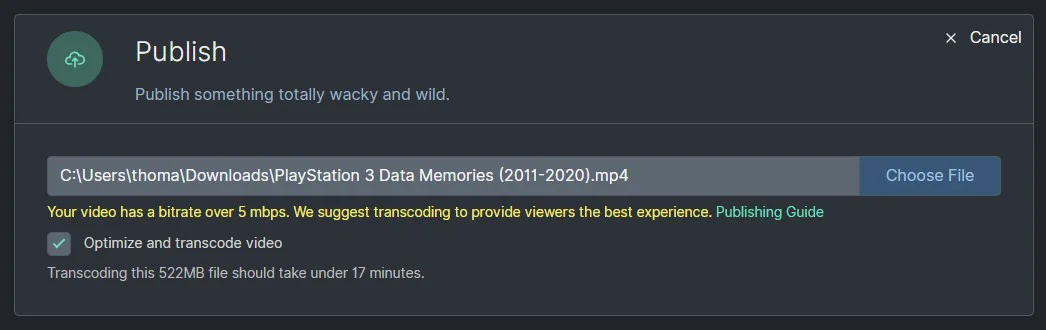
The LBRY Desktop application supports local transcoding of videos during the publish process. This will require ffmpeg (automated process coming later) to be installed and will create a transcoded copy alongside your original file (**_fixed** appended to the filename).
|
||||
The LBRY Desktop application supports local transcoding of videos during the publish process. This will require ffmpeg (automated process coming later) to be installed and will create a transcoded copy alongside your original file.
|
||||
|
||||
|
||||
ffmpeg will automatically be found from your system path or [lbrynet folder](/faq/lbry-directories), or you can also use a custom path.
|
||||
|
||||
@@ -31,7 +31,6 @@
|
||||
/what-is-lbry: /faq/what-is-lbry
|
||||
/youtube/sync: /faq/youtube
|
||||
/faq/referrals: /faq/invites
|
||||
/faq/account-sync: /faq/accounts-and-sync
|
||||
|
||||
# Get
|
||||
/dl/lbry_setup.sh: /get
|
||||
|
||||
@@ -143,7 +143,7 @@
|
||||
You need to provide an email
|
||||
</p>
|
||||
<p <?php echo ($statusData['has_verified_email']===false && $statusData['email']!=="") ? "" : "hidden"?> class="error-block">
|
||||
You need to verify your email! <a href="https://api.lbry.com/yt/resend_verification_email?status_token=<?php echo $token ?>&email=<?php echo $statusData['email'] ?>">Click here to resend a verification email</a>
|
||||
You need to verify your email! <a href="https://lbry.com/yt/resend_verification_email?status_token=<?php echo $token ?>&email=<?php echo $statusData['email'] ?>">Click here to resend a verification email</a>
|
||||
</p>
|
||||
|
||||
<fieldset-group>
|
||||
|
||||
Reference in new issue
Block a user