Compare commits
239
Commits
| Author | SHA1 | Date | |
|---|---|---|---|
 Thomas Zarebczan |
77d25dad3a | ||
|
Thomas Zarebczan
|
003f762ef9 | ||
|
Thomas Zarebczan
|
9f51a9eda1 | ||
|
Thomas Zarebczan
|
2f17c1196f | ||
|
Thomas Zarebczan
|
b9eb0b9617 | ||
|
Thomas Zarebczan
|
08a451157c | ||
|
eatdostacosandThomas Zarebczan
|
27dfce67c5 | ||
|
Thomas Zarebczan
|
48b81a4a77 | ||
|
eatdostacos
|
1deac813ce | ||
|
Thomas Zarebczan
|
ee3b9e7185 | ||
|
Thomas Zarebczan
|
9316bbfbb0 | ||
|
eatdostacos
|
0bdddd9d66 | ||
|
eatdostacos
|
d9a63b99d3 | ||
|
Josh Finer
|
f9b35dd77c | ||
|
infinite-persistence
|
cf09b51c4e | ||
|
eatdostacos
|
e200a995e2 | ||
|
eatdostacos
|
bae767716e | ||
|
hibyemy
|
69853dc420 | ||
|
Alex Grin
|
43e3a576ec | ||
|
Thomas Zarebczan
|
0847564bcd | ||
|
Thomas Zarebczan
|
4fa4bfdc7c | ||
|
Thomas Zarebczan
|
cfc2efa50e | ||
|
Julie SigwartandThomas Zarebczan
|
bd33882796 | ||
|
hibyemy
|
1c3bfb7665 | ||
|
eatdostacos
|
c14e08499e | ||
|
hibyemy
|
dc950d5596 | ||
|
eatdostacos
|
2a8009f003 | ||
|
Kenneth C
|
79909c91b0 | ||
|
Thomas Zarebczan
|
63fc3519eb | ||
|
Jo Ko
|
55f2692619 | ||
|
Jo Ko
|
da6933c0fe | ||
|
Thomas Zarebczan
|
f198515800 | ||
|
Thomas Zarebczan
|
d7df825b32 | ||
|
Thomas Zarebczan
|
95dd30e9e1 | ||
|
Jo KoandThomas Zarebczan
|
cf0542bc51 | ||
|
Alex Grin
|
92f1873450 | ||
|
Thomas Zarebczan
|
ed5223cc6e | ||
|
eatdostacos
|
f4dc4b1d0b | ||
|
littlemadhatter
|
04975ae4cd | ||
|
Thomas Zarebczan
|
99210e45f2 | ||
|
Thomas Zarebczan
|
abc3ff2dc2 | ||
|
Thomas Zarebczan
|
be114b4728 | ||
|
TigerxWood
|
32de968f1d | ||
|
keikari
|
fe1b4096ff | ||
|
Ryan Henning
|
347d1e2511 | ||
|
Thomas Zarebczan
|
6a8d110477 | ||
|
Thomas ZarebczanandJeremy Kauffman
|
5d70b7471d | ||
|
Jeremy Kauffman
|
3fe34cce66 | ||
|
Jeremy Kauffman
|
e217181f64 | ||
|
Thomas Zarebczan
|
f4589141ac | ||
|
eatdostacos
|
e198cd4008 | ||
|
eatdostacos
|
761657ab7f | ||
|
eatdostacos
|
0c1ebb3986 | ||
|
eatdostacosandThomas Zarebczan
|
dbb3ee2b8e | ||
|
eatdostacos
|
58a9e9e908 | ||
|
eatdostacos
|
252182aa32 | ||
|
YULIUS KURNIAWAN KRISTIANTO
|
abb5fb7e33 | ||
|
eatdostacosandThomas Zarebczan
|
a4275d67d7 | ||
|
eatdostacosandThomas Zarebczan
|
cfe960f0be | ||
|
hibyemy
|
a707a885f6 | ||
|
Thomas Zarebczan
|
da6ff85fd8 | ||
|
YULIUS KURNIAWAN KRISTIANTO
|
eea5d50f03 | ||
|
hibyemy
|
5e3b5d584b | ||
|
Thomas Zarebczan
|
0dc8ecc2ad | ||
|
Thomas Zarebczan
|
934c994323 | ||
|
Thomas Zarebczan
|
75cba3d613 | ||
|
eatdostacos
|
3b79dbaf58 | ||
|
Josh Finer
|
38e4ecdac0 | ||
|
Josh Finer
|
b3c5bcffce | ||
|
Josh Finer
|
a5611f7a84 | ||
|
Josh Finer
|
1751982333 | ||
|
Jeremy Kauffman
|
8da6c758d0 | ||
|
hibyemy
|
427febca83 | ||
|
Thomas Zarebczan
|
5f0f7cfa40 | ||
|
eatdostacos
|
15c6edcc65 | ||
|
eatdostacos
|
ba3be28f7f | ||
|
Alex Grin
|
cdd86e1440 | ||
|
Niko Storni
|
9ede244748 | ||
|
eatdostacos
|
57b70d0855 | ||
|
eatdostacos
|
fae1c1c365 | ||
|
eatdostacos
|
b6d41a7545 | ||
|
eatdostacos
|
6f735b20fb | ||
|
eatdostacos
|
af396ce13d | ||
|
eatdostacos
|
e157d5f50b | ||
|
eatdostacos
|
2147eb5110 | ||
|
Thomas Zarebczan
|
c0c09fcb67 | ||
|
Josh Finer
|
7561915a50 | ||
|
Josh Finer
|
7eadb2953c | ||
|
Josh Finer
|
f221acbd3c | ||
|
eatdostacos
|
dcc6938dd3 | ||
|
eatdostacosandThomas Zarebczan
|
e702f8f08c | ||
|
eatdostacos
|
2766fb36d6 | ||
|
Thomas Zarebczan
|
2ca931ddca | ||
|
eatdostacos
|
23c5ad99dc | ||
|
Thomas Zarebczan
|
7e632e10a4 | ||
|
mbrixius
|
faac76f398 | ||
|
Thomas Zarebczan
|
040dc33ef8 | ||
|
YULIUS KURNIAWAN KRISTIANTO
|
13c4a7913a | ||
|
Thomas Zarebczan
|
8628c0e2d1 | ||
|
Thomas Zarebczan
|
9003c597b4 | ||
|
Thomas Zarebczan
|
22efebb21a | ||
|
Thomas Zarebczan
|
f7ba162828 | ||
|
sighmanjestah
|
475d9edd27 | ||
|
Thomas Zarebczan
|
cd29f62ad4 | ||
|
Thomas Zarebczan
|
2c62456b61 | ||
|
Jeremy Kauffman
|
d6a1319dd5 | ||
|
Thomas Zarebczan
|
bd45e753a9 | ||
|
Thomas ZarebczanandJeremy Kauffman
|
6bebcca975 | ||
|
Thomas Zarebczan
|
2ed6ea2c7c | ||
|
Thomas Zarebczan
|
7a7529db94 | ||
|
Thomas Zarebczan
|
1558333733 | ||
|
Thomas Zarebczan
|
32ab0508a9 | ||
|
Thomas Zarebczan
|
5efdc28c68 | ||
|
Thomas Zarebczan
|
8bf53b96cf | ||
|
Thomas Zarebczan
|
d197e84696 | ||
|
Thomas Zarebczan
|
80fecbb977 | ||
|
ClementandThomas Zarebczan
|
9baf149051 | ||
|
Thomas Zarebczan
|
429506ac77 | ||
|
Thomas Zarebczan
|
33c4b8a41a | ||
|
Niko Storni
|
3b4e8662d0 | ||
|
Evan McCarter
|
60e3226732 | ||
|
Thomas Zarebczan
|
71d4f3b9ec | ||
|
Julie Sigwart
|
7592ebc9dc | ||
|
Julie Sigwart
|
b8e2e5b36e | ||
|
Preshyon
|
c3b378471b | ||
|
Thomas Zarebczan
|
97b7f001cf | ||
|
Jeremy Kauffman
|
08fc6780a1 | ||
|
Thomas Zarebczan
|
7634c29908 | ||
|
Thomas Zarebczan
|
8e9ba64770 | ||
|
Thomas Zarebczan
|
b75e4e68ad | ||
|
Thomas Zarebczan
|
11bf2d66e6 | ||
|
Josh Finer
|
99063431ea | ||
|
Thomas Zarebczan
|
d9f0c9154e | ||
|
Thomas Zarebczan
|
e6f737b66c | ||
|
Adrian Petrescu
|
1ad3d4dec6 | ||
|
Thomas Zarebczan
|
9b9e852653 | ||
|
Glen Cooper
|
81306ae803 | ||
|
YULIUS KURNIAWAN KRISTIANTO
|
791a3e0fae | ||
|
Niko
|
a127fb055e | ||
|
Jeremy Kauffman
|
c67beacb9f | ||
|
Jeremy Kauffman
|
99fdb0e4b4 | ||
|
Jeremy Kauffman
|
670273831a | ||
|
Julie Sigwart
|
a1493a0a55 | ||
|
Julie Sigwart
|
e6a3ae3ba2 | ||
|
Alex Grintsvayg
|
ba83190836 | ||
|
Jeremy Kauffman
|
84809efda8 | ||
|
Jeremy Kauffman
|
d18190216c | ||
|
Jeremy Kauffman
|
167d656219 | ||
|
Jeremy Kauffman
|
26038e431a | ||
|
Thomas Zarebczan
|
98181f92c9 | ||
|
Thomas Zarebczan
|
876529dac4 | ||
|
Clement
|
84fb27ac24 | ||
|
Thomas Zarebczan
|
58e44d062f | ||
|
Thomas Zarebczan
|
40f6490dd2 | ||
|
Thomas Zarebczan
|
a113926d57 | ||
|
Thomas Zarebczan
|
586357a5c7 | ||
|
Thomas Zarebczan
|
173079de7e | ||
|
Swapzone
|
0841bcadef | ||
|
Niko Storni
|
f5d9d6b850 | ||
|
Peter Mortensen
|
82b50f7dfd | ||
|
Jeremy Kauffman
|
fea7171efb | ||
|
Thomas Zarebczan
|
4ae1ffb812 | ||
|
Thomas Zarebczan
|
2ca1b61831 | ||
|
Thomas Zarebczan
|
c4dd805775 | ||
|
Thomas Zarebczan
|
e1cf0be288 | ||
|
Brendon J. Brewer
|
6e3d55ab0d | ||
|
Thomas Zarebczan
|
fc52cbaab3 | ||
|
Jeremy Kauffman
|
79287597c7 | ||
|
Thomas Zarebczan
|
af73d995ac | ||
|
kodxanaandThomas Zarebczan
|
107e92166e | ||
|
Thomas Zarebczan
|
1c66fd1aee | ||
|
Josh Finer
|
a621cb7804 | ||
|
Thomas Zarebczan
|
4163326cc8 | ||
|
Thomas Zarebczan
|
1ea95bee5c | ||
|
Thomas Zarebczan
|
a388ed3b5d | ||
|
Thomas Zarebczan
|
66617a8085 | ||
|
Jeremy Kauffman
|
bcb804aa63 | ||
|
Jeremy Kauffman
|
aeb1cc4770 | ||
|
Jeremy Kauffman
|
f44ad3bdff | ||
|
Jeremy Kauffman
|
9b03481dda | ||
|
Jeremy Kauffman
|
121244107d | ||
|
Jeremy Kauffman
|
4faebd6d4c | ||
|
Jeremy Kauffman
|
b96382b693 | ||
|
Jeremy Kauffman
|
75f77dcd49 | ||
|
Julie Sigwart
|
2f599b4784 | ||
|
Julie Sigwart
|
88a379049d | ||
|
Julie Sigwart
|
1a60696925 | ||
|
Thomas Zarebczan
|
6c65faf9a7 | ||
|
TigerxWoodandThomas Zarebczan
|
25a258fd52 | ||
|
Julie Sigwart
|
58e3082338 | ||
|
Julie Sigwart
|
3e4cf3f6f4 | ||
|
YULIUS KURNIAWAN KRISTIANTO
|
d80664e0f9 | ||
|
YULIUS KURNIAWAN KRISTIANTO
|
09c9ccf50a | ||
|
Thomas Zarebczan
|
c29e2d1a63 | ||
|
Julie Sigwart
|
0bb378c41d | ||
|
Julie Sigwart
|
e3a9cae126 | ||
|
er013
|
327ca1a8e1 | ||
|
Thomas Zarebczan
|
0319f18464 | ||
|
Thomas Zarebczan
|
0dc405a427 | ||
|
Thomas Zarebczan
|
9b3284060a | ||
|
Jeremy Kauffman
|
c68a373d62 | ||
|
Thomas Zarebczan
|
6667b3c8ae | ||
|
Jeremy Kauffman
|
0f118bf3ee | ||
|
Thomas Zarebczan
|
1b238ce17b | ||
|
Thomas Zarebczan
|
9ebea2f7cf | ||
|
Thomas Zarebczan
|
3e3de2e3ad | ||
|
Thomas Zarebczan
|
eb1254805b | ||
|
Thomas Zarebczan
|
e7eb24476f | ||
|
Thomas Zarebczan
|
2fe75fc13a | ||
|
Thomas Zarebczan
|
a92cb94f41 | ||
|
Julie Sigwart
|
5ca58cb912 | ||
|
Julie Sigwart
|
5404e3cf2d | ||
|
Julie Sigwart
|
f6577cbc23 | ||
|
YULIUS KURNIAWAN KRISTIANTO
|
f5da6804c1 | ||
|
Julie Sigwart
|
5f23fc343f | ||
|
Julie Sigwart
|
8cb20598c6 | ||
|
Julie Sigwart
|
c3de2f39ca | ||
|
YULIUS KURNIAWAN KRISTIANTO
|
7b9aabdf3e | ||
|
Jeremy Kauffman
|
02ed3f6375 | ||
|
Julie Sigwart
|
9f8b89397f | ||
|
Julie Sigwart
|
940189edc9 | ||
|
Julie Sigwart
|
714938d755 | ||
|
Jeremy Kauffman
|
b905d8b560 | ||
|
Jeremy Kauffman
|
79a8ae9b1f | ||
|
Julie Sigwart
|
970726a2c0 | ||
|
Thomas Zarebczan
|
ac94180e9d | ||
|
TigerxWood
|
049394f5fb | ||
|
Julie Sigwart
|
fd690a361f | ||
|
Julie Sigwart
|
b29d1a7bc0 | ||
|
Julie Sigwart
|
a717b14b24 | ||
|
Julie Sigwart
|
e4ce78408d | ||
|
Julie Sigwart
|
20fa7938a6 | ||
|
Julie Sigwart
|
58c6a96f59 | ||
|
Thomas Zarebczan
|
c0e2654287 | ||
|
Thomas Zarebczan
|
751fe60399 | ||
|
Julie Sigwart
|
53845cc365 | ||
|
Julie Sigwart
|
884d6c0ec5 | ||
|
Julie Sigwart
|
a3dd464ea1 | ||
|
Jeremy Kauffman
|
ea53ba9fe9 |
No files matched your search
@@ -1,6 +1,6 @@
|
||||
The MIT License (MIT)
|
||||
|
||||
Copyright (c) 2015-2019 LBRY Inc.
|
||||
Copyright (c) 2015-2020 LBRY Inc.
|
||||
|
||||
Permission is hereby granted, free of charge, to any person obtaining a copy of this software and associated documentation files (the
|
||||
"Software"), to deal in the Software without restriction, including without limitation the rights to use, copy, modify, merge, publish,
|
||||
|
||||
@@ -0,0 +1,39 @@
|
||||
---
|
||||
title: "Quarterly Credit Report: Fourth Quarter 2019"
|
||||
sheet: https://docs.google.com/spreadsheets/d/1H7uYR5XLNlf4Y-elrIS8mHdv4QnVQ-7BbM8YAR_u_W0/edit#gid=799352054
|
||||
category: policy
|
||||
---
|
||||
## Summary
|
||||
This quarter we moved no credits from cold storage. We spent 9,397,854 total community credits on line items detailed below. 269,328 operational credits were used for the LBRY team member LBC purchase program. No institutional credits were moved.
|
||||
We anticipate significantly larger community outlays throughout 2020. Operational spending may increase at any time, but is not expected to increase significantly. Institutional spending is expected to be less than 1,000,000 LBC.
|
||||
|
||||
## Overview By Fund
|
||||
|
||||
### Community Fund
|
||||
|
||||
9,397,854 credits were spent from the community fund, in the following areas:
|
||||
|
||||
| Category | Amount |
|
||||
|---|---|
|
||||
| Bounties | 1,196,600 |
|
||||
| User Engagement | 4,250,000 |
|
||||
| Community Engagement | 379,000 |
|
||||
| Publishing | 11,100 |
|
||||
| Acquisition | 1,073,000 |
|
||||
| Testing | 8,304 |
|
||||
| LBRY.fund | 493,500 |
|
||||
| Swarm | 1,986,350 |
|
||||
| Other | 162,000 |
|
||||
|
||||
As interest has been increasing, we anticipate continuing to reward new users, youtube channel owners, community contributions, and other beneficial activities. We are setting 7.5 million LBC as the expected spend this quarter, but it could easily be substantially lower or higher.
|
||||
|
||||
### Operational Fund
|
||||
|
||||
* LBRY sold no LBC on the open market
|
||||
* LBRY issued 269,328 LBC to employees
|
||||
|
||||
LBRY may move credits to market if conditions allow.
|
||||
|
||||
### Institutional Fund
|
||||
|
||||
No credits were moved or used.
|
||||
@@ -0,0 +1,44 @@
|
||||
---
|
||||
title: "Quarterly Credit Report: First Quarter 2020"
|
||||
sheet: https://docs.google.com/spreadsheets/d/12_4RFTiEjV1RVdhOOPURa724ZSS8RDBxfnn8MiOvEDQ/edit?usp=sharing
|
||||
category: policy
|
||||
---
|
||||
## Summary
|
||||
This quarter we moved 10MM operational, 23MM community credits, and 3MM institutional credits from master cold storage. We spent 16,026,383 total community credits on line items detailed below. 126,352 operational credits were used for the LBRY team member LBC purchase program. 3MM institutional credits were granted to lbry.org. We anticipate similar community outlays throughout 2020. Operational spending may increase at any time, but is not expected to increase significantly. Institutional spending could be substantial at any time, but would be expected to be coupled with sensible and sensitive distribution rules.
|
||||
|
||||
## Overview By Fund
|
||||
|
||||
### Community Fund
|
||||
|
||||
23,026,383 credits were spent from the community fund, in the following areas:
|
||||
|
||||
| Category | Amount |
|
||||
|---|---|
|
||||
| Bounties | 743,036 |
|
||||
| User Engagement | 9,056,100 |
|
||||
| Community Engagement | 370,847 |
|
||||
| Publishing | 70,100 |
|
||||
| Acquisition | 835,700 |
|
||||
| Testing | 100 |
|
||||
| Swarm | 664,000 |
|
||||
| LBRY funds staked | 4,115,000 |
|
||||
| Special Creator USB Sticks | 7,000,000 |
|
||||
|
||||
As interest has been increasing, we anticipate continuing to reward new users, YouTube channel owners, community contributions, and other beneficial activities.
|
||||
|
||||
Rewards are likely to be adjusted downwards, even if current growth flatlines rather than continues. Swarm funds are from a legacy program and are expected to be zero moving forward, and then removed.
|
||||
|
||||
We are setting 10,000,000 million LBC as the expected spend this quarter, but it could easily be substantially lower or higher.
|
||||
|
||||
It should be noted that LBRY funds staked are recoverable.
|
||||
|
||||
### Operational Fund
|
||||
|
||||
* LBRY sold 2,971,644 LBC on the open market
|
||||
* LBRY issued 126,352 LBC to employees
|
||||
|
||||
LBRY may move credits to market if conditions allow. LBRY is likely to announce new ways to acquire LBC in Q2 2020.
|
||||
|
||||
### Institutional Fund
|
||||
|
||||
3MM Institutional were granted to lbry.org, an independently run and organized entity.
|
||||
@@ -0,0 +1,20 @@
|
||||
---
|
||||
title: LBRY US 2257 Statement
|
||||
category: other
|
||||
---
|
||||
|
||||
## LBRY & US 2257
|
||||
|
||||
18 USC 2257 Statement: LBRY.COM / LBRY.TV
|
||||
|
||||
LBRY.COM / LBRY.TV is not a producer (primary or secondary) of any and all of the content found on the any LBRY INC server or website (LBRY.COM / LBRY.TV). With respect to the records as per 18 USC 2257 for any and all content found on this site, please kindly direct your request to the site for which the content was produced.
|
||||
|
||||
LBRY.COM / LBRY.TV is a video sharing protocol and website which allows for the uploading, sharing and general viewing of various types of adult content and while LBRY.COM / LBRY.TV does the best it can with verifying compliance, it may not be 100% accurate.
|
||||
|
||||
LBRY.COM / LBRY.TV abides by the following procedures to ensure compliance:
|
||||
|
||||
Requiring all users to be 18 years of age to upload videos.
|
||||
When uploading, user must verify the content; assure he/she is 18 years of age; certify that he/she keeps records of the models in the content and that they are over 18 years of age.
|
||||
For further assistance and/or information in finding the content's originating site, please contact hello@lbry.com
|
||||
|
||||
LBRY.COM / LBRY.TV allows content to be flagged as inappropriate. Should any content be flagged as illegal, unlawful, harassing, harmful, offensive or various other reasons, LBRY.COM / LBRY.TV shall remove it from the site without delay.
|
||||
@@ -1,35 +0,0 @@
|
||||
---
|
||||
title: lbry.tv account and wallet syncing
|
||||
category: getstarted
|
||||
order: 3
|
||||
---
|
||||
Users expect consistent experiences across devices and sessions. This includes everything from account preferences to subscriptions to account balances. In the land of central servers, this is straightforward, but in blockchain land, it is tricky. This article explains how we provide this functionality, various options in using it, and it's limitations.
|
||||
|
||||
## How it works
|
||||
1. Every user, whether on LBRY Desktop, Android, or [lbry.tv](https://lbry.tv), has a single wallet file. This file stores your private keys (like a password) that controls your channels and account balances. The keys in this file are the only way to move or spend LBC or publish to your channel.
|
||||
1. On an ongoing basis, your account preferences and other settings are written to your wallet file.
|
||||
1. If you create a lbry.tv login and turn on account sync (backup), your wallet file will be copied to and from a LBRY, Inc. server each time you login and at regular intervals.
|
||||
1. Each time this happens, your preferences, channels, subscriptions, and other data will be updated on the new device.
|
||||
1. If your wallet file has a password on it, LBRY, Inc. cannot see into your wallet or do anything with it, including reset your password.
|
||||
|
||||
## Using wallet sync
|
||||
### Sync limitations
|
||||
As of writing, current limitations are:
|
||||
- Can't set or change passwords (coming soon). Only Android allows setting of a password on new accounts currently.
|
||||
- Cannot remove a previously synced account (i.e. which you don't know the password to). This process is currently manual, please [contact us](/faq/support)
|
||||
- On Desktop, if you sign out and back in with a different email, these wallets and accounts will be merged. Do not do this unless it's intentional and you expect the new email to be used by the same person. To prevent this, rename/remove the [default_wallet file in the lbryum folder](/faq/lbry-directories) and quit the app with Ctrl-Q after signing out.
|
||||
|
||||
### Desktop
|
||||
1. If running the desktop app for the first time, you will be prompted during the first-run process to opt-in.
|
||||
1. If you want to opt-in later, click the Settings button in the top right and enable Sync.
|
||||
1. If you previously had sync configured with a password (i.e on Android), you'll be prompted for this. If you do not remember, please [reach out to us](mailto:hello@lbry.com) so we can remove the existing synced account.
|
||||
|
||||
### Android
|
||||
1. If running the Android app for the first time, you will be prompted during the first-run process to opt-in.
|
||||
1. If you want to opt-in later, click your balance or navigate to the Wallet area and you will see the option to turn this on.
|
||||
|
||||
### lbry.tv
|
||||
Syncing is automatically on for lbry.tv users and cannot be disabled. After all, what good would lbry.tv be if you could no longer use it once you signed out! If you have balances on other devices, these will not be reflected at this time.
|
||||
|
||||
## I'm having trouble
|
||||
If you have any trouble using or enrolling in account sync, check out this [FAQ article](/faq/how-to-report-bugs) on how to report this to us.
|
||||
@@ -0,0 +1,79 @@
|
||||
---
|
||||
title: lbry.tv accounts and wallet syncing
|
||||
category: getstarted
|
||||
order: 3
|
||||
---
|
||||
|
||||
Users expect consistent experiences across devices and sessions. This includes everything from account preferences to subscriptions to account balances. In the land of central servers, this is straightforward, but in blockchain land, it is tricky. This article explains how we provide this functionality, various options in using it, and it's limitations.
|
||||
|
||||
Users can establish accounts with lbry.tv on all of our applications. You'll be required to create a password when signing up through lbry.tv and confirm the email address. You can sign into existing accounts via the password or via email confirmation.
|
||||
|
||||
## Account passwords and logging in
|
||||
|
||||
lbry.tv users will be prompted to set a password when signing up for a new account and also confirm that the email belongs to them. **It is important to set a strong password to ensure no one else can access your account, LBRY credits, and published content.**. These passwords can be reset via email or changed on the Settings page.
|
||||
|
||||

|
||||
|
||||
If you are logging back in or from another device, you can do so with your account password or via an email confirmation (magic link option).
|
||||
|
||||

|
||||
|
||||
### Existing lbry.tv users without a password
|
||||
Existing lbry.tv users can set a password via the Settings page if password log in is preferred over email confirmation.
|
||||
|
||||

|
||||
|
||||
### Resetting account password
|
||||
|
||||
On the login screen, you'll have the option to reset an account password via email. Once you get the email, click the confirmation link and setup a new password.
|
||||
|
||||

|
||||
|
||||
### Changing account password
|
||||
|
||||
You can update your account password on the Settings page. You'll be prompted for your old password, and the new one. Existing sessions will be kept active. If you need them signed out for security reasons, please [contact us](/faq/support).
|
||||
|
||||

|
||||
|
||||
### Account vs encrypted wallet passwords
|
||||
Account passwords are separate from wallet passwords. Users with encrypted wallets will still be required to enter their wallet password when logging into lbry.tv and about every 2 weeks when the passwords expire. Setting wallet passwords is a [current limitation](#limitations) of our sync process.
|
||||
|
||||
## How syncing of account data works
|
||||
|
||||
1. Every user, whether on LBRY Desktop, Android, or [lbry.tv](https://lbry.tv), has a single wallet file. This file stores your private keys (like a password) that controls your channels and account balances. The keys in this file are the only way to move or spend LBC or publish to your channel.
|
||||
1. On an ongoing basis, your account preferences and other settings are written to your wallet file.
|
||||
1. If you create a lbry.tv login and turn on account sync (backup), your wallet file will be backed up to and from a LBRY, Inc. server each time you log in and at regular intervals.
|
||||
1. Each time this happens, your preferences, channels, subscriptions, and other data will be updated on the new device.
|
||||
1. If your wallet file has a password on it, LBRY, Inc. cannot see into your wallet or do anything with it, including reset your password.
|
||||
|
||||
## Using wallet sync
|
||||
|
||||
### I want to remove my wallet and synced data from lbry.tv
|
||||
|
||||
This process is currently manual, please [contact us](/faq/support).
|
||||
|
||||
### Sync limitations {#limitations}
|
||||
|
||||
As of writing, current limitations are:
|
||||
|
||||
- Can't set or change wallet passwords (coming in mid 2020) if you previously did not have one. If you'd like to do this manually, please [contact us](/faq/support). Wallet passwords are separate from account passwords, and they cannot be reset or changed if lost/forgotten.
|
||||
- On Desktop, if you sign out and back in with a different email, these wallets and accounts will be merged. Do not do this unless it's intentional and you expect the new email to be used by the same person. To prevent this, rename/remove the [default_wallet file in the lbryum/wallets folder](/faq/lbry-directories) and quit the app with Ctrl-Q after signing out.
|
||||
|
||||
### Desktop
|
||||
|
||||
1. If running the desktop app for the first time, you will be prompted during the first-run process to opt-in.
|
||||
1. If you want to opt-in later, click the Settings button in the top right and enable Sync.
|
||||
1. If you previously had sync configured with a password (i.e on Android), you'll be prompted for this. If you do not remember, please [reach out to us](mailto:hello@lbry.com) so we can remove the existing synced account.
|
||||
|
||||
### Android
|
||||
|
||||
1. If running the Android app for the first time, you will be prompted during the first-run process to opt-in.
|
||||
1. If you want to opt-in later, click your balance or navigate to the Wallet area and you will see the option to turn this on.
|
||||
|
||||
### lbry.tv
|
||||
|
||||
Syncing is automatically on for lbry.tv users and cannot be disabled. After all, what good would lbry.tv be if you could no longer use it once you signed out! If you have a wallet on other devices with sync turned on, it will be reflected here as well.
|
||||
|
||||
## I'm having trouble
|
||||
|
||||
If you're having any trouble using or enrolling in account sync, check out this [FAQ article](/faq/how-to-report-bugs) on how to report this to us.
|
||||
@@ -14,32 +14,32 @@ The purpose of this FAQ is to answer questions about some of the basic functiona
|
||||
|
||||
Emails are collected to authenticate a lbry.tv account and [uniquely identify](/faq/phone) users so that they can be eligible for [LBRY Rewards](#rewards), sync wallet data/preferences, and to stay up to date on the latest LBRY happenings.
|
||||
|
||||
No other data is stored with your email login. All other data, including your [wallet](#wallet), [downloads](#data) and published content are stored [locally on your device](/faq/lbry-directories#android). You will be asked to create a [password to secure your account](/faq/account_sync).
|
||||
No other data is stored with your email login. All other data, including your [wallet](#wallet), [downloads](#data), and published content are stored [locally on your device](/faq/lbry-directories#android). You will be asked to create a [password to secure your account](/faq/account_sync).
|
||||
|
||||
## How do I change my LBRY connected email?
|
||||
|
||||
If you ever need to change your LBRY Android App email address or sign out, please see [this guide](/faq/how-to-change-email#android). Clearing data or uninstalling leads to a loss of wallet if you don't have one synced.
|
||||
|
||||
If you sign into a new email and need to transfer your wallet/verification status, you'll need to [reach out to us](mailto:help@lbry.com) in order to link your accounts. Please do not verify again to obtain rewards on a 2nd account; your Rewards account may be disabled for abuse.
|
||||
If you sign in to a new email and need to transfer your wallet/verification status, you'll need to [reach out to us](mailto:help@lbry.com) to link your accounts. Please do not verify again to obtain rewards on a 2nd account; your Rewards account may be disabled for abuse.
|
||||
|
||||
## Syncing of wallets and other data
|
||||
|
||||
The Android app allow syncing of your account/wallet and secures it with a password. Please read the [sync FAQ](/faq/account_sync) in more detail to understand how this works.
|
||||
The Android app allows syncing of your account/wallet and secures it with a password. Please read the [sync FAQ](/faq/account_sync) in more detail to understand how this works.
|
||||
|
||||
## What are LBRY Rewards? {#rewards}
|
||||
|
||||
[LBRY Rewards](/faq/rewards) are used to distribute LBRY Credits (LBC) to new and existing users by allowing them to explore app functions and complete tasks which generate LBC as an award.
|
||||
[LBRY Rewards](/faq/rewards) are used to distribute LBRY Credits (LBC) to new and existing users by allowing them to explore app functions and complete tasks that generate LBC as an award.
|
||||
|
||||
In order to be eligible for Rewards, you need to verify your identity [phone number](/faq/phone) or [chat](https://chat.lbry.com) which uniquely identifies you as an LBRY user.
|
||||
To be eligible for Rewards, you need to verify your identity [phone number](/faq/phone) or [chat](https://chat.lbry.com) which uniquely identifies you as an LBRY user.
|
||||
|
||||
## What is a wallet And how do I find it? {#wallet}
|
||||
|
||||
A wallet is a secure digital file used to store, send and receive cryptocurrencies like LBRY Credits (LBC).
|
||||
A wallet is a secure digital file used to store, send, and receive cryptocurrencies like LBRY Credits (LBC).
|
||||
The LBRY Android App comes with its own wallet and is stored locally on your phone and nowhere else!
|
||||
|
||||
If you do not opt for the [sync program](/faq/account_sync), it is critical that you [backup your own wallet](/faq/how-to-backup-wallet#android) locally or else the credits, channels, and publishes will be lost.
|
||||
|
||||
To find your wallet in the LBRY Android app, click on the 3 horizontal bars at the upper left side of the app next to the Search bar. Clicking on it will open a sidebar and then click on Wallet. This will open the Wallet page which shows your wallet address, balance and recent transactions.
|
||||
To find your wallet in the LBRY Android app, click on the 3 horizontal bars at the upper left side of the app next to the Search bar. Clicking on it will open a sidebar and then click on Wallet. This will open the Wallet page which shows your wallet address, balance, and recent transactions.
|
||||
|
||||

|
||||
|
||||
@@ -62,13 +62,13 @@ The LBRY wallet is different from other wallets - it also stores your shared con
|
||||
|
||||

|
||||
|
||||
3. Choose the option for publishing your content either by recording a live video, taking a picture or picking a file from your gallery.
|
||||
3. Choose the option for publishing your content either by recording a live video, taking a picture, or picking a file from your gallery.
|
||||
|
||||
![Choose an option]https://spee.ch/4/chooses.png)
|
||||

|
||||
|
||||
4. Enter a `Title` and `Description` for your content.
|
||||
|
||||
5. Next you can add tags to your content which will help categorize it for [discovery purposes](https://lbry.com/faq/trending). If it's intended for mature audiences, please add the pink `mature` tag. Next, determine any other tags that relate to the content you are publishing. Please be mindful of accuracy when tagging content as this is currently up to the publisher only and cannot be edited. If incorrect/inappropriate tags are used, your content may be filtered to provide a better user experience. In the future, this will be done through community voting and building a web of trust.
|
||||
5. Next, you can add tags to your content which will help categorize it for [discovery purposes](https://lbry.com/faq/trending). If it's intended for mature audiences, please add the pink `mature` tag. Next, determine any other tags that relate to the content you are publishing. Please be mindful of accuracy when tagging content as this is currently up to the publisher only and cannot be edited. If incorrect/inappropriate tags are used, your content may be filtered to provide a better user experience. In the future, this will be done through community voting and building a web of trust.
|
||||
|
||||

|
||||
|
||||
@@ -76,33 +76,33 @@ The LBRY wallet is different from other wallets - it also stores your shared con
|
||||
|
||||

|
||||
|
||||
7.Under the `Price`, first, determine if you want to make your content free or set a price in LBC per view.
|
||||
7. Under the `Price`, first, determine if you want to make your content free or set a price in LBC per view.
|
||||
|
||||
8. Type in the URL you want the content to be found under, along with a minimum of 0.00000001 LBC deposit for the upload (default amount is higher due to publishing fees). If you are trying to outbid a user-friendly/common URL, the system will suggest a minimum bid to take over the content at that vanity URL. There may be a delay for this takeover. Making your bid higher will result in (better discovery)[https://lbry.com/faq/trending) for your content. For more details regarding the URL or bid, check out our [naming document](/faq/naming).
|
||||
8. Type in the URL you want the content to be found under, along with a minimum of 0.00000001 LBC deposit for the upload (default amount is higher due to publishing fees). If you are trying to outbid a user-friendly/common URL, the system will suggest a minimum bid to take over the content at that vanity URL. There may be a delay for this takeover. Making your bid higher will result in [better discovery](/faq/trending) for your content. For more details regarding the URL or bid, check out our [naming document](/faq/naming).
|
||||
|
||||

|
||||
|
||||
9. Next, there is `Show extra fields` which gives you an option to select language and license. Default language is set to `English`, and the License is set to `None`. If a change is needed, click the dropdown menus and select the appropriate choice.
|
||||
9. Next, there is `Show extra fields` which gives you an option to select language and license. The default language is set to `English`, and the License is set to `None`. If a change is needed, click the dropdown menus and select the appropriate choice.
|
||||
|
||||
*please review our terms of service before publishing [terms of service](/termsofservice)*
|
||||
|
||||
Click `Publish`.
|
||||
|
||||
The file will process in the background and will be added to the LBRY Blockchain. It is a good idea to leave LBRY open for a while after this to make sure the app is able to share your file to at least one peer on the data network. Larger files will take longer to upload depending on your network speed.
|
||||
The file will process in the background and will be added to the LBRY Blockchain. It is a good idea to leave LBRY open for a while after this to make sure the app is able to share your file with at least one peer on the data network. Larger files will take longer to upload depending on your network speed.
|
||||
|
||||
|
||||
Claim related [wallet transactions](/faq/transaction-types) ensure that the blockchain uniquely identifies your content and the payment/tips can be routed appropriately.
|
||||
|
||||
## How do I claim Rewards in the Android app? {#rewards}
|
||||
|
||||
You'll receive daily random rewards just for watching the videos you love! All you need to do is open your LBRY app and start watching. Comeback everyday for a different reward. For other rewards that can be claimed, see the Rewards page.
|
||||
You'll receive daily random rewards just for watching the videos you love! All you need to do is open your LBRY app and start watching. Come back every day for a different reward. For other rewards that can be claimed, see the Rewards page.
|
||||
|
||||
## How do I enable background media playback? {#backgroundmediaplayback}
|
||||
|
||||
When playing anything on the LBRY android app, it will stop playing when you minimize the app or switch to another application. Since we aren't YouTube and won't make you pay for subscription to enable background media playback, you can enable this feature in the app settings.
|
||||
|
||||
1. Swipe your phone screen to the right to reveal the menu, select Settings.
|
||||
2. Tap the `Enable background media playback` toggle on the right hand side, this will change the status of that option from grey to green.
|
||||
2. Tap the `Enable background media playback` toggle on the right-hand side, this will change the status of that option from grey to green.
|
||||
|
||||

|
||||
|
||||
@@ -111,6 +111,6 @@ Now you will be able to keep your media playing in the background without leavin
|
||||
|
||||
## How do I stop the LBRY service from running in the background? {#stoplbryservice}
|
||||
|
||||
You might have noticed the LBRY icon in your notifications with the status, `LBRY service is running in the background`. We keep the app open in the background to stay up-to-date with the blockchain, which helps the app load contents faster as it arrives. In the future, you'll be able to support the LBRY network and earn hosting rewards, but for now, the hosting features are disabled.
|
||||
You might have noticed the LBRY icon in your notifications with the status, `LBRY service is running in the background`. We keep the app open in the background to stay up-to-date with the blockchain, which helps the app load content faster as it arrives. In the future, you'll be able to support the LBRY network and earn hosting rewards, but for now, the hosting features are disabled.
|
||||
|
||||
However, if you do not want the LBRY service to be running in the background, you can disable this in the settings page by tapping `Keep the daemon background service running after closing the app` - this will change the status of that option from green to grey. Now close the LBRY app by clicking back multiple times or swipe the app to close - the notification icon should disappear.
|
||||
@@ -10,4 +10,4 @@ Do you use BitTorrent? Imagine getting paid to seed files into the network. Beca
|
||||
|
||||
Do you shop on the iTunes Store? Imagine paying less for songs, TV episodes, and music videos while having 100% of the cost go directly to the creators.
|
||||
|
||||
LBRY is a digital media library at your fingertips. It can store any kind of content and make it available at low cost on demand. In a few years time, LBRY may become your one-stop-shop for everything digital, from ebooks to video games to movies. One app to rule them all – but still leaving more power in your hands because it is decentralized by design.
|
||||
LBRY is a digital media library at your fingertips. It can store any kind of content and make it available at low cost on demand. In a few years, LBRY may become your one-stop-shop for everything digital, from ebooks to video games to movies. One app to rule them all – but still leaving more power in your hands because it is decentralized by design.
|
||||
@@ -6,14 +6,12 @@ order: 1
|
||||
|
||||
## What is mining?
|
||||
|
||||
Mining is a process where computing power is used to verify transactions on the LBRY network and add them to the public ledger (LBRY blockchain). It is also a process of how additional new LBRY credits (LBC) are created as a reward for the successful miners (see details below). The process uses the mining software to calculate complex mathematical puzzles in order to secure the transactions.
|
||||
Mining is a process where computing power is used to verify transactions on the LBRY network and add them to the public ledger (LBRY blockchain). It is also the process of how new LBRY Credits (LBC) are created as a reward for the successful miners (see details below). The process uses the mining software to calculate complex mathematical puzzles in order to secure the transactions.
|
||||
Both CPU and GPU hardware can be used for mining, but the current market is dominated by GPU and ASIC mining. LBRY uses a mix of SHA512, SHA256 and RIPEMD hash functions in its algorithm. To put it in the most simple terms: mining enables secure and fast LBC transactions.
|
||||
|
||||
## Only trust the source
|
||||
|
||||
The source code, and not this file, is the only true definition of the block rewards. That source file is located here in [`master`]:
|
||||
|
||||
[https://github.com/lbryio/lbrycrd/blob/master/src/validation.cpp](https://github.com/lbryio/lbrycrd/blob/master/src/validation.cpp#L1025)
|
||||
The source code, and not this file, is the only true definition of the block rewards. That source file is located [here](https://github.com/lbryio/lbrycrd/blob/v0.17.3.2/src/validation.cpp#L1025).
|
||||
|
||||
## Mining reward schedule
|
||||
|
||||
@@ -23,19 +21,24 @@ Eventually 1,083,202,000<sup>1</sup> LBRY credits will exist.
|
||||
|
||||
They are awarded on the following schedule:
|
||||
|
||||
* The genesis block creates 400,000,000 credits to be administered by LBRY, Inc. 300,000,000 of these will be strategically allocated to partners, many of whom have a direct interest in the naming layer. It also includes 100,000,000 earmarked for charity. Additionally, some may be given directly to the public in ways that add value and make sense. 100,000,000 are owned by LBRY directly.
|
||||
* The genesis block created 400,000,000 credits to be administered by LBRY, Inc. 300,000,000 of these will be strategically allocated to partners, many of whom have a direct interest in the naming layer. It also includes 100,000,000 earmarked for charity. Additionally, some may be given directly to the public in ways that add value and make sense. 100,000,000 are owned by LBRY directly.
|
||||
|
||||
* The remaining 600,000,000 are mined in 3 stages:
|
||||
|
||||
1. The first stage goes from block 1 to block 5100 and will take roughly 9 days. Every block in this stage has a reward of 1 credit. This is the testing stage, to ensure that there are no glaring problems with the blockchain.
|
||||
1. The first stage went from block 1 to block 5100 and took roughly 9 days. Every block in this stage had a reward of 1 credit. This was the testing stage, to ensure that there were no glaring problems with the blockchain.
|
||||
|
||||
2. The second stage is the ramp-up. It goes from block 5101 to block 55000 (roughly 3 months of mining). During this stage, the block reward increases linearly from 2 to 500. 500 is the largest block reward available.
|
||||
2. The second stage was the ramp-up. It went from block 5101 to block 55000 (roughly 3 months of mining). During this stage, the block reward increased linearly from 2 to 500. 500 was the largest block reward available.
|
||||
|
||||
3. The final stage is the "normal" mining stage. From block 55001 onward, the block reward decreases logarithmically over the course of 20 years.
|
||||
3. The final and current stage is the "normal" mining stage. From block 55001 onward, the block reward decreases logarithmically over the course of 20 years.
|
||||
|
||||
* Block rewards ramp up slowly because we want to ensure that users are given some time to get LBRY up and running, and to avoid unfairly benefiting the earliest users.
|
||||
* Block rewards ramped up slowly because we wanted to ensure that users were given some time to get LBRY up and running, and to avoid unfairly benefiting the earliest users.
|
||||
|
||||
* To see the current block reward, visit the [LBRY Blockchain Explorer](https://explorer.lbry.com) and explore the latest block details.
|
||||
|
||||
## Other Information
|
||||
The LBRY blockchain has a targeted block time of 2.5 minutes. This doesn't mean that a block will be confirmed exactly every 2.5 minutes, just that the average time between blocks is about that length.
|
||||
|
||||
The max size of each block is currently around 2 MB. In an average block, this translates to around 1800 transactions.
|
||||
|
||||
## Where can I see this visually?
|
||||
The [Stats page on the Explorer](https://explorer.lbry.com/stats) has this information, including inflation rates and emission schedule. It can be exported to CSV.
|
||||
@@ -4,11 +4,11 @@ category: bots
|
||||
order: 1
|
||||
---
|
||||
|
||||
LBRY Telegram bot is member of the [LBRY official Telegram group](https://t.me/lbryofficial). And running 24/7 on [lbry.melroy.org](https://lbry.melroy.org).
|
||||
The LBRY Telegram bot is a member of the [official LBRY Telegram group](https://t.me/lbryofficial). And running 24/7 on [lbry.melroy.org](https://lbry.melroy.org).
|
||||
|
||||
The bot is able to support you with all your basic questions regarding LBRY, including but not limited to listing the top channels, the latest LBRY token (LBC) price, mining data, address/transaction(s)/tip information and so much more.
|
||||
The bot is able to support you with all your basic questions regarding LBRY, including but not limited to listing the top channels, the LBRY Credit (LBC) price, mining data, address/transaction(s)/tip information and so much more.
|
||||
|
||||
**Hint:** Since the bot is part of the channel group, you can directly start typing the command starting with `/`; Telegram could support you by auto-completing the commands. Starting the commands with `!`-sign is also supported.
|
||||
**Hint:** Since the bot is part of the channel group, you can directly start typing the command starting with `/`; Telegram can support you by auto-completing the commands. Starting the commands with `!`-sign is also supported.
|
||||
|
||||
**Good to know:** LBRY Telegram bot is currently hosted on [gitlab.melroy.org](https://gitlab.melroy.org/melroy/lbry-bot) with a mirror on [Github.com](https://github.com/danger89/LBRY-Bot). You are free to create pull-requests with bug fixes or new features.
|
||||
|
||||
|
||||
@@ -0,0 +1,41 @@
|
||||
---
|
||||
title: How can I buy LBC with a credit card?
|
||||
category: getstarted
|
||||
order: 3
|
||||
---
|
||||
|
||||
On lbry.tv and the Desktop app, you can purchase LBC directly with a credit card through [MoonPay](https://moonpay.io) via an integrated buying process. Once the purchase is complete, the LBC is deposited into your wallet.
|
||||
|
||||
Please see these MoonPay FAQs for more information about using their services:
|
||||
|
||||
[Who can use MoonPay?](https://help.moonpay.io/en/articles/2509629-can-anyone-use-moonpay)␍
|
||||
[What are the daily and monthly limits?](https://help.moonpay.io/en/articles/2509649-what-are-the-daily-and-monthly-limits)
|
||||
|
||||
*Note: Currently, this service may not be available in all countries. LBRY will continue working on expanding availability.*
|
||||
|
||||
## Step by step LBC purchase
|
||||
|
||||
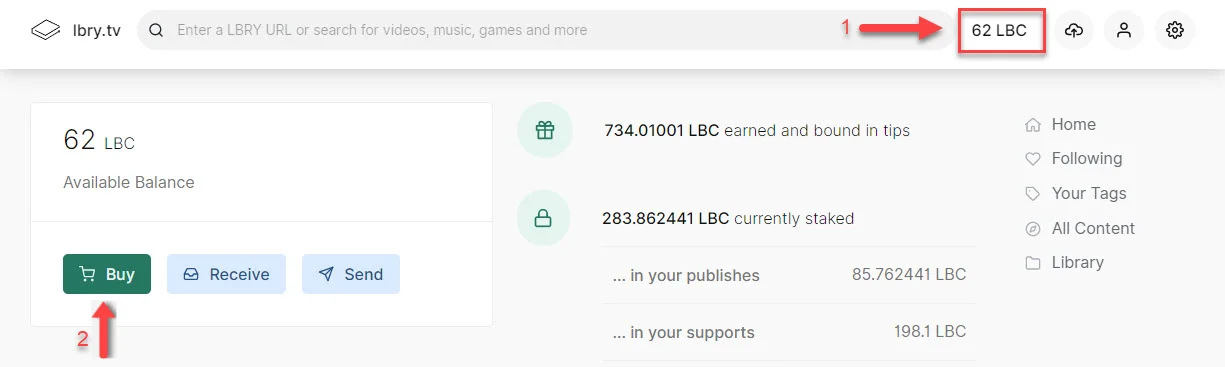
1. Access your wallet page by clicking your LBC balance in the top right and then click the Buy button.
|
||||
|
||||
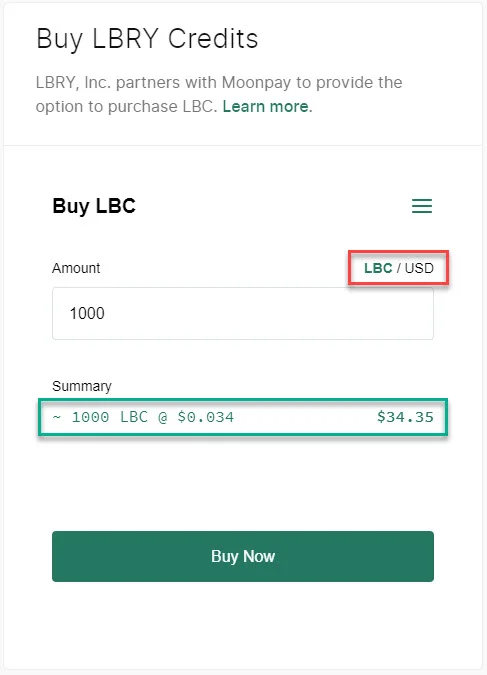
1. Enter the amount of LBC you wish to purchase, either in your currency or LBC. The exchange rate and total purchase amount will be shown at the bottom. Click **Buy** to continue.
|
||||
|
||||
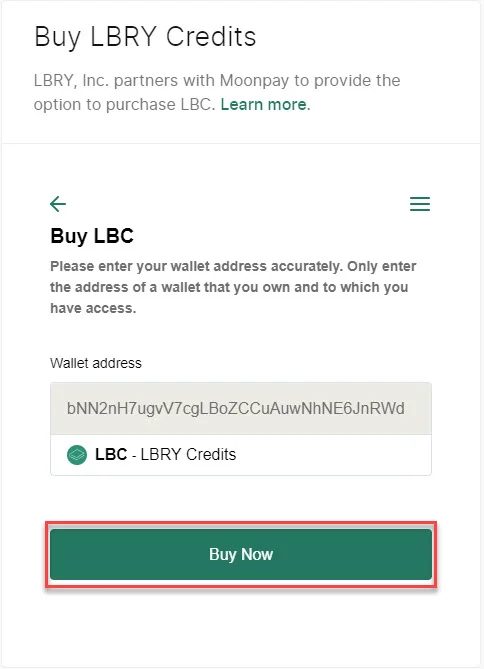
1. Your LBC address will be shown, click **Buy Now**.
|
||||
|
||||
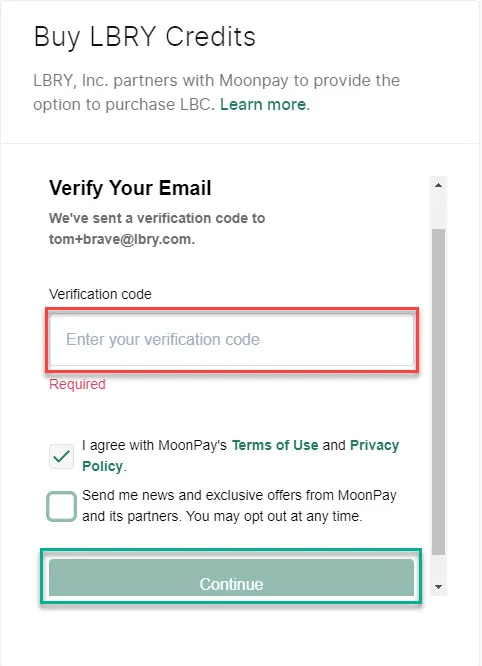
1. MoonPay will now ask you to verify your email. By default, this will be sent to your app email. Enter the code from your email and click **Continue**.
|
||||
|
||||
1. You'll be asked to provide additional information about yourself, click **Continue** to proceed.
|
||||
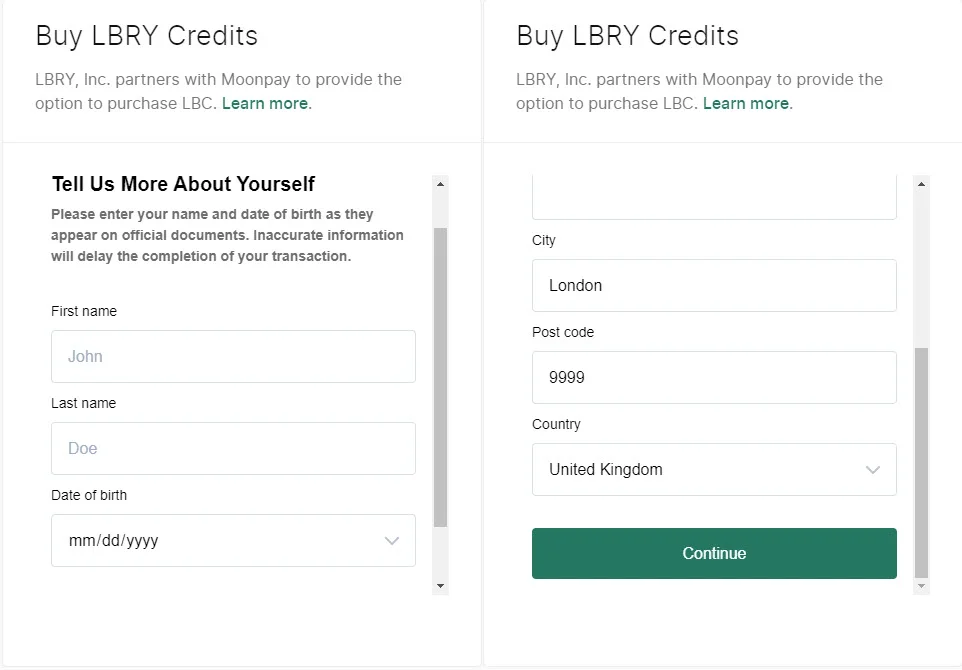
|
||||
1. Add a credit/debit card to use for the purchase.
|
||||
1. Review the purchase amount and fee (min of ~5 USD, or 4.5% typically). Click **Buy Now**.
|
||||
1. You may be prompted for additional information for your credit card, and finally you'll see your confirmation.
|
||||
1. The LBC should appear in your balance shortly. Thank you for purchasing LBC!
|
||||
|
||||
## Trouble with cookies or want to purchase outside of the app?
|
||||
|
||||
If you are having trouble on lbry.tv with cookies or want to purchase directly through MoonPay, please [use this URL](https://buy.moonpay.io/?apiKey=pk_live_xNFffrN5NWKy6fu0ggbV8VQIwRieRzy&colorCode=%23257761¤cyCode=lbc&showWalletAddressForm=true). You will be prompted for your LBC wallet address.
|
||||
|
||||
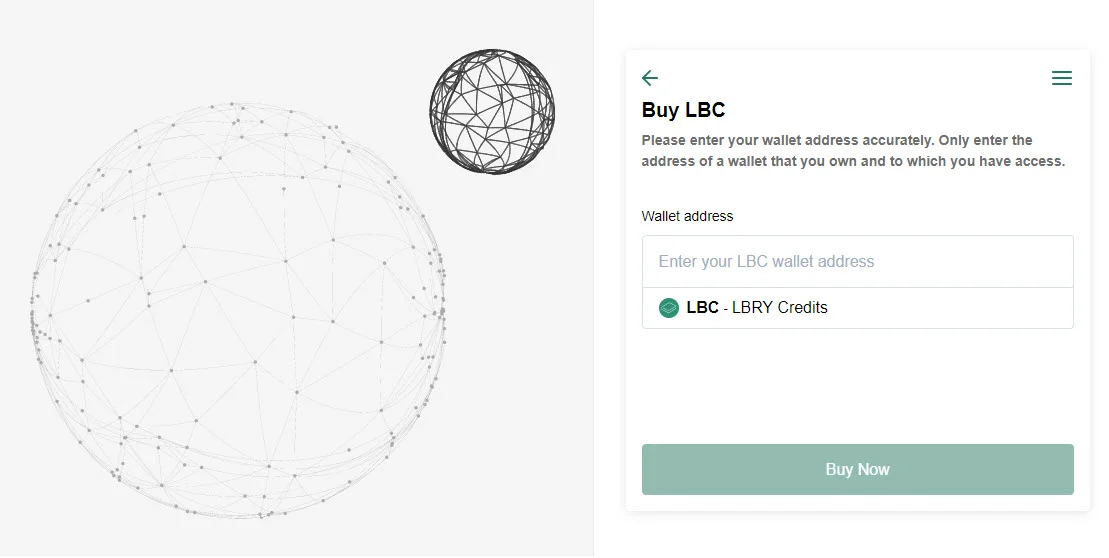
|
||||
|
||||
## Have additional questions or need support?
|
||||
|
||||
We are always here to help! Check out our [help page](/faq/how-to-report-bugs) on how to reach us. If you are having trouble with something on the MoonPay side, you can also [reach out to them](support@moonpay.io).
|
||||
@@ -0,0 +1,98 @@
|
||||
---
|
||||
title: Buying and selling LBC on exchanges
|
||||
category: getstarted
|
||||
---
|
||||
This guide is meant for informational purposes only and is not financial advice.
|
||||
|
||||
Currently, in order to exchange LBC for traditional currencies (and vice versa), you'll need to use [cryptocurrency exchanges](/faq/exchanges). LBRY is actively working on ways to make this easier right inside our applications, but we don't have an ETA on when this would be available.
|
||||
|
||||
Some exchanges have a US Dollar (USD/USDT) market, whereas others only trade LBC against Bitcoin (BTC). This means you'd need to go through BTC first before being able to obtain traditional currencies like USD. USDT is the equivalent of a digital dollar and makes it easier to exchange LBC.
|
||||
|
||||
These steps below are an example of how to buy and sell LBC on Bittrex which has both USDT and BTC market pairs, but the mechanism of using order books will be similar on other exchanges.
|
||||
|
||||
If you are acquiring LBC, you'll need to have BTC deposited into your account, link a bank account to deposit USD, or use a credit card (not available in all locations). If you are selling LBC, you'll need to [deposit the LBC to your Bittrex account first](#Withdrawing-LBC-to-Bittrex).
|
||||
|
||||
## Login or create a Bittrex account
|
||||
1. Login / create a [Bittrex account](https://bittrex.com) (you may need to complete KYC)
|
||||
|
||||
## Depositing funds
|
||||
### Depositing USD {#Depositing-USD}
|
||||
**Please note: This is only available to some customers depending on location**
|
||||
1. [Follow this process to enable USD](https://bittrex.zendesk.com/hc/en-us/articles/360021914672-How-do-I-deposit-USD-into-Bittrex-)
|
||||
1. Click on `Holdings` from the upper right corner.
|
||||
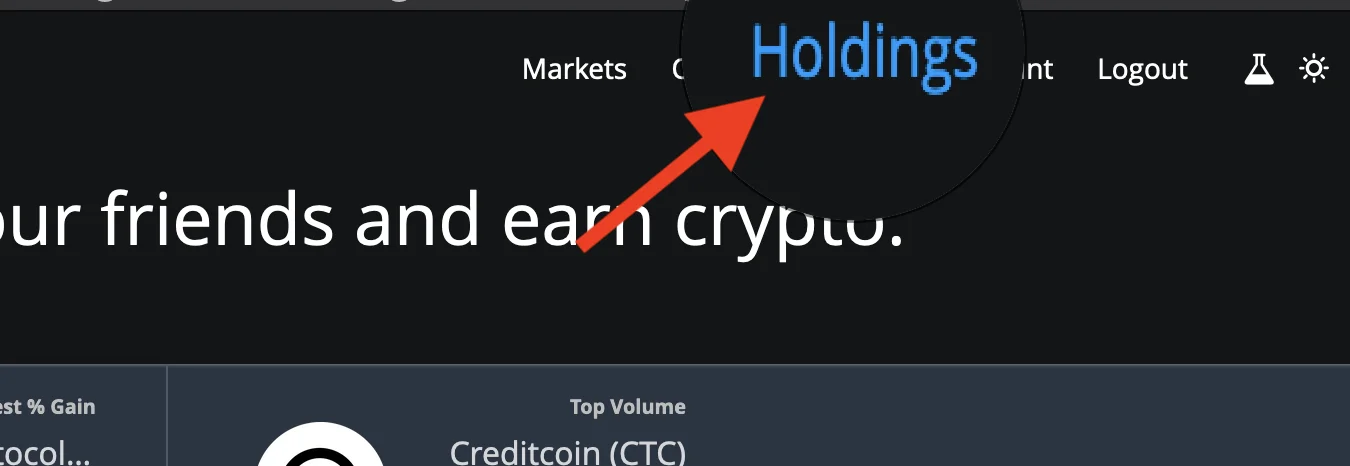
|
||||
1. Once the holdings page loads up, click on **Deposit by bank/wire**
|
||||
1. Click on Wire Transfer and click Get Started.
|
||||
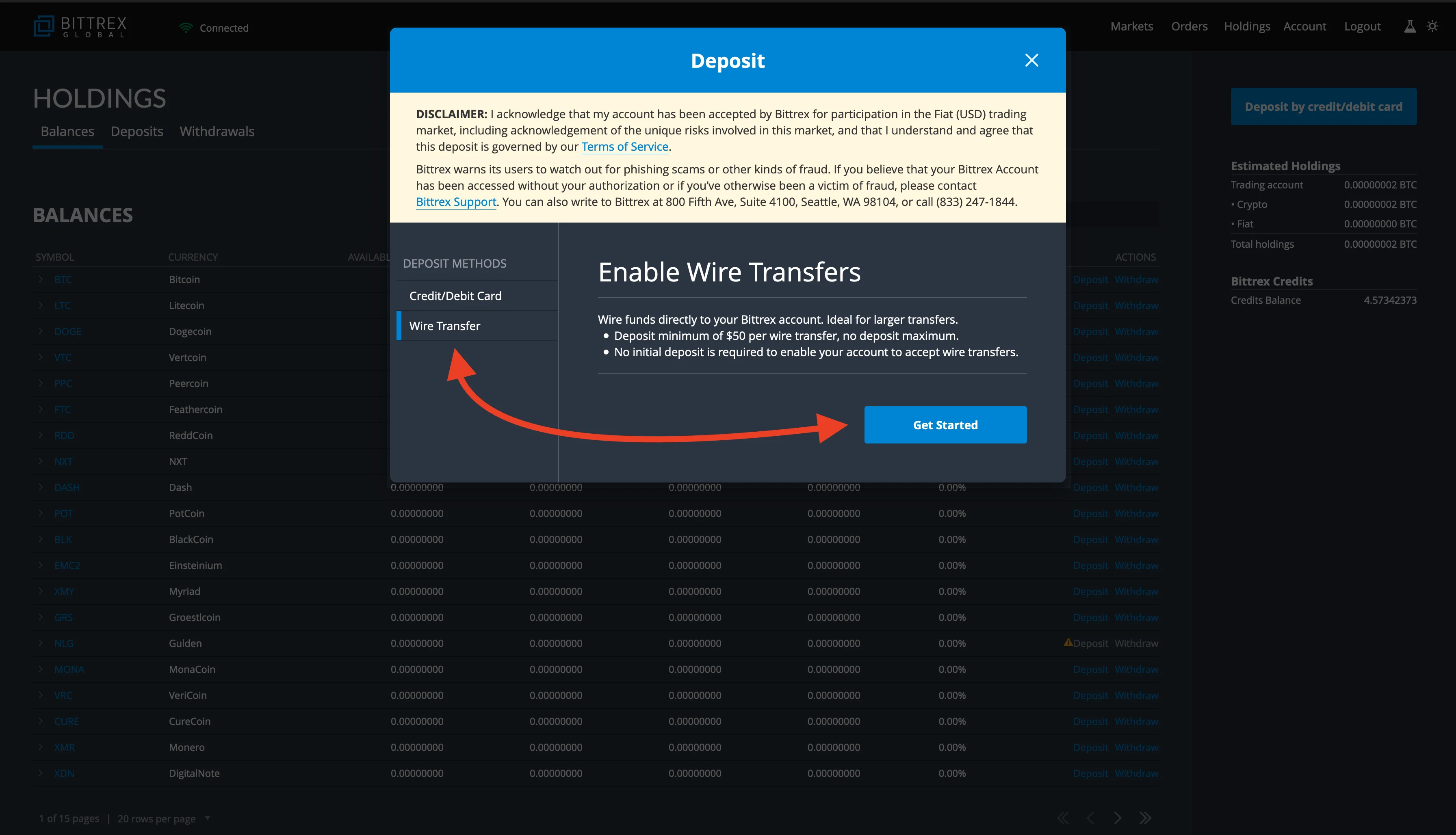
|
||||
1. Finish the process and deposit USD into your account.
|
||||
|
||||
### Purchasing with a debit card from Bittrex
|
||||
**Please note: This is only available to some customers depending on location**
|
||||
1. Click on `Holdings` from the upper right corner.
|
||||

|
||||
1. Once the holdings page loads up, click on **Deposit by credit/debit card**.
|
||||
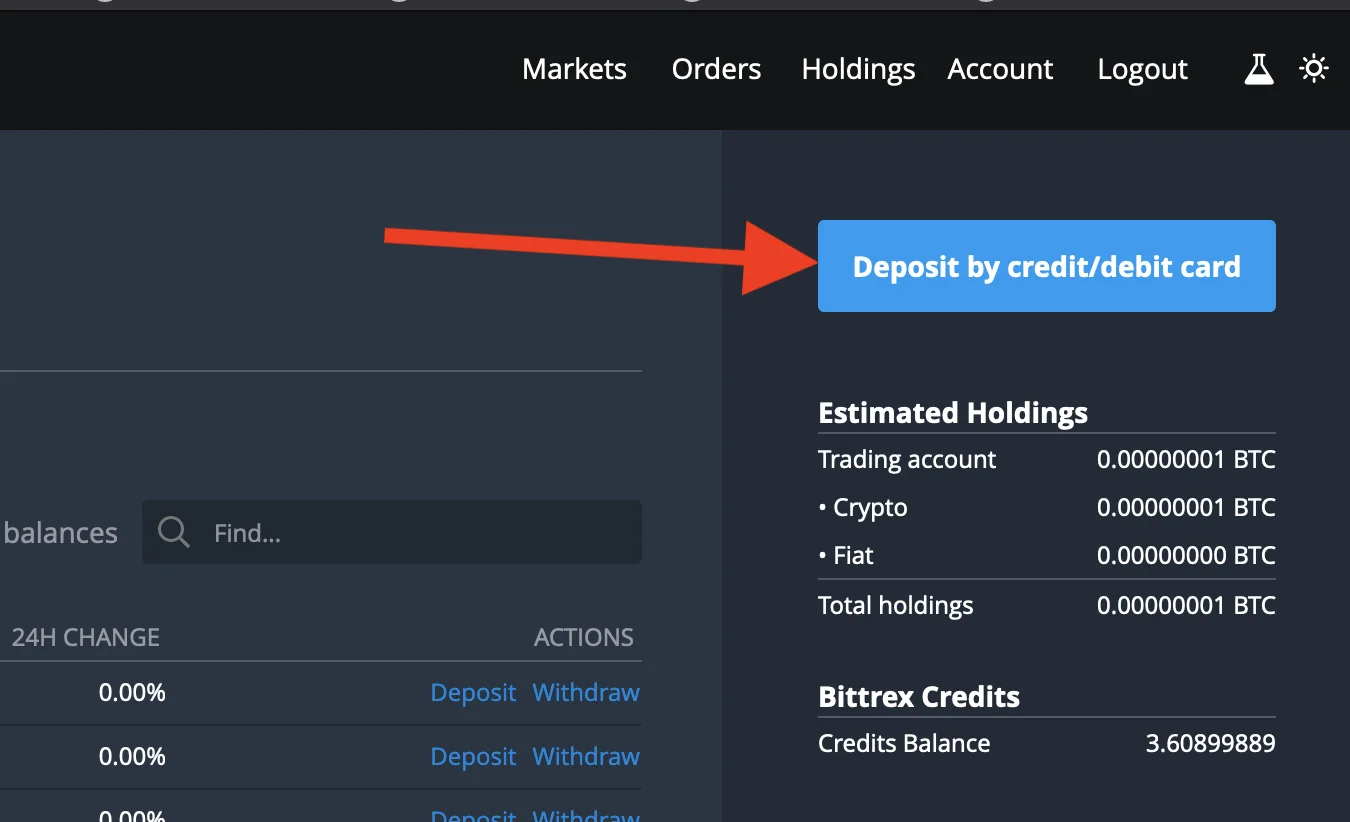
|
||||
1. Enter the amount you'd like to purchase in dollars and click on **Enter card info next**.
|
||||
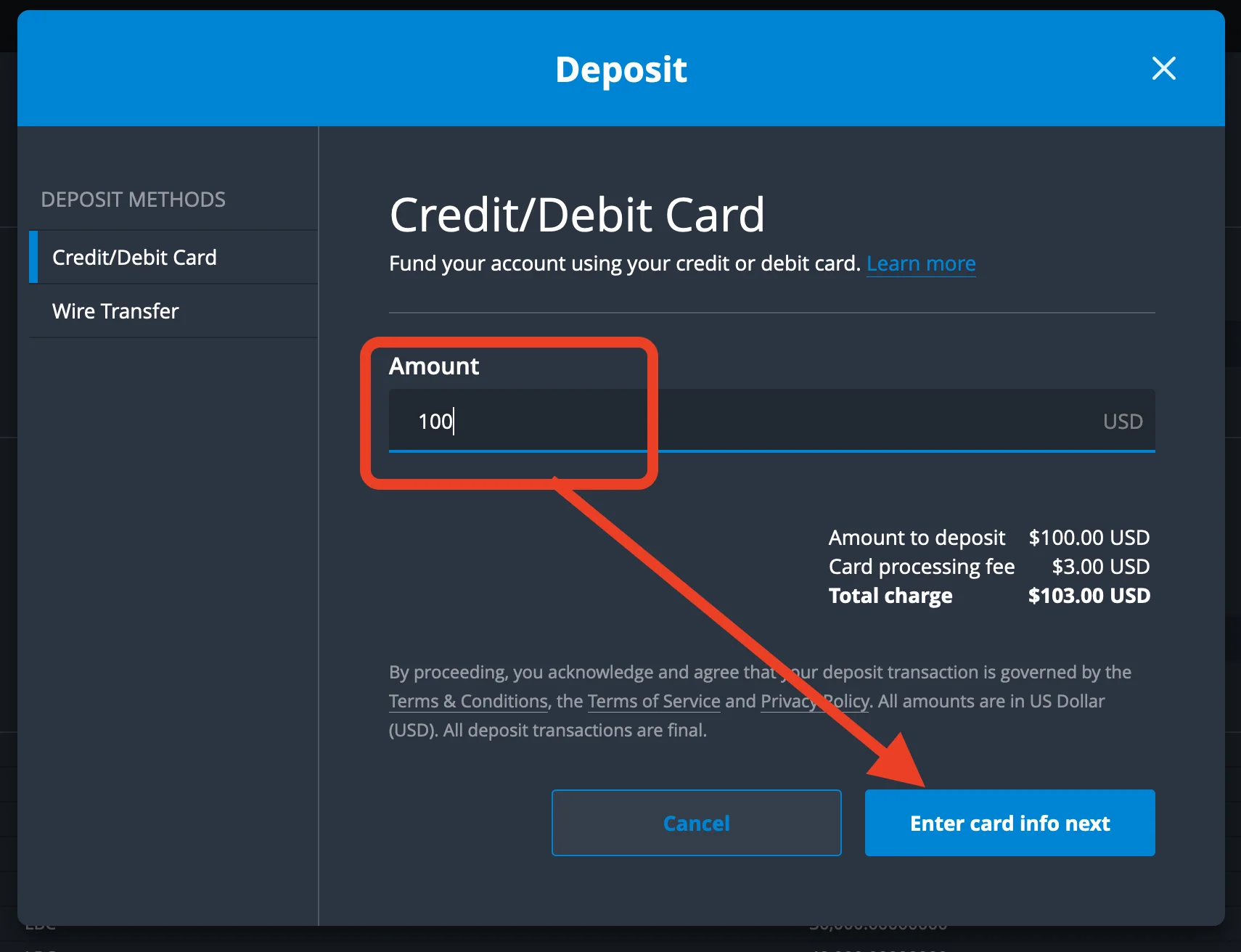
|
||||
1. Enter your card details and any other information and click on pay.
|
||||
1. Once the payment is successful, you should see fiat balance in BTC equivalence
|
||||
|
||||
### Depositing BTC
|
||||
1. Click on `Holdings` from the upper right corner.
|
||||

|
||||
1. Once the holdings page loads up, find BTC and click the deposit button.
|
||||
1. Deposit BTC to your account by sending funds to the address shown.
|
||||
|
||||
## Buying
|
||||
|
||||
### Purchasing LBC with BTC / USDT
|
||||
1. From the Bittrex home page: scroll down, under the BTC or USDT market, search for LBC and once it comes up, click on the trading pair.
|
||||

|
||||
1. Click on the market price you'd like to buy LBC (usually the first in the sell order book indicated as red.)
|
||||
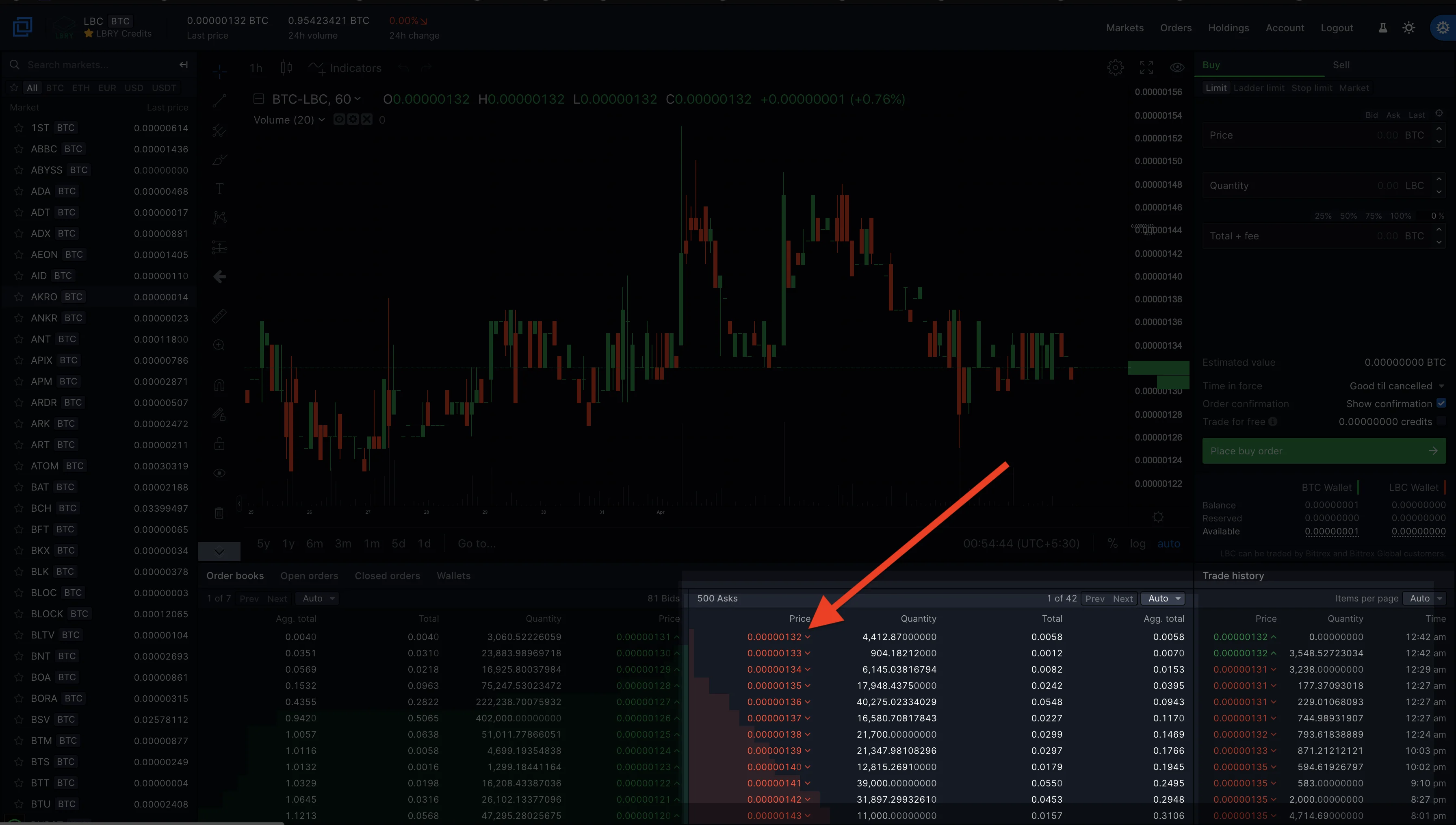
|
||||
1. Enter how much LBC you want to purchase or simply click on the percentage to select the amount you'd like to purchase, for example, 50% of your total holdings or 100% of your total holding in BTC.
|
||||
1. Click on place order, and once the order is executed, you'll now see your LBC holdings. You can check this right below the place order button or the holdings page from the upper right screen.
|
||||
|
||||
## Selling
|
||||
|
||||
### Selling LBC for BTC / USDT
|
||||
To sell LBC for BTC or USDT, you will have to deposit your LBC to the Bittrex LBC wallet. [See depositing LBC to Bittrex](#Withdrawing-LBC-to-Bittrex)
|
||||
1. Go to the Bittrex home page, scroll down, under the BTC / USDT market, search for LBC and once it comes up, click on the trading pair.
|
||||

|
||||
1. Click on Sell
|
||||
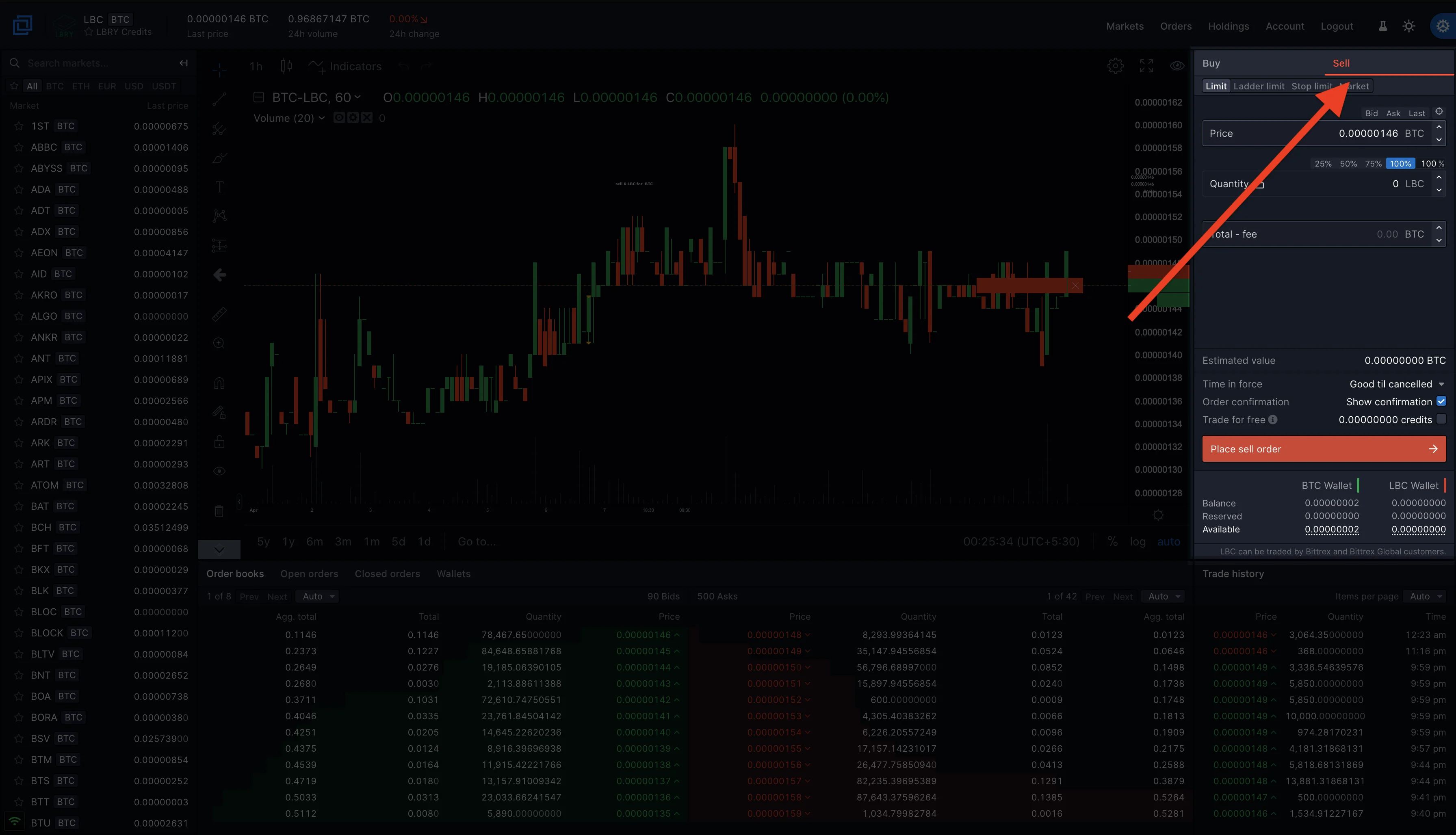
|
||||
1. Click on the market price you'd like to sell LBC (usually the first in the buy order book indicated as green.)
|
||||
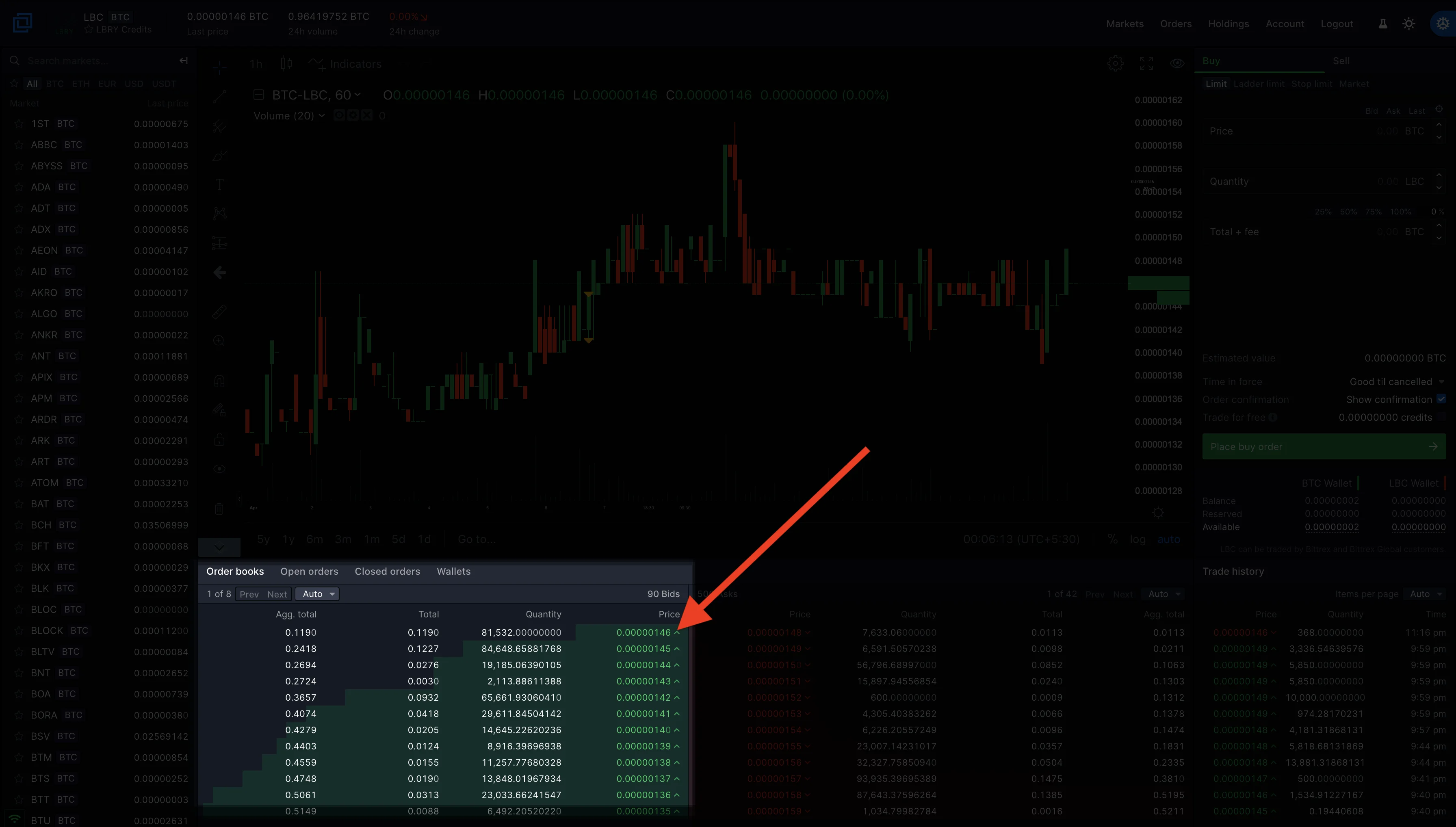
|
||||
1. Enter how much LBC you want to sell or simply click on the percentage to select the amount you'd like to sell. For example, 50% of your total holdings or 100% of your total holding in LBC.
|
||||
1. Click on place sell order, and once the order is executed, you'll now see your BTC holdings. You can check this right below the place order button or the holdings page from the upper right screen.
|
||||
|
||||
## Managing and withdrawing funds
|
||||
|
||||
### Checking Holdings and withdrawing LBC to your LBRY account.
|
||||
1. Click on the holdings on the upper right corner of the Bittrex page.
|
||||

|
||||
1. Toggle the **Show Zero Balances** option to show only wallets with balance or you can use the **find** option to search for LBC.
|
||||
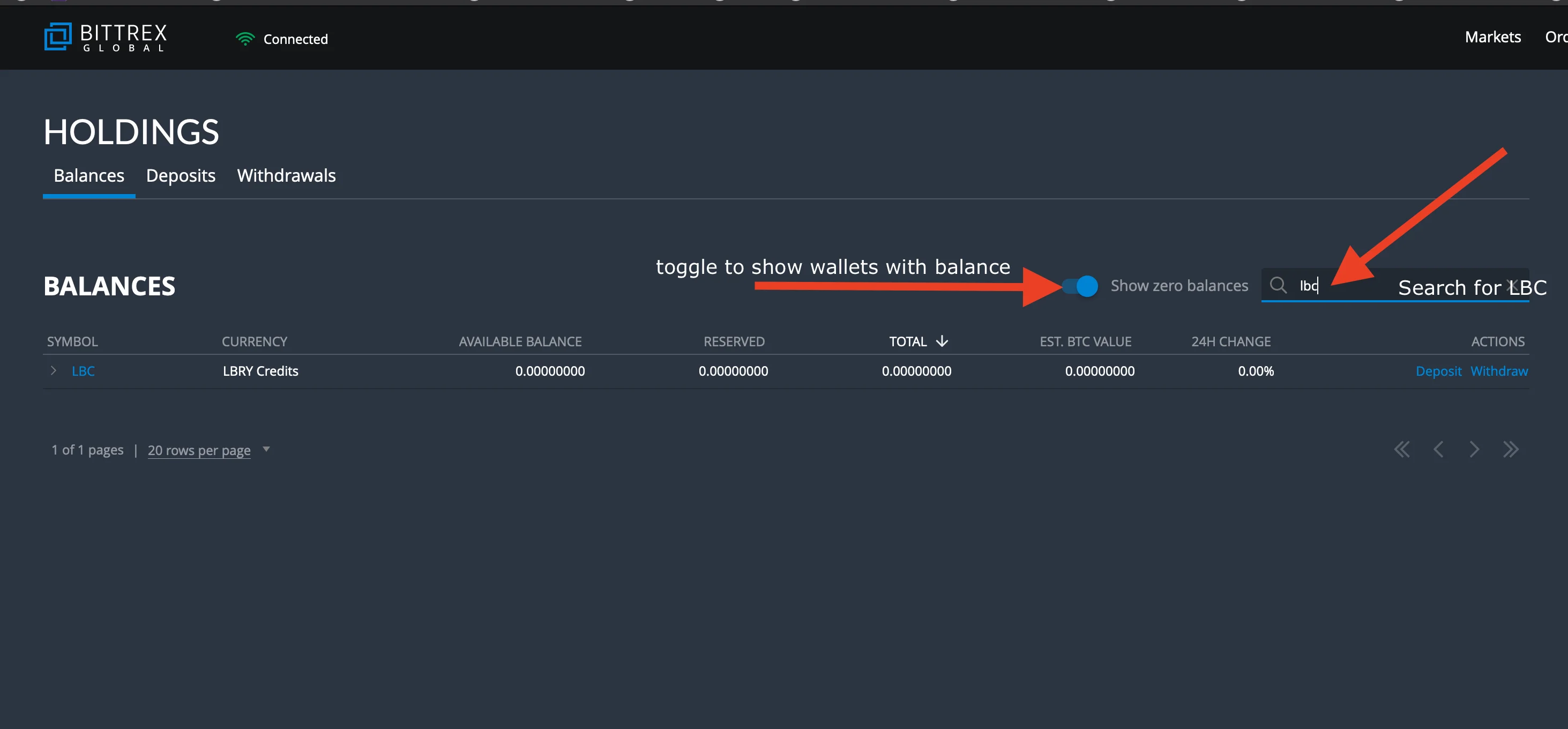
|
||||
1. Click on withdraw.
|
||||
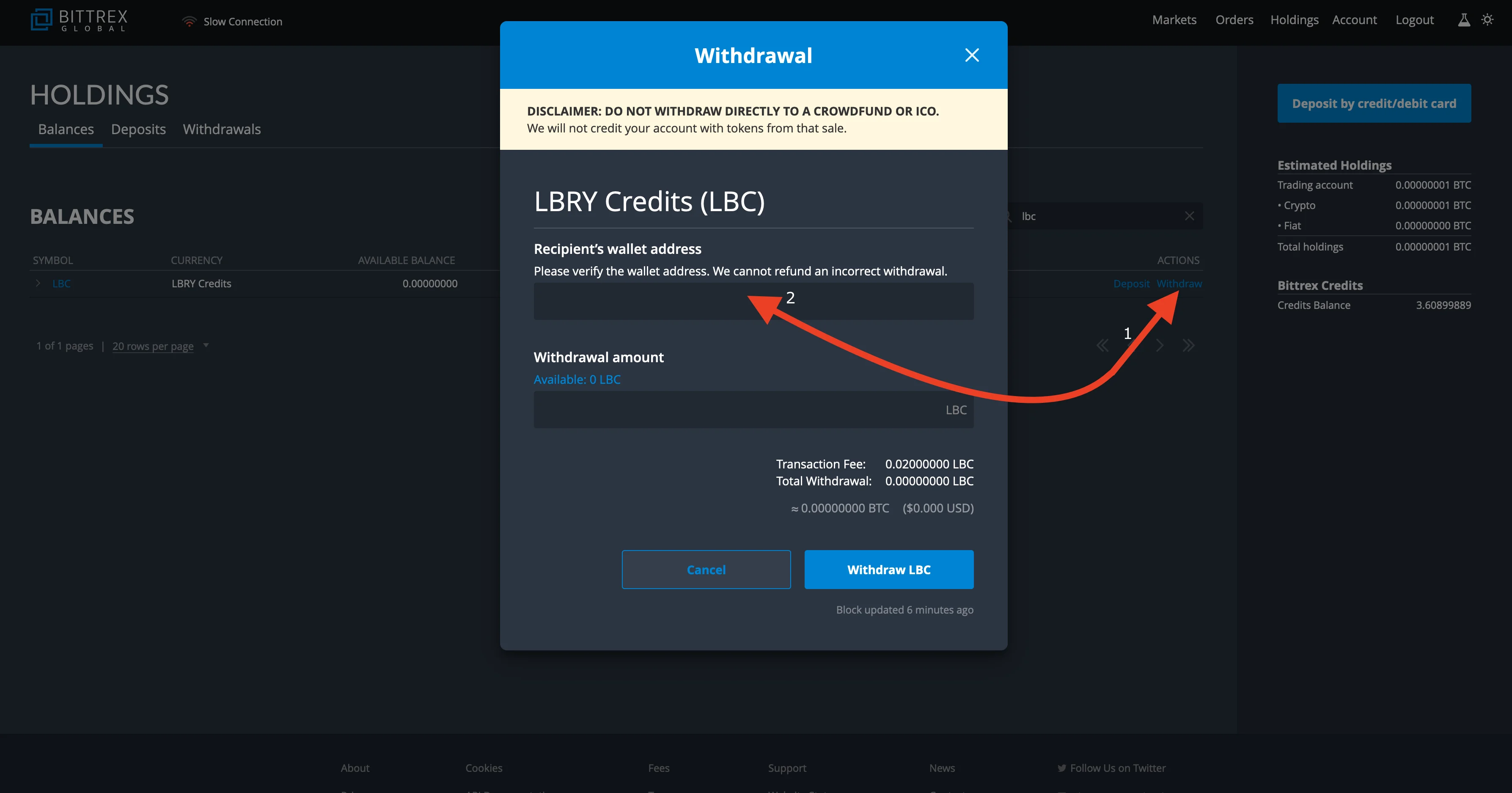
|
||||
1. Go to your LBRY app/lbry.tv page, click on the balance on the top right and click on `your address` to bring up your LBRY address.
|
||||
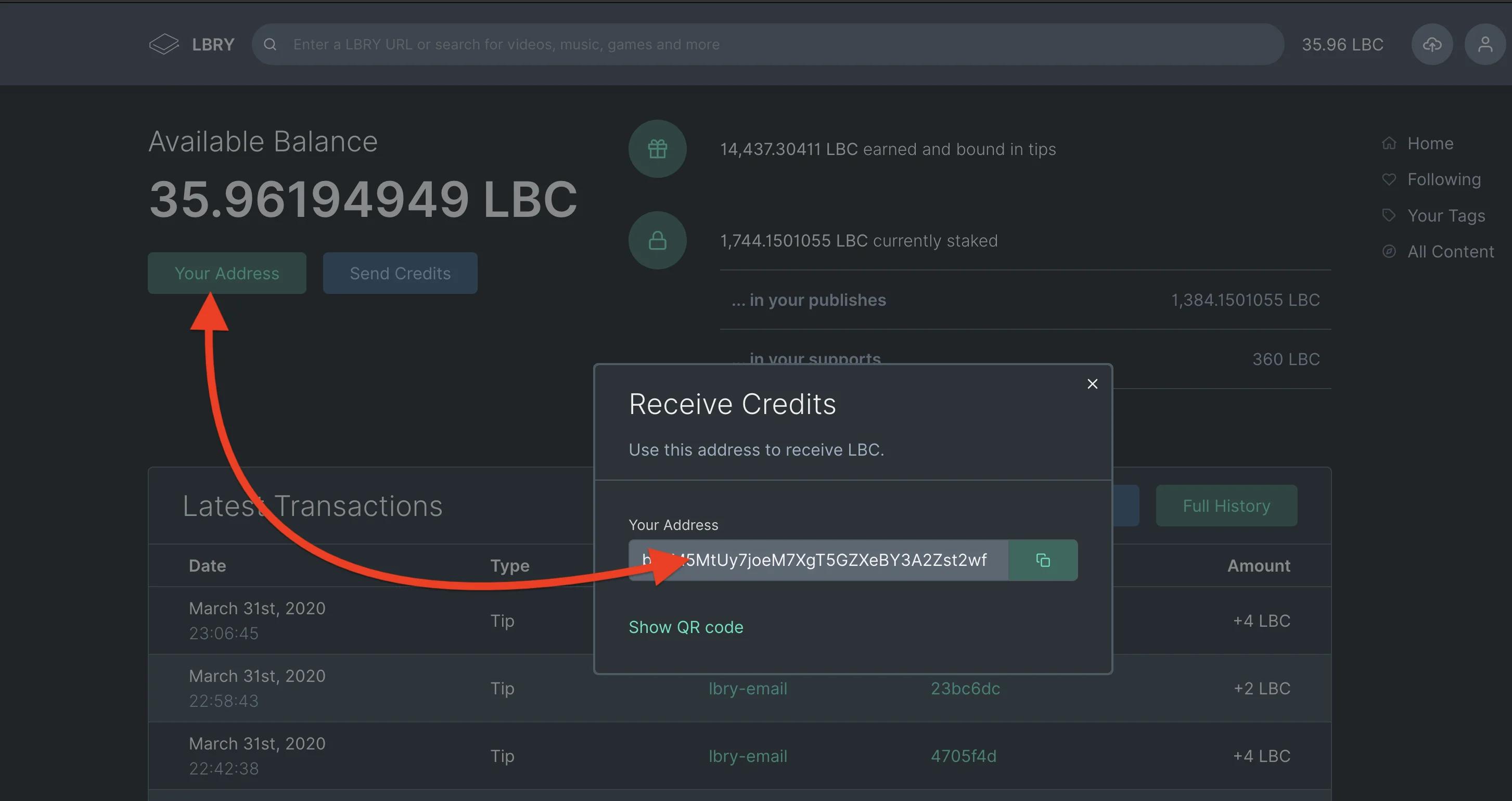
|
||||
1. Copy the address you get from your LBRY account to the address field on the Bittrex withdrawal page.
|
||||
1. Click on **available balance** or enter the total amount of LBC you want to withdraw and click on withdraw.
|
||||
1. Type in your 2FA if necessary and you are done, you should see your balance withdrawn from Bittrex to your LBRY account in minutes.
|
||||
|
||||
### Withdrawing LBC to Bittrex {#Withdrawing-LBC-to-Bittrex}
|
||||
1. Click on the holdings on the upper right corner of the Bittrex page.
|
||||
1. Search for LBC using the **find** option on the Bittrex holdings page.
|
||||
1. Click on the option for deposit.
|
||||
1. Copy your LBC wallet address.
|
||||
1. Open the wallet page on your LBRY app/lbry.tv by clicking on the balance option/wallet page.
|
||||
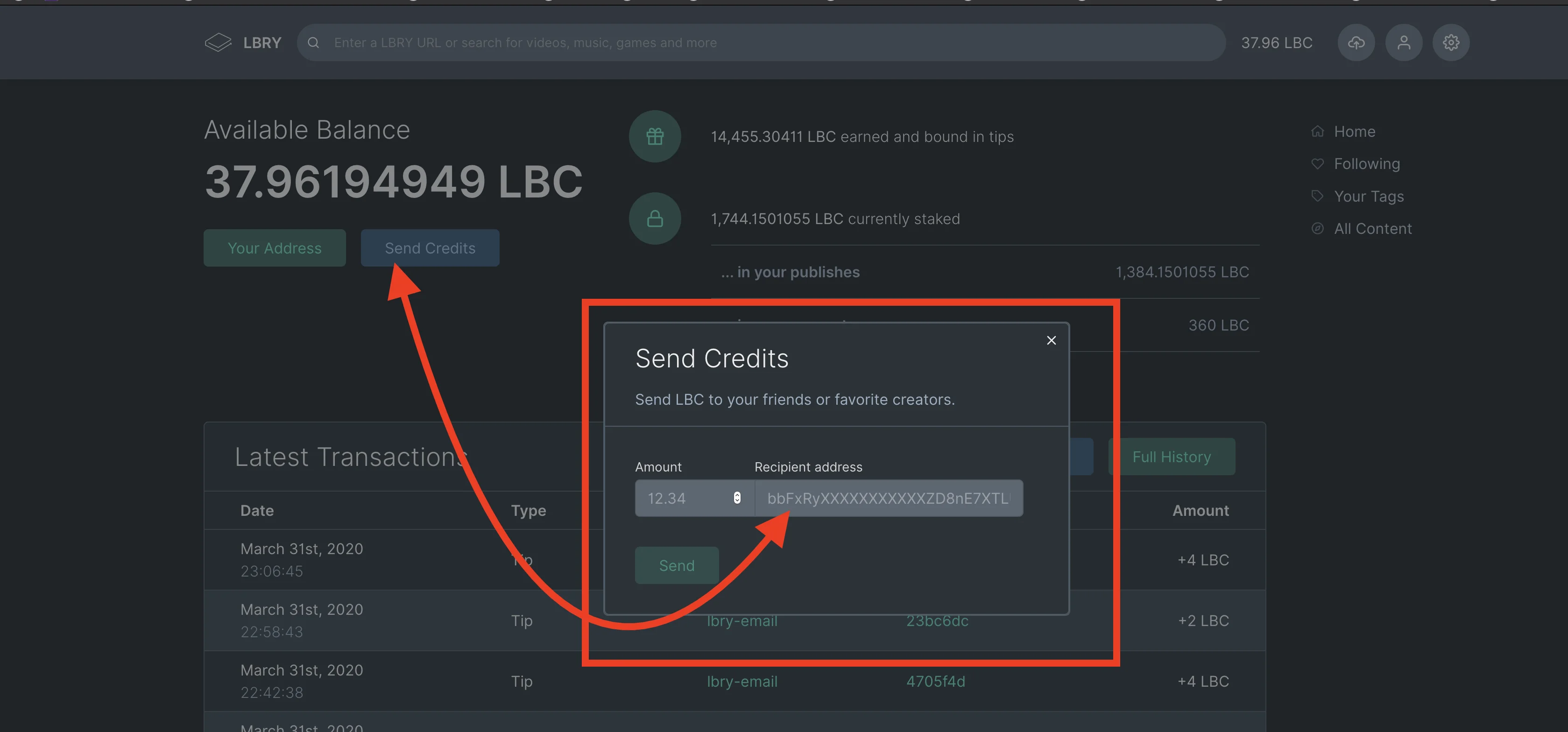
1. Click the option for send credits.
|
||||
|
||||
1. Paste the address you copied from Bittrex and enter the amount you want to transfer and click send.
|
||||
1. To check the status of your withdrawal, go to the holdings page on Bittrex and click on deposits. This will show pending deposit status.
|
||||
|
||||
### Withdrawing USDT to your bank
|
||||
Bittrex allows you to withdraw USDT to USD by first using the [USDT/USD market](https://bittrex.com/Market/Index?MarketName=USD-USDT) and then sending USD to your bank.
|
||||
|
||||
**Please note that it may take up to 10 minutes for the status to reflect under the deposit status. Bittrex requires 30 confirmations which can take anywhere from 60-90 minutes.**
|
||||
@@ -1,6 +1,7 @@
|
||||
---
|
||||
title: How does LBRY handle content and what am I allowed to upload?
|
||||
category: publisher
|
||||
order: 4
|
||||
---
|
||||
|
||||
This guide provides answers to questions regarding what you may upload to LBRY and network and how it differs from current centralized/status quo systems. To learn more about reporting infringing or illegal content and DMCA procedures, please see our [DMCA article](/faq/dmca).
|
||||
@@ -10,6 +11,16 @@ This guide provides answers to questions regarding what you may upload to LBRY a
|
||||
You may upload legal content that you own or have obtained permission to use, as long as it does not infringe on the rights of others.
|
||||
This includes Public Domain content, Creative Commons or Open Source content shared according to the license requirements, and Copyrighted content where you have permission from the owner.
|
||||
|
||||
We ask you to follow these simple rules:
|
||||
|
||||
1) The content is yours, you have permission to post it, or it's public domain / fair use / license allows re-use. If re-use is allowed, the original source and any other licensing rules must be followed.
|
||||
|
||||
2) The content is tagged properly, especially with mature content. Do not abuse tags with ones that don't pertain to your content.
|
||||
|
||||
3) The content is not illegal in your jurisdiction.
|
||||
|
||||
Failure to follow these rules may result in the filtering of your content/channel and the ability to earn rewards will be revoked.
|
||||
|
||||
## Because LBRY is decentralized, doesn't this mean the content can't be removed?
|
||||
|
||||
It is important to make a distinction between the LBRY protocol and any applications running on top when referring to censorship and the ability to block access to certain content. The LBRY protocol is fully decentralized and censorship-resistant - it provides permissionless access to [claiming of URLs](/faq/naming) and indexing metadata on the blockchain, and facilitates data transfers over a peer to peer (P2P) network which consists of our own content severs and anyone running the LBRY protocol. This means infringing content may be stored on our servers, by the uploader and by anyone else who may have downloaded it.
|
||||
|
||||
@@ -16,7 +16,7 @@ _Note that tagging your content improperly can result in it being negatively wei
|
||||
|
||||
## Why do creators have to do this on YouTube, but not LBRY?
|
||||
|
||||
YouTube’s parent organization, Google, tracks the activity of users across the internet, regardless of their age. Because Google serves targeted advertisements to these users, this triggers a legal requirement to attempt to prevent doing so to children. Google chooses to satisfy this requirement by putting the onus on creators themselves.
|
||||
YouTube’s parent organization, Google, tracks the activity of users across the internet, regardless of their age. Because Google serves targeted advertisements to these users, this triggers a legal requirement to attempt to prevent doing so to children. Google chooses to satisfy this requirement by putting the onus on the creators themselves.
|
||||
|
||||
In the case of LBRY, all users must affirm they are of the valid legal age to create a lbry.tv account. Users without lbry.tv accounts are not tracked and targeted. Additionally, LBRY does not perform the targeted advertising that Google does.
|
||||
|
||||
@@ -26,4 +26,4 @@ LBRY has a YouTube partner program that offers rewards, syncs your content, and
|
||||
|
||||
## How can a creator tag content as child-friendly?
|
||||
|
||||
We recommend using the tags “child friendy” and/or “family friendly” when publishing. Read more about [how to publish](/faq/how-to-publish).
|
||||
We recommend using the tags “child friendly” and/or “family-friendly” when publishing. Read more about [how to publish](/faq/how-to-publish).
|
||||
@@ -18,7 +18,7 @@ For each video, BitChute creates a corresponding torrent, that is supposed to de
|
||||
|
||||
However, let’s assume that there are magically enough people who download and continue to host these torrents, for free. All of the metadata and the entire user-experience is still *entirely* wrapped up in BitChute.
|
||||
|
||||
There is no alternative client. There is no data network that users are actively participating in (unless the video is open). If BitChute, goes down, or closes, or is taken over by censorious scolds (or the rent-extractors), *the whole thing is gone*. No one can even make another copy of it, because the source is closed.
|
||||
There is no alternative client. There is no data network that users are actively participating in (unless the video is open). If BitChute goes down, closes, or is taken over by censorious scolds (or the rent-extractors), *the whole thing is gone*. No one can even make another copy of it, because the source is closed.
|
||||
|
||||
Additionally, a single point of censorship means those around the world who would attempt to ban facts because they find them inconvenient have a clear place to go and ban them.
|
||||
|
||||
@@ -29,3 +29,15 @@ In the case of LBRY:
|
||||
- You can access and use LBRY in a truly decentralized, peer-to-peer way. Via [LBRY Desktop](https://lbry.com/get), anyone in the world can access the LBRY network without relying on LBRY Inc. servers or machinery.
|
||||
- If LBRY ever turns evil, all code is open-source and anyone in the world (okay, mainly nerds) could develop and release their own version with minimal effort. Hundreds of people have contributed to LBRY, the vast majority as volunteers.
|
||||
- *Anyone in the world* can run their own version of lbry.tv or make their own LBRY app, completely separate from us and without our permission.
|
||||
|
||||
## I'm a creator that wants to make a comparative video between LBRY and another platform.
|
||||
|
||||
That's awesome! We're offering 2000 LBC to any creator who wants to make a video on this subject.
|
||||
|
||||
Here's how to get it:
|
||||
|
||||
1. Make the video. Any conclusions you reach are fine (that is, it doesn't have to be pro-LBRY), so long as it doesn't actively misstate anything about LBRY.
|
||||
1. Post it to LBRY and the platform you are comparing us to. Add the tag #lbryvs (you can also add #lbryvsbitchute, #lbryvsdlive, etc.)
|
||||
1. Tweet at @LBRYio and the platform you are comparing us to with a link to the video and using the same hashtag(s) mentioned above. If you don't use Twitter, you can email hello@lbry.com with a link to your video and a screenshot of you posting about it somewhere else.
|
||||
|
||||
LBRY reserves the right to not offer this reward if you attempt to abuse it (for example, by creating a brand new account and creating an extremely low-effort video).
|
||||
@@ -3,6 +3,8 @@ title: How is LBRY different from YouTube / Netflix / Apple TV?
|
||||
category: differences
|
||||
---
|
||||
|
||||
YouTube, Netflix, Apple TV, and other similar services are centralized platforms controlled by a single corporate entity. These companies have the ability to change the rules unilaterally, as well as censor content to appease authoritarian governments or corporate partners.
|
||||
<iframe width="560" height="315" src="https://lbry.tv/$/embed/befreeonlbry/56cbb8e075d0f1971b311c9c9d82e0bf91919710" allowfullscreen></iframe>
|
||||
|
||||
LBRY is a decentralized, open-source protocol that is controlled by its users. LBRY facilitates a similar experience to the aforementioned services but does it in a way that is entirely decentralized. LBRY can never unilaterally change the rules on publishers or consumers, making it dramatically more trustworthy.
|
||||
YouTube, Netflix, Apple TV, and other similar services are centralized platforms controlled by a single corporation. These companies have the ability to change the rules at will, demonetize content, and even censor content to appease governments or corporate partners or advertisers. These companies offer no transparency into their source code or content search/viewing algorithms. Many creators have found themselves deplatformed and out of business overnight.
|
||||
|
||||
In contrast, LBRY is a decentralized, open-source protocol that is controlled by its users. LBRY facilitates a similar experience to the aforementioned services but does it in a way that is entirely decentralized and censorship-resistant. LBRY can never deplatform, demonetize or arbitrarily change the rules on publishers or consumers, making it dramatically more trustworthy.
|
||||
@@ -19,6 +19,6 @@ The reports are not official or legal financial disclosures, nor do they formall
|
||||
LBRY Inc. does not commit to following predictions made in the reports and reserves full rights to change how it uses LBC at any time.
|
||||
|
||||
## What happens if the reports contain a mistake?
|
||||
If we issue a report that was factually mistaken, we will update the report with a correction. If the mistake is caught within the same month that it was issued and was not substantial, the report will be updated without a notification other than a reply to the original Tweet.
|
||||
If we issue a factually mistaken report, we will update the report with a correction. If the mistake is caught within the same month that it was issued and was not substantial, the report will be updated without a notification other than a reply to the original Tweet.
|
||||
|
||||
If an error is noticed in the report outside of the month it was issued or the error was substantial, then we will publish a blog post and a separate Tweet announcing the correction, as well as leave a note in the report itself linking to the blog post explaining the mistake.
|
||||
+3
-1
@@ -17,7 +17,9 @@ Open the LBRY and navigate to the content you wish to report. Underneath the con
|
||||
|
||||
## How does LBRY handle and respond to a DMCA request or takedown notice?
|
||||
|
||||
Upon receipt of a DMCA request from the content owner or legal representative, LBRY Inc. will use its best judgment to determine validity. We will block access to content deemed infringing in any LBRY Inc. owned applications. LBRY Inc. will also remove any data related to the infringing content from servers within its control. LBRY also must abide by the [red flag rule](https://en.wikipedia.org/wiki/Online_Copyright_Infringement_Liability_Limitation_Act#Red_flags) also.
|
||||
Upon receipt of a DMCA request from the content owner or legal representative, LBRY Inc. will try its best to validate the legitimacy of the request and notify the alleged infringing party about it if there's a potential for dispute. Once validated, we will block access to content in any LBRY Inc. owned applications upon receipt of a DMCA takedown notice. The opposite party can file a DMCA counter notice if they believe they have a right to publish the content. If you have questions about the DMCA process, you can [find more information here.](https://www.dmca.com/faq/What-is-a-DMCA-Takedown)
|
||||
|
||||
LBRY Inc. will also remove any data related to the infringing content from servers within its control. LBRY will also abide by the [red flag rule](https://en.wikipedia.org/wiki/Online_Copyright_Infringement_Liability_Limitation_Act#Red_flags).
|
||||
|
||||
Due to the immutable nature of the LBRY blockchain, a record and metadata of the infringing content may continue to exist on network hosts if the original publisher does not remove it. The data may still exist on the original publisher's computer (and anyone who may have downloaded it prior to it being blocked) but will not be accessible through any LBRY Inc. controlled applications.
|
||||
|
||||
|
||||
@@ -7,7 +7,7 @@ order: 3
|
||||
There are several ways to earn LBRY Credits, or LBC.
|
||||
|
||||
1. LBRY users receive an LBC gift by way of [rewards](/faq/rewards).
|
||||
1. LBRY users get LBC for [referring](/faq/referrals) other users via the LBRY Desktop and lbry.tv (see Account Overview page).
|
||||
1. LBRY users get LBC for [referring](/faq/referrals) other users via the LBRY Desktop app or lbry.tv (see Account Overview page).
|
||||
1. You can earn LBC for helping with various tasks. Talk to us on [Discord Chat](https://chat.lbry.com/) if you're interested in additional testing or helping the community.
|
||||
1. [Contributing](https://lbry.tech/contribute) to the project as a developer/engineer.
|
||||
1. Buy them: see [Exchanges](/faq/exchanges)
|
||||
|
||||
@@ -1,7 +1,7 @@
|
||||
---
|
||||
title: How does LBRY benefit content creators? Can I earn money using LBRY?
|
||||
category: publisher
|
||||
order: 2
|
||||
order: 3
|
||||
---
|
||||
|
||||
In our AMA title, we pitched LBRY as a "community-driven" YouTube alternative that could "save the internet." That's a lot of big talk, but what does it mean for the people who care most about the changes happening on YouTube – the content creators?
|
||||
@@ -14,6 +14,6 @@ With LBRY, pricing is completely at the discretion of the creator, and 100% of t
|
||||
|
||||
Because LBRY uses digital currency (a la Bitcoin), creators can accept micropayments for every view without worrying about credit card processing fees. Or a studio could use LBRY to distribute a theatrical release to independent theaters and charge thousands of dollars per download. The only constraint on pricing is what your viewers are willing to pay.
|
||||
|
||||
With YouTube monetization, creators earn a variable amount based on viewers' engagement with ads. There is no set formula, but we've found a reasonable guesstimate of around [$2 per thousand views](https://www.quora.com/How-much-does-YouTube-pay-partners-for-their-content). This works out to a penny per 5 views. So on LBRY, if you charge just one penny per view (a price any viewer would pay without a second thought), you may get 5X the per-view earnings you'd get from YouTube instantly!
|
||||
With YouTube monetization, creators earn a variable amount based on viewers' engagement with ads. There is no set formula, but we've found a reasonable guesstimate of around [\$2 per thousand views](https://www.quora.com/How-much-does-YouTube-pay-partners-for-their-content). This works out to a penny per 5 views. So on LBRY, if you charge just one penny per view (a price any viewer would pay without a second thought), you may get 5X the per-view earnings you'd get from YouTube instantly!
|
||||
|
||||
Furthermore, you can share content of any type – video, music, ebooks, images, podcasts – all on the same platform.
|
||||
@@ -0,0 +1,42 @@
|
||||
---
|
||||
title: How do I share or embed LBRY videos on other websites?
|
||||
category: publisher
|
||||
order: 3
|
||||
---
|
||||
|
||||
LBRY videos can be embedded on your blog or other sites you want the video to play directly on. This is done via a simple HTML code snippet that includes an iframe to lbry.tv.
|
||||
|
||||
## How to embed a video via an iframe
|
||||
|
||||
1. From the content page, click the Share button.
|
||||

|
||||
2. Click the **<>** icon to show the embed snippet, and click the Copy button.
|
||||

|
||||
3. Paste the embed code into your website. Depending on what platform you are using, this may require an HTML code block.
|
||||
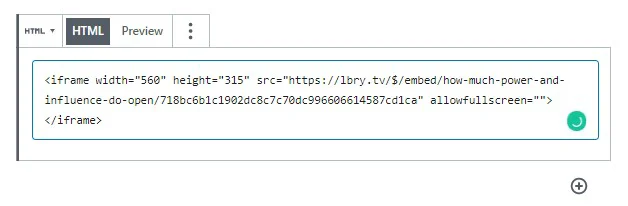
|
||||
|
||||
## What does an embed look like?
|
||||
|
||||
Here's a sample lbry.tv iframe embed, generated by following the above steps for the video [Meet lbry.tv](https://open.lbry.com/@lbry:3f/meetlbrytv:c?r=9PLaAYVfz6NLQa81fdSLpcvVhWm7joNV):
|
||||
|
||||
<iframe width="560" height="315" src="https://lbry.tv/$/embed/meetlbrytv/c6c0a5caa6cc391696e1270e33cd9d24ee7c2d52" allowfullscreen></iframe>
|
||||
|
||||
## Embed videos in markdown posts on LBRY
|
||||
|
||||
You can also embed a LBRY URL in your markdown (.md) posts on LBRY. It can be a vanity, canonical, or permanent URL. See sample markdown on our [lbry.tv blog post about embeds](https://open.lbry.com/@lbry:3f/embedforscience:0). It will open in the pop out player if available, or navigate to video page if not (actual embedding in this case to come later).
|
||||
|
||||
Syntax inside markdown file:
|
||||
|
||||
```
|
||||
<iframe src="lbry://@lbry#3f/befreeonlbry#5"></iframe>
|
||||
```
|
||||
|
||||
## What else do I need to know?
|
||||
|
||||
1. When an embedded video is played, it will count as a view for your content.
|
||||
1. If a user visiting the site has a lbry.tv account, their views may also [count as tips](/faq/rewards#contentview).
|
||||
1. You'll be credited with an invite if the user signs up for a lbry.tv account later (and their first video play was from your embed).
|
||||
|
||||
## I'm in need of some assistance, can you help?
|
||||
|
||||
Of course, we are always here to help! Check out our [help page](/faq/support) on how to reach us.
|
||||
@@ -8,7 +8,7 @@ LBRY supports all blockchain tokens, including its own, being as maximally avail
|
||||
|
||||
We are happy to work with any entity that wants to make LBC available to its users or customers, whether that is in exchange for other blockchain assets, state currencies, or well… anything really.
|
||||
|
||||
LBRY engages in outreach and communications with exchanges, whether we are available on the platform or not. We also provide technical and operational assistance in making LBC available and supporting it’s continued usage.
|
||||
LBRY engages in outreach and communications with exchanges, whether we are available on the platform or not. We also provide technical and operational assistance in making LBC available and supporting its continued usage.
|
||||
|
||||
To date, LBRY has not paid to be listed, but will consider paying fees to cover additional costs for quality exchanges and/or to reach markets where LBC is not available.
|
||||
|
||||
@@ -17,7 +17,7 @@ The answer depends on the value of X, but the answer is almost always: we don’
|
||||
|
||||
Most exchanges do not provide public or private insight into why and how they make the decisions that they do. If X is a well-known place, we’ve probably contacted them but not disclosed their reasoning. If you think X is a place we might not have heard of, you can let us know about it on [Twitter](https://twitter.com/lbryio), via [email](mailto:hello@lbry.com), or [in chat](https://chat.lbry.com).
|
||||
|
||||
Additionally, if X is a well-known place, let them know you want us available there. Exchanges like there to be user demand in order to add a token. And if you tag us both on [Twitter](https://twitter.com/lbryio), maybe someone will leave you a tip…
|
||||
Additionally, if X is a well-known place, let them know you want us available there. User demand is necessary for them to add a token/coin for exchange. And if you tag us both on [Twitter](https://twitter.com/lbryio), maybe someone will leave you a tip…
|
||||
|
||||
## Does LBRY have plans to end or ease the exchange pain?
|
||||
Yes. Working with exchanges is a pain for typical and actual users of the LBRY platform. We would happily provide onramps and offramps to many currencies, but it is a massive regulatory challenge.
|
||||
@@ -31,4 +31,4 @@ We do not control the markets. We do not interfere with the markets. We do not d
|
||||
|
||||
Don’t allocate very much credit to us when the price of LBC goes up and don’t allocate too much blame to us when it goes down.
|
||||
|
||||
Software changes in a gradual way. Massive market fluctuations or moves are rarely the result of direction actions we take. We continue to hold the philosophy that focusing on building, both in tech and usage, is the only trend that matters in the long term.
|
||||
Software changes in a gradual way. Massive market fluctuations or moves are rarely the results of direct actions we take. We continue to hold the philosophy that focusing on building, both in tech and usage, is the only trend that matters in the long term.
|
||||
@@ -1,16 +1,19 @@
|
||||
---
|
||||
title: Where can I buy or sell LBC?
|
||||
title: Where can I exchange LBC?
|
||||
category: getstarted
|
||||
---
|
||||
|
||||
We are listed on several exchanges. You can buy or sell LBRY Credits at one of these:
|
||||
We are listed on several cryptocurrency exchanges. You can buy or sell LBRY Credits at any of the below.
|
||||
|
||||
You can also [purchase LBC directly via the app](faq/buy-lbc).
|
||||
|
||||
For a guide on buying/selling, see our [Bittrex purchasing/selling FAQ](/faq/buy-sell-bittrex)
|
||||
|
||||
## Traditional exchanges
|
||||
- [Bittrex](https://bittrex.com/Market/Index?MarketName=BTC-LBC)
|
||||
- [CoinEx BTC](https://www.coinex.com/exchange?currency=btc&dest=lbc) / [USDT](https://www.coinex.com/exchange?currency=usdt&dest=lbc)
|
||||
- [Upbit](https://upbit.com/exchange?code=CRIX.UPBIT.BTC-LBC)
|
||||
- [VCC](https://vcc.exchange/exchange/basic?currency=btc&coin=lbc)
|
||||
- [BigONE](https://big.one/trade/LBC-BTC)
|
||||
- [Coinspot](https://www.coinspot.com.au/buy/lbc)
|
||||
- [Coindeal](https://frontend.coindeal.com/market/trade.html?pair=LBC/BTC)
|
||||
|
||||
@@ -18,6 +21,7 @@ We are listed on several exchanges. You can buy or sell LBRY Credits at one of t
|
||||
- [Simple Swap](https://simpleswap.io)
|
||||
- [Stealthex](https://stealthex.io/)
|
||||
- [SwapSpace](https://swapspace.co)
|
||||
- [Swapzone](https://swapzone.io)
|
||||
|
||||
## Decentralized exchanges (DEX)
|
||||
- [Bisq](https://bisq.network)
|
||||
@@ -1,11 +1,11 @@
|
||||
---
|
||||
title: Do you have a GPG key?
|
||||
title: Do you have a PGP key?
|
||||
category: other
|
||||
---
|
||||
|
||||
Reporting a security issue? [Click here](/faq/security).
|
||||
|
||||
Our GPG is on [Keybase](https://keybase.io/lbry/key.asc) and is reproduced below.
|
||||
Our PGP is on [Keybase](https://keybase.io/lbry/key.asc) and is reproduced below.
|
||||
|
||||
<pre><code id="keybase-key"></code></pre>
|
||||
<script type="text/javascript">
|
||||
|
||||
@@ -14,6 +14,9 @@ On the LBRY Desktop application, you can configure the download options on the S
|
||||
|
||||
On Android, only published data is saved in the blobs folder.
|
||||
|
||||
## Moving hosted content
|
||||
Currently, this process is manual and you can see our [FAQ on how to move the hosted content](/faq/how-to-change-lbry-blob-files) to another drive.
|
||||
|
||||
## Deleting hosted content
|
||||
You can delete files from the blob folder directly, or you can also delete them from the My LBRY section of the App - both will get rid of the hosted content and you'll lose the ability to seed it anymore.
|
||||
|
||||
|
||||
@@ -5,21 +5,24 @@ category: wallet
|
||||
|
||||
LBRY relies on blockchain technology and the LBRY Credits (LBC) cryptocurrency in order to participate in the network. These LBC are stored in a wallet (data file on your PC/device if using Desktop/Mobile) which is generated with each LBRY installation...think of your credits as digital cash on your PC. A wallet contains your funds, channel data, claims (any uploads), and preferences (subscriptions/tags/etc).
|
||||
|
||||
## Two ways to backup your wallet
|
||||
|
||||
### lbry.tv sync
|
||||
|
||||
An Account Sync service is provided automatically on [lbry.tv](https://lbry.tv) and can be enabled on Desktop/Mobile which allows LBRY to store a backup of the wallet for you. [Learn more](/faq/account-sync).
|
||||
|
||||
### User maintained backup
|
||||
|
||||
Otherwise, it is important to understand that the wallet is not stored on any LBRY servers (except when [sync](#sync) is enabled) and as such, users are responsible for its safeguarding and making sure [a backup](/faq/how-to-backup-wallet) (copy of the wallet file) is available in the event that it is lost. If a wallet is lost or needs to be transferred, follow the [restore procedures below](#restore).
|
||||
|
||||
*Note: If you are not using the sync service, wallets should be re-backed up after creating new Channels/Identities (this is stored directly in the wallet file, and not part of the seed/restore process at the moment).*
|
||||
|
||||
## Account Sync {#sync}
|
||||
|
||||
LBRY provides a wallet backup service by securely backing up your account and preferences. [Learn more here](/faq/account-sync).
|
||||
_Note: If you are not using the sync service, wallets should be re-backed up after creating new Channels/Identities (this is stored directly in the wallet file, and not part of the seed/restore process at the moment)._
|
||||
|
||||
## How do I find my wallet in LBRY Desktop?
|
||||
|
||||
The easiest way to find the location of your LBRY wallet is via the [LBRY app](/get). Open LBRY and on the left side, you should see a sidebar menu called "Help" - the wallet location is in the **Backup Your LBRY Credits** section.
|
||||
The easiest way to find the location of your LBRY wallet is via the [LBRY app](/get). Open LBRY and on the left side, you should see a sidebar menu called "Help" - the wallet location is in the **Backup Your LBRY Credits** section.
|
||||
|
||||
## How do I backup my LBRY Desktop wallet?
|
||||
|
||||
Click on "Help" and scroll down to the **Backup Your LBRY Credits** section.
|
||||
|
||||
When you click **Create Backup**, the app will generate a zip file of your wallet directory. You'll be directed to the folder it's saved to.
|
||||
@@ -28,7 +31,7 @@ Wallet backups should be copied securely to one or more locations which only you
|
||||
|
||||
## How do I find my wallet if I don't have LBRY open?
|
||||
|
||||
The LBRY wallet can be found manually by navigating to the [lbryum directory](/faq/lbry-directories). The `default_wallet` file is inside the wallet's folder.
|
||||
The LBRY wallet can be found manually by navigating to the [lbryum directory](/faq/lbry-directories). The `default_wallet` file is inside the `wallets` folder.
|
||||
|
||||
## How do I back up my wallet on lbry.tv?
|
||||
|
||||
@@ -40,8 +43,10 @@ The easiest way to find the location of your LBRY Android wallet is via the [And
|
||||
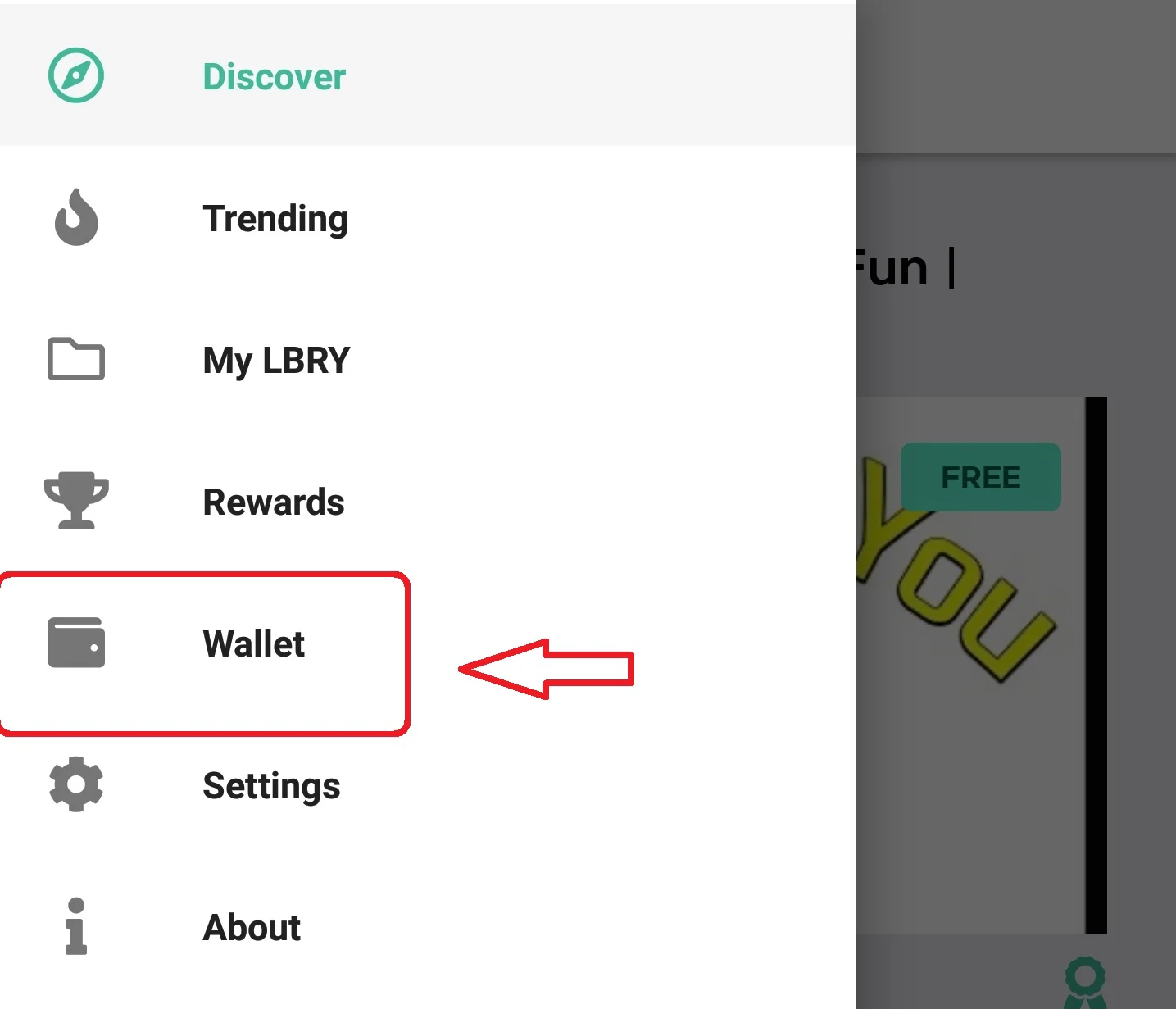
|
||||
|
||||
## How do I backup my LBRY Android app wallet? {#android}
|
||||
|
||||
The Android wallet will be removed if you uninstall the app or clear data or do not participate in the [sync](#sync) program. Scroll to the top of this page to learn more about your wallet.
|
||||
*Please note that this may vary with each Android device*
|
||||
_Please note that this may vary with each Android device_
|
||||
|
||||
1. Open your favorite file manager, navigate to `Internal storage/android/data/io.lbry.browser/files/lbryum/wallets`
|
||||
2. Copy the default_wallet to any other location on your device, i.e. your SD card or another directory on the Internal Storage
|
||||
|
||||
|
||||
@@ -14,6 +14,8 @@ If you are using lbry.tv only, your wallet will also not be transferred, so plea
|
||||
If you sign out of the Desktop app and back in with a different email, **these wallets and accounts will be merged**. Do not do this unless it's intentional and you expect the new email to be used by the same person.
|
||||
|
||||
## Changing email on Android {#android}
|
||||
**If you need to merge wallets, you need to backup/restore your Android wallet or use the LBRY Desktop app to merge them by signing into both emails. [Android wallet backup instructions](https://lbry.com/faq/how-to-backup-wallet#android).**
|
||||
|
||||
*(Exact steps may differ slightly)*
|
||||
*Before proceeding, please make sure to backup your wallet if there are funds in it*
|
||||
1. Go to phone settings
|
||||
|
||||
@@ -0,0 +1,144 @@
|
||||
---
|
||||
title: How do I change the location of blob files / hosted data?
|
||||
category: troubleshooting
|
||||
---
|
||||
|
||||
When you use the application LBRY Desktop on GNU/Linux, MacOS or Windows, you participate in the LBRY protocol which is a peer to peer, decentralized file sharing network similar to BitTorrent. As you upload and download conntent, the app will utilize your hard disk space for storing 2MB chunks of data used to share with others. The folder where these files are stored is named **blobfiles**, which is inside the [lbrynet folder](/faq/lbry-directories) and may grow over time. Currently there is no cleanup mechanism in place, so your drive may fill up with extended usage.
|
||||
|
||||
Currently there is no way to choose the location where these files are stored. The download folder setting is for the content files themselves, not the 2MB chunks. Because the application is installed on the operating system partition by default, this can be a problem if your partition is limited.
|
||||
|
||||
At this time, the easiest workaround to change the blob files location is to use the command line (or [GUI for Windows](#GUI)) to redirect one folder to another. This redirect is called symbolic link, also known as a symlink or soft link, which is something like a shortcut in Windows.
|
||||
|
||||
**Tip**: Periodically, when you want or your free space became too small on drive, you can access this new cache folder created and then delete all it's content, regaining the space occupied by downloaded blob files.
|
||||
|
||||
Since each Operating System has its own set of rules, use the below guide according to your situation to change the location of **blobfiles** folder: [Windows](#Windows) - [MacOS](#MacOS) - [GNU/Linux](#Linux)
|
||||
|
||||
## Windows {#Windows}
|
||||
|
||||
First, make sure the application is completely closed - right-click on application's tray icon and choose the **`Exit`** option from menu or press **`Ctlr-Q`**.
|
||||
|
||||
### Method 1 (creating the symbolic link only from Command Prompt)
|
||||
---
|
||||
1. Open **`Command Prompt`** (keyboard shortcut: **`Windows Key + R`**, enter the text **`cmd`** and press **`Enter`**).
|
||||
|
||||
2. In the **`Command Prompt`** window enter the below commands:
|
||||
|
||||
>**Notes**:
|
||||
>
|
||||
>- in our example below change the drive letter **`D`** and **`LBRY_cache`** destination folder name according to your needs;
|
||||
>
|
||||
>- if your folder path contains spaces or other special characters, you’ll need to enclose it in quotation marks, like **"D:\LBRY Cache"** when you enter the commands.
|
||||
|
||||
- if you don't have already created the folder where you want to move the blob files folder, then create it now. In our example this will be placed on drive **`D:`** and named **`LBRYCache`**.
|
||||
|
||||
- if you want to preserve the existing downloaded blob files then enter the next command, if not, go the the next one:
|
||||
|
||||
**`xcopy %localappdata%\lbry\lbrynet\blobfiles D:\LBRYCache`** [press Enter]
|
||||
|
||||
- this will remove the **`blobfiles`** folder and it's content:
|
||||
|
||||
**`rd /S /Q %localappdata%\lbry\lbrynet\blobfiles`** [press Enter].
|
||||
|
||||
- this will create symblolic link with our desired folder:
|
||||
|
||||
**`mklink /J %localappdata%\lbry\lbrynet\blobfiles D:\LBRYCache`** [press Enter]
|
||||
|
||||
3. Close the Command Prompt window and open the LBRY application. If you access the new folder created for the blob files, you will see it's contents populated.
|
||||
|
||||
### Method 2 (creating the symbolic link with a graphical tool) {#GUI}
|
||||
---
|
||||
1. Open Windows Explorer (keyboard shortcut **`Windows Key + E`**) or your preferred file manager and create a folder where you want to move the LBRY cached files, if you don't have it already created.
|
||||
|
||||
2. First you need to download a small portable application from here: <a href="http://bit.ly/symlinker_executable" target="_blank">Symlink Creator</a>. After download, you need to unpack it.
|
||||
|
||||
4. In Windows Explorer enter this text in his address bar:
|
||||
|
||||
**`%localappdata%\lbry\lbrynet`** [press Enter].
|
||||
|
||||
5. If you want to preserve the existing downloaded blob files then copy the content of the **`blobfiles`** folder in the destination folder created on step 1, if not, go the the next step.
|
||||
|
||||
6. In the list of files and folders displayed select the **`blobfiles`** folder and use the shortcut key **`Shift+Del`** or drag it over **`Recycle Bin`** icon from Desktop while you hold the **`Shift`** key pressed. In this way the blob files folder and it's entire content will be deleted directly.
|
||||
|
||||
5. After that, put the cursor again in the address bar of the Windows Explorer, select the entire path and copy it in the Clipboard with shortcut key **`Ctrl+C`** or right-click over the selected text and choose **`Copy`** option from the displayed menu.
|
||||
|
||||
6. Now run the **`"Symlink Creator`"** application that you unpacked.
|
||||
Fill the textboxes following the below instructions:
|
||||
|
||||
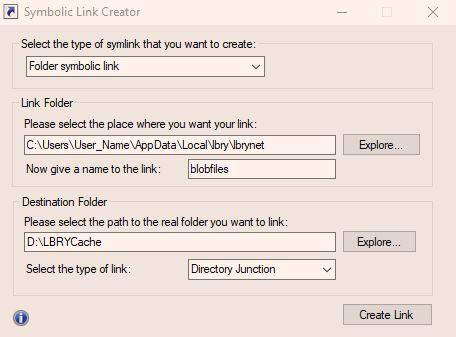
|
||||
|
||||
- select the type of symbolic link as: **`Folder symbolic link`**
|
||||
- put the cursor in the textbox named **`Please select the place where you want your link:`** and use the shortcut key **`Ctrl+V`** or right-click and choose **`Paste`** option from menu to bring back the path that you copied from Windows Explorer. In your case, **`User_Name`** will be your Windows user name.
|
||||
- in the textbox **`Now give a name to the link:`** **YOU MUST** put **`blobfiles`**. This name is mandatory, otherwise the LBRY won't start.
|
||||
- next choose your destination folder, that you created at step 1, where the cache files will be created after starting the LBRY application.
|
||||
- and finally for the **`Select the type of link:`** setting, choose the **`Directory Junction`** option and then click on the **`Create Link`** button.
|
||||
|
||||
If you respected all the above instructions you'll see a success message, otherwise it will give you an error. You can close the Symlink Creator and start the LBRY application. If you access the new folder created for the blob files, you will see it's contents populated.
|
||||
|
||||
---
|
||||
>**Note:** if you want to revert back to the original LBRY folder settings, you can delete the created symbolic link like you would with any other type of file from Command Prompt or with any file manager. After that, remember to recreate the original **`blobfiles`** folder in the original path of lbry **`%localappdata%\lbry\lbrynet\`**, otherwise the LBRY app won't start.
|
||||
|
||||
## MacOS {#MacOS}
|
||||
1. Make sure the application it's completely closed - right-click on application's icon from Dock and choose **`Quit`** option from menu or press Ctlr-Q.
|
||||
|
||||
2. Open the **Terminal** application (Press **`Command+Space`**, type **`Terminal`** and then press **`Enter`** to open **`Terminal`** from Spotlight search or navigate to **`Finder > Applications > Utilities > Terminal`** to launch the **`Terminal`** shortcut or click on the **`Terminal`** app icon from the **`Dock`** menu if it's available.)
|
||||
|
||||
3. In the Terminal window enter the below commands:
|
||||
|
||||
>**Notes**:
|
||||
>- replace **`Volume_Name`** with your mounted volume name and **`LBRY_Cache`** with the your desired folder name in our example below.
|
||||
>
|
||||
>- if your destination folder contains spaces or other special characters, you’ll need to enclose it in quotation marks, like **`/volumes/Volume_Name/"LBRY Cache"`** when enter the commands.
|
||||
|
||||
- if you don't have already created the folder where you want to move the blob files folder, then create it now:
|
||||
|
||||
**`mkdir /volumes/Volume_Name/LBRY_Cache`** [press Enter]
|
||||
|
||||
- if you want to preserve the existing downloaded blob files then enter the next command, if not, go the the next one:
|
||||
|
||||
**`cp ~/Library/"Application Support"/LBRY/blobfiles/*.* /volumes/Volume_Name/LBRY_Cache`** [press Enter]
|
||||
|
||||
- this will remove the default **`blobfiles`** folder and it's content:
|
||||
|
||||
**`rm -r ~/Library/"Application Support"/LBRY/blobfiles`** [press Enter]
|
||||
|
||||
- this will create the symbolic link with our desired folder:
|
||||
|
||||
**`ln -s /volumes/Volume_Name/LBRY_Cache ~/Library/"Application Support"/LBRY/blobfiles`** [press Enter]
|
||||
|
||||
4. Close the **`Terminal`** window and start the LBRY application. If you access the new folder created for the blob files, you will see it's contents populated.
|
||||
|
||||
>**Note:** if you want to revert back to the original situation, you can delete the created symbolic link like you would with any other type of file from **`Terminal`** app or any other file manager. After that, remember to recreate the original **`blobfiles`** folder, otherwise the LBRY app won't start.
|
||||
|
||||
## Ubuntu / Linux *(Exact steps may differ slightly)* {#Linux}
|
||||
|
||||
1. Make sure the application it's completely closed - right-click on application's tray icon and choose the **`Quit`** option from menu or press Ctlr-Q.
|
||||
|
||||
2. Open the **`Terminal`** application
|
||||
|
||||
3. In the **`Terminal`** window enter the below commands:
|
||||
|
||||
>**Notes**:
|
||||
>
|
||||
>- in our example below replace **`User_Name`** with your user name, **`Volume_Name`** with your mounted volume name and **`LBRY_Cache`** with your desired folder name;
|
||||
>
|
||||
>- if your folder path contains spaces or other special characters, you’ll need to enclose it in quotation marks, like **`"/media/User_Name/Volume_Name/LBRY Cache"`** when you enter the commands;
|
||||
|
||||
- if you don't have already created the folder where you want to move the blob files folder, then create it now:
|
||||
|
||||
**`mkdir /media/User_Name/Volume_Name/LBRY_Cache`** [press Enter]
|
||||
|
||||
- if you want to preserve the existing downloaded blob files then enter the next command, if not, go the the next one:
|
||||
|
||||
**`cp .local/share/lbry/lbrynet/blobfiles/*.* /media/User_Name/Volume_Name/LBRY_Cache`** [press Enter]
|
||||
|
||||
- this will remove the default **`blobfiles`** folder and it's content:
|
||||
|
||||
**`rm -r .local/share/lbry/lbrynet/blobfiles`** [press Enter]
|
||||
|
||||
- this will create the symbolic link with the new folder:
|
||||
|
||||
**`ln -s /media/User_Name/Volume_Name/LBRY_Cache .local/share/lbry/lbrynet/blobfiles`** [press Enter]
|
||||
|
||||
4. Close the **`Terminal`** window and start the LBRY application. If you access the new folder created for the blob files, you will see it's contents populated.
|
||||
|
||||
>**Note:** if you want to revert back to the original situation, you can delete the created symbolic link like you would with any other type of file from **`Terminal`** app or any other file manager. After that, remember to recreate the original **`blobfiles`** folder, otherwise the LBRY app won't start.
|
||||
@@ -21,8 +21,9 @@ To change the port once during runtime, set the LBRY_PEER_PORT env variable. Her
|
||||
|
||||
Once the daemon is running, you can change the port permanently by using the following [api](/api) call
|
||||
|
||||
curl 'http://localhost:5279' --data '{"method":"settings_set", "params":{"tcp_port":<port-num>}}'
|
||||
curl -d'{"method": "settings_set", "params": {"key": "tcp_port", "value": <port-num>}}' http://localhost:5279/
|
||||
|
||||
|
||||
or via cli command
|
||||
|
||||
lbrynet settings_set --tcp_port 3334
|
||||
lbrynet settings set tcp_port 3334
|
||||
@@ -6,18 +6,22 @@ order: 1
|
||||
|
||||
LBRY is a free, open, and community-driven digital marketplace that enables content sharing, monetization, discovery and consumption. Publishing in LBRY is the process of sharing your content on the network. You have the ability to set the price per view (can be free too) which is paid directly to you. This process involves making a "claim" in the LBRY blockchain which will be used to retrieve the content via a URL. Content can either be published anonymously or to a particular channel/identity which groups content in a single location. Both channels and claims require a deposit (bid) of LBRY Credits (LBC) in order to reserve their location on the LBRY network. This deposit will be deducted from your balance as long as the claim is active. See our [naming](/faq/naming) and [transaction](/faq/transaction-types) documentation for more information about claims, bids and transactions.
|
||||
|
||||
To see our recommended video upload format and settings, please see our [video publishing guide](/faq/video-publishing-guide).
|
||||
|
||||
If you are a YouTube Sync user, please make sure to [read our FAQ](https://lbry.com/faq/youtube) on how this process works.
|
||||
|
||||
If you don't have LBRY yet, download it [here](/get). You can also publish files up to 500MB from the web at [lbry.tv](https://lbry.tv).
|
||||
If you don't have LBRY yet, download it [here](/get). You can also publish files up to 1 GB from the web at [lbry.tv](https://lbry.tv).
|
||||
|
||||
**IMPORTANT NOTE: Only use appropriate tags when publishing content. Tag abuse and follow for follow/view for view type activity is prohibited and will not be tolerated.**
|
||||
|
||||
## How do I publish content?
|
||||
|
||||
1. Click on the Account/LBC balance showing at the top right of the app. You will get a dropdown, select `Publish` from the menu.
|
||||

|
||||

|
||||
|
||||
2. Under the `Publish` section, click `Choose File`.
|
||||
|
||||
3. On your local machine, select the content you wish to upload to LBRY. For video content, LBRY works best with MP4 files in H264/AAC format which support proper streaming. Besides videos, other popular formats supported are MP3s, text documents like markdown (md)/HTML, PDF, CSV, and comic books (cbr, cbz). In the future, the in app player may support additional formats.
|
||||
3. On your local machine, select the content you wish to upload to LBRY. For video content, LBRY works best with MP4 files in H264/AAC format which support proper streaming (see [video publishing guide for details](/faq/video-publishing-guide)). Besides videos, other popular formats supported are MP3s, text documents like markdown (md)/HTML, PDF, CSV, and comic books (cbr, cbz). In the future, the in app player may support additional formats.
|
||||
|
||||
Other file types can also be uploaded, but won't be streamable via LBRY directly. They can be opened externally for viewing on the Desktop/Android apps.
|
||||
|
||||
@@ -32,18 +36,18 @@ Other file types can also be uploaded, but won't be streamable via LBRY directly
|
||||

|
||||
|
||||
8. You have the option to select/create the channel you would like to publish the content under. If no channel is selected, it will be posted anonymously.
|
||||

|
||||

|
||||
|
||||
9. Type in the URL you want the content to be found under, along with a minimum of 0.00000001 LBC deposit for the upload (default amount is higher due to publishing fees). If you are trying to outbid a user-friendly/common URL, the system will suggest a minimum bid to take over the content at that vanity URL. There may be a delay for this takeover. Making your bid higher will result in (better discovery)[https://lbry.com/faq/trending) for your content. For more details regarding the URL or bid, check out our [naming document](/faq/naming).
|
||||

|
||||

|
||||
|
||||
10.Under the `Price`, first, determine if you want to make your content free or set a price (in USD or LBC) per view.
|
||||
10. Under the `Price`, first, determine if you want to make your content free or set a price (in USD or LBC) per view.
|
||||
|
||||
11. Next, there is `Additional Option` which gives you an option to select language and license. Default language is set to `English`, and the License is set to `None`. If a change is needed, click the dropdown menus and select the appropriate choice.
|
||||
11. Next, there is `Additional Option` which gives you an option to select language and license. Default language is set to `English`, and the License is set to `None`. If a change is needed, click the dropdown menus and select the appropriate choice.
|
||||
|
||||
*please review our terms of service before publishing [terms of service](/termsofservice)*
|
||||
_please review our terms of service before publishing [terms of service](/termsofservice)_
|
||||
|
||||
Click `Publish`.
|
||||
12. Click `Publish`.
|
||||
|
||||
The file will process in the background and will be added to the LBRY Blockchain. Please leave LBRY running while your content is in the "pending confirmation" mode. This page will automatically refresh and you will be notified when the publish is completed. After this, your content will be available to other LBRY users. However, it is a good idea to leave LBRY open for a while after this to make sure the app is able to share your file to at least one peer on the data network. Larger files will take longer to upload depending on your network speed.
|
||||
|
||||
@@ -53,21 +57,21 @@ You can continue to use LBRY while the upload completes.
|
||||
|
||||
1. Open LBRY
|
||||
|
||||
2. Click on the LBC balance showing at the top right of the app. You will get a dropdow, select `Publish` from the menu.
|
||||

|
||||
2. Click on the cloud with an arrow pointing into it in the top right corner.
|
||||
|
||||
3. Select a source file and then in the `Channel Name` section, click on the dropdown menu and select `New Channel` and then declare the name you would like for your channel. For more details on different channel types, see our write up on [naming](/faq/naming).
|
||||
3. Select `New Channel` in the dropdown menu.
|
||||
|
||||
4. Once your name is selected, there is a `Deposit` section that is below. It requires a minimum bid of 0.0001 LBC (see more on deposits [here](/faq/naming)). Please ensure that you have enough LBRY credits in your wallet to cover the bid amount. There is also a small network fee associated with the creation of a channel.
|
||||

|
||||
4. Once your name is selected, there is a `Deposit` section that is below. It requires a minimum bid of 0.00001 LBC (see more on deposits [here](/faq/naming)). Please ensure that you have enough LBRY Credits in your wallet to cover the bid amount. There is also a small network fee associated with the creation of a channel.
|
||||

|
||||
|
||||
5. Click `Create Channel` once you have entered your bid amount. You now own `lbry://@channelnameyoubidon#Claim_ID` and `lbry://@channelnameyoubidon` (the vanity name without a claim id) if you are the highest bidder.
|
||||
5. Click `Create channel` once you have entered your bid amount. You now own `lbry://@channelnameyoubidon` (the vanity name without a claim id) if you are the highest bidder.
|
||||
|
||||
## How do I customize my channel? {#channel}
|
||||
|
||||
First, you need to access your channel from your Publishes page by clicking on it.
|
||||
|
||||
1. You will now see an edit button next to the name. Click the button to proceed to the edit page.
|
||||

|
||||

|
||||
|
||||
2. You can now upload your thumbnail and cover image to spee.ch using the upload option from the dropdown on the left, or you can use an existing URL. If using spee.ch select the file, then click the upload button. The page will update once a valid URL is available.
|
||||
|
||||
@@ -82,43 +86,44 @@ First, you need to access your channel from your Publishes page by clicking on i
|
||||
1. Click on the `Publishes` tab from the rightside of the app.
|
||||
|
||||
2. Select the content you want to remove from LBRY
|
||||

|
||||

|
||||
|
||||
3. Click on the `Delete` icon. If the delete icon does not respond, try downloading the content locally and try again.
|
||||
3. Click on the `Delete` icon.
|
||||
|
||||
4. There will be two options. `Delete this file from my computer` and `Abandon the claim for this URI`. Select the option that applies. Abandoning your claim will release the LBC back into your wallet (99% of the time you want to select this).
|
||||

|
||||
4. There will be two options. `Delete this file from my computer` and `Abandon the claim for this URI`. Select the option that applies. Abandoning your claim will release the LBC back into your wallet (99% of the time you want to select this).
|
||||

|
||||
|
||||
**Warning: Deleting content is permanent. Please make sure this is what you want to do before confirming the deletion.**
|
||||
|
||||
Click `Remove`. If you abandoned your claim, you should see the deposit back in your balance shortly.
|
||||
5. Click `Remove`. If you abandoned your claim, you should see the deposit back in your balance shortly.
|
||||
|
||||
## How do I edit my existing published content?
|
||||
|
||||
1. Click on the `Publishes` tab from the right-side of the app.
|
||||
2. Select the content you want to update.
|
||||
3. Click `Edit`.
|
||||
|
||||
4. You can now edit your claim information. No need to re-select the file if it's the same one or has the same url.
|
||||
|
||||
5. When you are done, click `Edit`.
|
||||
5. When you are done, click `Save`.
|
||||
|
||||
## Where is my content stored and shared from? {#blobs}
|
||||
|
||||
Content uploaded is chunked up into 2MB files called blobs, and stored in your [lbrynet/blob files folder](https://lbry.com/faq/lbry-directories). These can be deleted if the video is fully streamable on [https://lbry.tv](https://lbry.tv) or [spee.ch](https://spee.ch).
|
||||
|
||||
## Can someone tip me for my content?
|
||||
|
||||
Yes, check out how tipping in LBRY works by going [here](/faq/tipping).
|
||||
|
||||
## Can I increase my bid amount?
|
||||
|
||||
Yes, the claim can be edited to increase the bid amount or you can also send a Support to your own content. The Support button will appear instead of the tip button for your own claims. See the [FAQ](/faq/tipping) to learn more.
|
||||
|
||||
## My video doesn't stream in the app or on lbry.tv, what's wrong?
|
||||
|
||||
The in-app and lbry.tv video player's streaming capability works best with the H264/AAC format, typically in a MP4 container but others like M4V will also work. Other non-streaming video types like AVI/WMV/MOV file formats are not supported by the in-app player, but they can be shared/downloaded and will play outside of the app.
|
||||
The in-app and lbry.tv video player's streaming capability works best with the H264/AAC format, typically in an MP4 container but others like M4V will also work. Other non-streaming video types like AVI/WMV/MOV file formats are not supported by the in-app player, but they can be shared/downloaded and will play outside of the app.
|
||||
|
||||
## I shared my URL, but others can't download it. What's going on?
|
||||
|
||||
Since LBRY is a Peer-to-Peer network, it requires that your device is accessible to the internet. LBRY also runs servers to assist in content hosting, but this process may fail if your device cannot send it to us or if you didn't wait long enough after the initial publish. Try quitting (ctrl-Q) and restarting the LBRY app if the content is not accessible on [lbry.tv](https://lbry.tv).
|
||||
Since LBRY is a Peer-to-Peer network, it requires that your device is accessible to the internet. LBRY also runs servers to assist in content hosting, but this process may fail if your device cannot send it to us or if you didn't wait long enough after the initial publish. Try quitting (Ctrl-Q) and restarting the LBRY app if the content is not accessible on [lbry.tv](https://lbry.tv).
|
||||
|
||||
## Where is my channel and content saved locally?
|
||||
|
||||
@@ -130,7 +135,7 @@ LBRY URLs can be shared with anyone - users can view it in their Desktop app or
|
||||
|
||||
## I'm an advanced user, is there more I can poke around with?
|
||||
|
||||
Advanced users can check out the [API/CLI/SDK](https://lbry.tech/api/sdk) documentation for command line / API options.
|
||||
Advanced users can check out the [API/CLI/SDK](https://lbry.tech/api/sdk) documentation for command line/API options.
|
||||
|
||||
## I'm confused and need some assistance, can you help?
|
||||
|
||||
|
||||
@@ -3,7 +3,7 @@ title: How does the invite program work?
|
||||
category: getstarted
|
||||
---
|
||||
|
||||
You can earn LBRY Credits (LBC) for inviting others to use LBRY as well as letting us know who invited you. Invite new users to LBRY via email or a customized link on the [Invites page of LBRY Desktop or lbry.tv](http://open.lbry.com/?invite). This page will also show the status of existing invites.
|
||||
You can earn LBRY Credits (LBC) for inviting others to use LBRY as well as letting us know who invited you. Invite new users to LBRY via email or a customized link on the [Invites page of LBRY Desktop or lbry.tv](http://open.lbry.com/?invite). This page will also show the status of existing invites. Both the inviter and invitee are eligible for the reward.
|
||||
|
||||
*Note: Referral redemptions are typically limited to 20, but increases as your channel grows in popularity on LBRY. See the [limits section below](#limits)*
|
||||
|
||||
@@ -31,11 +31,11 @@ For a limited time, you can claim a reward for being invited and letting us know
|
||||
|
||||
## How many LBRY Credits do I earn?
|
||||
|
||||
New invites are eligible for a 20 LBC reward (subject to change based on our discretion).
|
||||
New invites are eligible for a 15 LBC reward (subject to change based on our discretion).
|
||||
|
||||
## Is there a limit to the credits I can earn? {#limits}
|
||||
|
||||
The default limit for claimable invites is 20. Your limit increases as you use LBRY more and your channel grows in popularity. If you want us to review your account and allow for more redemptions, please first make sure you've claimed your maximum and then [email us](mailto:help@lbry.com) with details about yourself and users you are inviting.
|
||||
The default limit for claimable invites is 20. Your limit increases as you use LBRY more and your channel grows in popularity. If you want us to review your account and allow for more redemptions, please first make sure you've claimed your maximum and then [email us](mailto:help@lbry.com) with details about yourself and users you are inviting. This is typically reserved for creators or influencers.
|
||||
|
||||
## What is the difference between accepted and claimable?
|
||||
|
||||
@@ -43,9 +43,9 @@ Accepted means the user has signed into LBRY. Claimable means they have verified
|
||||
|
||||
## What are the criteria for a claimable invite?
|
||||
|
||||
A claimable invite has the same definition as a Rewards eligible or Verified LBRY user. This means the referred user must have logged into LBRY and verified their account.
|
||||
A claimable invite has the same definition as a Rewards eligible or Verified LBRY user. This means the referred user must have logged into LBRY and validated their account for rewards.
|
||||
|
||||
LBRY users who abuse either the Invite or Rewards system will not be eligible for invite redemption. If you have specific questions about individual invites which are not claimable, please reach out to the [helpdesk](mailto:help@lbry.com) with details.
|
||||
LBRY users who abuse either the Invite or Rewards system will not be eligible for invite redemption. If you have specific questions about individual invites which are not claimable, please reach out to the [helpdesk](mailto:help@lbry.com) with details.
|
||||
|
||||
## I have a clever idea to cheat the invite system
|
||||
|
||||
|
||||
+53
-33
@@ -4,46 +4,52 @@ category: getstarted
|
||||
order: 1
|
||||
---
|
||||
|
||||
The LBRY Desktop app and lbry.tv allow you to view content, upload your digital media for free or at a set price, tip your favorite creators, send/receive LBRY Credits (LBC) and earn credits through [LBRY Rewards](/faq/rewards). The app and web version run on top of the [LBRY protocol](/faq/what-is-lbry) which is a peer to peer, decentralized file sharing and payment network secured by blockchain technology.
|
||||
The LBRY Desktop and lbry.tv allow you to view content, upload your digital media for free or at a set price, tip your favorite creators, send/receive LBRY Credits (LBC) and earn credits through [LBRY Rewards](/faq/rewards). The apps and web version run on top of the [LBRY protocol](/faq/what-is-lbry) which is a peer to peer, decentralized file sharing and payment network secured by blockchain technology.
|
||||
|
||||
The purpose of this FAQ is to answer questions about some of the basic functionality available on LBRY Desktop / lbry.tv. Please see our [other FAQ entries](/faq) for additional information.
|
||||
The purpose of this FAQ is to answer questions about some of the basic functionality available on LBRY Desktop, LBRY mobile, and lbry.tv. Please see our [other FAQ entries](/faq) for additional information.
|
||||
|
||||
**Important notes:**
|
||||
|
||||
1. By default, LBRY Desktop saves any content you view to disk, see the [explanation below](#disk). You can modify this behavior on the Settings page.
|
||||
1. By default, LBRY Desktop saves any content you view to disk, see the [explanation below](#disk). You can modify this behavior on the ***Settings*** page.
|
||||
|
||||
2. Rewards are completely optional, you can use LBRY without them. You'll need to acquire LBC to publish, but viewing is free.
|
||||
|
||||
3. To edit your channel, click on Channels from the right-hand side of the app and select the desired channel. You'll see an edit button next to the channel name. If using spee.ch uploads for thumbnails/covers, make sure to click the upload button after selecting the files.
|
||||
3. To edit your channel, click on **Channels** from the right sidebar and select the desired channel. You'll see an edit button next to the channel name. If using **[spee.ch](https://spee.ch)** uploads for thumbnails/covers, make sure to click the upload button after selecting the files.
|
||||
|
||||
4. To sync balances and preferences across devices, make sure you have Syncing enabled on the Settings page.
|
||||
4. To sync balances and preferences across devices, make sure you have ***Syncing*** enabled on the ***Settings*** page.
|
||||
|
||||
## What is the purpose of having my email connected to LBRY?
|
||||
Emails are collected to authenticate a lbry.tv account and [uniquely identify](/faq/identity-requirements) users so that they can be eligible for [LBRY Rewards](#rewards), sync account data, and to stay up to date on the latest LBRY happenings. See our [Privacy FAQ](/faq/privacy-and-data) for more information on what data is collected.
|
||||
|
||||
## How do I change my LBRY connected email?
|
||||
If you ever need to change your LBRY email address or sign out, please see [this guide](/faq/how-to-change-email). If you sign into a new email and need to transfer your verification status and account (lbry.tv only users), you'll need to [reach out to us](/faq/support) in order to link your accounts.
|
||||
If you ever need to change your LBRY email address or sign out, please see [this guide](/faq/how-to-change-email). If you sign in to a new email and need to transfer your verification status and account (lbry.tv only users), you'll need to [reach out to us](/faq/support) to link your accounts.
|
||||
|
||||
## What if I want to run LBRY on multiple computers or different Windows accounts?
|
||||
If you want to run LBRY on multiple PCs or on other platforms like Android, you can sign in with the same email on all devices. Your account data and preferences will be synced as long as it's enabled in Settings.
|
||||
If you want to run LBRY on multiple PCs or other platforms like Android, you can sign in with the same email on all devices. Your account data and preferences will be synced as long as it's enabled in Settings.
|
||||
|
||||
## What are LBRY Rewards? {#rewards}
|
||||
[LBRY Rewards](/faq/rewards) are used to distribute LBRY Credits (LBC) to new and existing users by allowing them to explore app functions and complete tasks which generate LBC as a reward. In order to be eligible for rewards, you need to [verify your identity](/faq/identity-requirements) which uniquely identifies you as an LBRY user.
|
||||
[LBRY Rewards](/faq/rewards) are used to distribute LBRY Credits (LBC) to new and existing users by allowing them to explore app functions and complete tasks which generate LBC as a reward. To be eligible for rewards, you need to [verify your identity](/faq/identity-requirements) which uniquely identifies you as an LBRY user. Not all users or regions may qualify for rewards for various reasons, thank you for respecting this. LBRY can be used without the reward feature.
|
||||
|
||||
## What is a wallet and how do I find it? {#wallet}
|
||||
A wallet is a secure, digital wallet used to store, send and receive cryptocurrencies like LBRY Credits(LBC). LBRY comes with its own wallet and is stored locally on your device and nowhere else unless you enable the Sync feature. **If you do not enable syncing, it is critical that you [backup your wallet data](/faq/how-to-backup-wallet) in case you lose access to your PC or need to [migrate](/faq/backup-data) to a new one.**
|
||||
A wallet is a secure, digital wallet used to store, send, and receive cryptocurrencies like LBRY Credits (LBC). LBRY comes with its own wallet and is stored locally on your device and nowhere else unless you enable the Sync feature. **If you do not enable syncing, it is critical that you [backup your wallet data](/faq/how-to-backup-wallet) in case you lose access to your PC or need to [migrate](/faq/backup-data) to a new one.**
|
||||
|
||||
To find your wallet on LBRY, click on your LBC Balance showing at the top right of the App (Balance may show as `0 LBC` if you have not credits). Clicking it will give you a dropdown menu, select `Wallet` from the dropdown and it should display the wallet overview page which shows your balance, send / receive and recent transactions.
|
||||
To find your wallet in LBRY:
|
||||
- in the **Desktop app** or **lbry.tv** click on your LBC Balance showing at the top right and it should display the wallet overview page which shows your balance, send/receive and recent transactions (balance may show as **`0 LBC`** if you don't have credits or as **`Wallet`** text if in the ***Settings** is enabled the option "***Hide wallet balance in header***").
|
||||
|
||||
- in the **mobile app**, you need to open the main menu and then choose the `Wallet` option, where you can see the address of your wallet, recent transactions, you can send credits and synchronize your wallet.
|
||||
|
||||
The LBRY wallet is different from other cryptocurrencies because it also stores your shared content's metadata in the form of [claims](/faq/naming) when using the [publishing features](/faq/how-to-publish). Claim related [wallet transactions](/faq/transaction-types) ensure that the blockchain uniquely identifies your content and the payment/tips can be routed appropriately.
|
||||
|
||||
## Where do I find my LBC wallet address?
|
||||
You can find your wallet address by first clicking on your LBC Balance showing at the top right of the App (Balance may show as `0 LBC` if you have not credits). Clicking it will give you a dropdown menu, select `Wallet` from the dropdown.
|
||||
It'll come up with the wallet overview which shows your balance, LBC address and recent transactions.
|
||||
To find your wallet address in LBRY:
|
||||
|
||||

|
||||
- in the **Desktop app** or **lbry.tv** click on your LBC Balance showing at the top right (Balance may show as `0 LBC` if you have no credits) and it should display the wallet overview page which shows your balance, send/receive, and recent transactions. To see your wallet address, click on the `Your address` button.
|
||||
|
||||
Your wallet holds multiple receiving addresses (lbry.tv only users won't see this option), and new ones can be generated by clicking "Get New Address". Your wallet balance is the sum total of all the LBC available in each of your addresses.
|
||||
- in the **mobile app**, you need to access the main menu of the app and then choose the `Wallet` option where you can see the address of your wallet.
|
||||
|
||||

|
||||
|
||||
Your wallet holds multiple receiving addresses (lbry.tv only users won't see this option), and new ones can be generated by clicking "Get New Address". Your wallet balance is the total amount of all the LBC available in each of your addresses.
|
||||
|
||||
## Where can I get more LBRY Credits?
|
||||
You can [earn more LBC](/faq/earn-credits) or [purchase LBC from exchanges](/faq/exchanges).
|
||||
@@ -52,49 +58,63 @@ You can [earn more LBC](/faq/earn-credits) or [purchase LBC from exchanges](/faq
|
||||
Please see the [LBRY directories FAQ page](/faq/lbry-directories) for more information on where LBRY data is stored. Besides the internal LBRY data, you can also configure your LBRY download directory via the option at the top of the Settings page (gear icon in the top right).
|
||||
|
||||
## Why is content downloaded to my PC even when I stream? {#disk}
|
||||
LBRY is a decentralized peer to peer protocol, meaning there are no centralized servers or a single entity storing all the files (like YouTube). Instead, data is stored on each participant's computer locally (similar to BitTorrent). When you stream or download, LBRY will store the content in encrypted chunks called [blobs files](/faq/lbry-directories) and seed it to the entire network so others can also download from you. It will also store the completed file in your downloads folder. You can configure these storage options on the Settings page.
|
||||
LBRY is a decentralized peer to peer protocol, meaning no centralized servers or a single entity storing all the files (like YouTube). Instead, data is stored on each participant's computer locally (similar to BitTorrent). When you stream or download, LBRY will store the content in encrypted chunks called [blobs files](/faq/lbry-directories) and seed it to the entire network so others can also download from you. It will also store the completed file in your downloads folder. You can configure these storage options on the Settings page.
|
||||
|
||||
## I want to share my content, where do I start? {#publish}
|
||||
Please refer to our [publishing guide](/faq/how-to-publish) as a reference to assist you through the publishing process.
|
||||
|
||||
## Where can I see my downloads?
|
||||
The downloaded contents can be found on the right side of the LBRY Desktop app under Library. This is not available on lbry.tv currently.
|
||||
- In the **Desktop app** choose the `Library` option from the right sidebar.
|
||||
- On **lbry.tv** this option is not available yet.
|
||||
- In the **mobile app** open the main menu of the app and then choose the `Library` option.
|
||||
|
||||
## How can I delete my downloads?
|
||||
The downloaded contents can be found on the right side of the LBRY Desktop app under Library. Select the item you want to delete, and then click the trash can icon on the file page.
|
||||
Access your Library section as mentioned before and then select the item you want to delete. After the page of the content is opened, click on the trash can icon located under the main content published.
|
||||
|
||||
In the **Desktop app**, if you want to delete faster more or all the files from your download folder, open the folder with a file explorer, select the files and delete them.
|
||||
|
||||
## Where can I see my publishes?
|
||||
You can find published items under Publishes on the right side of the LBRY Desktop / lbry.tv.
|
||||

|
||||
- In the **Desktop app** or **lbry.tv** click the user icon (the middle icon in the top right) and then choose the **`Publishes`** option.
|
||||
|
||||

|
||||
|
||||
- In the **mobile app** open the main menu of the app and then choose the **`Publishes`** option.
|
||||
|
||||
## How do I know if I'm sharing content and helping the LBRY network properly?
|
||||
The easiest way to confirm that you are sharing correctly is to determine if the port used for seeding (3333) is open to the rest of the LBRY network. To do so, type 3333 into [this port checking tool](http://www.canyouseeme.org) and check the result. It if shows "open", you are all set. If it shows "closed", you may need to check your router settings for UPnP options (set to enable) or forward TCP port 3333 and UDP Port 4444 to your local computer running the LBRY Desktop. Firewall and NAT settings may also affect the availability of these ports.
|
||||
The easiest way to confirm that you are sharing correctly is to determine if the port used for seeding (3333) is open to the rest of the LBRY network. To do so, type 3333 into [this port checking tool](http://www.canyouseeme.org) and check the result. It if shows "Success", you are all set. If it shows "Error", you may need to check your router settings for UPnP options (set to enable) or forward TCP port 3333 and UDP Port 4444 to your local computer running the LBRY Desktop. Firewall and NAT settings may also affect the availability of these ports. Also, when you access the checking tool page, check if in the browser there is no active plug-in or extension that act as a VPN. In this case the result could be false and indeed your Desktop app could have access to these ports, but the browser not.
|
||||
|
||||
## How can I search for content on LBRY?
|
||||
Searching in LBRY is as easy as typing your search term(s) into the address bar at the top and clicking Enter.
|
||||
When you press enter, you will be given both the direct URL and search results
|
||||

|
||||
Searching in LBRY is as easy as typing your search term(s) into the address bar at the top and then pressing Enter.
|
||||
When you press enter, you will be given both the direct URL and search results.
|
||||
|
||||

|
||||
|
||||
## How can I subscribe to and view my favorite channels?
|
||||
You can subscribe to a channel by clicking the Follow button from the homepage, channel page, or content pages.
|
||||
|
||||

|
||||

|
||||
|
||||
To manage channels and tags you follow, you can simply click on **Customize** from the right side of the to view all of your followed channels on one page.
|
||||

|
||||
- To manage channels that you follow, just click on the **Following** option from the right sidebar of the app window and view all of your followed channels on one page. Then click on the **Manage** option from the upper-right corner of the displayed channels list. Then you can choose to unfollow any channel you want.
|
||||
|
||||

|
||||
|
||||
- To manage tags that you follow, just click on **Your tags** option from the right sidebar of the app window and view the results for your selected tags. To modify the current followed tags, click on the **Manage** option from the upper-right corner of the displayed channels list. Then you can modify the tags you want to follow.
|
||||
|
||||

|
||||
|
||||
## How can I block channels?
|
||||
You can block a channel by clicking the Block button from the homepage, channel page, or content pages.
|
||||
You can block a channel by clicking the **Block** button from the homepage, channel page, or content pages.
|
||||
|
||||
## Content consistently fails to stream or download, what should I do?
|
||||
## Content consistently fails to stream or download. What should I do?
|
||||
Please see our [streaming guide](/faq/unable-to-stream) if you consistently cannot download or stream content on LBRY. If you are having intermittent issues with download failures, try closing LBRY Desktop completely (including ending the "lbrynet.exe" process in task manager) and re-initiating the download.
|
||||
|
||||
## Some files don't open in the LBRY Desktop or lbry.tv, what's going on?
|
||||
Currently, the LBRY in-app player supports MP4 videos, MP3s, Images, GIFs, HTML and text files. Even though it doesn't support other formats from within the app or lbry.tv, the files can still be externally opened when using the Desktop app by clicking the **Open** button or navigating to the file by clicking the **Downloaded to** file path on the content page.
|
||||

|
||||
## Some files don't open in the LBRY Desktop or lbry.tv. What's going on?
|
||||
Currently, the LBRY in-app player supports MP4 videos, MP3 files, images, GIF images, HTML, and text files. Even though it doesn't support other formats from within the app or lbry.tv, the files can still be externally opened when using the Desktop app by clicking the **Open file** icon or navigating to the file by clicking the **Downloaded to** file path on the content page.
|
||||
|
||||

|
||||
|
||||
## How do I begin troubleshooting problems myself?
|
||||
Please see [this guide](/faq/how-to-find-lbry-log-file) on how to find your LBRY log files. These may provide you additional information to troubleshoot issues or to provide to the [support team](/faq/support).
|
||||
|
||||
## I need additional help, where can find it? {#support}
|
||||
Please check our [other FAQ entries](/faq) for more information. We are always here to help as well, feel free to [reach out to us](/faq/support).
|
||||
## I need additional help. Where can find it? {#support}
|
||||
Please check our [other FAQ entries](/faq) for more information. We are always here to help as well and feel free to [reach out to us](/faq/support).
|
||||
@@ -4,16 +4,14 @@ category: LBRY 101
|
||||
order: 3
|
||||
---
|
||||
|
||||
The very first question of newcomers is often, "How do you pronounce it?" Answer: library.
|
||||
## How do you pronounce LBRY?
|
||||
|
||||
"Is it an acronym?" No.
|
||||
Pronounce LBRY just as you would pronounce "library." It's not an acronym or initialism, though it is spelled with all capital letters.
|
||||
|
||||
"Then why confuse people with the all-caps and removed vowels?"
|
||||
## Why is LBRY named LBRY?
|
||||
|
||||
First and foremost, LBRY is an internet protocol, just like HTTP. Content on LBRY is served to users via "LBRY names," which look like this: lbry://itsawonderfullife. Very similar to the URL you type into your internet browser. LBRY is not just our branded name, but the character string we've chosen to lead our URIs (Uniform Resource Identifier).
|
||||
At its core, LBRY is internet protocol, similar to the HTTP you may have seen in web addresses. Every piece of content on the internet is found at a special address called a URI, or Uniform Resource Identifier. Web sites use HTTP addresses, like http://example.com/, but LBRY content uses special LBRY addressses, like lbry://examplecatvideo. LBRY addresses have special functionality that HTTP addresses don't, and that functionality powers one of LBRY's most important differences from sites like Youtube, Netflix, or Vimeo: decentralization. No single company or organization has power over the LBRY network or the content that it delivers, and we believe that is extremely important. [Learn more about LBRY's addresses here.](/faq/naming) The LBRY protocol also includes built-in payment options, so content creators don't need to rely on advertising or third-party services to make money from their work.
|
||||
|
||||
It also serves as a truncated form of "library," which reflects our mission: every film, song, book, and app ever made – available anywhere. Our vision for LBRY is to create a massive media repository for the 21st century that is built on a decentralized network controlled by its users. LBRY is to a traditional library what Amazon is to a department store.
|
||||
LBRY is of course a nod to "library," which reflects our mission to be the internet's library: every film, song, book, and app ever made – available anywhere. Our vision for LBRY is to create a massive media repository built on a decentralized network controlled by its users.
|
||||
|
||||
Is it an odd name? Perhaps. But we would kindly point to the success of brands like Hulu, Yahoo!, Etsy, Skype, Tumblr, and Zillow. In the end, a good company with a strong user base will be remembered regardless of its name. And a company with a brand as straightforward as Pets.com can still fail.
|
||||
|
||||
LBRY is working well as a brand so far. SEO is a top consideration for startup branding, and LBRY already dominates the search results for our brand name.
|
||||
[**Learn what makes LBRY unique.**](/what)
|
||||
@@ -3,11 +3,11 @@ title: How does the company behind LBRY make money?
|
||||
category: other
|
||||
---
|
||||
|
||||
The LBRY protocol has a built-in digital currency that allows it to function called LBRY credits (LBC). These credits are very similar to bitcoins. Having a built-in digital currency creates an opportunity for a new kind of business that has never existed: [the protocol-first enterprise](https://medium.com/the-coinbase-blog/app-coins-and-the-dawn-of-the-decentralized-business-model-8b8c951e734f#.6mr8znoiu). LBRY Inc. has reserved 10% of all LBRY credits to fund continued development and provide profit for the founders. Since credits only gain value as the use of the protocol grows, the company has an incentive to continue developing this open-source project, and we can do it all without taking a percentage of anyone's transactions.
|
||||
The LBRY protocol has a built-in digital currency that allows it to function called LBRY Credits (LBC). These credits are very similar to bitcoins. Having a built-in digital currency creates an opportunity for a new kind of business that has never existed: [the protocol-first enterprise](https://medium.com/the-coinbase-blog/app-coins-and-the-dawn-of-the-decentralized-business-model-8b8c951e734f#.6mr8znoiu). LBRY Inc. has reserved 10% of all LBRY credits to fund continued development and provide profit for the founders. Since credits only gain value as the use of the protocol grows, the company has an incentive to continue developing this open-source project, and we can do it all without taking a percentage of anyone's transactions.
|
||||
|
||||
Here's how LBRY Inc. **doesn't** make money:
|
||||
|
||||
- **We do not take a cut of any transactions.** When users purchase content on LBRY, 100% of the listed price goes to the publisher. There is also a fee paid to the decentralized network of hosts that store and deliver the content to you. LBRY Inc. doesn't take any of that unless the company is publishing or hosting content itself. The same rules apply to everyone.
|
||||
- **We do not take a cut of any transactions.** When users purchase content on LBRY, 100% of the listed price goes to the publisher. There is also a small fee added on top that is paid to the decentralized network of hosts that store and deliver the content to you. LBRY Inc. doesn't take any of that unless the company is publishing or hosting content itself. The same rules apply to everyone.
|
||||
- **We do not earn profits from auctioning of names**, nor do we benefit from bidding wars over names. Our goal with the naming system is simply to allocate names most efficiently to benefit users.
|
||||
- **This is not a "pump and dump" scheme or vaporware.** See my essay [$1.2B Valuation and We Don't Care](/news/1.2b-market-cap-we-dont-care). LBRY credits have already experienced a bubble, and we paid it no mind. LBRY is real software with a live blockchain and thousands of active users. Our goal is to increase the long-term value of the protocol, which if adopted globally, will make our reserve many times more valuable than any short-term bubble. We've already invested 10,000 working hours into this project, and it will take many more, but we're patient and focused on the future.
|
||||
|
||||
|
||||
@@ -4,4 +4,6 @@ category: LBRY 101
|
||||
order: 5
|
||||
---
|
||||
|
||||
[lbry.tech](https://lbry.tech) is home to technical information about LBRY, an interactive playground to learn more about how it functions, resources on how to contribute and build on top of it, and much more.
|
||||
For an general overview of LBRY and how it works, [**see the About page**](/what).
|
||||
|
||||
For complete technical information on LBRY, including an interactive playground to learn more about how it functions, resources on how to contribute to the project, and much more, visit [**lbry.tech**](https://lbry.tech).
|
||||
@@ -11,4 +11,6 @@ LBRY mining is dominated by the GPU and FPGA market, and we don't see CPU mining
|
||||
For GPU/ASIC mining, please see our list of [pools](/faq/mining-pools). Each pool has a slightly different setup so please check their Getting Started/help page. We can also provide mining assistance via [Discord Chat](https://chat.lbry.com).
|
||||
**Note:** Sgminer is for AMD GPUs and CCminer is for Nvidia GPUs.
|
||||
|
||||
To rent hash rate, see [this article for instructions](https://medium.com/luxor/how-to-mine-lbry-lbc-with-nicehash-on-luxor-89ae1280d339).
|
||||
|
||||
Join us on [Discord Chat](https://chat.lbry.com) if you need help compiling from source!
|
||||
@@ -4,18 +4,22 @@ category: mining
|
||||
---
|
||||
|
||||
Absolutely. Here are links to some of the pools. Each pool will have different instructions on how to join and get set up.
|
||||
While we try to work with reliable pool operators, LBRY Inc. does not officially run or endorse any one pool.
|
||||
While we try to work with reliable pool operators, LBRY Inc. does not officially run or endorse any one pool. You can also [rent hashrate](#rent).
|
||||
|
||||
However, some pools are in a partnership with the independent community initiative at [LBRY.Community](https://lbry.community). These pools fund development and expansion of the community by donating 10% of their LBC revenues. This is a great way to contribute directly to the community!
|
||||
|
||||
The current breakdown of mining hash rates can be found on [Mining Pool Stats](https://miningpoolstats.stream/lbry)
|
||||
|
||||
## Pools
|
||||
- [Luxor](https://mining.luxor.tech/lbry) <- Support the LBRY community with this pool!
|
||||
- [Luxor](https://mining.luxor.tech/coins/lbry) <- Support the LBRY community with this pool!
|
||||
- [SuprNova](https://lbry.suprnova.cc/index.php?page=gettingstarted)
|
||||
- [CoinMine](https://www2.coinmine.pl/lbc/index.php?page=gettingstarted)
|
||||
- [Blazepool](blazepool.com)
|
||||
- [Blazepool](http://blazepool.com/)
|
||||
- [zPool](https://www.zpool.ca/)
|
||||
- [AHashPool](https://www.ahashpool.com/)
|
||||
- [Zerg Pool](https://zergpool.com/)
|
||||
- [NiceHash](https://www.nicehash.com/my/marketplace/LBRY)
|
||||
|
||||
## How do I get involved without hardware? {#rent}
|
||||
|
||||
You can purchase hashing power through a service called NiceHash. Luxor has [written up a great guide about it here](https://medium.com/luxor/how-to-mine-lbry-lbc-with-nicehash-on-luxor-89ae1280d339). There may be other providers where LBRY hash is also available, but proceed as your own caution.
|
||||
+16
-12
@@ -3,17 +3,19 @@ title: Multisignature and Ledger hardware wallets
|
||||
category: powerusers
|
||||
---
|
||||
|
||||
This guide is meant for power users and those who want to store LBRY Credits on their [Ledger Hardware devices](#HW) before official support is added. If you are participating in the LBRY Swarm program, this solution will allow you to store LBC at a multisignature address which typically requires more than 1 person to sign off on a transaction before it's sent to the network. **It is important to test a single small transaction incoming and outgoing before using the wallet to store larger amounts. Also make sure a backup is taken (see instructions below).**
|
||||
This guide is meant for power users and those who want to store LBRY Credits on their [Ledger Hardware devices](#HW) before official support is added.
|
||||
|
||||
If you are participating in the LBRY Swarm program, this solution will allow you to store LBC at a multisignature address which typically requires more than 1 person to sign off on a transaction before it's sent to the network. **It is important to test a single small transaction incoming and outgoing before using the wallet to store larger amounts. Also make sure a backup is taken (see instructions below).**
|
||||
|
||||
**Please note that the LBRY does not support outgoing transactions to multisignature wallets.**
|
||||
|
||||
Learn more about multisignature wallets and how they work: [Electrum Documentation ](http://docs.electrum.org/en/latest/multisig.html), [Creating a Multisignature Wallet](https://bitcoinelectrum.com/creating-a-multisig-wallet/). This documentation can also be referenced along with the steps below.
|
||||
Learn more about multisignature wallets and how they work: [Electrum Documentation](http://docs.electrum.org/en/latest/multisig.html), [Creating a Multisignature Wallet](https://bitcoinelectrum.com/creating-a-multisig-wallet/). This documentation can also be referenced along with the steps below.
|
||||
|
||||
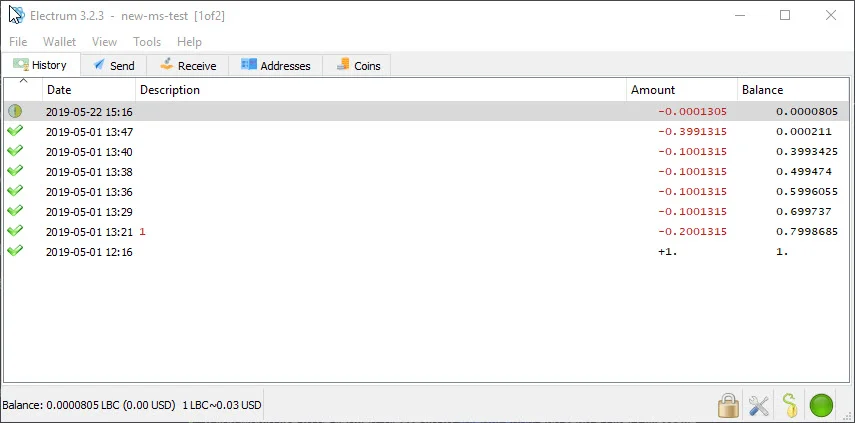
|
||||
|
||||
## Installing and running Electrum for LBRY
|
||||
## Installing and running LBRY Vault for LBRY
|
||||
|
||||
You can find the downloads and setup information for [Electron LBRY on GitHub](https://github.com/tzarebczan/electrum/releases/tag/0.1.0). Windows and Mac installers are provided, but Linux needs to be run from source as detailed on the install instructions. If you previously ran an old version and created wallets, they will need to be re-created in this new version. You can use the old version to send the funds to another wallet and then re-create a new one.
|
||||
You can find the downloads and setup information for [LBRY Vault on GitHub](https://github.com/kodxana/LBRY-Vault/releases). Windows, Mac, and Linux Appimage installations are provided. Additional setup and installation required.
|
||||
|
||||
## Setting up a multisignature wallet
|
||||
|
||||
@@ -23,13 +25,13 @@ On the initial screen, you'll be asked to select a wallet file or create a new o
|
||||
|
||||
At the next prompt, you'll be asked for the wallet type - choose Multi-signature. Next, choose how many people (including the current person/wallet) will be sharing this wallet (from X cosigners) and how many are required to approve the transaction (require X cosigners). For example, if you choose 2 of 3, any 2 people will need to sign off to send the transaction.
|
||||
|
||||
Next, you'll be asked to provide a key for each wallet, including the current one, which is first. If you want to use your LBRY app's key / seed, proceed with "I already have a seed". You can find this seed inside your default_wallet file that's [created as part of your app installation](https://lbry.io/faq/how-to-backup-wallet). Open the default_wallet and you'll see a seed there. The wallet must not be encrypted to view it (you can decrypt temporarily via Desktop App > Settings). Otherwise, you can proceed with a new seed or Hardware device (requires Ledger device, [see below](#HW). Make sure to back up the seed if creating a new one - this can be done by copying the seed phrase or backing up the wallet file that's created.
|
||||
Next, you'll be asked to provide a key for each wallet, including the current one, which is first. If you want to use your LBRY app's key / seed, proceed with "I already have a seed." You can find this seed inside your default_wallet file that's [created as part of your app installation](https://lbry.com/faq/how-to-backup-wallet). Open the default_wallet and you'll see a seed there. The wallet must not be encrypted to view it (you can decrypt temporarily via Desktop App > Settings). Otherwise, you can proceed with a new seed or Hardware device (requires Ledger device, [see below](#HW). Make sure to back up the seed if creating a new one - this can be done by copying the seed phrase or backing up the wallet file that's created.
|
||||
|
||||
You will be given a Master Public Key that will be shared with the other co-signers when they create the same wallet locally. Next, you will be prompted for the next cosigners key. This would come from their PC while setting up the same wallet, or from their [default_wallet file](https://lbry.io/faq/how-to-backup-wallet) by opening it and using the ```"public_key":``` portion (this assumes they will create their Electrum wallet from this LBRY app seed). Proceed with all cosigners until they are all filled out. Lastly, enter a password to encrypt the multisignature wallet.
|
||||
You will be given a Master Public Key that will be shared with the other co-signers when they create the same wallet locally. Next, you will be prompted for the next cosigners key. This would come from their PC while setting up the same wallet, or from their [default_wallet file](https://lbry.com/faq/how-to-backup-wallet) by opening it and using the ```"public_key":``` portion (this assumes they will create their Electrum wallet from this LBRY app seed). Proceed with all cosigners until they are all filled out. Lastly, enter a password to encrypt the multisignature wallet.
|
||||
|
||||
## Receiving LBC in the wallet
|
||||
|
||||
To receive LBC in the Electrum wallet, go to the Receive tab to view an address or enable the addresses view by going to **View > Show Addresses** from the top menu bar. Here you will see all available addresses on the wallet. Multisignature addresses with start with an **r**, regular wallets, including hardware ones, will start with a **b**.
|
||||
To receive LBC in the LBRY Vault wallet, go to the Receive tab click On-chain button to view an address or enable the addresses view by going to **View > Show Addresses** from the top menu bar. Here you will see all available addresses on the wallet. Multisignature addresses with start with an **r**, regular wallets, including hardware ones, will start with a **b**.
|
||||
|
||||
## Sending multisignature transactions
|
||||
|
||||
@@ -37,15 +39,17 @@ Once all parties have their multisignature wallets configured and LBC has been r
|
||||
|
||||
The cosigner has to open the wallet on their PC and go to **Tools > Load Transaction** and then choose from text (if copied) or from file (if export was used). They can then sign the transaction. Each cosigner will need to do the same to send the transaction on the network.
|
||||
|
||||
## Ledger hardware wallet with Electrum {#HW}
|
||||
## Ledger hardware wallet with LBRY Vault {#HW}
|
||||
|
||||
You can use your Ledger device with LBRY Electrum to store LBC. Please follow [these directions on how to install it on your device](https://github.com/tzarebczan/ledger-app-btc/releases/tag/lbry) and then use the above directions to setup a new wallet. For a normal account (non-multisignature), you will choose **Standard wallet** when setting up the device, and then **Use a hardware device**, and then follow the prompts.
|
||||
You can use your Ledger device with LBRY Vault to store LBC. Please follow [these directions on how to install it on your device](https://support.ledger.com/hc/en-us/articles/360012122999-LBRY-LBRY-) and then use the above directions to setup a new wallet.
|
||||
|
||||
Official support with Ledger will be coming at a later date.
|
||||
For a normal account (non-multisignature), you will choose **Standard wallet** when setting up the device, and then **Use a hardware device**, and then follow the prompts.
|
||||
|
||||
## Electrum wallet file location {#backup}
|
||||
Official support with Ledger Live is coming at a later date.
|
||||
|
||||
Electrum wallet files and blockchain data can be found in the App Data Roaming directory under `Electrum-lbry`. The wallet is located in `%appdata%\Electrum-lbry\wallets` and the data in `%appdata%\Electrum-lbry` on Windows. On Mac/Ubuntu, search your system for the Electrum-lbry folder or the name of the wallet file. The wallet should be backed up if you do not have your phrase or are not using the LBRY Desktop wallet.
|
||||
## LBRY Vault wallet file location {#backup}
|
||||
|
||||
LBRY Vault wallet files and blockchain data can be found in the App Data Roaming directory under `Electrum-lbry`. The wallet is located in `%appdata%\Electrum-lbry\wallets` and the data in `%appdata%\Electrum-lbry` on Windows. On Mac/Ubuntu, search your system for the .lbry-vault folder or the name of the wallet file. The wallet should be backed up if you do not have your phrase or are not using the LBRY Desktop wallet.
|
||||
|
||||
## Troubleshooting
|
||||
|
||||
|
||||
@@ -8,7 +8,7 @@ order: 4
|
||||
|
||||
Before talking about how names (URLs) in LBRY work, it's important to understand the problem. What is a naming system and why do we have one?
|
||||
|
||||
Names exist so that we can map a human readable and understandable word or term to a more difficult to remember number or ID. In the traditional DNS (domain name system), names are mapped to a numerical IP address. In LBRY, names are mapped to a unique, permanent ID representing a piece of digital content and/or a publisher identity.
|
||||
Names exist so that we can map a human-readable and understandable word or term to a more difficult one to remember like number or ID. In the traditional DNS (domain name system), names are mapped to a numerical IP address. In LBRY, names are mapped to a unique, permanent ID representing a piece of digital content and/or a publisher identity.
|
||||
|
||||
Designing a naming system that works well and fairly assigns names is quite hard! Consider the domain system you are likely using to access this document. LBRY's domain used to be lbry.io for a long time, rather than lbry.com. Is it because lbry.com is providing some unique service? No! It is because a squatter was in possession of it, simply looking to auction the domain name to the highest bidder in demand. We had to negotiate for months (and pay lots of $$$) to get in possession of the lbry.com domain and we don't want LBRY users to go through a similar experience...we'd rather leave it up to incentives and fixed protocol rules.
|
||||
|
||||
@@ -37,10 +37,10 @@ Claims in LBRY are non-consumptive. When you designate a number of credits in a
|
||||
|
||||
LBRY supports several types of URL resolution:
|
||||
|
||||
| Type | Syntax | Resolution |
|
||||
| --- | --- | --- |
|
||||
| Type | Syntax | Resolution |
|
||||
| --------------------- | ----------------------------- | -------------------------- |
|
||||
| **Permanent** | `lbry://<name>#<claim_id>` | This URL consists of a name and randomly assigned ID. This is permanently owned and controlled by the publisher. Permanent URLs support partial, temporal-ordered ID matching, so these can be quite short (e.g. lbry://name#8 or lbry://name#ab) |
|
||||
| **Short** | `lbry://<name>#<short_claim_id>` | This URL consists of a name and one or more characters (first come first serve to preserve uniqueness) form the Permanent URL. This is permanently owned and controlled by the publisher. If a shorter URL is made available, the claim next in line will take over it's resolution.
|
||||
| **Short** | `lbry://<name>#<short_claim_id>` | This URL consists of a name and one or more characters (first come first serve to preserve uniqueness) from the Permanent URL. This is permanently owned and controlled by the publisher. If a shorter URL is made available, the claim next in line will take over its resolution.
|
||||
| **Community** | `lbry://<name>` | Of all of the claims named `<name>`, this returns the publish with the most credits committed towards it, not just by the publisher, but by the entire community. These URLs are not permanent or owned but instead controlled by the community itself, allowing the resolution to settle on that which the community determines most appropriate. |
|
||||
| **Channel** | `lbry://<@channel_name>` | A URL corresponding to a publisher identity. These resolve to the identity of a specific publisher and their publishes. Channel URLs can be specified with or without the `#` modifier. An unmodified URL returns the channel determined by the community.
|
||||
| **Signed** | `lbry://<@channel_name>/<example>` | The piece of content published to the name `<example>` within the channel of `<@channel_name>`.
|
||||
@@ -49,7 +49,7 @@ LBRY supports several types of URL resolution:
|
||||
|
||||
1. **Names aren't bought, only reserved – no credits are lost, only put on deposit.** If you win the auction for a name, your credits are held with that name until you decide to withdraw them (at any time you wish). You aren't buying the name from anyone, and no one profits off of the transfer of names. It's just a test of who is willing to deposit the most credits toward a name. The only downside is that you can't spend the credits on content or withdraw them while they are in reserve.
|
||||
|
||||
2. **The longer a community name is held, the longer it sticks.** Community-controlled URLs don't change instantly if more credits are designated – especially if you've held it for awhile. For every month a name is controlled, 1 day is added to the waiting period, for a maximum of 7 days (after 7 months).
|
||||
2. **The longer a community name is held, the longer it sticks.** Community-controlled URLs don't change instantly if more credits are designated – especially if you've held it for a while. For every month a name is controlled, 1 day is added to the waiting period, for a maximum of 7 days (after 7 months).
|
||||
|
||||
3. **Everyone has a say.** If you claim lbry://bestmovieever and your film lives up to the hype, user tips and purchases are a strong force keeping your content there. If the community feels a URL resolution is incorrect, they can band together to change it anytime. This is a powerful force keeping bad actors at bay that has already proved useful.
|
||||
|
||||
@@ -67,4 +67,4 @@ We're trying to solve a very hard problem in a novel way, and we're committed to
|
||||
|
||||
## Relevance in search and trending/top categories
|
||||
|
||||
Increasing your bid and receiving tips on your content/channel, increases it's relevance in search results and discoverability through the Trending and Top categories on LBRY. Trending calculations are based on how much the LBC bid has increased through any bid updates and tips, compared to all the other claims on LBRY. [Learn more](/faq/trending).
|
||||
Increasing your bid and receiving tips on your content/channel, increases its relevance in search results and discoverability through the Trending and Top categories on LBRY. Trending calculations are based on how much the LBC bid has increased through any bid updates and tips, compared to all the other claims on LBRY. [Learn more](/faq/trending).
|
||||
@@ -12,7 +12,7 @@ Unfortunately, when running a rewards program, people may abuse it.
|
||||
Phone number approval provides an alternative method for LBRY users to participate in the [rewards](/faq/rewards) program.
|
||||
|
||||
## What if my phone number isn't working?
|
||||
Certain regions, prepaid services and VOIP numbers will be blocked from phone verifications in order to combat abuse. If you are having trouble with getting a phone number accepted, please see one of the [other approval methods](/faq/identity-requirements).
|
||||
Certain regions, prepaid services, and VOIP numbers will be blocked from phone verifications combat abuse. If you are having trouble with getting a phone number accepted, please see one of the [other approval methods](/faq/identity-requirements).
|
||||
|
||||
## What if LBRY says my phone number already exists?
|
||||
This usually means that there is another LBRY account/email address that's already associated with that number. If you are changing email addresses and need to link your accounts or you believe this is an error, please [reach out to us](mailto:help@lbry.com).
|
||||
@@ -18,15 +18,15 @@ We promise to keep any collected data safe and to never share personal, private
|
||||
|
||||
Users can also [choose to use LBRY anonymously](#anonymous) however some features, like [LBRY Rewards](https://lbry.com/faq/rewards), will not be available.
|
||||
|
||||
Additionally, even when not sending data to us, using LBRY typically involves participation in the peer-to-peer LBRY network and certain information like your IP address is likely to be exposed regardless. See [below](#p2p) for more information.
|
||||
Additionally, even when not sending data to us, using LBRY (outside of lbry.tv) typically involves participation in the peer-to-peer LBRY network and certain information like your IP address is likely to be exposed regardless. See [below](#p2p) for more information.
|
||||
|
||||
## What type of data is collected and where?
|
||||
As a first time user of LBRY applications and [lbry.tv](https://lbry.tv), you have the option of providing an email address to create a LBRY account. This allows for a richer user experience by enabling services such as [LBRY Rewards](https://lbry.com/faq/rewards), email notifications, and account synchronization (i.e. subscriptions and user preferences) across multiple devices/platforms. If you do not provide an email, any data collected cannot be associated with your identity, but may still be tied back to other system information like IP addresses.
|
||||
As a first time user of LBRY applications and [lbry.tv](https://lbry.tv), you have the option of providing an email address to create an LBRY account. This allows for a richer user experience by enabling services such as [LBRY Rewards](https://lbry.com/faq/rewards), email notifications, and account synchronization (i.e. subscriptions and user preferences) across multiple devices/platforms. If you do not provide an email, any data collected cannot be associated with your identity, but may still be tied back to other system information like IP addresses.
|
||||
|
||||
See below tables for a break-down of the types of data collected and associated applications.
|
||||
|
||||
Scope of Data | Depends on| Optional | Visibility | Details
|
||||
:------------ |:------------ |:------------ |:------------ |:------------ |
|
||||
Scope of Data | Depends on | Optional | Visibility | Details
|
||||
:------------ |:------------ |:------------ |:---------------- |:------------ |
|
||||
Email addresses | | Yes, if email provided | LBRY | Used to create and authenticate a LBRY account
|
||||
User preferences | Email | Yes, if email provided | LBRY | Subscriptions, tags, blocked channels, and application settings
|
||||
System information | | Yes, if Share Diagnostic Data enabled | LBRY | Operating system, application/SDK versions, and unique install identifier
|
||||
@@ -37,34 +37,38 @@ IP addresses | | No, use VPN to protect | Everyone | Any access to LBRY services
|
||||
Blockchain metadata | Email | Yes, if email provided | LBRY| Wallet addresses and transactions related to Rewards are logged to prevent abuse and comply with tax requirements (above $600 yearly threshold)
|
||||
Blockchain transactions | | No, don’t create transactions | Everyone | Any actions taken that use LBRY credits and create a permanent transaction on the blockchain. Not linked to any Account/User data.
|
||||
|
||||
Scope of Data | LBRY Desktop App | LBRY.tv (Web) | LBRY Android App | LBRY SDK |
|
||||
Scope of Data | LBRY Desktop App | lbry.tv (Web) | LBRY Android App | LBRY SDK |
|
||||
:------------ |:------------ |:------------ | :-------------| :-------------|
|
||||
Email addresses | yes | yes | yes | no |
|
||||
User preferences | yes | yes | yes | no |
|
||||
System information | yes | no | yes | yes |
|
||||
Identity verification | yes | yes | yes | no |
|
||||
Google Analytics | opt-out | yes | yes | no |
|
||||
Google Analytics | opt-in | yes | yes | no |
|
||||
Content access analytics | yes | yes | yes | yes |
|
||||
IP addresses | yes | yes | yes | opt-out |
|
||||
Blockchain metadata | yes | yes | yes | no |
|
||||
Blockchain transactions | yes | yes | yes | yes |
|
||||
|
||||
## What’s the difference between account data and cryptocurrency wallets?
|
||||
Each installable LBRY application also contains a cryptocurrency wallet which is stored locally on the respective device. The wallet allows you to store LBRY Credits and use them to [transact (spend, publish, purchase, and tip) on the network](https://lbry.com/faq/transaction-types). The private information, which is required to perform these actions, is under the sole control of the user.
|
||||
Each installable LBRY application also contains a cryptocurrency wallet That is stored locally on the respective device. The wallet allows you to store LBRY Credits and use them to [transact (spend, publish, purchase, and tip) on the network](https://lbry.com/faq/transaction-types). The private information, which is required to perform these actions, is under the sole control of the user.
|
||||
|
||||
LBRY does provide a wallet syncing and backup mechanism to allow seamless access across multiple devices. The backup service ensures that a wallet can be retrieved by the user through their LBRY account in case they lose access to their local copy. Any storage and exchange of wallet data has end to end encryption, and the user can also provide an additional encryption password if desired.
|
||||
|
||||
## How do I use LBRY anonymously? {#anonymous}
|
||||
To use LBRY in a fully anonymous way, we recommend the LBRY Desktop application. To disable tracking features, you’ll want to disable the `Share Diagnostic Data` option from the Settings page (cog in the top right of the app). Also, you’ll want to skip providing an email and use a Virtual Private Network (VPN) to protect your IP address. This will still allow you use blockchain related features like retrieving content data, publishing, purchasing, tipping, and other transactions. Depending on VPN features and network configuration, hosting data currently may not be possible but we are looking into techniques to allow this in the future.
|
||||
To use LBRY privately, we recommend the LBRY Desktop application. By default, the LBRY Desktop app will not share account or analytics data with LBRY, Inc. or third-parties without specifically being enabled.
|
||||
|
||||
For a maximally private experience, you should also use a Virtual Private Network (VPN) to protect your IP address. This will allow you to use features like retrieving content data, publishing, purchasing, tipping, and other transactions anonymously. Depending on VPN features and network configuration, hosting data currently may not be possible, but this is an area of active development.
|
||||
|
||||
Note that if using LBRY anonymously or privately you are not eligible for [lbry.tv rewards](https://lbry.com/faq/rewards).
|
||||
|
||||
## Where is the account and analytics data stored?
|
||||
LBRY stores collected data on its own secured databases and ensures only authorized employees have access to this data. Google Analytics data is anonymized and protected by Google.
|
||||
|
||||
## What information is shared with others in the network? {#p2p}
|
||||
Similarly to other peer to peer protocols like BitTorrent, users in the network share messages (i.e. announcing content availability) and create direct connections to exchange data (i.e. downloads / uploads). While LBRY does not collect this information, other participants of the network can observe and collect the information.
|
||||
Similarly to other peer to peer protocols like BitTorrent, users in the network share messages (i.e. announcing content availability) and create direct connections to exchange data (i.e. downloads/uploads). While LBRY does not collect this information, other participants of the network can observe and collect the information.
|
||||
|
||||
## Can I use a VPN to use and access LBRY?
|
||||
Yes, a VPN can be used with all LBRY services. Major features will work without any problems, but VPN users may not be eligible for [LBRY Rewards](https://lbry.com/faq/rewards) in order to prevent abuse.
|
||||
Yes, a VPN can be used with all LBRY services. Major features will work without any problems, but VPN users may not be eligible for [LBRY Rewards](https://lbry.com/faq/rewards) to prevent abuse.
|
||||
|
||||
## Is any additional data collected if I participate in the YouTube Sync program?
|
||||
When authenticating into the [YouTube Sync program](https://lbry.com/youtube), you provide proof of channel ownership that allows us to link your YouTube channel to a LBRY account. Information about your account is stored and kept by LBRY, Inc.
|
||||
When authenticating into the [YouTube Sync program](https://lbry.com/youtube), you provide proof of channel ownership that allows us to link your YouTube channel to an LBRY account. Information about your account is stored and kept by LBRY, Inc.
|
||||
@@ -4,7 +4,7 @@ category: tutorial
|
||||
order: 3
|
||||
---
|
||||
|
||||
Publishing to LBRY allows anyone else in the world to access your content. You can publish any type of digital file to LBRY. Publishing requires a small amount of LBC, but almost all of this is returned if you decide to later unpublish. We'll cover that later. For now, get those [cat videos](https://lbry.tv/cats:cb) ready!
|
||||
Publishing to LBRY allows anyone else in the world to access your content. You can publish any type of digital file to LBRY. Publishing requires a small amount of LBC, but almost all of this is returned if you decide to later unpublish. We'll cover that later. For now, get those [cat videos](https://lbry.tv/$/top?name=cats) ready!
|
||||
|
||||
This tutorial is meant to provide a quick overview. Our [Publishing FAQ](/faq/how-to-publish) covers publishing in even more detail.
|
||||
|
||||
@@ -17,7 +17,7 @@ We'll start with publishing on LBRY Desktop and lbry.tv. Scroll down or [click h
|
||||
1. For your video thumbnail, you can upload a thumbnail image or take one directly from your video. 
|
||||
1. For the channel section, you can choose to publish anonymously, select an existing channel, or create a new one.
|
||||
1. Set a price for your content, if desired.
|
||||
1. Adjust the auto-suggested lbry:// URL and bid, if desired. ([learn more](/faq/naming) about how this works)
|
||||
1. Adjust the auto-suggested lbry://URL and bid, if desired. ([learn more](/faq/naming) about how this works)
|
||||

|
||||
1. Click **Publish** to submit your upload to the LBRY network! Please leave your app open so that the file can be properly seeded to the network.
|
||||
|
||||
@@ -28,7 +28,7 @@ Congratulations on publishing your first piece of content! Have any questions? P
|
||||
1. Select from: record a new video, snap a photo, select a file manually, or click an item from the recent videos/GIFs list.
|
||||
1. Fill in details for the content you are uploading, including the title, tags, and description.
|
||||
1. For the channel section, you can choose to publish anonymously, select an existing channel, or create a new one.
|
||||
1. Adjust the auto-suggested lbry:// URL and bid, if desired. ([learn more](/faq/naming) about how this works)
|
||||
1. Adjust the auto-suggested lbry://URL and bid, if desired. ([learn more](/faq/naming) about how this works)
|
||||
1. Set a price for your content, if desired.
|
||||
1. Click **Publish** to submit your upload to the LBRY network!
|
||||
|
||||
|
||||
+104
-98
@@ -1,98 +1,104 @@
|
||||
---
|
||||
title: What are LBRY Rewards?
|
||||
category: getstarted
|
||||
---
|
||||
|
||||
Rewards allow LBRY users to earn LBC, the token that powers the LBRY network. You can earn rewards for watching content, creating an identity, and generally learning about and using LBRY.
|
||||
|
||||
**Please note:** Reward amounts are subject to change at any time by LBRY Inc.
|
||||
|
||||

|
||||
_The rewards screen in the LBRY app_
|
||||
|
||||
## Rewards eligibility
|
||||
|
||||
To be eligible for LBRY Rewards, you must:
|
||||
|
||||
- Sign up for an account at [lbry.tv](https://lbry.tv)
|
||||
- Verify your email
|
||||
- Potentially complete an [additional verification step](#additional-verification) (common if using from VPN or a fraud-prone network)
|
||||
|
||||
Rewards are intended to be earnable on a per-person basis (typically limited to 1 rewards account per household / location). LBRY reserves the right to revoke rewards privileges on any account if abuse is suspected, including on the basis of VPN or shared connections. Users on shared connections will typically not be eligible for rewards.
|
||||
|
||||
## Do I need to be eligible for rewards?
|
||||
|
||||
LBRY works with full functionality without rewards and there's never a requirement to earn rewards or sign in to lbry.tv.
|
||||
|
||||
## How do I claim a reward?
|
||||
|
||||
Some rewards will automatically be added when you complete them. Others require an explicit click or acknowledgement to receive.
|
||||
|
||||
All the rewards can always be seen by clicking **Rewards** from the Account drop down menu (top right of the app).
|
||||
|
||||
Rewards that you have earned be marked your [wallet](/faq/transaction-types).
|
||||
|
||||
## What rewards exist?
|
||||
| Reward | Amount | Description |
|
||||
--- | --- | ---
|
||||
| **Your First Nickel** | 3 LBC | A one-time welcome gift for learning the basics of the application & wallet. Including the purchase of paid content.
|
||||
| **Go for a Stream** | 2 LBC | Rewarded for streaming your very first video on LBRY.
|
||||
| **Channel Surfing** | 3 LBC | A one-time reward for creating a channel on LBRY via the Publish screen.
|
||||
| **First Publish** | 5 LBC | A one-time reward for publishing your first piece of content to LBRY.
|
||||
| **Daily View** | 1- 100 LBC | A random daily reward from 1 to 100 LBC, resets every 24 hours!
|
||||
| **Many Views** | 2- ???? LBC | A multi-level reward for watching videos on LBRY. See descriptions in-app for levels/details!
|
||||
| **Faithful Follower** | 1 - 10 LBC | A multi-level reward for following channels.
|
||||
| [**Coveted Creator**](#followers) | 1 - 10K LBC | A multi-level reward for gaining followers on your channel.
|
||||
| [**Content View Tips**](#contentview) | 1 - 5 LBC | A per view reward from verified lbry.tv users
|
||||
| **Welcome Back** | 3 LBC | Return to the LBRY 24-48 hours following your first use of the app. This reward will self-destruct after that time span.
|
||||
| **Android in Beta** | 10 LBC | Limited time reward for early Android Beta testers.
|
||||
| **Upgrade** | 5 LBC | Rewarded each time the LBRY Desktop app updates versions (i.e. 0.27 to 0.28).
|
||||
| **YouTube** | ?? LBC | Rewarded as part of the [YouTube Sync program](/youtube).
|
||||
| **Reward Code** | ?? LBC | [Custom reward codes](#reward-code) given out to users - be on the look out on social media/Discord/Reddit!
|
||||
| **Referral** | 20 LBC | LBRY users can refer their friends via an email invitation and get rewarded when those users are verified. For more information on referrals, click [here](/faq/referrals).
|
||||
|
||||
If you are new to Publishing, check out [our guide](/faq/how-to-publish).
|
||||
|
||||
## Followers reward {#followers}
|
||||
|
||||
You receive additional rewards as you build a following on LBRY. Only verified LBRY users count, so there may be a discrepancy between what you see on your channel page. Share your channel with the world to earn more LBC!
|
||||
|
||||
| Number of followers | Amount |
|
||||
--- | ---
|
||||
| 1 | 2 LBC
|
||||
| 5 | 10 LBC
|
||||
| 20 | 50 LBC
|
||||
| 100 | 100 LBC
|
||||
| 500 | 300 LBC
|
||||
| 1,000 | 1,000 LBC
|
||||
| 5,000 | 5,000 LBC
|
||||
| 10,000 | 10,000 LBC
|
||||
|
||||
_Not seeing this reward despite being eligible? If you created your channel while not signed in to lbry.tv, we might not know about it. Publishing something new while signed in to lbry.tv will restore eligibility._
|
||||
|
||||
## Views reward and tips {#contentview}
|
||||
|
||||
You receive additional rewards for views from verified lbry.tv accounts. You will see these on your wallet page as Tips and they will be summed up monthly on your Rewards page. You may [unlock the tips](https://lbry.com/faq/tipping) to have the show in your balance, but while locked, they help your content be discovered.
|
||||
|
||||
## Custom reward codes {#reward-code}
|
||||
|
||||
Custom reward codes can be claimed via the [Rewards](https://open.lbry.com/?rewards) page on LBRY. You may have been given a reward code via email, social media or you stumbled upon it somewhere - whichever way, you can claim it for LBC today! It's simple, just hit `Enter Code`, type it in and press `Redeem`.
|
||||
|
||||
**Please note:** Reward code sharing is strictly prohibited and rewards privileges will be revoked.
|
||||
|
||||

|
||||
|
||||
## What is the additional verification step? {#additional-verification}
|
||||
|
||||
Accounts created from networks that have above average fraud rates or that make it difficult to detect fraud may require additional verification steps.
|
||||
|
||||
If this step is required, you will be notified when creating an account or entering the rewards area, which will then walk you through it.
|
||||
|
||||
The additional verifications are:
|
||||
- Via [phone number](/faq/phone)
|
||||
- Via [credit card](/faq/identity-requirements)
|
||||
- Via [Discord](https://chat.lbry.com).
|
||||
|
||||
## Having trouble?
|
||||
|
||||
If you have any questions or problems with receiving the Rewards, feel free to [reach out to us](/faq/support).
|
||||
---
|
||||
title: What are LBRY Rewards?
|
||||
category: getstarted
|
||||
---
|
||||
|
||||
Rewards are one of the ways LBRY users can obtain LBC (also known as LBRY credits, the digital currency token that powers the LBRY network). You can earn rewards for viewing content, following channels, publishing content, having other users to follow your channels, inviting other people to join LBRY, and more. Rewards are issued by LBRY Inc. **Reward amounts are subject to change at any time.**
|
||||
|
||||
Not all users are eligible for rewards, but you can still use LBRY without earning rewards; there is no requirement to spend LBC or even create a LBRY.tv account if you just want to view content. [Learn more about eligibility below.](#eligibility)
|
||||
|
||||
If you're not eligible for rewards but want LBC to publish content or support other content creators, [learn about other ways to obtain LBC.](/faq/earn-credits)
|
||||
|
||||

|
||||
|
||||
_The rewards screen in the LBRY app._
|
||||
|
||||
## Rewards eligibility {#eligibility}
|
||||
|
||||
A reward is intended to be earned no more than one time by each real person. As such, eligibility restrictions are in place to prevent one person from earning rewards under multiple accounts.
|
||||
|
||||
To be eligible for rewards, you must **sign up for an account** at [lbry.tv](https://lbry.tv) and **verify your email**. Many users are required to **complete** [**additional verification**](#additional-verification); this common if using LBRY from VPN or a fraud-prone network. You may not be eligible if there is already another verified account in your household / location. Users on shared connections will typically not be eligible for rewards.
|
||||
|
||||
**Eligibility may be revoked by LBRY.tv if abuse is suspected.** Your eligibility may be revoked if:
|
||||
|
||||
- you use a VPN or shared network to access LBRY.
|
||||
- you try to artificially inflate follow counts or view counts (with "follow for follow" or "view for view" activity or purchased traffic) on LBRY or in other groups.
|
||||
- you spam comments on LBRY.
|
||||
- you immediately withdraw credits from the platform and do not use LBRY for its intended usecase.
|
||||
|
||||
## How do I claim a reward?
|
||||
|
||||
Some rewards will automatically be added when you complete them. Others require an explicit click or acknowledgement to receive.
|
||||
|
||||
All rewards can always be seen by clicking your [Rewards page](https://open.lbry.com/?rewards) from the Account drop down menu (top right of the app).
|
||||
|
||||
Rewards that you have earned will be marked in your [wallet](/faq/transaction-types).
|
||||
|
||||
## What rewards exist?
|
||||
|
||||
**Reward amounts are subject to change at any time.**
|
||||
|
||||
| Reward | Amount | Description |
|
||||
| ------------------------ | ----------- | ------------------------------------------------------------------------------------------------------------------------------------------------------------- |
|
||||
| **Your First Nickel** | 2 LBC | One-time welcome gift for learning the basics of the application & wallet. |
|
||||
| **Go for a Stream** | 1 LBC | One-time reward for streaming your very first video. |
|
||||
| **Welcome Back** | 2 LBC | One-time reward for returning to LBRY 24-48 hours following your first use of the app. (This reward cannot be earned after 48 hours.) |
|
||||
| **Daily View** | 1 - 100 LBC | Repeatable reward for viewing any content. Earn a random reward of 1 to 100 LBC. Reward may be earned once every 23 hours. |
|
||||
| **Many Views** | 2+ LBC | Multi-level reward for watching videos that increases with the number of videos you watch. |
|
||||
| **Faithful Follower** | 1 - 6 LBC | Multi-level reward for following channels. |
|
||||
| **First Publish** | 3 LBC | One-time reward for publishing your first content on LBRY. If you are new to publishing, [learn how to publish](/faq/how-to-publish). |
|
||||
| **Channel Surfing** | 1 LBC | One-time reward for creating a channel on LBRY. |
|
||||
| **Coveted Creator** | 1 - 4K LBC | Multi-level reward for gaining followers on your channel. [Learn more about **Coveted Creator** rewards below.](#followers) |
|
||||
| **Content View Tips** | 1 - 4 LBC | Variable reward based on content views from other validated lbry.tv users. [Learn more about **Content View Tips**.](/faq/view-rewards) |
|
||||
| **Android in Beta** | 4 LBC | Limited-time reward for early Android Beta testers. |
|
||||
| **Upgrade** | 4 LBC | Repeatable reward each time the LBRY Desktop app updates versions (i.e. 0.27 to 0.28). |
|
||||
| **YouTube** | ?? LBC | Rewarded as part of the [YouTube Sync program](/youtube). |
|
||||
| **Reward Code** | ?? LBC | [Custom reward codes](#reward-code) given out to users - be on the look out on social media/Discord/Reddit! |
|
||||
| **Referral** | 15 LBC | LBRY users can refer their friends via an email invitation and get rewarded when those users are verified. [Learn more about **Referrals**.](/faq/referrals). |
|
||||
|
||||
## Followers reward {#followers}
|
||||
|
||||
You receive additional rewards as you build a following on LBRY. Only verified LBRY users count, so there may be a discrepancy between what you see on your channel page. Share your channel with the world to earn more LBC!
|
||||
|
||||
**Reward amounts are subject to change at any time.**
|
||||
|
||||
| Number of followers | Amount |
|
||||
| ------------------- | --------- |
|
||||
| 1 | 2 LBC |
|
||||
| 5 | 5 LBC |
|
||||
| 20 | 10 LBC |
|
||||
| 100 | 50 LBC |
|
||||
| 500 | 150 LBC |
|
||||
| 1,000 | 500 LBC |
|
||||
| 5,000 | 2,000 LBC |
|
||||
| 10,000 | 4,000 LBC |
|
||||
|
||||
_Not seeing this reward despite being eligible? If you created your channel while not signed in to lbry.tv, we might not know about it. Publishing something new while signed in to lbry.tv will restore eligibility._
|
||||
|
||||
## Views reward and tips {#contentview}
|
||||
|
||||
You may receive additional rewards for views from validated lbry.tv accounts. Please see our [view rewards FAQ](/faq/view-rewards) for more details.
|
||||
|
||||
## Custom reward codes {#reward-code}
|
||||
|
||||
Custom reward codes can be claimed via the [Rewards](https://open.lbry.com/?rewards) page on LBRY. You may have been given a reward code via email, social media or you stumbled upon it somewhere - whichever way, you can claim it for LBC today! It's simple, just hit `Enter Code`, type it in and press `Redeem`.
|
||||
|
||||
**Please note:** Reward code sharing is strictly prohibited and rewards privileges will be revoked.
|
||||
|
||||

|
||||
|
||||
## What is the additional verification step? {#additional-verification}
|
||||
|
||||
Accounts created from networks that have above average fraud rates or that make it difficult to detect fraud may require additional verification steps. Even after this step, some users and regions may not qualify for rewards.
|
||||
|
||||
If this step is required, you will be notified when creating an account or entering the rewards area, which will then walk you through it.
|
||||
|
||||
The additional verifications are:
|
||||
|
||||
- Via [phone number](/faq/phone)
|
||||
- Via [credit card](/faq/identity-requirements)
|
||||
- Via [Discord](https://chat.lbry.com).
|
||||
|
||||
## Having trouble?
|
||||
|
||||
If you have any questions or problems with receiving the Rewards, feel free to [reach out to us](/faq/support).
|
||||
@@ -16,6 +16,7 @@ LBRY operates on a couple of different ports, and if there are conflicts/firewal
|
||||
- Port 3333 - LBRY daemon runs and shares data on port 3333 (TCP) by default. Often times, this port can be already in use to due to mining software or other applications/services.
|
||||
- Port 4444 - LBRY daemon utilizes port 4444 to stream and download data from the LBRY network.
|
||||
- Port 50001 - LBRY wallet connections happen over port 50001. LBRY may fail to start if this port is blocked by a firewall or network rules.
|
||||
- Port 5567 - LBRY rehosts content on this port. If it's blocked, you will only be able to download from the P2P network.
|
||||
|
||||
## This is my first time running LBRY, and it won't start
|
||||
- If don't see the LBRY app starting up at all on Windows, run LBRY.exe with CMD (command prompt) to further debug the problem. Navigate to the installation path e.g. `C:\Program Files\LBRY` for x64 and `C:\Program Files (x86)\LBRY` for x86, type `LBRY.exe` and hit enter for the app to launch. This will show any errors the app has starting up. The most common issue [is related to incorrect Windows environment variables](https://superuser.com/questions/1178674/wmic-is-not-recognized-as-an-internal-or-external-command-operable-program-or/1178758).
|
||||
@@ -40,11 +41,8 @@ First and foremost, please ensure you are on the [latest version](/get) of LBRY.
|
||||
### Stuck at blockchain sync or wallet issues {#sync}
|
||||
If you are stuck on the blockchain sync step or it shows a block count that doesn't decrease, you may need to clear your blockchain headers and/or synced data. To do so, Shut LBRY down completely by closing it from the system tray (check for running LBRY/lbrynet-daemon processes), delete the `headers` and `blockchain.db` files in the [lbryum/lbc_mainnet folder](/faq/lbry-directories) and then start LBRY again.
|
||||
|
||||
### Linux auth_token requirements {#auth}
|
||||
Currently, LBRY requires an authorization token to be generated using the [keytar](https://github.com/atom/node-keytar) libraries. Please ensure libsecret and keytar are installed. On some distributions, LBRY won't run unless gnome-keyring is also installed/operational. See [GitHub issue](https://github.com/lbryio/lbry-desktop/issues/386) for more information. If you get a GLIBCXX_3.4.2 error, please see [this issue](https://github.com/lbryio/lbry-desktop/issues/423#issuecomment-327519486).
|
||||
|
||||
### SDK could not start because port is in use (IPV6 / debian)
|
||||
If the newly installed or re-installed LBRY has the start up issue with daemon being in use, check the .local/share/lbry/lbrynet folder for `daemon_settings.yml` file.
|
||||
If the newly installed or re-installed LBRY has the start up issue with SDK not being able to bind, check the .local/share/lbry/lbrynet folder for `daemon_settings.yml` file.
|
||||
If the file doesn't exist, create one and settings inside should be:
|
||||
|
||||
api: 127.0.0.1:5279
|
||||
|
||||
@@ -3,13 +3,15 @@ title: How do I get help or report a bug?
|
||||
category: troubleshooting
|
||||
---
|
||||
|
||||
### Live help
|
||||
## Live community help
|
||||
|
||||
For live help, you can join [our chat](https://chat.lbry.com) and post in the #help channel. Please share a detailed message with the issue you are experiencing. LBRY log files are a good source of information for us; you can learn how to [find them here](/faq/how-to-find-lbry-log-file).
|
||||
For live help, you can join [our community chat](https://chat.lbry.com) and post in the #help channel.
|
||||
|
||||
## Help via email
|
||||
|
||||
You can also [email LBRY](mailto:help@lbry.com) with questions or issues. LBRY log files will help us better understand the issue you are experiencing, you can learn how to [find them here](/faq/how-to-find-lbry-log-file) and attach with your email.
|
||||
You can also [email LBRY](mailto:help@lbry.com) with questions or issues.
|
||||
|
||||
If you're using LBRY Desktop, LBRY log files will help us better understand the issue you are experiencing. You can learn how to [find them here](/faq/how-to-find-lbry-log-file) and attach with your email.
|
||||
|
||||
## Reporting issues
|
||||
|
||||
@@ -19,4 +21,4 @@ To report an issue, you can do one of the following:
|
||||
|
||||
2. Go to the "Help" page of the app and then click the "Submit a Bug Report" button.
|
||||
|
||||
3. If you're a developer or otherwise technical and want to interact with LBRY developers directly, you're welcome to open an issue directly on GitHub. Please try to open network or protocol related issues [here](https://github.com/lbryio/lbry/issues) and interface, usability, and other application related issues [here](https://github.com/lbryio/lbry-desktop/issues). The penalty for getting this wrong is a mild shaming. We would appreciate a quick search to see if similar issues already exist, as well.
|
||||
3. If you're a developer or otherwise technical and want to interact with LBRY developers directly, you're welcome to open an issue directly on GitHub. Please try to open network or protocol related issues [here](https://github.com/lbryio/lbry/issues) and interface, usability, and other application related issues [here](https://github.com/lbryio/lbry-desktop/issues). We would appreciate a quick search to see if similar issues already exist, as well.
|
||||
@@ -14,17 +14,17 @@ When publishing content thumbnails, we recommend a minimum size of 800x450 and a
|
||||
|
||||
Applications can make their own choices on how to render thumbnails. Most applications choose to crop to the center when an image does not fit their desired ratios.
|
||||
|
||||

|
||||

|
||||
|
||||
## Channel covers and profile thumbnails
|
||||
When creating or editing your channel, we recommend the following:
|
||||
- **cover photo**: minimum size of 1000x160 and an aspect ratio of 10:1.6
|
||||
- **cover photo**: minimum size of 1000x160 and an aspect ratio of 6.25:1
|
||||
- **profile thumbnail**: minimum size of 300x300 and an aspect ratio of 1:1 (square).
|
||||
|
||||
Applications can make their own choices on how to render these images. Most applications choose to crop to the center when an image does not fit their desired ratios.
|
||||
|
||||

|
||||

|
||||
|
||||
## How are uploads stored?
|
||||
|
||||
If you are using LBRY to upload the images, they will go through [spee.ch](https://spee.ch) which is limited to 10MBs per file.
|
||||
If you are using LBRY to upload the images, they will go through [spee.ch](https://spee.ch) which is limited to 2MB per file. We are working on implementing a new thumbnail upload process directly on the LBRY protocol.
|
||||
@@ -10,7 +10,7 @@ Tips, in LBRY Credits (LBC), are an integral part of our community because they
|
||||
|
||||
It is important to note that the LBC stored as a result of a tip is tied to your Discord account username and are stored on LBRY's wallet server. **This will not sync with your app/lbry.tv wallet.** It is your responsibility to withdraw the tips to your own wallet or to another third-party wallet like [Coinomi](https://play.google.com/store/apps/details?id=com.coinomi.wallet). If you plan on storing LBC on the Discord server, it is a good idea to enable Two Factor Authentication (2FA) on your account. LBRY takes no responsibility for lost funds due to negligence.
|
||||
|
||||
Use the following commands to make amazing things happen. We recommend running them in the `#bot-sandbox` channel, unless you are tipping someone!
|
||||
Use the following commands to make amazing things happen!
|
||||
|
||||
### Help
|
||||
This displays a list of tip commands and how to use them.
|
||||
@@ -25,12 +25,12 @@ Displays the balance of your Discord LBC wallet.
|
||||
**Example:** `!tip balance`
|
||||
|
||||
### Deposit
|
||||
Displays your Discord LBC wallet address. Useful if you want to receive LBCs directly to your Discord wallet.
|
||||
Displays your Discord LBC wallet address. Useful if you want to receive LBC directly to your Discord wallet.
|
||||
|
||||
**Example:** `!tip deposit`
|
||||
|
||||
### Withdraw
|
||||
Use this to withdraw a chosen amount from your LBC Discord wallet to another LBC wallet such as the wallet in LBRY, Coinomi or to an LBC wallet on an exchange.
|
||||
Use this to withdraw a chosen amount from your LBC Discord wallet to another LBC wallet such as the wallet in any LBRY app, Coinomi or to an LBC wallet on an exchange.
|
||||
|
||||
- **Arguments:** `!tip withdraw <address> <amount>`
|
||||
- **Example:** `!tip withdraw bQ8N2xbbityGNyiijaUtZVHkN3KZys2ci 10`
|
||||
|
||||
@@ -9,7 +9,7 @@ order: 3
|
||||
Tips, in LBRY Credits (LBC), are an integral part of our community because they allow us to reward members for their contributions - whether that's for sharing something insightful, providing feedback, completing bounties, testing our various apps or helping promote LBRY's vision and technology. You can earn them, share, or transfer them via simple [commands on Reddit](https://np.reddit.com/r/lbry/wiki/tipbot).
|
||||

|
||||
|
||||
It is important to note that the LBC stored as a result of a tip is tied to your Reddit account and are stored on LBRY's wallet server. It is your responsibility to withdraw the tips to your LBRY app / [lbry.tv](https://lbry.tv) or other wallet like Coinomi. If you plan on storing LBC on Reddit, it is a good idea to enable Two Factor Authentication (2FA) on your account. LBRY takes no responsibility for lost funds due to negligence.
|
||||
It is important to note that the LBC stored as a result of a tip is tied to your Reddit account and is stored on LBRY's wallet server. It is your responsibility to withdraw the tips to your LBRY app/[lbry.tv](https://lbry.tv) or other wallet like Coinomi. If you plan on storing LBC on Reddit, it is a good idea to enable Two Factor Authentication (2FA) on your account. LBRY takes no responsibility for lost funds due to negligence.
|
||||
|
||||
Use the following commands to make amazing things happen.
|
||||
|
||||
@@ -21,13 +21,13 @@ Displays the balance of your Reddit LBRY wallet. Performed via Reddit messaging.
|
||||
- **Request:** [Request Balance](https://reddit.com/message/compose?to=lbryian&subject=Balance&message=balance)
|
||||
|
||||
### Deposit
|
||||
Displays your Reddit LBRY wallet address. Useful if you want to receive LBC's directly to your wallet. Performed via Reddit messaging.
|
||||
Displays your Reddit LBRY wallet address. Useful if you want to receive LBC directly to your wallet. Performed via Reddit messaging.
|
||||
|
||||
- **Example:** `Deposit`
|
||||
- **Request:** [Request Wallet Address](https://www.reddit.com/message/compose?to=lbryian&subject=Deposit&message=deposit)
|
||||
|
||||
### Withdraw
|
||||
Use this to withdraw your balance from your LBRY Reddit wallet to another LBRY wallet such as the wallet in your LBRY app, or to an LBRY exchange wallet. Performed via Reddit messaging.
|
||||
Use this to withdraw your balance from your LBRY Reddit wallet to another LBRY wallet such as the wallet in your LBRY app, or to a LBRY exchange wallet. Performed via Reddit messaging.
|
||||
|
||||
- **Arguments:** `withdraw <amount> <address>`
|
||||
- **Request:** [Request Withdraw](https://reddit.com/message/compose?to=lbryian&subject=Withdraw&message=withdraw%20%3Camount%3E%20%3Caddress%3E)
|
||||
|
||||
@@ -10,7 +10,7 @@ Tips, in LBRY Credits (LBC), are an integral part of our community because they
|
||||
|
||||

|
||||
|
||||
It is important to note that the LBC stored as a result of a tip is tied to your Twitter account username and are stored on LBRY's wallet server. It is your responsibility to withdraw the tips to your LBRY App / [lbry.tv](https://lbry.tv) or [a standalone wallet](/faq/standalone-wallet). If you plan on storing LBC on Twitter, it is a good idea to enable Two Factor Authentication (2FA) on your account. LBRY takes no responsibility for lost funds due to negligence.
|
||||
It is important to note that the LBC stored as a result of a tip is tied to your Twitter account username and are stored on LBRY's wallet server. It is your responsibility to withdraw the tips to your LBRY App/[lbry.tv](https://lbry.tv) or [a standalone wallet](/faq/standalone-wallet). If you plan on storing LBC on Twitter, it is a good idea to enable Two Factor Authentication (2FA) on your account. LBRY takes no responsibility for lost funds due to negligence.
|
||||
|
||||
Use the following commands to make amazing things happen. You may need to first follow the [@LBC_TipBot](https://twitter.com/LBC_TipBot) account. We recommend creating a new Tweet and starting out with tagging the [@LBC_TipBot](https://twitter.com/LBC_TipBot), followed by the desired command. If the tipbot account is already tagged in a thread, only command is required. Note: Make sure you keep your commands on one line. If they are on multiple lines, the command will not work.
|
||||
|
||||
@@ -32,7 +32,7 @@ Displays the balance of your Twitter LBRY wallet.
|
||||
|
||||
- [**Tweet Example:**](https://twitter.com/TomZarebczan/status/1015244426841677826) `@LBC_TipBot balance`
|
||||
|
||||

|
||||

|
||||
|
||||
|
||||
### Deposit
|
||||
@@ -40,7 +40,7 @@ Displays your Twitter LBRY wallet address. Useful if you want to receive LBC dir
|
||||
|
||||
- [**Tweet Example:**](https://twitter.com/TomZarebczan/status/1015244855247888384) `@LBC_TipBot deposit`
|
||||
|
||||

|
||||

|
||||
|
||||
### Tip
|
||||
Want to tip someone? This will send a tip to a chosen username.
|
||||
@@ -56,11 +56,11 @@ Use this to withdraw your balance from your LBRY Twitter wallet to another LBRY
|
||||
- **Arguments:** `@LBC_TipBot withdraw <address> amount`
|
||||
- [**Tweet Example:**](https://twitter.com/TrendsPremium/status/1015251227599364096) `@LBC_TipBot withdraw bP8P5Dr9d3XcH5ibSsjeDYFU8vMWR8HHe3 5`
|
||||
|
||||

|
||||

|
||||
|
||||
### Terms
|
||||
Displays the terms and conditions
|
||||
|
||||
- [**Tweet Example:**](https://twitter.com/TomZarebczan/status/1015245044415156225) `@LBC_TipBot terms`
|
||||
|
||||

|
||||

|
||||
+44
-7
@@ -5,28 +5,65 @@ category: getstarted
|
||||
|
||||
LBRY allows you to tip and support your favorite creators.
|
||||
|
||||
These credits are automatically stored as associated with the content owners' claim, which helps the claim perform better in search results, top, and [trending calculations](https://lbry.com/faq/trending). It also helps secure the winning [vanity name claims](/faq/naming).
|
||||
A _tip_ sends credits to a publisher permanently, while also boosting the trust and performance of the content (while active). Recipient can keep active or unlock (move to wallet balance).
|
||||
|
||||
LBRY Desktop and lbry.tv also have a experimental setting for supporting claims without tipping (you keep the deposit). By default, creators will also see the Support button on their own content. When supporting other content, you help the publisher [boost their discoverability](https://lbry.com/faq/trending) and secure their [vanity claim names](/faq/naming), but you can redeem your deposit at anytime. [Learn more below](#supports)
|
||||
A _support_ boosts trust and performance, but _does not_ give anything to the publisher permanently. Can be revoked anytime via the wallet page.
|
||||
|
||||
In both cases, the amount of credits is stored as associated with (staked against) either the piece of content or the publisher themselves. Either way, the amount staked:
|
||||
|
||||
- Help content perform better in search results.
|
||||
- Helps content appear higher in the list of [top and trending](https://lbry.com/faq/trending) publishes.
|
||||
- Determines which content is shown at the [community-controlled name](/faq/naming)
|
||||
|
||||
## How do I send a tip?
|
||||
|
||||
Sending tips via LBRY is easy. Simply go to the page of the content you want to support and click "Tip".
|
||||
|
||||
Next, you'll be prompted for the tip amount in LBRY Credits (LBC). Once you enter a value, click "Send". Mahalo!
|
||||

|
||||

|
||||
|
||||
**Note: This amount will show up in your transaction list and will be deducted from your balance.**
|
||||
|
||||
## How do I redeem my tips?
|
||||
|
||||
When you receive a tip, the credits will come into your wallet, and you can see them in your Transaction History. However, since the credits come in as supporting a claim, they will not show in your available balance.
|
||||
When you receive a tip, the credits will come into your wallet, and you can see them in your Transaction History. However, since the credits come in as supporting a claim, they will not show in your available balance. See our [suggested guidelines](#guidelines) on tip unlocking.
|
||||
|
||||
To have these credits show in your balance, they must be unlocked via the wallet Overview/History page. This is done by clicking the unlock icon next to `Tip` and then confirming your action on the following screen. Once the transaction is finalized, the icon will disappear. This also nullifies any help the support/tip was giving in terms of search results, trending, and top discovery mechanisms.
|
||||
To have these credits show in your balance, they must be unlocked. Tips can be unlocked in 1 of 2 ways.
|
||||
|
||||
Unlock tip: 
|
||||
### 1. Unlocking tips by publish
|
||||
|
||||
Confirmation box: 
|
||||
You can mass unlock tips from a published item using the LBC Details section of the content page.
|
||||
|
||||

|
||||
|
||||
You'll have an option choose the amount to unlock, with the default being 25%. Enter an amount or use the slider, and then click Unlock. The remaining LBC is sent back to you as a support on your content.
|
||||
|
||||
**Please note: Mass tip unlocking may fail if there are over ~500 active tips. We're working on making this possible! If this occurs, you'll need to unlock some via the per tip method below.**
|
||||
|
||||

|
||||
|
||||
### 2. Unlocking tips in transaction history
|
||||
|
||||
You can also unlock tips across all of your publishes in your transaction history.
|
||||
|
||||
This is done by clicking the unlock icon next to `Tip` and then confirming your action on the following screen. Once the transaction is finalized, the icon will disappear.
|
||||
|
||||
Unlock tip: 
|
||||
|
||||
Confirmation box: 
|
||||
|
||||
## What are the downsides of unlocking tips? Are there any good rules to follow? {#guidelines}
|
||||
|
||||
While you should never hesitate to unlock LBC you need or want to spend, unlocking LBC does reduce the boost it gives to your content in terms of search results, trending, and discovery mechanisms.
|
||||
|
||||
Aside from [community-controlled names](/faq/naming), which are just a small part of how your content is discovered, the rules about how unlocking tips will affect your content is complicated, and can change based on the overall popularity of the type of content you create. For example, a large amount of tips showing up on a previously obscure publish can mean more than a large amount of tips showing up on content that has received large tips before!
|
||||
|
||||
If you're feeling uncertain, some easy advice to follow is:
|
||||
|
||||
- Never unlock more than half the LBC on content that is performing well
|
||||
- Never go below 10 LBC on a piece of content you want to continue to get views
|
||||
|
||||
But these rules are just suggestions and may change as LBRY evolves.
|
||||
|
||||
## How do I send a support? {#supports}
|
||||
|
||||
|
||||
@@ -3,31 +3,30 @@ title: What types of LBRY transactions are there?
|
||||
category: wallet
|
||||
---
|
||||
|
||||
There are a number of transaction types which take place on the LBRY blockchain. LBRY displays these transactions on the Wallet page.
|
||||
There are a number of transaction types which take place on the LBRY blockchain. LBRY displays these transactions on the Wallet page. You can filter on various types and statuses of these transactions using the options provided.
|
||||
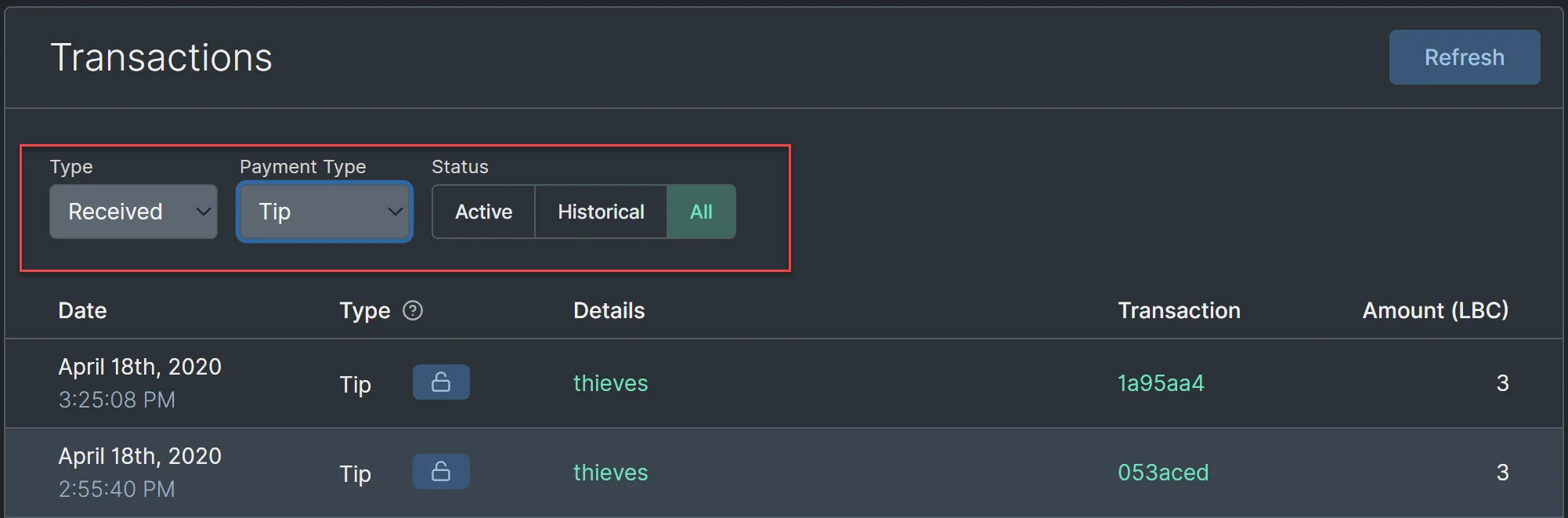
|
||||
|
||||
Many transaction types also have details associated with them such as the claim/channel name or if they came from an LBRY Reward. You can also see additional details by clicking the transaction ID and accessing them in the [LBRY block explorer](https://explorer.lbry.com).
|
||||
|
||||
## Transaction types
|
||||
|
||||
| Type | Details |
|
||||
--- | ---
|
||||
| **Spends** | LBC is sent to another address or used to purchase content.<br/>Also, revoked content/claimed tips show as Spends.
|
||||
| **Receives** | LBC received at wallet address, an incoming content payment or LBRY Reward.
|
||||
| **Publishes** | LBC claim associated with content publication.<br/>Claims can be revoked via trash button<sup>1</sup>.
|
||||
| **Channels** | LBC claim associated with Channel creation.<br/>Channel claims can be revoked via trash button.
|
||||
| **Tips** | Tips sent or received. Received tips can be claimed via the unlock button in order to be reflected in your balance.
|
||||
| **Supports** | Claim support sent or received. Support claims can be revoked via trash button.
|
||||
| **Updates** | Update to previously published content<sup>2</sup>. Updated claims can be revoked via trash button.
|
||||
| **Abandons** | Transaction that results after revoking a claim or tip. The amount shown is the LBC returned to your wallet.
|
||||
| Type | Details |
|
||||
------------- | ---------------
|
||||
| **Sent** | LBC is sent to a wallet address - sent LBC, outgoing tips, or content purchases.
|
||||
| **Receive** | LBC received at a wallet address - received LBC, incoming tips, or content purchases.<br/>***Active** = currently supporting your content. **Historical** = claimed into your balance.*
|
||||
| **Publish** | LBC claim associated with content publication.<br/>Claims can be revoked via trash icon<sup>1</sup>. Historical records are previous updates<sup>2</sup>.
|
||||
| **Channel** | LBC claim associated with Channel creation.<br>Channel claims can be revoked via trash button. Historical records are previous updates<sup>2</sup>.
|
||||
| **Repost** | Link to another LBRY claim <br/>Reposts can be revoked via trash icon<sup>1</sup>.
|
||||
| **Support** | LBC used to support your own or other content. Support claims can be revoked via trash icon<sup>1</sup>. <br/>***Active** = currently locked. **Historical** = revoked.*
|
||||
|
||||
<sup>1</sup> If the revoke icon is not available, the claim may have already been revoked, or there may be an update to the claim (which can be revoked).
|
||||
<sup>1</sup> If the revoke icon is not available, the claim may have already been revoked, or it may be a historical record.
|
||||
|
||||
<sup>2</sup> Amount shown does not reflect balance taken out of wallet - the update process uses the original bid amount, and the resulting transaction may result in a positive or negative balance to your wallet based on the updated bid amount.
|
||||
|
||||
## Additional Actions
|
||||
|
||||
Certain transactions allow you to take additional actions directly from the transaction screen, such as claiming an incoming tip via the unlock button and revoking a claim via the trash button. Once the action is taken, the action icon will disappear, and the resulting transaction will appear in your history.
|
||||
Certain transactions allow you to take additional actions directly from the transaction screen, such as claiming an incoming tip via the unlock button and revoking a claim via the trashcan button. Once the action is taken, the action icon be greyed out, and LBC will be returned to your wallet.
|
||||
|
||||
## What About Purchases?
|
||||
## What about purchase details?
|
||||
|
||||
Content purchases and incoming content payments are not currently available but are planned for a future release. Currently these show as spends.
|
||||
Content purchases and incoming content payments do not currently show which content they are linked to. This is coming in a future release.
|
||||
+17
-15
@@ -6,19 +6,21 @@ order: 2
|
||||
|
||||
## How do trending, top, and discovery work on LBRY?
|
||||
|
||||
As of the [LBRY Erikson Release](https://github.com/lbryio/lbry-desktop/releases/tag/v0.34.0), the LBRY desktop app and web app support dynamic trending and top views based on your interests and the channels you follow. This article explains how these features work. **Please note: Your list of followed tags does not currently sync between devices and may be lost if cache/data is cleared.**
|
||||
LBRY apps support dynamic trending and top discovery based on your interests and the channels you follow. This article explains how these features work.
|
||||
|
||||
**Please note: Content publishers are responsible for ensuring appropriate and valid tags are used. If posting content for mature audiences, the Mature tag MUST be specified. Tag abuse and failure to apply appropriate tags will not be tolerated. Your channel may be filtered and rewards revoked.**
|
||||
|
||||
## How do I use it?
|
||||
|
||||
At the top of your Home area, you can toggle between Trending, Top, and New for either your interests (tags you follow), your channels, or the whole LBRY network. When Top is selected, you can also choose the relevant time frame. You can also browse these same options for specific tags by clicking on the tag name anywhere on the screen or by searching for one.
|
||||
At the top of your Home area, you can toggle between Trending, Top, and New for either your channels, videos, audio, images, text or the whole LBRY network. When Top is selected, you can also choose the relevant time frame. You can also browse these same options for specific tags by clicking on the tag name anywhere on the screen or by searching for one.
|
||||
|
||||

|
||||

|
||||
|
||||
## How do these views work?
|
||||
|
||||
| View | What It Shows |
|
||||
| View | What It Shows |
|
||||
| --- | --- |
|
||||
| _Trending_ | Trending shows the content that has had the greatest increase in tips and supports over the last 24 hours, compared to its baseline performance, and that of other content, over the last 7 days. |
|
||||
| _Trending_ | Trending shows the content that has had the greatest increase in tips and supports over the last few hours and days, compared to its baseline performance, and that of other content. |
|
||||
| _Top_ | Top shows the content published within the selected period that has received the largest total amount of tips and supports. |
|
||||
| _New_ | New shows the newest content by time. |
|
||||
|
||||
@@ -28,10 +30,9 @@ All of these views work the same whether you are viewing tags you follow, a sing
|
||||
|
||||
### Customizing tags
|
||||
|
||||
To customize the tags you follow, click "Customize" from your home screen and select content areas that interest you. You can search for tags that have been used and follow those that interest you. You can even type in a tag that has never been used before, and follow it in case someone publishes content with that tag in the future.
|
||||
To customize the tags you follow, click "Your Tags" from your home screen and select content areas that interest you. You can search for tags that have been used and follow those that interest you. You can even type in a tag that has never been used before, and follow it in case someone publishes content with that tag in the future.
|
||||
|
||||

|
||||

|
||||

|
||||
|
||||
### Customizing channels
|
||||
|
||||
@@ -39,24 +40,25 @@ There are two ways to follow channels:
|
||||
|
||||
1. Click the follow button for creators that you are interested in. These buttons appear on channel and content pages.
|
||||
|
||||

|
||||

|
||||
|
||||
2. Click "Customize" from your home screen to discover and follow new channels using the `Find New Channels` option. Suggested channels include those most subscribed on LBRY and those who have been featured creators. More suggested channel options will be added in a future release.
|
||||
2. Click "Following" from your home screen to discover and follow new channels using the `Discover New Channels` option. Suggested channels include those most subscribed on LBRY, Top channels, and those who have been featured creators. More suggested channel options will be added in a future release.
|
||||
|
||||

|
||||

|
||||

|
||||
|
||||
### Exploring tags
|
||||
|
||||
You can also explore each individual tag by clicking on it from anywhere on the screen or using the search function. Once you are on a tag page, you can click the follow button to add it to your customized list of tags.
|
||||
You can also explore each tag by clicking on it from anywhere on the screen or using the search function. Once you are on a tag page, you can click the follow button to add it to your customized list of tags.
|
||||
|
||||

|
||||

|
||||
|
||||
## How does content make it into top or trending?
|
||||
|
||||
Top content is based on calculations around the total LBC value of content, which is accumulated through the claim bid amount plus any community [tipping and supports](https://lbry.com/faq/tipping). Trending is similar, but does not take into account any initial bids, and is based on tip/support changes over time. The Top category is normally instant - the highest ranked LBC content will appear at the top when published in the time periods specified. Trending takes some time to update (about 1 day) and it ranked against how all other content on LBRY also trended up or down.
|
||||
Top content is based on calculations around the total LBC value of content, which is accumulated through the claim bid amount plus any community [tipping and supports](https://lbry.com/faq/tipping). Trending is similar and is based on tip/support changes over a period of time. The Top category is normally instant - the highest-ranked LBC content will appear at the top when published in the time periods specified. Trending takes some time to update and larger tips/supports may see a delay to avoid abuse.
|
||||
|
||||
## How is this different from YouTube?
|
||||
|
||||
YouTube uses obscured, secret algorithms that are designed to be biased in favor of the mainstream media and other creators they prefer, rather than being neutral to all content ([See Veritasium's take on this](https://lbry.tv/@veritasium:f/my-video-went-viral-here-s-why:e)).
|
||||
|
||||
LBRY creates open-source code that allows all of the world to see precisely how our features work. We can then write articles like this one that try to spell it out in plain language. The source code for the Trending/Top/New functionality is viewable [here](https://github.com/lbryio/lbry-sdk/blob/master/lbry/wallet/server/db/trending.py).
|
||||
LBRY creates open-source code that allows all of the world to see precisely how our features work. We can then write articles like this one that tries to spell it out in plain language. The source code for the Trending/Top/New functionality is viewable [here](https://github.com/lbryio/lbry-sdk/tree/master/lbry/wallet/server/db/trending).
|
||||
@@ -0,0 +1,54 @@
|
||||
---
|
||||
title: What are the recommended video settings for publishing?
|
||||
category: publisher
|
||||
order: 2
|
||||
---
|
||||
|
||||
Even though LBRY does not enforce any file size, resolution, or quality of video content, we still encourage publishers to adhere to web optimized bitrates/sizes to ensure a good overall experience for lbry.tv and app users. LBRY does not automatically transcode on upload or when viewing, but an option is available on the LBRY Desktop app to do so during the publish process. If you are publishing on Android or lbry.tv, please follow the manual instructions for Handbrake/ffmpeg below.
|
||||
|
||||
See our [Publishing FAQ](/faq/how-to-publish) for more information about the publishing process.
|
||||
|
||||
## Recommended settings and bitrate
|
||||
|
||||
We recommend uploading videos at 720P in an MP4 container, H264 video encoding, and AAC audio with a maximum bitrate of 5 Mbps (check file properties to see current rate). It's also helps if the moov atom is at the front of the file - this is sometimes referred to as Fast Start (ffmpeg) or Web Optimized (Handbrake). If the content is not compatible or over 5 Mbps, you'll be given a warning on the publish page.
|
||||
|
||||
If you prefer 1080P, please try to keep the bitrate at or below 8 Mbps. You'll be given a warning on the publish page, but you can still proceed.
|
||||
|
||||
## Automated transcoding in LBRY Desktop {#automatic}
|
||||
|
||||
The LBRY Desktop application supports local transcoding of videos during the publish process. This will require ffmpeg (automated process coming later) to be installed and will create a transcoded copy alongside your original file (**_fixed** appended to the filename).
|
||||
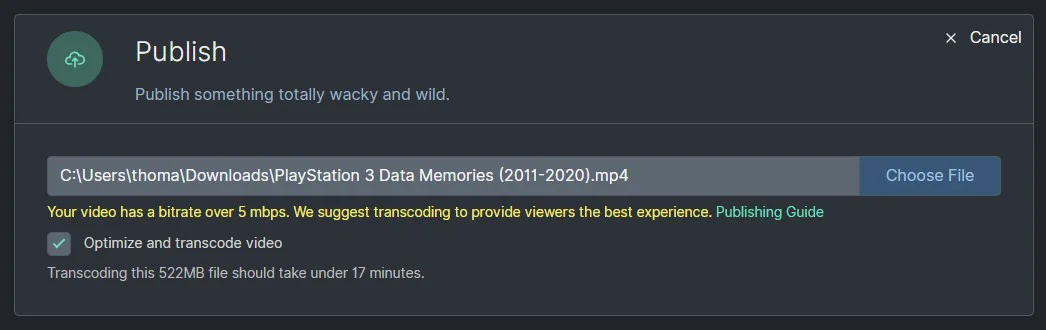
|
||||
|
||||
ffmpeg will automatically be found from your system path or [lbrynet folder](/faq/lbry-directories), or you can also use a custom path.
|
||||
|
||||
### Install and configure
|
||||
|
||||
The easiest way to configure ffmpeg on Windows/Mac is to [download the executables](https://www.ffmpeg.org/download.html) and copy the bin folder into a new folder called ffmpeg inside your [lbrynet folder](/faq/lbry-directories). The final path to the files would be something like `lbry/lbrynet/ffmpeg/bin/ffmpeg.exe`. For Linux, the install process typically adds it to your system path.
|
||||
|
||||
This will allow the application to automatically detect it, but you can also choose your own custom path on the Settings page (will require restart in most cases).
|
||||
|
||||
**Known issues:*
|
||||
|
||||
- For Windows users, do not use system protected paths like program files/system32 as this may not have appropriate permissions.
|
||||
- For Mac users, you may need to run the ffmpeg / ffplay from the command line a single time before the app has permission to do so.
|
||||
|
||||
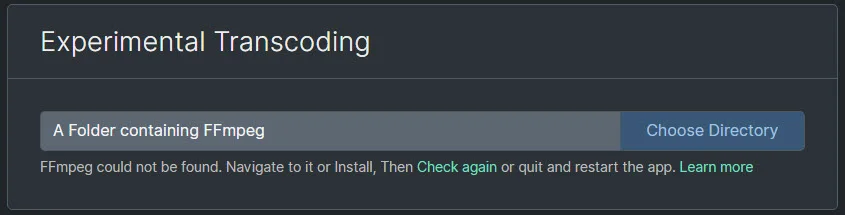
|
||||
|
||||
## Instructions for Handbrake
|
||||
|
||||
If using Handbrake, we recommended the following settings:
|
||||
|
||||
- Preset of Fast 720P30.
|
||||
- Enable Web optimized.
|
||||
- Disable Align A/V Start.
|
||||
- Save as .mp4 extension.
|
||||
|
||||
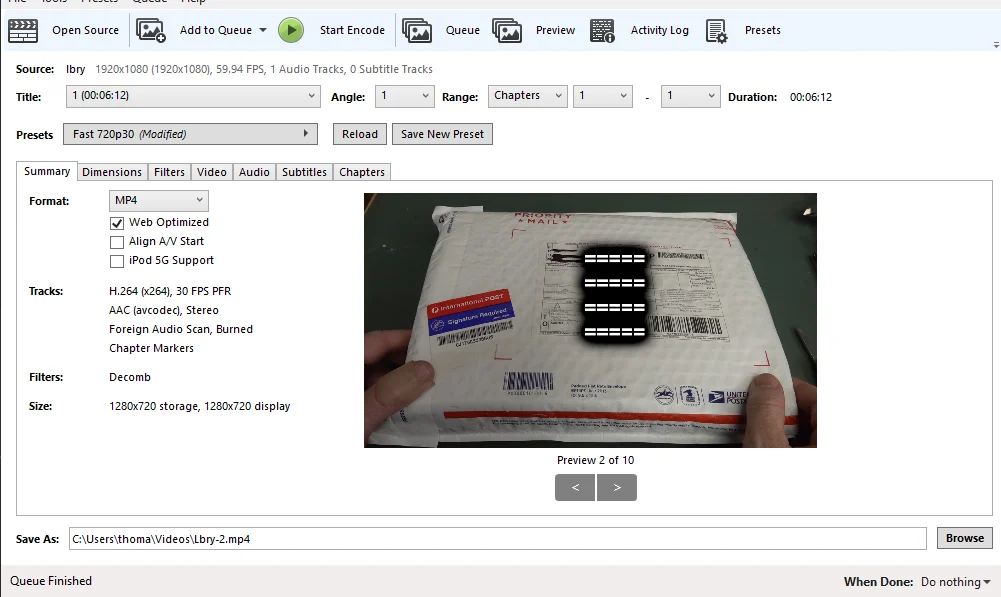
|
||||
|
||||
## Instructions for ffmpeg
|
||||
|
||||
If using FFMPEG, we recommend the following parameters, and replace input/output with the appropriate file path:
|
||||
|
||||
```
|
||||
ffmpeg -i input.avi -c:v libx264 -crf 21 -preset faster -pix_fmt yuv420p -maxrate 5000K -bufsize 5000K -vf 'scale=if(gte(iw\,ih)\,min(1920\,iw)\,-2):if(lt(iw\,ih)\,min(1920\,ih)\,-2)' -movflags +faststart -c:a aac -b:a 160k output.mp4
|
||||
```
|
||||
@@ -0,0 +1,47 @@
|
||||
---
|
||||
title: What are creator view rewards? What do creators earn for views?
|
||||
category: publisher
|
||||
order: 2
|
||||
---
|
||||
|
||||
We want creators to create quality content that other LBRY users will enjoy and to be able to earn at a comparable or greater amount to alternatives.
|
||||
|
||||
If you publish quality original content, you may be eligible to receive additional rewards for views from validated lbry.tv accounts on behalf of us. These tips are separate from tips your followers may issue independently and ineligibility does not mean the content is demonetized.
|
||||
|
||||
## How creator view rewards work
|
||||
|
||||
LBRY tracks views from lbry.tv users and other clients. When a user views your content that is reward-verified, we will automatically send an LBC tip for each of their daily first ten views.
|
||||
|
||||
Creators will see these on their wallet page as Tips (filter on Received + Tips) and they will be summed up monthly on the Rewards page under `Content View Tips: Month Year`. You may [unlock the tips](https://lbry.com/faq/tipping) to have the show in your balance, but while locked, they help your content be discovered.
|
||||
|
||||

|
||||
|
||||
## Requirements and disqualifications
|
||||
|
||||
Not all accounts are eligible for tips.
|
||||
|
||||
Existing YouTube synced channels with over 500 subscribers and other established creators on LBRY are automatically opted in.
|
||||
|
||||
In order for your account to qualify for view rewards, it must meet the following requirements:
|
||||
|
||||
- The majority of the content must be original content in video or audio form (we will expand to other formats later).
|
||||
- The content and channel must be properly tagged.
|
||||
- The account must be at least a week old.
|
||||
|
||||
Typical disqualifications include:
|
||||
|
||||
- Spamming LBRY comments with your channel/content.
|
||||
- Participation in follow-for-follow/view-for-view activity on LBRY and other public/private chats.
|
||||
- Non-original, spam, manipulative, abusive, or other quality issues with your content.
|
||||
- Majority of content is non video/audio.
|
||||
- Majority of content is related to airdrops/free money.
|
||||
|
||||
**LBRY reserves the right to disable view rewards on any account, similar to other rewards.**
|
||||
|
||||
## I'm eligible but not receiving tips, what can I do?
|
||||
|
||||
We will monitor for new channels to opt in automatically. If you've met the above requirements and are not getting tips for viewed content, [please reach out to via email](mailto:hello@lbry.com) and tell us more about your channel and content. This will later be made clearer in the app and automated via an opt in process.
|
||||
|
||||
## I'm in need of some assistance, can you help?
|
||||
|
||||
Of course, we are always here to help! Check out our [help page](/faq/support) on how to reach us.
|
||||
@@ -14,3 +14,7 @@ Instead, view and subscriber counts are currently provided by LBRY, Inc., not th
|
||||
Currently, users who opt-out of analytics (more on how to use [LBRY anonymously here](https://lbry.com/faq/privacy-and-data#anonymous)) are not counted in view or subscriber figures.
|
||||
|
||||
In the future, LBRY will look to improve the accuracy of this feature as well as by adding it to the protocol itself (for example, by allowing wallet servers to share aggregated statistics and allowing subscriptions to occur via a special transaction).
|
||||
|
||||
## LBC value of content
|
||||
You'll notice an LBC value next to the view count. This value includes the [original bid amount for the URL](/faq/naming), [tips, and supports](/faq/tipping). Content owners can see how much belongs to them via the LBC details section by clicking the unlock button.
|
||||

|
||||
@@ -7,7 +7,7 @@ Wallet servers are used to relay data to and from the LBRY blockchain. They also
|
||||
|
||||
## How do I connect to a wallet server?
|
||||
|
||||
[LBRY Desktop](https://lbry.com/get) (version 0.38 and up) is required to configure and connect to a custom wallet server. Navigate to the Settings page and scroll down to experimental settings. Choose **Use custom wallet servers**. Here you can enter the server and port of the wallet server. The connection status will update after a few seconds. If an invalid server is used or it becomes unavailable, you'll lose any wallet and discovery features. If this happens on startup, it will reset to the lbry.tv servers.
|
||||
[LBRY Desktop](https://lbry.com/get) is required to configure and connect to a custom wallet server. Navigate to the Settings page and scroll down to experimental settings. Choose **Use custom wallet servers**. Here you can enter the server and port of the wallet server. The connection status will update after a few seconds. If an invalid server is used or it becomes unavailable, you'll lose any wallet and discovery features. If this happens on startup, it will reset to the lbry.tv servers.
|
||||
|
||||

|
||||
|
||||
@@ -25,6 +25,20 @@ If you...
|
||||
|
||||
This process is mainly meant for power users and will most likely require a dedicated server. Installing and running a wallet server requires two main components, the LBRY full blockchain node and LBRY SDK. We have dockerized this process so it's easy for users to configure and run. Please see our [setup and installation](https://lbry.tech/resources/wallet-server) on how to proceed.
|
||||
|
||||
## Manual connection via config file
|
||||
|
||||
This requires the creation of a daemon_settings.yml file in the [default data directory](/faq/lbry-directories). Open in text editor and add (**make sure there's a space after the -**):
|
||||
```
|
||||
lbryum_servers:
|
||||
- <domain or ip of server>:50001
|
||||
```
|
||||
|
||||
Example:
|
||||
```
|
||||
lbryum_servers:
|
||||
- community1.lbry.com:50001
|
||||
```
|
||||
|
||||
## What else do I need to know?
|
||||
|
||||
1. Join our [Discord chat](https://chat.lbry.com) and ask to be added to the wallet-server channel to stay up to date.
|
||||
|
||||
@@ -1,12 +1,13 @@
|
||||
---
|
||||
---
|
||||
title: What is LBRY exactly? Is it a protocol, an app, a website, or a company?
|
||||
category: LBRY 101
|
||||
order: 1
|
||||
---
|
||||
|
||||
For most users, LBRY will be a place where they can find great videos, music, ebooks, and more: imagine a vast digital library that is available on all of your devices. But under the hood, LBRY is many components working together.
|
||||
|
||||
First and foremost, LBRY is a new *protocol* which allows anyone to build apps that interact with digital content on the LBRY network. Apps built using the protocol allow creators to upload their work to the LBRY network of hosts (like BitTorrent), to set a price per stream or download (like iTunes) or give it away for free (like YouTube without ads). The work you publish could be videos, audio files, documents, or any other type of file.
|
||||

|
||||
|
||||
First and foremost, LBRY is a new *protocol* that allows anyone to build apps that interact with digital content on the LBRY network. Apps built using the protocol allow creators to upload their work to the LBRY network of hosts (like BitTorrent), to set a price per stream or download (like iTunes) or give it away for free (like YouTube without ads). The work you publish could be videos, audio files, documents, or any other type of file.
|
||||
|
||||
Traditional video (or other content) sites such as YouTube, Instagram, and Spotify store your uploads on their servers and allow viewers to download them. They also allow creators to make some money through advertising or other mechanisms. However, there are some well-known drawbacks, especially for people whose material is perceived as not being advertiser-friendly.
|
||||
|
||||
@@ -16,6 +17,10 @@ What makes this all possible is the blockchain technology developed by the creat
|
||||
|
||||
Do you have to understand any of this to use and enjoy LBRY? No. Does it still matter to users? Yes!
|
||||
|
||||
<video autoplay loop poster="https://spee.ch/f/2019-08-lbry-interface-poster.jpg" playsinline>
|
||||
<source src="https://spee.ch/b/2019-09-lbry-interface-webm-2.webm" type="video/webm">
|
||||
<source src="https://spee.ch/0/2019-09-lbry-interface-mp4-2.mp4" type="video/mp4"></video>
|
||||
|
||||
## Why build a protocol?
|
||||
Building [protocols, not platforms](/news/blockchain-is-love-blockchain-is-life), is the best way to secure a free, open internet. Almost every tech giant today is a centralized service that sells users' personal information and attention to advertisers. They spend a lot of money chasing their product (your personal information and time/attention), but at the end of the day, users (you) offer it up for free in exchange for access to the platform.
|
||||
|
||||
|
||||
@@ -4,7 +4,7 @@ category: publisher
|
||||
order: 6
|
||||
---
|
||||
|
||||
By agreeing to sync your content to the LBRY network, you agree to the terms specified in the below document. You must agree to these terms to make your content available on LBRY and receive LBRY Credits. A human-friendly summary appears lower down, *but the actual agreement you are making is specified in the below document*.
|
||||
By agreeing to sync your content to the LBRY network, you agree to the terms specified in the below document. You must agree to these terms to make your content available on LBRY and receive LBRY Credits. A human-friendly summary appears lower down, _but the actual agreement you are making is specified in the below document_.
|
||||
|
||||
## The terms
|
||||
|
||||
@@ -13,16 +13,23 @@ Visit our [Google Doc](https://docs.google.com/document/d/e/2PACX-1vS0H7gnSg7Zlx
|
||||
## Human-friendly highlights
|
||||
|
||||
### 1. Term Period
|
||||
This Agreement lasts twelve (12) months from the date that the Content is uploaded to your Channel on LBRY. After that time, your content will continue to be on the LBRY Network under the terms of this agreement for successive 6-month periods; if you decide to revoke your content, it will be taken down within 30 days of LBRY receiving notice from you.
|
||||
|
||||
This Agreement lasts twelve (12) months from the date that the Content is uploaded to your Channel on LBRY. After that time, your content will continue to be on the LBRY Network under the terms of this agreement for successive 6-month periods; if you decide to revoke your content, it will be taken down within 30 days of LBRY receiving notice from you.
|
||||
|
||||
### 2. Receiving LBRY Credits (LBC)
|
||||
|
||||
Receiving LBRY Credits is considered taxable income in the United States, and may be considered taxable income in your country. If you are a citizen of the United States* and receive over $600 worth of LBC, you will also have to complete tax related documentation. We will contact you if you are over this threshold.
|
||||
|
||||
Receiving LBRY Credits is considered taxable income in the United States, and may be considered taxable income in your country. If you are a citizen of the United States and receive over $600 worth of LBC, you will also have to complete tax related documentation. We will contact you if you are over this threshold. Reward amounts, similar to [other LBRY Rewards](/faq/rewards) may change at any time.
|
||||
|
||||
### 3. Promotional rights
|
||||
|
||||
LBRY, Inc. has the right to promote your content and its availability on the LBRY network, and to use the name/likeness/voice of your content in its mailing lists, on its website, on the network itself, and through advertising by any and all means.
|
||||
|
||||
### 4. Content security
|
||||
|
||||
LBRY, Inc. makes no promises as to the availability or security of your content. While blockchain entries can expire and may no longer be accessed in our clients, we make no promises or guarantees that we can fully remove your content from the network, nor that we will keep your content secure.
|
||||
|
||||
### 5. YouTube Terms of Service and Google Privacy Policy
|
||||
|
||||
If you participate in the YouTube Creator Program, you also agree to [YouTube's Terms of Service (https://www.youtube.com/t/terms)](https://www.youtube.com/t/terms) and [Google's Privacy Policy (https://www.google.com/policies/privacy)](http://www.google.com/policies/privacy).
|
||||
|
||||
To revoke LBRY's access to your YouTube account or manage your security preferences, please refer to your [Google Security and Permissions Page (https://security.google.com/settings/security/permissions)](https://security.google.com/settings/security/permissions). If you plan to do this, please also email us to stop the sync process. You may need to return any LBC earned if you break the agreement before the term period.
|
||||
+18
-11
@@ -6,7 +6,7 @@ order: 4
|
||||
|
||||
**Please note:** Our queue is currently backed up due to an influx of content creators syncing their channels. It may take a few days to process your channel, thank you for your patience and syncing to LBRY!
|
||||
|
||||
LBRY offers an easy way for YouTubers to republish their content to the LBRY network, engage with LBRY users, and earn LBC. This program is available to new and existing LBRY users - installing or using our platform is not a prerequisite to syncing your channel. LBRY provides a one-click sync process that gathers your channel and video metadata (i.e. covers, thumbnails, etc), creates a channel for you on LBRY, and publishes your videos to it. Creators are eligible for [monthly LBC rewards](#reward) if they have over 1K subscribers.
|
||||
LBRY offers an easy way for YouTubers to republish their content to the LBRY network, engage with LBRY users, and earn LBC. This program is available to new and existing LBRY users - installing or using our platform is not a prerequisite to syncing your channel. LBRY provides a one-click sync process that gathers your channel and video metadata (i.e. covers, thumbnails, etc.), creates a channel for you on LBRY, and publishes your videos to it. Creators are eligible for [monthly LBC rewards](#reward) if they have over 1K subscribers.
|
||||
|
||||
To sync your existing YouTube channel to LBRY and learn more about the program, use [lbry.com/youtube](/youtube).
|
||||
|
||||
@@ -17,14 +17,16 @@ To sync your existing YouTube channel to LBRY and learn more about the program,
|
||||
There are three main steps to this program:
|
||||
|
||||
1. *[Enroll](#enroll)* - Provide authorization for us to begin syncing. After this step, you can begin claiming [rewards](#reward) (if eligible).
|
||||
2. *Sync* - During this step, we perform magic behind the scenes. It can take up to several days and [some sync limitations apply](#limits).
|
||||
2. *Sync* - During this step, we perform magic behind the scenes. It can take up to several days, your subscription count must be public at all times, and [some sync limitations apply](#limits).
|
||||
3. *[Transfer](#transfer)* - Claim ownership of your new LBRY channel and LBRY wallet, so that you and only you are in control. More [below](#transfer).
|
||||
|
||||
### Enrolling {#enroll}
|
||||
|
||||
To enroll, visit [lbry.com/youtube](/youtube).
|
||||
|
||||
The enrollment page will validate that you own your channel and that you agree to the terms of the LBRY YouTube program. After enrolling, we collect information about your channel (title, description, etc.) and put your content into a queue to be automatically published to the LBRY network. This means you don't have to do anything to have your entire channel backed up and permanently available via LBRY.
|
||||
The enrollment page will validate that you own your channel and that you agree to the terms of the LBRY YouTube program.You will also need to confirm your email. Please make sure to use your LBRY email account if you already have one. If you have multiple YouTube channels, they should all be linked to the same LBRY account (some exceptions allowed).
|
||||
|
||||
After enrolling, we collect information about your channel (title, description, etc.) and put your content into a queue to be automatically published to the LBRY network. This means you don't have to do anything to have your entire channel backed up and permanently available via LBRY.
|
||||
|
||||
When the process is complete, you will receive a notice from LBRY indicating your channel is available to view.
|
||||
|
||||
@@ -32,9 +34,11 @@ When the process is complete, you will receive a notice from LBRY indicating you
|
||||
|
||||
Note that as soon as you enroll, you are eligible to receive LBRY Credits based on the terms of our program. The current rewards for participating can be seen on the [program page](/youtube). The exact agreement you make when you enroll can be seen [here](/faq/youtube-terms).
|
||||
|
||||
### Claiming rewards {#reward}
|
||||
### Rewards {#reward}
|
||||
|
||||
As soon as you've enrolled, you can claim your rewards. Rewards can be claimed on a monthly basis. You will receive an email when it is available and you never lose any LBC for not claiming promptly.
|
||||
As soon as you've enrolled, you can claim your rewards. Rewards can be claimed on a monthly basis if you have over 1K subs and 10K YouTube views, and as long as you publish content regularly. You will receive an email when your monthly reward is available.
|
||||
|
||||
Monthly reward amounts, similar to our [policy with other rewards](/faq/rewards), can change based on LBRY Inc's discretion. If rewards are not claimed for over 3 months, any subsequent months will be forfeited.
|
||||
|
||||
1. Visit [lbry.tv](https://lbry.tv) or download the LBRY Desktop app from [lbry.com](https://lbry.com/get).
|
||||
2. Sign in with the email that matches the address on your [YouTube status page](/youtube/status). You can change your email on this page if you want to sign in with a different email.
|
||||
@@ -55,7 +59,7 @@ Once the channel and content is transferred, you'll be able to publish, comment,
|
||||
|
||||
If you are signing into the LBRY for the first time, you'll be presented with an option to claim your channel. If the channel is still queued, you'll be able to claim it from the Channels page (right hand side above Publishes) after its synced. Existing app users can also claim their channels via the Channels page. If you created any channels or published content locally before initiating this step, see the [cleanup section](#cleanup).
|
||||
|
||||
**Note: if you choose not enable wallet sync during your sign up process, it is vital that you have a [backup of your wallet](/faq/how-to-backup-wallet) after the transfer process is initiated.**
|
||||
**Note: if you choose not to enable wallet sync during your sign up process, it is vital that you have a [backup of your wallet](/faq/how-to-backup-wallet) after the transfer process is initiated.**
|
||||
|
||||

|
||||
|
||||
@@ -74,13 +78,16 @@ You are responsible for keeping your wallet safe | no | maybe\* |
|
||||
\*Yes if you do not turn on wallet sync in Settings on Desktop. Sync is on by default for lbry.tv.
|
||||
|
||||
## Limitations {#limits}
|
||||
- **Subscription count must be public on YouTube**
|
||||
- Videos longer than 1 hour will only be synced for channels with more than 1000 subscribers
|
||||
- Videos longer than 2 hours will not be synced
|
||||
- Videos bigger than 2GB will be synced at lower quality (1080p, 720p, 480p, ...)
|
||||
- Only your 1000 most recent videos will be synced
|
||||
- Due to high demand, you will be only be synced if you have at least 100 subscribers
|
||||
- Private or unlisted videos will not be published, but everything else will
|
||||
|
||||
- There is a size limit per video of 2GB/2-hours
|
||||
- There is limit of your most recent 1,000 videos.
|
||||
Exceptions can be discussed. Contact us at hello@lbry.com
|
||||
|
||||
Your most recent 1,000 videos that are 2GB or smaller in size will be synced to LBRY.
|
||||
|
||||
Private or unlisted videos will not be published, but everything else will.
|
||||
|
||||
## What happens if I created a channel and/or published to LBRY before transfer? {#cleanup}
|
||||
|
||||
|
||||
@@ -5,7 +5,7 @@ date: '2017-03-15 00:09:00'
|
||||
cover: 'berkeley-banner.jpg'
|
||||
---
|
||||
|
||||
**Update 12/21/2019: just looking to access these videos? Check out the [@UCBerkeley channel on lbry.tv](https://lbry.tv/@UCBerkeley:d) or [download the app](https://lbry.com/get) and go to [lbry://@UCBerkeley:d]([lbry://@UCBerkeley:d]).**
|
||||
**Update 12/21/2019: just looking to access these videos? Check out the [@UCBerkeley channel on lbry.tv](https://lbry.tv/@UCBerkeley:d) or [download the app](https://lbry.com/get) and go to [lbry://@UCBerkeley:d](lbry://@UCBerkeley:d).**
|
||||
|
||||
Today, the University of California at Berkeley has deleted 20,000 college lectures from its YouTube channel. Berkeley removed the videos because of a lawsuit brought by two students from another university under the Americans with Disabilities Act.
|
||||
|
||||
|
||||
@@ -9,7 +9,7 @@ category: update
|
||||
|
||||
## This is the only crypto puzzle to combine juggling, math, language, and a whole lot more into a challenging (and rewarding) package!
|
||||
|
||||
<iframe src="https://spee.ch/video-embed/@juggling:1/siteswapping" allowfullscreen="true" style="border:0"></iframe>
|
||||
<iframe width="560" height="315" src="https://lbry.tv/$/embed/siteswapping/7deefad0ace0867cde5541ce9c08120c7bff5eb4" allowfullscreen></iframe>
|
||||
|
||||
## Watch the video to get started!
|
||||
|
||||
|
||||
@@ -0,0 +1,45 @@
|
||||
---
|
||||
author: samuel-lbryian
|
||||
title: 'LBRY Joule for Desktop'
|
||||
date: '2020-01-22 10:00:00'
|
||||
cover: 'joule-lightning.jpg'
|
||||
category: update
|
||||
---
|
||||
|
||||
## Introducing a High-Energy Homepage, Improved ERGonomics, and More Changes that Will Make You Say Watt?!
|
||||
|
||||
Today, LBRY releases LBRY Joule for Windows, macOS, and Linux. This new release adds a brand new homepage, improved navigation, and more.
|
||||
|
||||
- [Download Joule for desktop](https://lbry.com/get)
|
||||
- [Use LBRY in your browser](https://lbry.tv)
|
||||
|
||||
The new homepage brings larger tiles and offers a mix of content, rather than a single, specific view. The homepage view will look different depending on the number of channels and tags you follow. In general, the navigation has made it easier and clearer how to get back to content you like, as well as content you create.
|
||||
|
||||
A typical homepage view might show:
|
||||
|
||||
- Latest content from channels you follow
|
||||
- Trending for tags you follow
|
||||
- Content trending across the network
|
||||
- Content tagged #homepagecagematch
|
||||
- Latest from @lbry channel
|
||||
|
||||
We expect to add further customization of the homepage in future updates.
|
||||
|
||||
|
||||
|
||||
LBRY Joule also includes a revamped Invites area as part of a larger update to Invites for lbry.tv account holders. This will be shared in more detail in a separate announcement, but you are welcome to check it out and use them now.
|
||||
|
||||
### More about LBRY Joule
|
||||
|
||||
- Revamped homepage. Homepage uses grid display with images to display a variety of claim filters, such as new content from your follows or trending across the network.
|
||||
- Improved navigation in the sidebar and header.
|
||||
- Improved display and handling of text content including markdown.
|
||||
- Now released via AppImage for Linux users.
|
||||
- The cursor automatically hides on full screen videos.
|
||||
- Fixed issues with the color profile on some Linux distributions.
|
||||
- Fixed issues around sign in occasionally getting inappropriately stuck.
|
||||
- Fixed issues with app crashes on some content edits. Fixed some other minor presentation bugs around editing.
|
||||
|
||||
For the full release notes, visit [GitHub](https://github.com/lbryio/lbry-desktop/releases/tag/v0.39.0).
|
||||
|
||||
For a limited time, enter custom reward code `lbry-joule-buzz` to zap a little LBC into your wallet.
|
||||
@@ -0,0 +1,41 @@
|
||||
---
|
||||
author: samuel-lbryian
|
||||
title: 'What Did WeAreChange Find on Epstein's Private Island?'
|
||||
date: '2020-01-23 13:00:00'
|
||||
cover: 'wearechange.jpg'
|
||||
category: featured-content
|
||||
---
|
||||
|
||||
## News is what somebody somewhere wants to suppress; all the rest is advertising.
|
||||
|
||||

|
||||
|
||||
We Are Change is an independent, non-partisan news organization that seeks to find and and uncover the stories the mainstream media does not.
|
||||
|
||||
### Visiting Epstein’s Island
|
||||
|
||||
If you want an example of their coverage style, check out their coverage of Jeffery Epstein’s private island. We Are Change wanted to learn more about it, so they did the most direct and logical thing: they just went there.
|
||||
|
||||
What was on Epstein’s island?
|
||||
[EXCLUSIVE: First-Ever Look Inside Epstein’s Private Island](https://open.lbry.com/@wearechange:1/exclusive-first-ever-look-inside-epstein:c)
|
||||
|
||||
### Virginia Gun Protests
|
||||
|
||||
Going on the ground to get a first-hand, in-person look and see how things really are is a central tenet of coverage at We Are Change. For a fresh example, check out their visit to Virginia Lobby Day.
|
||||
|
||||
Was Virginia Lobby Day full of violent Neo Nazis or a day of peaceful protest?
|
||||
|
||||
[Richmond Virginia During Lobby Day](https://lbry.tv/@wearechange:1/live-richmond-virginia-now-during-lobby:c)
|
||||
|
||||
### How Did Senior Saudis’ Get Bezos’ Boy Bits?
|
||||
|
||||
While on the ground reporting is one of their more unique touches, We Are Change isn’t afraid to cover a story du jour. Especially if that story involves a foreign government obtaining private photos of one of the most powerful men in America.
|
||||
|
||||
[Saudi Crown Prince Hacks Amazon CEO Jeff Bezos](https://lbry.tv/@wearechange:1/mystery-chinese-virus-reaches-us-saudi:5)
|
||||
|
||||
Follow We Are Change on LBRY and Support Independent Journalism
|
||||
Organizations like We Are Change are fighting to enable people to directly tell stories to other people.
|
||||
|
||||
This is vital in a time when the news is less trustworthy than it has been in generations, if not ever.
|
||||
|
||||
Follow [@WeAreChange on LBRY](https://open.lbry.com/@WeAreChange:1), and show them some support!
|
||||
@@ -0,0 +1,53 @@
|
||||
---
|
||||
author: samuel-lbryian
|
||||
title: 'I̶t̶'̶s̶ ̶a̶b̶o̶u̶t̶ ̶e̶t̶h̶i̶c̶s̶ ̶i̶n̶ ̶g̶a̶m̶e̶ ̶j̶o̶u̶r̶n̶a̶l̶i̶s̶m̶ Aw who knows just watch The Quartering'
|
||||
date: '2020-01-30 13:00:00'
|
||||
cover: '2020-0130quartering.jpg'
|
||||
category: featured-content
|
||||
---
|
||||
|
||||
## The Quartering talks video games, movies, comics, and culture. At last, a break from all the politics?
|
||||
|
||||

|
||||
|
||||
Video games. Comics. Movies. The enjoyable entertainment we consume after a long day at work, free from the day-to-day drama of the real world.
|
||||
|
||||
No.
|
||||
|
||||
No, stop.
|
||||
|
||||
We have to fight about this sh*t now too?
|
||||
|
||||
I’ve learned three things this week:
|
||||
|
||||
1. We are indeed fighting about these things.
|
||||
2. The Quartering provides a pretty frickin funny and informative take on this stuff.
|
||||
3. You should not watch the Quartering if you are prone to beard envy.
|
||||
|
||||
### Drink from the hose
|
||||
|
||||
Jeremy is a great follow for prompt coverage of hot topics in gaming, culture, and the news at large. Here’s some just from the last week:
|
||||
|
||||
#### [Warcraft 3: Reforged Is A Total DISGRACE & Blizzard's New RIDICULOUS Policy!](https://open.lbry.com/@TheQuartering:1/warcraft-3-reforged-is-a-total-disgrace:2)
|
||||
|
||||
<video controls poster="https://thumbnails.lbry.com/w6b78tyr0nQ" src="https://lbryplayer.xyz/content/claims/warcraft-3-reforged-is-a-total-disgrace/29663cf285a45cad897ebfa7e4a9fe2663121e01/stream"></video>
|
||||
|
||||
#### [Youtube Just DESTROYED An ENTIRE Genre Of Videos! Please Help! (watch this and tell them about LBRY!)](https://open.lbry.com/@TheQuartering:1/youtube-just-destroyed-an-entire-genre:2)
|
||||
|
||||
<video controls poster="https://thumbnails.lbry.com/IFhz7MyiRQA" src="https://lbryplayer.xyz/content/claims/youtube-just-destroyed-an-entire-genre/2450dc4320d99fbad58e2c6b4d8717e483b71a1f/stream.mp4"></video>
|
||||
|
||||
#### [Calm Down On China Coronavirus! Media Profits From Fear](https://open.lbry.com/@TheQuartering:1/calm-down-on-china-coronavirus-media:8)
|
||||
|
||||
<video controls poster="https://thumbnails.lbry.com/F9gtmIzk_-g" src="https://lbryplayer.xyz/content/claims/calm-down-on-china-coronavirus-media/8956d003cb5f6c262ffb6b83a2dccb1e27cd0081/stream.mp4"></video>
|
||||
|
||||
### The Greatest Hits
|
||||
|
||||
Some hits from the last year:
|
||||
|
||||
1. [Avengers Cast Savagely Roast Brie Larson & Her Lies About Doing Her Own Stunts](https://open.lbry.com/@TheQuartering:1/avengers-cast-savagely-roast-brie-larson:b)
|
||||
2. [Court Orders PewDiePie Delete "Congratulations" & "Bitch Lasagna"](https://open.lbry.com/@TheQuartering:1/court-orders-pewdiepie-delete:d)
|
||||
3. [Outrage Over Call of Duty: Modern Warfare! Demands For Censorship](https://open.lbry.com/@TheQuartering:1/outrage-over-call-of-duty-modern-warfare:d)
|
||||
|
||||
### Support the Quartering
|
||||
|
||||
Jeremy has faced censorship and exclusion for speaking his mind in the past. Please [click here to follow and support him on LBRY.](https://open.lbry.com/@TheQuartering:1) Let’s continue to show we are a community that accepts all voices, even if we disagree!
|
||||
@@ -0,0 +1,186 @@
|
||||
---
|
||||
author: julie-sigwart
|
||||
title: 'Wrapping up 2019 and looking into 2020 Community update!'
|
||||
date: '2020-01-25 13:00:00'
|
||||
cover: '2020goldlights.jpg'
|
||||
category: community-update
|
||||
---
|
||||
|
||||
Here come the Roaring 20s! We finished strong in 2019, increasing our user base by more than 1500% (that’s 15x!), and we can’t wait to tackle 2020! All of our apps have changed dramatically, new features have been added, and we had a slew of press coverage recently.
|
||||
|
||||

|
||||
|
||||
## In this update {#updates}
|
||||
* [So long 2019 (and YouTube), hello to Content Freedom 2020!](#wrapup)
|
||||
* [What's new at LBRY?](#news)
|
||||
* [LBRY Foundation and the Swarm](#swarm)
|
||||
* [LBRY Foundation logo contest - up to 70,000 LBC in prizes to be awarded](#contest)
|
||||
* [Internationalization update](#i18n)
|
||||
* [The cherry on the top](#treat)
|
||||
|
||||
### So long 2019 (and YouTube), hello to Content Freedom 2020! {#wrapup}
|
||||
|
||||
All of our projects have progressed significantly since our last community report, and 2019 was an amazing year. Some of our achievements:
|
||||
|
||||
- [LBRY on the web, lbry.tv, is introduced](https://lbry.tv)
|
||||
- App Internationalization: our community contributed 39 languages to LBRY apps
|
||||
- Launch of Swarm program and LBRY Foundation
|
||||
- Commenting on content launched
|
||||
- Much better creator features and control
|
||||
- Improved discovery
|
||||
- Launch of Chainquery
|
||||
- A single LBRY account across all your devices
|
||||
- Protocol improvements including faster resolution and fewer errors
|
||||
- Overall more robust network
|
||||
- File tagging, more new metadata
|
||||
|
||||
CEO Jeremy Kauffman will publish a 2019 wrapup blog, and we'll reveal our 2020 Roadmap by the end of January.
|
||||
|
||||
### What's new at LBRY? {#news}
|
||||
|
||||
#### YouTube gave LBRY an amazing Christmas present
|
||||
|
||||
With the rise of YouTube stars, the legal path for tech companies like Google is unclear. Bumbling along, Google released new YouTube terms of service on December 10 designed to address the Children's Online Privacy Protection Act (COPPA.)
|
||||
|
||||
While this may help YouTube comply with the law, the bottom line for YouTubers meant more demonetization of their content, fewer views of their videos, and many unanswered questions about what kind of legal jeopardy they might face, including huge fines.
|
||||
|
||||
LBRY community member [@neohumaneve](https://lbry.tv/@neohumaneve:e?r=J9AzYYBK8iuEiH53V5PgyYUJqbvzJsnW) contributed this video about the situation:
|
||||
|
||||
[Escape from YouTube](https://lbry.tv/@neohumaneve:e/Escape-YouTube:8)
|
||||
|
||||

|
||||
|
||||
Included among the changes, was a disclaimer that YouTube could terminate services (including access to Google services) if they deemed your content was not "commercially viable."
|
||||
|
||||
Many folks dismissed YouTube's terms of service change as "Business as normal," and that it was no big deal.
|
||||
|
||||
Abruptly on December 23, YouTube gave hundreds of creators of cryptocurrency-related content a strike, locked them out of their channels, or outright deleted some channels and Google accounts entirely. Learn more about this and how to find/support these creators on LBRY on our [blog post regarding the crackdown](https://lbry.com/news/youtubecryptocrackdown).
|
||||
|
||||
[Horror stories emerged](https://www.businessinsider.com/markiplier-youtube-fans-heist-lost-access-google-accounts-spamming-emotes-2019-11) of folks who lost their longtime Google account (including access to their gmail address) when their YouTube account was terminated.
|
||||
|
||||
A huge influx of users rushed to LBRY, and despite some growing pains, the network scaled well, and LBRY received good press coverage:
|
||||
|
||||
- Cointelegraph: [Cryptocurrency Influencers Speak Out On YouTube Deleting Crypto-Related Content ](https://cointelegraph.com/news/cryptocurrency-influencers-speak-out-on-youtube-deleting-crypto-related-content)
|
||||
- Cointelegraph: [YouTube Reinstates More Crypto-Related Content, Admits To Mistake Via Twitter](https://cointelegraph.com/news/youtube-reinstates-more-crypto-related-content-admits-to-mistake-via-twitter )
|
||||
- Cointelegraph: [What’s Next For YouTubers Impacted By Crypto-Related Content Ban?](https://cointelegraph.com/news/whats-next-for-youtubers-impacted-by-crypto-related-content-ban)
|
||||
_“Building a business or a following on YouTube is building on quicksand. YouTube regularly censors and bans creators, with capricious and arbitrary rules enforcement.”_
|
||||
- Coinspice: [Christmas Massacre: YouTube Begins Crackdown on Crypto as LBRY Tried to Warn Content Creators](https://coinspice.io/news/christmas-massacre-youtube-begins-crackdown-on-crypto-as-lbry-tried-to-warn-content-creators/)
|
||||
_"Decentralized, crypto-friendly platform LBRY seized the opportunity. “Sneaky of YouTube to do this to all the crypto content creators right before Christmas when everyone is distracted.” Earlier this month LBRY highlighted coming changes to the YouTube platform. “Escape YouTube before it’s too late,” the company urged, which turned out to be very good advice."_
|
||||
- Bitcoin.com: [Youtube 'Christmas Purge' Has Content Creators Pointing to These Alternate Platforms](https://news.bitcoin.com/youtube-christmas-purge-has-content-creators-pointing-to-these-alternate-platforms/)
|
||||
- Altcoinbuzz: [Decentralized Alternatives to Youtube](https://www.altcoinbuzz.io/bitcoin-and-crypto-guide/decentralized-alternatives-to-youtube/ )
|
||||
- Cryptocracy: [Special Edition: YouTube's War on Crypto Content
|
||||
Refugee video creators are migrating to LBRY with a hope and a prayer](https://cryptocracy.substack.com/p/special-edition-youtubes-war-on-crypto)
|
||||
- Yahoo: [YouTube has restored deleted videos from crypto channels](https://finance.yahoo.com/news/youtube-restored-deleted-videos-crypto-103023456.html)
|
||||
- Bitcoin Warrior: [Crypto YouTubers claim platform is censoring their videos](https://bitcoinwarrior.net/2019/12/crypto-youtubers-claim-platform-is-censoring-their-videos/)
|
||||
|
||||
#### Joule for desktop released
|
||||
|
||||
LBRY Joule brings many great updates such as a brand new homepage, improved navigation, invites and more.
|
||||
|
||||
The new homepage brings a grid of content tiles and offers a mix of content depending on the number of channels and tags you follow. Navigation changes have made it easier to return to content you like, as well as your published content.
|
||||
|
||||
Full details of the Joule release [are here.](https://open.lbry.com/@lbry:3f/joule:a?r=J9AzYYBK8iuEiH53V5PgyYUJqbvzJsnW)
|
||||
|
||||

|
||||
|
||||
#### Fireworks for Android released
|
||||
The new Android Fireworks release adds improved search, rich text support, a better video play experience, channel view and play counts, and more.
|
||||
|
||||
- [Download from the Play Store](https://play.google.com/store/apps/details?id=io.lbry.browser&_ga=2.119991816.1200782483.1578512453-972114350.1553020414)
|
||||
|
||||
Full details and changes are available [on our blog.](https://open.lbry.com/@lbry:3f/android-fireworks:d?r=J9AzYYBK8iuEiH53V5PgyYUJqbvzJsnW)
|
||||
|
||||
#### Searching on LBRY
|
||||
If you’ve used LBRY recently, you may have noticed improved search results - that’s because we’ve made large strides with our search algorithm to better process and spit out more relevant and timely results. This includes putting some weight on newer content and taking into account better multi-word scenarios. You can now also put quotes around entire phrases for exact search matches. We will continue to improve this area of the LBRY experience by adding additional filters and sorting criteria in the coming months.
|
||||
|
||||
#### Wallet servers {#wallet-servers}
|
||||
Adding an option to select [wallet servers](https://lbry.com/faq/wallet-servers) is a large step towards our goal to further decentralize the LBRY apps and allows different communities to customize their view of the LBRY network, including search results, trending, and block lists.
|
||||
|
||||
One such example is a community member (@EF on Discord) who is running an alternative trending algorithm on his server, connect to it to check it out: 199.192.31.122:50001. If a server is unavailable on startup, it will default back to the known lbry.tv wallet servers. We’ve also dockerized the process to make it super simple to run, check out our guide on lbry.tech.
|
||||
|
||||
#### Invites changes
|
||||
We have revamped our invites program to make it easier for users to share referrals and claim referrers. You can access your invites link [here](https://open.lbry.com/?invite) and learn more on our [FAQ](https://lbry.com/faq/invites).
|
||||
|
||||
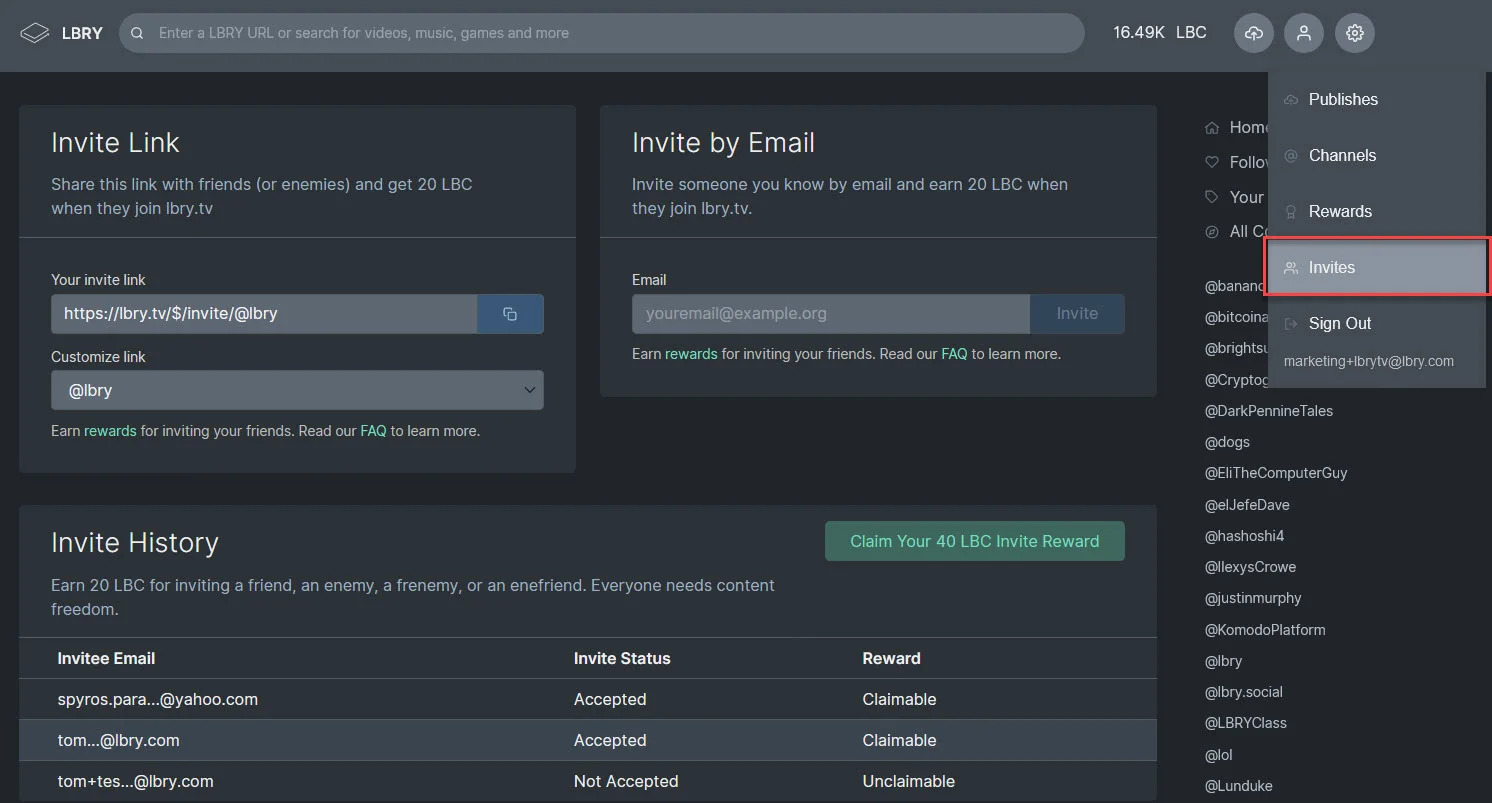
|
||||
|
||||
#### Support for more file types and downloads on lbry.tv
|
||||
We now support additional file types for viewing in the web experience - this includes markdown, text, HTML, and PDF. You can now also save content from lbry.tv using the download button!
|
||||
|
||||

|
||||
|
||||
### LBRY Foundation and the Swarm {#swarm}
|
||||
Our community held its first election, adding community member Jon Ringo to our foundation board.
|
||||
|
||||
The results were extremely tight - a single vote could have changed the outcome. All of the candidates are standouts among our community, and we're looking forward to adding another two board seats soon.
|
||||
|
||||

|
||||
|
||||
We're very excited Jon has joined us! He brings relevant experience from the Gridcoin community as a Core contributor, Twitter Admin, Github Repo Organizer, and is their Discord Moderator.
|
||||
|
||||
Intro from Jon’s candidate statement:
|
||||
|
||||
_”Hi there. My name is Jon, I come from the US, I received a few humanities degrees from one of those sciency ivy-esque schools several years ago. I made a pilgrimage to Zuccotti park during OWS, started my first successful long-term business, and learned about Bitcoin shortly thereafter. I have been involved with crypto in some form ever since. As a result I have been following LBRY (and a lot of other projects) since their release. Gridcoin is the project to which I have dedicated much of my time during the past few years, and a project I have been directly involved in since 2013. While my certificates say "humanities", economics, FOSS, and human/network/complex systems science have been my fields of study for some time now”_
|
||||
|
||||
Some skills Jon brings to the LBRY Foundation:
|
||||
|
||||
- Experience in communicating from small teams to large groups
|
||||
- A focus on the big picture
|
||||
- 15+ years of business, media, and on/offline community development experience
|
||||
- Nearly 3 years of crypto community, infrastructure, and organization development in a FOSS environment
|
||||
- 6+ years of crypto experience
|
||||
|
||||
#### Want to participate in LBRY Foundations future? Please make sure you add the lbryian role on Discord to gain access to the Swarm-related channels
|
||||
|
||||
1. After joining the main Discord at chat.lbry.com, type "!addrole lbryian" in #bots-and-roles channel to be added to the Swarm governance channel.
|
||||
|
||||
2. Edit your email preferences (click the link in the footer of every email LBRY has sent you) and ensure the lbry.org box is checked.
|
||||
|
||||
Come chat with us on Discord to get involved!
|
||||
|
||||
### LBRY Foundation logo contest - up to 70,000 LBC in prizes to be awarded
|
||||
|
||||
The LBRY Foundation is asking for submissions for its logo design. You are tasked with creating a logo for the LBRY Foundation that embodies your vision of LBRY’s implementation of decentralized and independent technology. This will be the logo used on the Foundation's website and other materials.
|
||||
|
||||
**There will be two rounds to the contest.**
|
||||
|
||||
**Round 1 - Submissions**
|
||||
Round one will be open to everyone. To participate, submit your design to the #logo-contest-submissions channel on the [LBRY Discord](https://chat.lbry.com). Please keep any discussion about designs or about the contest in the #logo-contest-discussion channel. ** Submission deadline: January 31, 2020, 11:59 ET.**
|
||||
|
||||
**Round 1 - Voting**
|
||||
Everyone will be able to vote on the round one logos from February 1 through February 7th. The full details on the voting process will be released prior to the start of the voting period.
|
||||
|
||||
**Round 1 - Winners**
|
||||
The top 20 designs will receive 1,000 LBC
|
||||
|
||||
Round 2 - Finalists refine concepts
|
||||
The LBRY Foundation board will choose 5 of the top 20 designs to participate in round 2. Each of these designs will receive an additional 5,000 LBC.
|
||||
|
||||
The submitters of these designs will be given feedback and an additional week to modify anything they’d like. Final designs must be submitted to the Foundation board by February 17th.
|
||||
|
||||
LBRY Veterans will vote on a final design starting February 17th and ending on February 21th. The full details on the voting process will be released prior to the start of the voting period.
|
||||
|
||||
The winner will be announced on February 15th and receive an additional 25,000 LBC.
|
||||
|
||||
Good luck everyone! Submissions are open, and we’re looking forward to seeing your concepts!
|
||||
|
||||
### LBRY app language translations {#i18n}
|
||||
|
||||
21 languages have been translated by the LBRY community and are live in the app! We still are seeking volunteers to help translate to add more languages and to update the current translations as new strings are added to the apps.
|
||||
|
||||
You can sign up for your [language or request a new language](https://www.transifex.com/lbry/) for the Desktop and mobile projects in Transifex.
|
||||
|
||||
If you have been helping translate, we ask you please continue to [check Transifex for new strings](https://www.transifex.com/lbry/). We are continually updating and adding new features to both the Desktop/Web app and the Mobile app.
|
||||
|
||||
### The cherry on the top 🍒 {#treat}
|
||||
|
||||
2020 is going to be cherry! Enter custom code `lbry-is-cherry` in the app and we'll give you a nice treat!
|
||||
|
||||
## Want to develop on the LBRY ecosystem?
|
||||
|
||||
All of our code is open source and available on [GitHub](https://github.com/lbryio). Are you a developer and want to find out more? Check out our [contributing guide](https://lbry.tech/contribute) and our [LBRY App specific contributing document](https://github.com/lbryio/lbry-app/blob/master/CONTRIBUTING.md). Make sure you have turned on the Developer option in your email preferences (see app overview page), or sign up at [lbry.tech](https://lbry.tech). We also have a [LBRY Discourse Forum](https://discourse.lbry.io) where developers can interact with the team and ask questions across all our different projects.
|
||||
|
||||
If you aren’t part of our Discord community yet, [join us](https://chat.lbry.com) anytime and say hello! Our community allows LBRYians to interact with the team directly and for us to engage users and grow the LBRY platform. If you don't already, follow us on [Twitter](https://twitter.com/lbryio), [Facebook](https://facebook.com/lbryio), [Reddit](https://www.reddit.com/r/lbry), and [Telegram](https://t.me/lbryofficial).
|
||||
|
||||
[Back to **Community Updates**](#updates)
|
||||
|
||||
Thanks for supporting LBRY - stay tuned for more news and updates! And if you haven’t downloaded the [LBRY app](https://lbry.com/get?auto=1) or checked out [lbry.tv](https://lbry.tv) yet, what are you waiting for?
|
||||
@@ -0,0 +1,66 @@
|
||||
---
|
||||
author: samuel-lbryian
|
||||
title: 'Introducing lbry.tv'
|
||||
date: '2020-01-31 12:00:00'
|
||||
cover: 'https://spee.ch/2/Y6AsYIS338Q8khyhdLJgcVga.png'
|
||||
---
|
||||
We are thrilled to announce the public launch of lbry.tv, the most free way to share, follow, and support digital content.
|
||||
|
||||
Via lbry.tv, you can create a secure publishing account that you and only you (not even us) have the ability to update or modify. You can also watch content from top creators, stream Hollywood films, and browse a quirky digital wonderland while earning a stake in a community-controlled protocol.
|
||||
|
||||
If a picture is worth a thousand words, then a personal experience is worth like... a billion? So one option is that rather continue to read this, you simply [go over to lbry.tv and try it out](https://lbry.tv/).
|
||||
|
||||
Still here, huh? You must want more moving pictures and more words. We shall supply them.
|
||||
|
||||
## What is lbry.tv?
|
||||
|
||||
lbry.tv is a nearly feature-complete web version of LBRY desktop, a browser for the LBRY network. lbry.tv allows you to...
|
||||
|
||||
## Boring, please stop. I don’t know what LBRY is. Can you start there?
|
||||
|
||||
LBRY is an open-source, censorship-resistant protocol that facilitates the discovery, distribution, and purchase of digital content.
|
||||
|
||||
## You’re still nerding it too much.
|
||||
|
||||
OK. LBRY is a YouTube-like service but instead of it being owned by a single company (Google), we created an open, distributed, and inter-operable standard (like HTTP).
|
||||
|
||||
This means that when you use LBRY, you as a creator or viewer are left in complete control. Your account is truly yours, funds you earn are truly yours, and not only is there not a middleman taking a cut or putting thumbs on scales, *LBRY makes it impossible for that middleman to ever exploit you.*
|
||||
|
||||
## Hot stuff. So what is LBRY.tv?
|
||||
|
||||
lbry.tv is the full LBRY experience in the convenience of your browser, with the ability to transition seamlessly from the web version to the desktop or mobile version of LBRY.If you’re familiar with Bitcoin, you can think of lbry.tv as Coinbase - a web interface for an underlying decentralized network.
|
||||
|
||||
If you’re not familiar with Bitcoin or that previous sentence did not make sense, you can just think of lbry.tv as YouTube but YouTube back in 2009 when it was actually cool.
|
||||
|
||||
## Words words blah blah blah. Do you have some kind of epic video?
|
||||
|
||||
<iframe width="560" height="315" src="https://lbry.tv/$/embed/befreeonlbry/56cbb8e075d0f1971b311c9c9d82e0bf91919710" allowfullscreen></iframe>
|
||||
|
||||
## Well thanks now my American eagle is crying, but it didn’t actually tell me much about what I can do on LBRY. Do you have a less epic video, maybe one showcasing creators on LBRY with cheerful pop music?
|
||||
|
||||
<iframe width="560" height="315" src="https://lbry.tv/$/embed/meetlbrytv/c6c0a5caa6cc391696e1270e33cd9d24ee7c2d52" allowfullscreen></iframe>
|
||||
|
||||
## Maybe you could just list some what you can find on LBRY?
|
||||
|
||||
- Hundreds of huge YouTubers, like [Veritasium](https://lbry.tv/@veritasium:f), [minutephysics](https://lbry.tv/@MinutePhysics:5), [John Stossel](https://lbry.tv/@johnstossel:7), and [3Blue1Brown](https://lbry.tv/@3Blue1Brown:b). Tens of thousands of popular YouTubers co-publish or publish unique content to LBRY.
|
||||
- Hollywood films, including the catalog from [Oscilloscope Studios](https://lbry.tv/@oscopelabs:4), which includes award-winning films starring actors like James Franco, Julia Stiles, David Cross and more.
|
||||
- Creators who stand up for free speech and free expression like [Jordan Peterson](https://lbry.tv/@JordanBPeterson:c), [Benjamin Boyce](https://lbry.tv/@BenjaminABoyce:2), [Justin Murphy](https://lbry.tv/@justinmurphy:0) and more.
|
||||
- [20,000 top college lectures that almost disappeared](https://lbry.com/news/20000-illegal-college-lectures-rescued) forever due to threat of censorship.
|
||||
- All kinds of weird and original gems.
|
||||
|
||||
## What’s in it for me, besides great content on an open platform that actually stands up for its users?
|
||||
|
||||
While it seems a bit demanding to be asking for more, this is a good time to mention there are bonus rewards to celebrate the lbry.tv launch.LBRY is backed by a blockchain token. This token is used to publish, tip creators, incentivize hosting, and secure the network. It also gives you a say in how the network and content discovery work.
|
||||
|
||||
## Can I publish to lbry.tv?
|
||||
|
||||
Yes! The account creation process walks you through setting up an initial channel, and then it’s as easy as clicking Publish.
|
||||
|
||||
If you have an active YouTube channel, you can sync the entire channel and earn great rewards in just one click. Head on over to [lbry.com/youtube](http://lbry.com/youtube).
|
||||
|
||||
## I didn’t read anything and just scrolled to the bottom because I have ADD. Can you give me a TL;DR?
|
||||
|
||||
- LBRY is an internet protocol (like HTTP or SMTP) that allows the publishing of digital content with no middlemen, no censorship, and no interference (even from us).
|
||||
- [lbry.tv](https://lbry.tv/) just launched and allows anyone in the world to immediately start using LBRY.
|
||||
- LBRY has millions of pieces of content from top creators available on a platform that guarantees free speech and user control.
|
||||
- Create a lbry.tv account now and get a special bonus of magic internet coins.
|
||||
@@ -0,0 +1,30 @@
|
||||
---
|
||||
author: samuel-lbryian
|
||||
title: 'Invites and Downloads Come to LBRY on Android with Galaxy Release'
|
||||
date: '2020-02-03 13:13:13'
|
||||
cover: '2020-02galaxy.jpg'
|
||||
category: update
|
||||
---
|
||||
|
||||
## Galaxy release of LBRY for Android is LIVE in the Play Store
|
||||
|
||||
Today, LBRY releases LBRY Galaxy for Android, which brings the invite program to mobile, adds support for downloading, improves performance, and more.
|
||||
|
||||
[Download from Play Store](https://play.google.com/store/apps/details?id=io.lbry.browser) or [Direct download](http://lbry.com/releases/lbry-android.apk)
|
||||
|
||||

|
||||
|
||||
### More about LBRY Galaxy
|
||||
|
||||
* Invites area allows users to invite friends and earn LBC rewards.
|
||||
* File pages now support downloading for videos and more.
|
||||
* App start up speed has been improved. The app now resumes on your last visited page, rather than returning to home.
|
||||
* The rewards area now has tabs to split between available and claimed, making it much more navigable for long-term users.
|
||||
* Videos support quick skip and rewind. Double tap the left or right of the video screen to jump forward or back 10 seconds.
|
||||
* Search is more performant, now scrolls infinitely, and filters mature content better (if desired).
|
||||
* Updated to LBRY SDK 0.56.0 for improved stability and performance.
|
||||
* Fixed bug causing inappropriate background video play.
|
||||
* Fixed behavior of publish page when missing credentials.
|
||||
* A number of smaller bug fixes.
|
||||
|
||||
For the full release notes, see both versions [0.12.3](https://github.com/lbryio/lbry-android/releases/tag/0.12.3) and [0.13.0.](https://github.com/lbryio/lbry-android/releases/tag/0.13.0)
|
||||
@@ -0,0 +1,96 @@
|
||||
---
|
||||
author: jeremy-kauffman
|
||||
title: 'Down to F*&%@# February'
|
||||
date: '2020-02-05 12:00:00'
|
||||
cover: 'https://spee.ch/6/5M-lbc.png'
|
||||
---
|
||||
|
||||
## Five million LBC for fifty thousand people, because February is a month for people who like to F…
|
||||
|
||||
...ollow their favorite creators and be free on LBRY.
|
||||
|
||||
We’re following up the lbry.tv launch finally firing with Down to Follow February.
|
||||
|
||||
Down to Follow February will:
|
||||
|
||||
1. Funnel up to five million LBC to creators, existing users, and new users.
|
||||
2. Feature something fantastic for creators and fans each week this month.
|
||||
|
||||
## Down to Follow Announcement Video
|
||||
|
||||
<iframe width="560" height="315" src="https://lbry.tv/$/embed/DTF-Feb/ebb024d2976eeb2c30b50dc0c8380deb4eac64ca" allowfullscreen></iframe>
|
||||
|
||||
## Down to Follow February Specifics
|
||||
|
||||
The program has three parts.
|
||||
|
||||
### 15 LBC for Everyone
|
||||
|
||||
If five hundred thousand new follows happen and fifty thousand new users join LBRY in February, **everyone who participates* in DTF February gets 15 LBC**.
|
||||
|
||||
Participation is defined as: inviting a user, making a video about LBRY, or joining LBRY this month as a new user and following five creators.
|
||||
|
||||
This is an ambitious but easily achievable goal. Have you told a friend or favorite creator about LBRY yet?
|
||||
|
||||
### 50,000 LBC for 5 Creators
|
||||
|
||||
**The number one way LBRY grows is by creators talking about it.**
|
||||
|
||||
Whether you’re a LBRY-exclusive creator or you post your content elsewhere, we’re asking you to encourage your audience to check you out and follow you on LBRY this month. That can be either by making a video about LBRY specifically, or mentioning LBRY in your other videos or other communications.
|
||||
|
||||
50,000 LBC will be given to:
|
||||
|
||||
- The three creators that resulted in the most new users, as measured by invite and referral tracking.
|
||||
- The creator who makes a video about LBRY with the most views on YouTube.
|
||||
- The creator who makes a video about LBRY with the most views on Bitchute.
|
||||
|
||||
We’ll also be giving rewards and tips to any creator who makes a good-faith effort to do this. You can make sure we see it by tagging us on Twitter, applying the #dtflbry tag to your video on LBRY, YouTube, or BitChute, or emailing us at [hello@lbry.com](mailto:hello@lbry.com).
|
||||
|
||||
Please make sure to link to your invite page so you receive the 20 bonus LBC immediately after someone joins. If a new user does not visit your invite page, channel page, or a video of yours first, they become difficult to attribute.
|
||||
|
||||
*Note that unlike invite bonuses, creator rewards will be granted even if we do not hit the overall goal.*
|
||||
|
||||
### Invite Bonuses
|
||||
|
||||
If we hit our overall targets of five hundred thousand follows and fifty thousand new users, we’ll be granting some extra bonuses as the end of the month for invites:
|
||||
|
||||
- 30 extra LBC for new users that follow five creators and visit five times (55 instead of 25).
|
||||
- 20 extra LBC per user invited that does the above (45 instead of 25)
|
||||
|
||||
These bonuses will be awarded in a single reward in early March.
|
||||
|
||||
## Down to Follow February Schedule
|
||||
|
||||
### Week 1: Goals
|
||||
|
||||
This first week is about setting and communicating goals. In addition to announcing and pushing out DTF February, **we’ll be releasing our 2020 roadmap and our 2019 goals report card**.
|
||||
|
||||
### Week 2: Following and Reposts
|
||||
|
||||
The second week we’ll be releasing features to facilitate more following (and a better experience in general). This will primarily be from two features:
|
||||
|
||||
1. **Reposts.** Creators will be able to repost other creators, facilitating discovery across channels from creators that want to support each other and share great content made by others.
|
||||
2. **Revamped following.** We will be updating the features around finding new channels and especially for new users, who will go through an explicit step to encourage this.
|
||||
|
||||
### Week 3: Privacy and Education
|
||||
|
||||
We want to make sure **everyone understands how their data is stored, when it is shared with others, and how to not share data you want private or inaccessible** to third parties.
|
||||
|
||||
In addition to some new features and changes here, we’ll be reaching out to privacy-oriented creators and communities.
|
||||
|
||||
Are you a creator that cares about privacy, or a member of a community group that does? Please let us know!
|
||||
|
||||
### Week 4: ???
|
||||
|
||||
This one would be spoiled if we announced it today, but it’s as big or bigger than all the others.
|
||||
|
||||
## The Bottom Summary for the Scroll Bar Junkies and/or Goldfish
|
||||
|
||||
- Down to Follow February is a campaign to get 500,000 new follows and 50,000 new users on LBRY in February.
|
||||
- Up to 5 million LBC if we come together to hit goals. Participate by inviting someone or making a video.
|
||||
- Big rewards for creators who mention LBRY or make videos about LBRY. Big high fives, too.
|
||||
- A feature each week this month:
|
||||
- DTF February and 2020 Roadmap
|
||||
- Reposts and revamped following
|
||||
- Privacy and education
|
||||
- Top-secret mystery
|
||||
@@ -0,0 +1,61 @@
|
||||
---
|
||||
author: samuel-lbryian
|
||||
title: 'Shining warm (and cool) lights on LBRY Kelvin'
|
||||
date: '2020-02-05 10:00:00'
|
||||
cover: 'kelvin.jpg'
|
||||
category: update
|
||||
---
|
||||
|
||||
## Reposts, content type icons, comment editing and more are here in the coolest LBRY Desktop release ever.
|
||||
|
||||
Look, we get paid by how ridiculous our titles are, okay? You’ll probably live. But, *caveat emptor* and all.
|
||||
|
||||
Let’s look at what’s in LBRY Kelvin.
|
||||
|
||||
[Download Kelvin for desktop](https://lbry.com/get)
|
||||
|
||||

|
||||
|
||||
### Reposts
|
||||
|
||||
Reposts are inspired by retweets on Twitter, sharing on Facebook, or reposts on Tumblr, but designed for LBRY.
|
||||
|
||||
This update allows reposts to display in your browser, but does not allow your browser to issue them (command line junkies, [go here](https://lbry.tech/api/sdk#stream_repost)).
|
||||
|
||||
You can see an example repost in the [official @lbry channel](https://open.lbry.com/@lbry:3f).
|
||||
|
||||
Reposts will be a big part of our quest to have [500,000 new followers](https://open.lbry.com/@lbry:3f/downtofollowfebruary:b) on the LBRY network this month, as we enable creators to recommend other creators and improve content discovery in general.
|
||||
|
||||
### Content Type Icons and Download Buttons
|
||||
|
||||
You will now see feedback on tiles regarding content types, as well as download buttons. Sweet!
|
||||
|
||||

|
||||
|
||||
### Comment Editing and Deleting
|
||||
|
||||
The title says it. Now you can fat finger comments with reckless abandon. Click the menu in the top right of your comment to access these features.
|
||||
|
||||
## Full Release Notes
|
||||
|
||||
### Added
|
||||
|
||||
- Basic display of reposts ([#3593](https://github.com/lbryio/lbry-desktop/pull/3593))
|
||||
- File type and content length icons ([#3572](https://github.com/lbryio/lbry-desktop/pull/3572))
|
||||
- Download buttons on file previews ([#3546](https://github.com/lbryio/lbry-desktop/pull/3546))
|
||||
- Comment edit and delete ([#3453](https://github.com/lbryio/lbry-desktop/pull/3453))
|
||||
- Autoplay countdown timer ([#3556](https://github.com/lbryio/lbry-desktop/pull/3556))
|
||||
|
||||
### **Changed**
|
||||
|
||||
- Improved embed links on share page ([#3565](https://github.com/lbryio/lbry-desktop/pull/3565))
|
||||
- Improved search and related content if mature setting enabled ([#3586](https://github.com/lbryio/lbry-desktop/pull/3586) / [#3577](https://github.com/lbryio/lbry-desktop/pull/3577))
|
||||
- Library moved to sidebar ([#3562](https://github.com/lbryio/lbry-desktop/pull/3562))
|
||||
- Better aria-labels for use with voiceover apps ([#3588](https://github.com/lbryio/lbry-desktop/pull/3588))
|
||||
|
||||
### **Fixed**
|
||||
|
||||
- Channels failing to update between synced devices ([#3619](https://github.com/lbryio/lbry-desktop/pull/3619))
|
||||
- Channels that have been abandoned can now be unfollowed ([#3636](https://github.com/lbryio/lbry-desktop/pull/3636))
|
||||
- Context menu not working properly in some cases ([#3604](https://github.com/lbryio/lbry-desktop/pull/3604))
|
||||
- Don't autoplay paid content or content from blocked channels ([#3570](https://github.com/lbryio/lbry-desktop/pull/3570))
|
||||
@@ -0,0 +1,43 @@
|
||||
---
|
||||
author: jeremy-kauffman
|
||||
title: 'Looking Back and Moving Forward: LBRY in 2019/2020'
|
||||
date: '2020-02-07 17:17:17'
|
||||
cover: 'wooden-letters-banner.jpg'
|
||||
category: update
|
||||
---
|
||||
|
||||
How was your year, everyone? Ours was… okay.
|
||||
|
||||

|
||||
|
||||
Before we begin our annual review, let’s go ahead and knock out the sentence that’s been in [this thing three years running](https://lbry.com/news/lbry-in-2018-2019).
|
||||
|
||||
Our token price is irrelevant compared to what actually matters: building and marketing a technology that solves problems and is a joy to use.
|
||||
|
||||
By that metric, LBRY had it’s best year yet, and by a pretty absurd percent: our **weekly user numbers are up about 20x year-over-year**.
|
||||
|
||||
As lbry.tv has made it easier to embed and show video content to everyone, we're moving away from written blog posts to video content for our yearly review and roadmap announcement.
|
||||
|
||||
## Looking back at 2019
|
||||
|
||||
### See the 2019 Report Card
|
||||
|
||||
[Open the report card spreadsheet](https://lbry.com/2019goalsreportcard) and follow along with the video below.
|
||||
|
||||
### Watch the 2019 roadmap review video
|
||||
|
||||
<iframe width="560" height="315" src="https://lbry.tv/$/embed/LBRY-2019-Review/0368a0ccd107d86c6fe953ffc980b0da40db3455" allowfullscreen></iframe>
|
||||
|
||||
## Looking forward to 2020
|
||||
|
||||
### See the 2020 Roadmap
|
||||
|
||||
[Open the roadmap](https://lbry.com/roadmap) and follow along with the video below.
|
||||
|
||||
### Watch the 2020 roadmap release video
|
||||
|
||||
<iframe width="560" height="315" src="https://lbry.tv/$/embed/LBRY-2020-Roadmap-Release/64eb16ad73773ef9a894918a8f2d2066993d5c77" allowfullscreen></iframe>
|
||||
|
||||
## Now spread LBRY love
|
||||
|
||||
We're only going to [give away 5,000,000 LBC, but only if you f*&(@# your friends](https://lbry.tv/@lbry:3f/downtofollowfebruary:b).
|
||||
@@ -0,0 +1,237 @@
|
||||
---
|
||||
author: tom-zarebczan
|
||||
title: 'Development Update for February 2020'
|
||||
date: '2020-02-24 16:00:00'
|
||||
cover: 'wooden-letters-banner.jpg'
|
||||
category: community-update
|
||||
---
|
||||
|
||||
Welcome to the January-February 2020 LBRY Development update, the first of the new decade! In this post we’ll show you what we’ve been up to since our [last update in December](https://lbry.com/news/nov-dec-dev-2019). Sit tight, there’s been lots of progress and releases, including updates from the Apps (Desktop, lbry.tv, and Mobile), SDK, and blockchain teams!
|
||||
|
||||
To read previous updates, please visit our [Development and Community Update archive](https://lbry.com/news/category/community-update).
|
||||
|
||||
If you want to see a condensed view of what we've completed recently and what’s planned for LBRY, check out our [Roadmap](https://lbry.com/roadmap). We’ve recently updated it with our 2020 priorities, and you can watch our [video overview on lbry.tv](https://lbry.tv/@lbry:3f/LBRY-2020-Roadmap-Release:6).
|
||||
|
||||
Let’s start with some GitHub stats across all our repos since our last update about 51 days ago. 45 repos were updated. 770 issues were created and 100 were closed. 21 pull requests were merged. 13 GitHub users outside of LBRY made code contributions: [kodxana](https://github.com/kodxana), [andbeletsky](https://github.com/andbeletsky), [Meantub](https://github.com/Meantub), [TigerxWood](https://github.com/TigerxWood), [Yamboy1](https://github.com/Yamboy1), [dalhill](https://github.com/dalhill), [eggplantbren](https://github.com/eggplantbren), [er013](https://github.com/er013), [joebass85](https://github.com/joebass85), [michaeltintiuc](https://github.com/michaeltintiuc), [mkroman](https://github.com/mkroman), [nestordominguez](https://github.com/nestordominguez), [osilkin98](https://github.com/osilkin98), [tuxfoo](https://github.com/tuxfoo), and [ykris45](https://github.com/ykris45).
|
||||
|
||||
Thanks to everyone who took time from their busy days to help LBRY out!
|
||||
|
||||
## In this report
|
||||
* [Desktop app](#summary-desktop)
|
||||
* [SDK](#summary-sdk)
|
||||
* [lbry.tv](#web)
|
||||
* [Thumbnails on LBRY](#thumbs)
|
||||
* [LBRY for Android](#android)
|
||||
* [Blockchain](#blockchain)
|
||||
* [YouTube Sync](#youtube)
|
||||
* [New creator repost reward is live, analytics via email, and a special surprise](#rewards)
|
||||
* [2019 review and new 2020 roadmap](#roadmap)
|
||||
|
||||
## Desktop app {#summary-desktop}
|
||||
Since our last development update, the app team shipped two named releases: [0.39.0](https://github.com/lbryio/lbry-desktop/releases/tag/v0.39.0), under codename [Joule](https://lbry.com/news/joule), and [0.41.0](https://github.com/lbryio/lbry-desktop/releases/tag/v0.41.0), under codename [Kelvin](https://lbry.com/news/kelvin). Both continue to improve user experience through homepage improvements and a new repost feature. Version number 0.40 was skipped due to a bad build, and [0.42.0](https://github.com/lbryio/lbry-desktop/releases/tag/v0.42.0) finished up the repost work started in Kelvin by allowing them to be created in the directly in the app.
|
||||
|
||||
### Joule improvements - homepage, invites, and more
|
||||
Joule brought a huge revamp to the homepage experience by moving away from the default trending + tags view, to a more dynamic and larger tile listing of your preferred content.
|
||||
|
||||
We want to make the experience more about the content you’re already interested in, as opposed to trying to force you into trending-first discovery as in previous versions. The other main feature in this release was invites. We re-worked this area allowing users to share special invite URLs featuring their channels instead of a random invite code. Inviting friends and fans of your channel has never been easier!
|
||||
|
||||
A bit more on the UI changes: front and center is your Following feed, which includes two rows of the latest content from your subscriptions. Below this you are presented with trending content for some of your tags, then trending across LBRY, and finally content from the @lbry channel to help you stay up to date with the latest news and happens on our platform. Each of these sections can be clicked into via the hyperlink to a more detailed listing. We moved from dropdowns to more user-friendly buttons to sort by top/trending/new. The sidebar is also a bit more dynamic and shows your followed tags or channels, depending on your choice of view.
|
||||
|
||||

|
||||
|
||||
### Kelvin features - reposts, top claims, autoplay, and more
|
||||
In Kelvin, we added the ability to display reposts. This is a new feature created for LBRY and is similar to what you’ve seen on platforms like Twitter where you can repost someone else’s content to your own feed.
|
||||
|
||||
We are hoping it will help in the discovery process as it allows creators to share content from other creators. It also enables a cool new type of channel, dedicated to curating content. We call these repost only-channels (check out [lbry://@Top-LBRY-YouTubers](https://lbry.tv/@Top-LBRY-YouTubers:d) for an example). Another cool use case is the ability to repost your own or others’ content under a different URL (i.e. when you go to lbry://lbryrocks it redirects to lbry://jiggytom).
|
||||
|
||||
On LBRY, reposts work by creating a new claim, which references the content you are reposting, and signs it with your channel. Attribution still goes to the original claim holder, i.e. tips go to them, but your channel can still get tipped for having a well curated feed or helping share content from other creators you enjoy. Version 0.42 introduced the ability to make reposts directly from file pages. By default, it keeps the same claim name as the original post, and specifies a low bid. However, you can also change the claim name and bid to anything you want (e.g., with the jiggytom example above, the claim name was changed, and you might want the bid to be high enough to obtain the vanity name). Sometimes it requires you to do so as the app currently doesn't allow a wallet to have two claims with the same name at present.
|
||||
|
||||
We also added a top claims page when typing any URL in the search bar, see [lbry://elon-musk](https://lbry.tv/$/top?name=elon-musk). This page also allows you to directly support this content to help it appear higher in the search and trending. Finally, other new features include a download button on claim hover, new icons that show the file type, and the ability to edit and delete your own comments.
|
||||
|
||||

|
||||
|
||||
### Other features, tweaks, and bug fixes
|
||||
Other new features and changes in Joule/Kelvin, and since our last update include:
|
||||
- Autoplay next improvements: a countdown/cancel button, prevent playing channels/blocked content, remove mature recommendations on non-mature content
|
||||
- More languages: Danish, Romanian, and Urdu.
|
||||
- Improved display and handling of text content including markdown.
|
||||
- AppImage support on Linux, including seamless auto upgrades!
|
||||
- Authentication data now stored in a cookie rather than keyring (including a migration).
|
||||
- Ability to unfollow deleted channels.
|
||||
- Fix followed-channel syncing between devices.
|
||||
- Thumbnail of content auto-generated on lbry.tv when no thumbnail is present.
|
||||
- Improved embed links - with support Twitter video, thumbnails, and better autoplay support (off by default).
|
||||
|
||||
### Privacy at LBRY
|
||||
If you’ve checked out the @lbry channel recently, you may have seen our [latest video explaining privacy changes coming to LBRY](https://lbry.tv/@lbry:3f/privacy-update:f). On the desktop side, it will now be clearer which types of data is tracked and by whom, and users will have control over their settings. Both new and existing users will be prompted with the above welcome screen on startup. Users who choose to sign into lbry.tv on desktop will have to at least share data with LBRY to be eligible to earn rewards. Telemetry and other analytics data through Google Analytics will be opt-in.
|
||||
|
||||

|
||||
|
||||
### Channel discovery on first run
|
||||
In order to help users better curate their homepage and follow channels they will enjoy, we’ll be encouraging following of top channels during the first run process on sign in. We’ve also revamped the [Discover New Channels page](https://lbry.tv/$/following/channels/discover) to show top, trending, and channels from @lbrycast to aid in content discovery.
|
||||
|
||||

|
||||
|
||||
### Additional discovery filters
|
||||
|
||||
We want to give users more control over discovery, so we’ll be adding additional options to filter by similar to those you’ve seen on the search page. At first, these will include: claim type (reposts, channels, streams), file type (video/audio/document), and duration. We’ll be adding more like free/paid, language, and release time.
|
||||
|
||||

|
||||
|
||||
## SDK {#summary-sdk}
|
||||
On the SDK side of the house, we’ve shipped versions every weeks since our last update: [0.52.0](https://github.com/lbryio/lbry-sdk/releases/tag/v0.52.0), [0.53.0](https://github.com/lbryio/lbry-sdk/releases/tag/v0.53.0),
|
||||
[0.54.0](https://github.com/lbryio/lbry-sdk/releases/tag/v0.53.0),
|
||||
[0.55.0](https://github.com/lbryio/lbry-sdk/releases/tag/v0.55.0),
|
||||
[0.56.0](https://github.com/lbryio/lbry-sdk/releases/tag/v0.56.0),
|
||||
[0.57.0](https://github.com/lbryio/lbry-sdk/releases/tag/v0.57.0),
|
||||
[0.58.0](https://github.com/lbryio/lbry-sdk/releases/tag/v0.58.0),
|
||||
[0.59.0](https://github.com/lbryio/lbry-sdk/releases/tag/v0.59.0),
|
||||
[0.60.0](https://github.com/lbryio/lbry-sdk/releases/tag/v0.60.0), and the latest patch at [0.60.1](https://github.com/lbryio/lbry-sdk/releases/tag/v0.60.1).
|
||||
|
||||
The main features and bug fixes include:
|
||||
- Add file transcoding options (see below).
|
||||
- New [wallet server indexes](https://github.com/lbryio/lbry-sdk/pull/2811) and ability to filter by duration (coming to an app soon!).
|
||||
- Reflected status on file list.
|
||||
- Ability to pay wallet servers (not enabled by default).
|
||||
- Torba, the wallet, is now part of the main lbry-sdk codebase.
|
||||
- Ability to update comments (editing).
|
||||
- Wallet sync speed improvements through batching.
|
||||
- UPnP improvements to support more routers.
|
||||
- Add ability to pass blocking and filtering channels to wallet server configurations.
|
||||
- Add Prometheus metrics for better monitoring.
|
||||
- Add additional trending algorithm called AR which is more responsive by recalculating every 10 blocks (Thanks @EF).
|
||||
- Resolve flag to claim/stream/channel list (to get canonical urls and other trending metadata).
|
||||
|
||||

|
||||
|
||||
### Transcoding of content on upload
|
||||
The latest SDK includes the ability to transcode content during the publish process if FFMPEG is installed on the system. It must be present in the path, or specified via the ffpmeg_folder configuration item in daemon_settings. There are two flags available:
|
||||
**--validate_file** - validate that the video container and encodings match common web browser support or that optimization succeeds if specified.
|
||||
**--optimize_file** - transcode the video & audio if necessary to ensure common web browser support.
|
||||
|
||||
The first will simply tell you whether or not the file is within spec for typical streaming scenarios at LBRY (i.e. it will check the bitrate, that it’s web optimized - faststart, and has the correct encoding) and won’t actually transcode. The 2nd flag is the one that does the transcoding to the most compatible spec (h264/AAC, faststart, streamable bitrate). A new file is created along side the original in the same folder, which is then used to upload to LBRY. Currently this file must be manually deleted.
|
||||
|
||||

|
||||
|
||||
### Claim search indexes added
|
||||
|
||||
We recently revamped our [wallet server indexes](https://github.com/lbryio/lbry-sdk/pull/2811) to include additional sorting and filtering options so that the Desktop app can give users advanced discovery options. This includes duration, claim type, stream type, fee amount, and channels. We also cleaned up some old indexes for trending global that were not being used. Currently there is a limitation with SQLite where only one index can be used at a time and we hope we can take more advantage of multiple indexes when we move to a POSTGRES database.
|
||||
|
||||
### Faster sync and performance improvements
|
||||
The SDK team has also been working closely with the blockchain team on sharing/consuming data directly without having to sync. Part of this work will also allow us to make the client/server work directly together without having to make additional calls to sync address data, transaction history, and to make claim search/resolve calls. This is going to speed things up considerably for the lbry.tv use case.
|
||||
|
||||
### BitTorrent progress
|
||||
We’ve made additional progress on our ability to download Torrent files directly into the LBRY app as if they were regular LBRY files. These will show up in file list alongside LBRY files and will give app users more decentralized content options by allowing Torrent downloads.
|
||||
|
||||
## lbry.tv {#web}
|
||||
|
||||
After the silent lbry.tv launch, we officially launched lbry.tv at the end of January, and have been heavily promoting it throughout February. We’ve had tons of new users sign up for the LBRY app experience on the web and we are thrilled with the growth and attention we are seeing!
|
||||
|
||||
With this large and quick growth, we’ve also experienced technical and resource growing pains. Although we’ve added additional streaming servers in the US, they are sometimes still overloaded, causing buffering issues. Our plan to to add additional servers here and around the world in the next couple of weeks - lbry.tv will be able to figure out which server is the best for a particular user.
|
||||
|
||||
On the SDK side, we’ve also seen large loads due to many wallets being loaded and tons of wallet related activity. Some of the calls are not optimized yet, which may bog down the experience for some users. This led us to scale up with additional SDK servers, and we are currently moving to a cluster solution to support more traffic across multiple server instances. We are also re-working some of the inner designs of how the SDKs interact with wallet servers to provide the most optimized environment for users (there’s really no need to have these databases on separate servers like the typical LBRY app > wallet server connection we have today).
|
||||
|
||||
We are excited to see how performance improves once we get the larger server and SDK improvements in place. Thank you for bearing with us during some of the downtimes and slowness during this large growth period. We promise a much smoother experience is on the horizon.
|
||||
|
||||
### Monitoring data and metrics
|
||||
During the last couple of months, we’ve beefed up our system monitoring and metrics tools to get a better understanding of the lbry.tv environment and the pieces that come into play. We’re integrating Prometheus into more of the various layers, and using a tool called Grafana to put together some fantastic metrics and monitoring tools so we can understand what’s happening at a glance.
|
||||
|
||||

|
||||
|
||||
### Dedicated streaming servers
|
||||
|
||||
As LBRY becomes increasingly more popular, we have to ensure the network remains stable and fast when it comes to content delivery. For this reason, we provisioned multiple servers with absurdly high capacity (almost 50TB of space) to better cache and quickly deliver content straight to our users. If you're interested in running your own content storage you should stay tuned as we will likely release instructions on how to better help the network en masse.
|
||||
|
||||
One key component that we detached and deployed as a standalone service is the streaming server itself, which used to be part of lbry.tv. It now has its [own repository](https://github.com/lbryio/lbrytv-player) and runs on several dedicated servers. The improvement was very noticeable: the website became snappier, loaded faster and most importantly, videos played more reliably!
|
||||
|
||||
We intend to continue working on scaling lbry.tv better and reaching regions all around the world providing an experience at least comparable to the one North Americans are having now.
|
||||
|
||||
### Invite page
|
||||
With our invites improvements, there is now a dedicated landing page for content creator’s channels when they share their invite links. Once a user hits an invite URL, they are automatically subscribed to the channel, the invite is credited, and new users can proceed to create a lbry.tv account.
|
||||
|
||||

|
||||
|
||||
### Privacy on lbry.tv
|
||||
As part of our privacy improvements for DTF February week 3, we’ve made it clearer that lbry.tv collects usage information, even with third parties like Google Analytics. Users who wish to opt out can run the Desktop app, or run an ad blocker that disables typical GA products.
|
||||
|
||||

|
||||
|
||||
## Thumbnails on LBRY {#thumbs}
|
||||
You may have noticed a few instances where the Thumbnail upload service was down due to spee.ch having issues. The spee.ch wallet and server have grown very large over the years due to tens of thousands of thumbnail uploads. We are exploring solutions to replace this, one of which is adding a special 2MB blob directly to the file itself which will store the thumbnail. Thank you for your patience while we work out a better solution.
|
||||
|
||||
## LBRY for Android {#android}
|
||||
|
||||
Since our last update, our team has released [0.12.2](https://github.com/lbryio/lbry-android/releases/tag/0.12.2) codename [Fireworks] (https://lbry.com/news/fireworks) and [0.13.0](https://github.com/lbryio/lbry-android/releases/tag/0.13.0) codename [Galaxy](https://lbry.com/news/android-galaxy) which continue to polish up the Android app experience, and bring it closer to feature parity with Desktop/lbry.tv.
|
||||
|
||||
### Fireworks
|
||||
Fireworks greatly improved the search experience by preloading content from the lighthouse search service so it didn’t need to be resolved, basic text rendering (including markdown), added view and follower counts, ability to download videos/content, and removed sign in on first run. You’ll see the content download progress in the notification bar, file page, and in the Library area - you can stop downloads from any of the areas too.
|
||||
|
||||

|
||||
|
||||
### Galaxy
|
||||
|
||||
The Galaxy release enabled a long awaited feature on Android - Invites! This area works similar to the one on Desktop/lbry.tv where you can select (or create) a channel to customize you invite URL. You can also invite via email, and see your invite list. The invite reward must be claimed from the rewards page which now has a filter for claimed/unclaimed invites.
|
||||
|
||||

|
||||
|
||||
### Other improvements and bug fixes
|
||||
|
||||
Other new features and changes in Fireworks/Galaxy, and since our last update include:
|
||||
- More responsive content pages (related content delayed load).
|
||||
- Quick skip in videos (10 seconds at a time).
|
||||
- Improved search results when dealing with non-mature content (no mature content suggested even with setting enabled).
|
||||
- Fixed background playback bugs (still happens rarely).
|
||||
- Purchase confirmations for paid content.
|
||||
- Tipping of channels directly from channel pages.
|
||||
- Improved notifications at bottom of the screen.
|
||||
|
||||
### First run improvements around following and reposts
|
||||
|
||||
Next steps for Android include the similar first run changes as Desktop where we want to encourage users to follow creators for a better overall experience. Currently reposted claims do not display correctly on Android and thus are not accessible, so we will also be adding basic repost display and repost capabilities to match lbry.tv/Desktop.
|
||||
|
||||

|
||||
|
||||
### F-Droid
|
||||
As part of our privacy initiative for DTF February, we’ve begun making the necessary changes to our build process and removing analytics/Firebase so that we can be officially part of the F-Droid repository. Both of these were requirements in order to be considered and require a standalone SDK build without buildozer and a refactor of our code to easily remove GA. Since Firebase will also be removed, these versions will not have notification capabilities until we can replace it with a non-Google alternative.
|
||||
|
||||
## Blockchain {#blockchain}
|
||||
In the last couple of months, the blockchain team has been working on two main tasks - assisting the SDK team with a single claim database mechanism and bringing in Bitcoin version 19 upstream changes. The claim database redesign will allow the LBRY SDK to directly access claim data without having the wallet servers needing to sync from LBRYcrd, which is currently a slow and tedious process.
|
||||
|
||||
The Bitcoin version 19 changes will bring additional stability improvements to our codebase, but will force us to revamp how our tipbots work since the accounts mechanism is removed in this version. The team has also been assisting with providing the video transcoding capabilities in the SDK and debugging slowness of wallet related calls.
|
||||
|
||||
## YouTube Sync {#youtube}
|
||||
YouTube Sync has played a fundamental role in the previous months. YouTube has become more aggressive in censoring topics and channels on their platform and with their recent ban on crypto related videos we've observed a huge influx of new creators wanting to transfer to LBRY. During the first month and a half of the year we published more than 200,000 new videos with an average of 4500 videos every day!
|
||||
|
||||
With so many new users and creators flooding into LBRY we had to better optimize the process of syncing new channels and keeping previous ones up to date. We have been very successful at that as we not only managed to keep up with the great demand, we also reduced the time it takes for popular channels to be updated: while in the past it would take up to 24 hours for a new video to appear on LBRY, we've reduced this latency to up to 3 hours maximum.
|
||||
We're currently researching ways to further speed this process up as we'd like to see new videos come in as soon as they're released on YouTube.
|
||||
|
||||

|
||||
|
||||
(source: https://lbry.social/lbrynomics/live-graphs/)
|
||||
|
||||
## New creator repost reward is live, analytics via email, and a special surprise
|
||||
|
||||
Recently we rolled out a new reward around the repost feature and our DTF February campaign which allows creators with at least 50 validated followers to re-share content from five different creators to earn 105 LBC. We think this will help users discover new channels from the creators they already follow, and helps creators co-promote their content between channels.
|
||||
|
||||
We’ve been working on a new email that will go out weekly to creators to share some of their analytics for the last week. This will also eventually feed data into the LBRY apps to show similar information.
|
||||
|
||||
Finally, we’ve got [a big surprise scheduled for the final week of February](https://lbry.tv/@lbry:3f/hmmm:4) to our largest and most loyal content creators. If you are one of them, you should have received an email asking for some information from you, and we’ll publically share what the special gift is later this week!
|
||||
|
||||

|
||||
|
||||
## 2019 review and new 2020 roadmap {#roadmap}
|
||||
We’re excited to announce our [2019 review by Jeremy](https://lbry.tv/@lbry:3f/LBRY-2019-Review:0) and the [roadmap for 2020](https://lbry.com/roadmap)! Jeremy covers the roadmap in details on our lbry.tv channel in both [video](https://lbry.tv/@lbry:3f/LBRY-2020-Roadmap-Release:6) and [text formats](https://lbry.tv/@lbry:3f/lbry-in-2019-2020:5).
|
||||
|
||||
Everyone at LBRY is excited about what’s in store for this year, especially with the interest we’ve seen in lbry.tv and more awesome creators coming on board. We hope to continue improving the creator experience through analytics and LBRY first publishing, which we think will change the game considerably (once content is exclusive on LBRY for the first X hours).
|
||||
|
||||
## Limited Reward Code!
|
||||
We’ve got a special bonus for readers of this update, enjoy some LBC via this code (while supplies last!): `feb-dev-yuosd`
|
||||
|
||||
## Want to Develop on the LBRY ecosystem?
|
||||
All of our code is open source and available on [GitHub](https://github.com/lbryio). Are you a developer and want to find out more? Check out our [contributing guide](https://lbry.tech/contribute) and our [LBRY App specific contributing document](https://github.com/lbryio/lbry-app/blob/master/CONTRIBUTING.md). Make sure you have turned on the Developer option in your email preferences (see app overview page), or sign up at [lbry.tech](https://lbry.tech). We also have a [LBRY Discourse Forum](https://discourse.lbry.io) where developers can interact with the team and ask questions across all our different projects.
|
||||
|
||||
If you aren’t part of our Discord community yet, [join us](https://chat.lbry.com) anytime and say hello!
|
||||
|
||||
Our community allows LBRYians to interact with the team directly and for us to engage users in order to grow the LBRY platform. Also follow us on [Twitter](https://twitter.com/lbryio), [Facebook](https://facebook.com/lbryio), [Reddit](https://www.reddit.com/r/lbry), [BitcoinTalk](https://bitcointalk.org/index.php?topic=5116826.new#new), and [Telegram](https://t.me/lbryofficial).
|
||||
|
||||
Thanks for supporting LBRY - stay tuned for more news and updates! And if you haven’t downloaded the [LBRY app](https://lbry.com/get?auto=1) yet, what are you waiting for?
|
||||
@@ -112,10 +112,13 @@ class Controller
|
||||
|
||||
$router->get(['/get', 'get'], 'DownloadActions::executeGet');
|
||||
$router->get(['/getrubin', 'getrubin'], 'DownloadActions::executeGet');
|
||||
|
||||
foreach (array_keys(OS::getAll()) as $os) {
|
||||
$router->get(['/' . $os, 'get-' . $os], 'DownloadActions::executeGet');
|
||||
$router->get(['/' . $os, 'get-' . $os], 'DownloadActions::executeGet');
|
||||
}
|
||||
|
||||
$router->get('/roadmap', 'ContentActions::executeRoadmap');
|
||||
$router->get('/roadmap/{year}', 'ContentActions::executeRoadmap');
|
||||
|
||||
$router->post('/postcommit', 'OpsActions::executePostCommit');
|
||||
$router->post('/log-upload', 'OpsActions::executeLogUpload');
|
||||
|
||||
@@ -95,7 +95,7 @@ class ContentActions extends Actions
|
||||
'tutorial' => 'LBRY Tutorials',
|
||||
'publisher' => 'Publishers and Creators',
|
||||
'troubleshooting' => 'Help and Troubleshooting',
|
||||
'powerusers' => 'LBRY for Power Users',
|
||||
'powerusers' => 'LBRY for Power Users',
|
||||
'wallet' => 'Wallet and Transactions',
|
||||
'bots' => 'LBRY Bots',
|
||||
'mining' => 'Mining LBC',
|
||||
@@ -165,12 +165,20 @@ class ContentActions extends Actions
|
||||
return Controller::redirect('https://lbry.tech/contribute');
|
||||
}
|
||||
|
||||
public static function executeRoadmap()
|
||||
public static function executeRoadmap(string $year = '2020')
|
||||
{
|
||||
$cache = !Request::getParam('nocache');
|
||||
$years = range(2019, 2020);
|
||||
|
||||
$year = $year ?: $years[count($years) - 1];
|
||||
if (!in_array($year, $years)) {
|
||||
Controller::redirect('/roadmap');
|
||||
}
|
||||
|
||||
return ['content/roadmap', [
|
||||
'items' => Github::listRoadmapItems($cache)
|
||||
'year' => $year,
|
||||
'years' => $years,
|
||||
'items' => Github::listRoadmapItems($year, $cache)
|
||||
]];
|
||||
}
|
||||
|
||||
|
||||
+5
-5
@@ -34,15 +34,15 @@ description:
|
||||
dmca:
|
||||
form_help:
|
||||
email: All communication regarding this claim will be sent to this address
|
||||
identifier: Name, claim ID, or another way for us to identify the infringing content
|
||||
rightsholder: The name of the entity that owns the rights to the infringing content
|
||||
identifier: Name, claim ID, or another way for us to identify the reported content
|
||||
rightsholder: The name of the entity that owns the rights to the reported content
|
||||
form_labels:
|
||||
email: Email Address
|
||||
identifier: Infringing Content Identifier
|
||||
identifier: Reported Content Identifier
|
||||
name: Your Name
|
||||
rightsholder: Rightsholder's Name
|
||||
rightsholder: Rightsholder or Your Name
|
||||
form_submit: Submit Report
|
||||
header: Report Infringing Content
|
||||
header: Report Infringing or Mistagged Content
|
||||
|
||||
download:
|
||||
beta: This software is in beta.
|
||||
|
||||
@@ -18,6 +18,8 @@
|
||||
/faq/proof-algorithm: https://lbry.tech/resources/pow
|
||||
/faq/regtest-setup-guide: https://lbry.tech/resources/regtest-setup
|
||||
/faq/bounty: https://lbry.tech/contribute
|
||||
/lbryonyoutube: https://www.youtube.com/channel/UCXAcp3dJuPqeUekOacsuyaQ
|
||||
/tv: https://lbry.tv/
|
||||
|
||||
# FAQ
|
||||
/faq/tips: /faq/appreciation
|
||||
@@ -30,6 +32,7 @@
|
||||
/what-is-lbry: /faq/what-is-lbry
|
||||
/youtube/sync: /faq/youtube
|
||||
/faq/referrals: /faq/invites
|
||||
/faq/account-sync: /faq/accounts-and-sync
|
||||
|
||||
# Get
|
||||
/dl/lbry_setup.sh: /get
|
||||
@@ -93,6 +96,7 @@
|
||||
/rubin: /
|
||||
/sexed: /
|
||||
/shirt-contest: /
|
||||
/3d-printing: https://open.lbry.com/$/discover?t=3d-printing
|
||||
|
||||
# Team
|
||||
/news/author/jeremy: /team
|
||||
@@ -117,7 +121,11 @@
|
||||
/press-kit.zip: /press-kit
|
||||
/news/tag/events: /roadmap
|
||||
/privacy: /privacypolicy
|
||||
# /publish: /youtube
|
||||
/publish: https://lbry.tv/$/publish
|
||||
|
||||
# Images
|
||||
/img/lbry-ui.png: /img/og-image.png
|
||||
|
||||
# Other
|
||||
/explorer: https://explorer.lbry.com/
|
||||
/block-explorer: https://explorer.lbry.com/
|
||||
@@ -7,8 +7,9 @@
|
||||
/doitlive: https://meet.jit.si/lbry
|
||||
/LBRY-deck.pdf: "https://www.dropbox.com/s/0xj4vgucsbi8rtv/lbry-deck.pdf?dl=1"
|
||||
/hacktoberfest: /news/hacktoberfest-2019
|
||||
/2019goalsreportcard: https://docs.google.com/spreadsheets/d/1SrHI53hBQnz4Lc7_hKb-rHSH9XiGE6ROATVf8Z-ygKo/edit#gid=0
|
||||
/security: /faq/security
|
||||
/youtubers: "https://traction.lbry.io/public/question/8dfc23e2-71e7-44cb-9740-0aec18d1da73"
|
||||
/youtubers: "https://traction.lbry.com/public/question/8dfc23e2-71e7-44cb-9740-0aec18d1da73"
|
||||
/youtubecryptocrackdown: "https://docs.google.com/spreadsheets/d/1xGOSn60BW-aqheHEr-5iye8fw5PmgKoOcE1pA20Bpys"
|
||||
/support: /faq/support
|
||||
/web3july2019: https://docs.google.com/presentation/d/1oep9pXAT0unYw8EKiPsUSdsQ3DajOxsyGMjwljq43cY/edit
|
||||
Vendored
+16
-12
@@ -7,6 +7,9 @@ class Github
|
||||
public static function isAssetForOs(array $asset, string $os)
|
||||
{
|
||||
$ext = pathinfo($asset['name'], PATHINFO_EXTENSION);
|
||||
if (strpos($asset['name'], 'latest') === 0) { //never match on
|
||||
return false;
|
||||
}
|
||||
switch ($os) {
|
||||
case OS::OS_LINUX:
|
||||
return
|
||||
@@ -43,14 +46,14 @@ class Github
|
||||
$bestAsset = null;
|
||||
foreach ($release['assets'] as $asset) {
|
||||
if (static::isAssetForOs($asset, $os)) {
|
||||
if (!$bestAsset) {
|
||||
$bestAsset = $asset;
|
||||
} else if ($os === Os::OS_LINUX) {
|
||||
$ext = pathinfo($asset['name'], PATHINFO_EXTENSION);
|
||||
if ($ext === $preferredExt || (!$preferredExt && $ext === 'AppImage')) {
|
||||
$bestAsset = $asset;
|
||||
if (!$bestAsset) {
|
||||
$bestAsset = $asset;
|
||||
} elseif ($os === Os::OS_LINUX) {
|
||||
$ext = pathinfo($asset['name'], PATHINFO_EXTENSION);
|
||||
if ($ext === $preferredExt || (!$preferredExt && $ext === 'AppImage')) {
|
||||
$bestAsset = $asset;
|
||||
}
|
||||
}
|
||||
}
|
||||
}
|
||||
}
|
||||
|
||||
@@ -105,20 +108,21 @@ class Github
|
||||
);
|
||||
}
|
||||
|
||||
public static function listRoadmapItems($cache = true)
|
||||
public static function listRoadmapItems($year, $cache = true)
|
||||
{
|
||||
$year = $year ?: date('Y');
|
||||
$apiResponse = Config::get(Config::GITHUB_PERSONAL_AUTH_TOKEN) ?
|
||||
static::get('/repos/lbryio/internal-issues/issues?labels=2019&filter=all') :
|
||||
static::get('/repos/lbryio/internal-issues/issues?labels=' . $year . '&filter=all') :
|
||||
include ROOT_DIR . '/data/dummy/githubroadmap.php';
|
||||
|
||||
$issues = array_reduce($apiResponse, function ($issues, $issue) {
|
||||
$issues = array_reduce($apiResponse, function ($issues, $issue) use ($year) {
|
||||
return array_merge($issues, [[
|
||||
'name' => $issue['title'],
|
||||
'quarter_date' => array_reduce($issue['labels'], function ($carry, $label) {
|
||||
'quarter_date' => array_reduce($issue['labels'], function ($carry, $label) use ($year) {
|
||||
if ($carry) {
|
||||
return $carry;
|
||||
}
|
||||
return $label['name'][0] === 'Q' ? $label['name'] . ' 2019' : '';
|
||||
return $label['name'][0] === 'Q' ? ($label['name'] . ' ' . $year) : '';
|
||||
}, ''),
|
||||
'body' => $issue['body_html']
|
||||
]]);
|
||||
|
||||
@@ -58,7 +58,7 @@
|
||||
if ($error_message): echo "<p class='error-block'>" . "The following error occurred: ". $error_message . " For support please send an email to <a href='mailto:hello@lbry.com' title='Email LBRY for help'>hello@lbry.com</a>." . "</p>";
|
||||
endif;?>
|
||||
|
||||
<p hidden id="lbry_error" class="error-block">YouTube channel name is either not valid (only letters, numbers and - allowed, no spaces) or your input is blank</p>
|
||||
<p hidden id="lbry_error" class="error-block">LBRY channel name is either not valid (only letters, numbers and - allowed, no spaces) or your input is blank</p>
|
||||
|
||||
<h2>Connect with your fans while earning rewards</h2>
|
||||
<form id="youtube_claim" method="post" action="/youtube/token">
|
||||
@@ -69,7 +69,7 @@
|
||||
<input
|
||||
id="lbry_channel_name"
|
||||
name="desired_lbry_channel_name"
|
||||
placeholder="Enter your channel name"
|
||||
placeholder="Enter desired LBRY channel name"
|
||||
type="text"
|
||||
/>
|
||||
<input
|
||||
@@ -90,7 +90,7 @@
|
||||
</form>
|
||||
|
||||
<small class="meta">
|
||||
This will verify you are an active YouTuber. Instructions about how to claim credits, and technical details about your channel, will be emailed to you after you are verified.
|
||||
This will verify you are an active YouTuber. Channel names cannot be changed once chosen, please be extra careful. Instructions about how to claim credits, and technical details about your channel, will be emailed to you after you are verified.
|
||||
<a href="/faq/youtube">Learn more</a>
|
||||
</small>
|
||||
</div>
|
||||
@@ -172,8 +172,8 @@
|
||||
<h4>
|
||||
Views on LBRY
|
||||
</h4>
|
||||
<p>Receive 1-5 LBC (<span class="lbc-to-usd" data-lbc-amount="1"></span> - <span class="lbc-to-usd" data-lbc-amount="5"></span>) per view from verified lbry.tv accounts.
|
||||
<small> <em>These reward amounts may change at LBRY Inc's discretion.</em></small>
|
||||
<p>Receive up to 2 LBC (<span class="lbc-to-usd" data-lbc-amount="2"></span>) per view from verified lbry.tv accounts. <a href="https://lbry.com/faq/view-rewards" target="_blank">Learn more.</a>
|
||||
<small> <em>These reward amounts may change at LBRY Inc.'s discretion.</em></small>
|
||||
</p>
|
||||
|
||||
<h4>
|
||||
|
||||
@@ -38,7 +38,8 @@
|
||||
<?php if (preg_match('/^[A-Za-z0-9._%+-]+@plusgoogle.com$/', $statusData['email'])): ?>
|
||||
<p class="error-block" id="email-google-plus-error">
|
||||
Your email address is set as <?php echo $statusData['email']; ?>.<br/>
|
||||
If this is not your email address, please change it below.
|
||||
If this is not your email address, please change it below.<br/>
|
||||
If you have a LBRY Account, please use that email here so the accounts are merged.
|
||||
</p>
|
||||
<?php endif ?>
|
||||
|
||||
@@ -143,7 +144,7 @@
|
||||
You need to provide an email
|
||||
</p>
|
||||
<p <?php echo ($statusData['has_verified_email']===false && $statusData['email']!=="") ? "" : "hidden"?> class="error-block">
|
||||
You need to verify your email
|
||||
You need to verify your email! <a href="https://api.lbry.com/yt/resend_verification_email?status_token=<?php echo $token ?>&email=<?php echo $statusData['email'] ?>">Click here to resend a verification email</a>
|
||||
</p>
|
||||
|
||||
<fieldset-group>
|
||||
@@ -158,7 +159,7 @@
|
||||
</fieldset-section>
|
||||
|
||||
<fieldset-section>
|
||||
<label for="email">Preferred Email</label>
|
||||
<label for="email">Email (use existing LBRY account if signed up)</label>
|
||||
<input
|
||||
type="text"
|
||||
id="email"
|
||||
@@ -188,7 +189,9 @@
|
||||
</label>
|
||||
<checkbox-toggle/>
|
||||
</checkbox-element>
|
||||
|
||||
<div>
|
||||
<p>Please note: your subscriber count must be public (not 0) and over 100 to sync with LBRY.</p>
|
||||
</div>
|
||||
<div>
|
||||
<button type="submit" onClick="return submitEditForm()">Save Changes</button>
|
||||
</div>
|
||||
@@ -208,6 +211,7 @@
|
||||
</fieldset>
|
||||
<?php endif ?>
|
||||
<p>Have questions, problems, or feedback? Check out the <a href="/faq/youtube" title="YouTube FAQ">YouTube FAQ</a> or send us an <a href="mailto:hello@lbry.com">email</a>.</p>
|
||||
<p><a href="/termsofservice" title="View Terms of Service">View Terms of Service</a>.</p>
|
||||
</div>
|
||||
</section>
|
||||
</main>
|
||||
@@ -3,9 +3,13 @@
|
||||
<?php NavActions::setNavUri('/news') ?>
|
||||
|
||||
<main class="news ancillary">
|
||||
<section
|
||||
class="hero hero--news<?php echo $post->getCover() ? '' : ' hero--half-height'?>"<?php echo $post->getCover() ? ' style="background-image: url(\'/img/blog-covers/' . $post->getCover() . '\')"' : ''?>
|
||||
>
|
||||
<?php $bgStyle = '' ?>
|
||||
<?php if ($post->getCover()): ?>
|
||||
<?php $bgStyle = preg_match('/https?:\//', $post->getCover()) ?
|
||||
' style="background-image: url(\'' . $post->getCover() . '\')"' :
|
||||
' style="background-image: url(\'/img/blog-covers/' . $post->getCover() . '\')"' ?>
|
||||
<?php endif ?>
|
||||
<section class="hero hero--news<?php echo $post->getCover() ? '' : ' hero--half-height'?>" <?php echo $bgStyle ?>>
|
||||
<div class="inner-wrap inner-wrap--center-hero">
|
||||
<h1><?php echo nl2br(htmlentities($post->getTitle())) ?></h1>
|
||||
<h2>
|
||||
|
||||
@@ -10,6 +10,7 @@
|
||||
|
||||
<section>
|
||||
<div class="inner-wrap">
|
||||
<div class="notice notice-info spacer1">For more regular updates, see <a href="https://open.lbry.com/@lbry">the official @lbry channel</a> on LBRY itself.</div>
|
||||
<ul class="news-items bulletless">
|
||||
<?php foreach ($posts as $post): ?>
|
||||
<li class="news-item">
|
||||
|
||||
@@ -10,31 +10,46 @@
|
||||
|
||||
<section>
|
||||
<div class="inner-wrap">
|
||||
<p>Our top priorities, definitions of success, and target completion dates for key initiatives in <?php echo date('Y') ?> are outlined below.</p>
|
||||
<p class="align-text--center">Top priorities, definitions of success, status, and target completion dates for key initiatives in
|
||||
<select id="roadmap-year-select">
|
||||
<?php foreach ($years as $aYear): ?>
|
||||
<option value="<?php echo $aYear ?>" <?php echo $aYear == $year ? 'selected="selected"' : '' ?>>
|
||||
<?php echo $aYear ?>
|
||||
</option>
|
||||
<?php endforeach ?>
|
||||
</select>
|
||||
<?php js_start() ?>
|
||||
$('#roadmap-year-select').change(function() { window.location = '/roadmap/' + $(this).val(); });
|
||||
<?php js_end() ?>
|
||||
</p>
|
||||
<div class="roadmap-container" id="project-roadmap">
|
||||
<?php foreach ($items as $item): ?>
|
||||
<div class="roadmap-item">
|
||||
<h3 class="roadmap-item-title">
|
||||
<?php if (isset($item['url']) && $item['url']): ?>
|
||||
<a href="<?php echo $item['url'] ?>" class="link-primary"><?php echo $item['name'] ?></a>
|
||||
<?php else: ?>
|
||||
<?php echo $item['name'] ?>
|
||||
<?php endif ?>
|
||||
</h3>
|
||||
|
||||
<div class="roadmap-item-date">
|
||||
<?php if (isset($item['quarter_date'])): ?>
|
||||
<?php echo $item['quarter_date'] ?>
|
||||
<?php if (count($items)): ?>
|
||||
<?php foreach ($items as $item): ?>
|
||||
<div class="roadmap-item" id="<?php echo strtolower(trim(preg_replace('/[^A-Za-z0-9-]+/', '-', $item['name']))) ?>">
|
||||
<h3 class="roadmap-item-title">
|
||||
<?php if (isset($item['url']) && $item['url']): ?>
|
||||
<a href="<?php echo $item['url'] ?>" class="link-primary"><?php echo $item['name'] ?></a>
|
||||
<?php else: ?>
|
||||
<?php echo $item['date'] ? date('m-d-Y', strtotime($item['date'])) : '' ?>
|
||||
<?php endif ?>
|
||||
</div>
|
||||
<?php echo $item['name'] ?>
|
||||
<?php endif ?>
|
||||
</h3>
|
||||
|
||||
<div class="roadmap-item-content content markdown">
|
||||
<?php echo $item['body'] ?: '<em class="no-results">No description</em>' ?>
|
||||
<div class="roadmap-item-date">
|
||||
<?php if (isset($item['quarter_date'])): ?>
|
||||
<?php echo $item['quarter_date'] ?>
|
||||
<?php else: ?>
|
||||
<?php echo $item['date'] ? date('m-d-Y', strtotime($item['date'])) : '' ?>
|
||||
<?php endif ?>
|
||||
</div>
|
||||
|
||||
<div class="roadmap-item-content content markdown">
|
||||
<?php echo $item['body'] ?: '<em class="no-results">No description</em>' ?>
|
||||
</div>
|
||||
</div>
|
||||
</div>
|
||||
<?php endforeach ?>
|
||||
<?php endforeach ?>
|
||||
<?php else: ?>
|
||||
<div class="notice notice-info">No roadmap items found for this year.</div>
|
||||
<?php endif ?>
|
||||
</div>
|
||||
</div>
|
||||
</section>
|
||||
|
||||
@@ -0,0 +1,5 @@
|
||||
<div style="min-height: 40px; line-height: 40px;">
|
||||
<?php echo View::render('download/_downloadButton', ['buttonStyle' => 'primary'])?>
|
||||
<a href="https://lbry.tv" class="button button--inverse">Open in Browser</a>
|
||||
<a href="/get?showall=1" class="button--link hide--mobile">show all platforms</a>
|
||||
</div>
|
||||
@@ -1,3 +1,3 @@
|
||||
<figure class="video">
|
||||
<video src="https://spee.ch/@PremiumTrends:7/LBRYApp.mp4" poster="https://spee.ch/@thumbnails:e7b0620f6e5a56031cbfc8b9373b02d6ed63c39c/hellolbry-forweb-thumb.jpg" controls/>
|
||||
<video controls poster="https://spee.ch/3/DVFysUg8wSz8ksuVseaI2Z2B.png" src="https://lbryplayer.xyz/content/claims/meetlbrytv/c6c0a5caa6cc391696e1270e33cd9d24ee7c2d52/stream.mp4"></video>
|
||||
</figure>
|
||||
@@ -11,7 +11,8 @@
|
||||
</ul>
|
||||
|
||||
<ul>
|
||||
<li>Download LBRY</li>
|
||||
<li>Use LBRY</li>
|
||||
<li><a href="https://lbry.tv" title="Try lbry.tv">lbry.tv</a></li>
|
||||
<li><a href="/android" title="Get LBRY on Android">Android</a></li>
|
||||
<li><a href="/linux" title="Get LBRY on Linux">Linux</a></li>
|
||||
<li><a href="/ios" title="Get LBRY on iOS">iOS</a></li>
|
||||
@@ -21,7 +22,7 @@
|
||||
|
||||
<ul>
|
||||
<li>Social</li>
|
||||
<li><a href="https://chat.lbry.com" title="LBRY's Discord channel">Chat</a></li>
|
||||
<li><a href="https://chat.lbry.com" title="LBRY's Discord server">Chat on Discord</a></li>
|
||||
<li><a href="https://twitter.com/lbryio" title="LBRY's Twitter page">Twitter</a></li>
|
||||
<li><a href="https://reddit.com/r/lbry" title="LBRY's subreddit">Reddit</a></li>
|
||||
<li><a href="https://facebook.com/lbryio" title="LBRY's Facebook page">Facebook</a></li>
|
||||
|
||||
@@ -13,75 +13,28 @@
|
||||
<drawer-navigation>
|
||||
<drawer-section>
|
||||
<drawer-title>
|
||||
Community
|
||||
<drawer-navigation-helper/>
|
||||
<a href="/get">Download</a>
|
||||
</drawer-title>
|
||||
</drawer-section>
|
||||
|
||||
<drawer-wrap>
|
||||
<drawer-children>
|
||||
<drawer-child>
|
||||
<a href="/get">
|
||||
<strong>Get LBRY</strong>
|
||||
<span>Use LBRY on your computer or phone</span>
|
||||
</a>
|
||||
</drawer-child>
|
||||
|
||||
<drawer-child>
|
||||
<a href="/faq">
|
||||
<strong>Frequently Asked Questions</strong>
|
||||
<span>Got questions? We probably have answers!</span>
|
||||
</a>
|
||||
</drawer-child>
|
||||
|
||||
<drawer-child>
|
||||
<a href="/news">
|
||||
<strong>News</strong>
|
||||
<span>The latest from the LBRY team and community</span>
|
||||
</a>
|
||||
</drawer-child>
|
||||
|
||||
<drawer-child class="drawer--no-border drawer--social">
|
||||
<div>
|
||||
<strong>Social</strong>
|
||||
<span>
|
||||
<a href="https://www.facebook.com/lbryio"><span class="icon icon-facebook-square"></span></a>
|
||||
<a href="https://twitter.com/lbryio"><span class="icon icon-twitter"></span></a>
|
||||
<a href="https://reddit.com/r/lbry"><span class="icon icon-reddit"></span></a>
|
||||
<a href="https://t.me/lbryofficial"><span class="icon icon-telegram"></span></a>
|
||||
</span>
|
||||
</div>
|
||||
</drawer-child>
|
||||
|
||||
<drawer-child>
|
||||
<a href="https://chat.lbry.com">
|
||||
<strong>Chat</strong>
|
||||
<span>Talk with LBRY fans and team members, right now</span>
|
||||
</a>
|
||||
</drawer-child>
|
||||
|
||||
<drawer-child>
|
||||
<a href="https://explorer.lbry.com">
|
||||
<strong>Blockchain Explorer</strong>
|
||||
<span>Lookup transactions and claims on the LBRY blockchain</span>
|
||||
</a>
|
||||
</drawer-child>
|
||||
|
||||
</drawer-children>
|
||||
</drawer-wrap>
|
||||
<drawer-section class="header--mobile-only">
|
||||
<drawer-title>
|
||||
<a href="https://lbry.tv">Use on Web (lbry.tv)</a>
|
||||
</drawer-title>
|
||||
</drawer-section>
|
||||
|
||||
<drawer-section>
|
||||
<drawer-title>
|
||||
Creators
|
||||
Community ⌄
|
||||
<drawer-navigation-helper/>
|
||||
</drawer-title>
|
||||
|
||||
<drawer-wrap>
|
||||
<drawer-children>
|
||||
<drawer-child>
|
||||
<a href="/publish">
|
||||
<strong>Publish to LBRY</strong>
|
||||
<span>Make your content available to everyone using LBRY</span>
|
||||
<a href="https://lbry.org">
|
||||
<strong>lbry.org</strong>
|
||||
<span>Meet, chat, and party in the heart of the LBRY community.</span>
|
||||
</a>
|
||||
</drawer-child>
|
||||
|
||||
@@ -93,31 +46,60 @@
|
||||
</drawer-child>
|
||||
|
||||
<drawer-child>
|
||||
<a href="/faq?category=publisher">
|
||||
<strong>Creator Questions</strong>
|
||||
<span>Frequently asked questions and answers for creators</span>
|
||||
<a href="/faq">
|
||||
<strong>Frequently Asked Questions</strong>
|
||||
<span>Got questions? We probably have answers!</span>
|
||||
</a>
|
||||
</drawer-child>
|
||||
|
||||
<drawer-child>
|
||||
<a href="https://lbry.fund/creator">
|
||||
<strong>lbry.fund Content Funding</strong>
|
||||
<span>Get support for your latest creation</span>
|
||||
</a>
|
||||
<drawer-child>
|
||||
<a href="https://explorer.lbry.com">
|
||||
<strong>Blockchain Explorer</strong>
|
||||
<span>Look up transactions and claims on the LBRY blockchain</span>
|
||||
</a>
|
||||
</drawer-child>
|
||||
|
||||
|
||||
<drawer-child class="drawer--no-border drawer--social">
|
||||
<div>
|
||||
<strong>Social</strong>
|
||||
<span>
|
||||
<a href="https://twitter.com/lbryio"><span class="icon icon-twitter"></span></a>
|
||||
<a href="https://reddit.com/r/lbry"><span class="icon icon-reddit"></span></a>
|
||||
<a href="https://www.facebook.com/lbryio"><span class="icon icon-facebook-square"></span></a>
|
||||
<a href="https://t.me/lbryofficial"><span class="icon icon-telegram"></span></a>
|
||||
</span>
|
||||
</div>
|
||||
</drawer-child>
|
||||
|
||||
|
||||
</drawer-children>
|
||||
</drawer-wrap>
|
||||
</drawer-section>
|
||||
|
||||
<drawer-section>
|
||||
<drawer-title>
|
||||
Company
|
||||
Company ⌄
|
||||
<drawer-navigation-helper/>
|
||||
</drawer-title>
|
||||
|
||||
<drawer-wrap>
|
||||
<drawer-children>
|
||||
<drawer-child>
|
||||
<drawer-child>
|
||||
<a href="https://open.lbry.com/@lbry">
|
||||
<strong>@lbry on LBRY</strong>
|
||||
<span>Everything about LBRY, from LBRY, on LBRY</span>
|
||||
</a>
|
||||
</drawer-child>
|
||||
|
||||
<drawer-child>
|
||||
<a href="/news">
|
||||
<strong>Company News</strong>
|
||||
<span>The latest from the LBRY team</span>
|
||||
</a>
|
||||
</drawer-child>
|
||||
|
||||
<drawer-child>
|
||||
<a href="/team">
|
||||
<strong>The Team</strong>
|
||||
<span>Meet the people building LBRY and why they're doing it</span>
|
||||
@@ -133,6 +115,13 @@
|
||||
</drawer-child>
|
||||
/-->
|
||||
|
||||
<drawer-child>
|
||||
<a href="/roadmap">
|
||||
<strong>Roadmap</strong>
|
||||
<span>The next steps in our journey</span>
|
||||
</a>
|
||||
</drawer-child>
|
||||
|
||||
<drawer-child>
|
||||
<a href="/contact">
|
||||
<strong>Contact</strong>
|
||||
@@ -143,7 +132,7 @@
|
||||
<drawer-child>
|
||||
<a href="/credit-reports">
|
||||
<strong>Credit Reports</strong>
|
||||
<span>Quarterly reports on LBRY's funds</span>
|
||||
<span>Quarterly reports on LBRY's blockchain assets</span>
|
||||
</a>
|
||||
</drawer-child>
|
||||
</drawer-children>
|
||||
@@ -152,19 +141,27 @@
|
||||
|
||||
<drawer-section>
|
||||
<drawer-title>
|
||||
Developers
|
||||
Developers ⌄
|
||||
<drawer-navigation-helper/>
|
||||
</drawer-title>
|
||||
|
||||
<drawer-wrap>
|
||||
<drawer-children>
|
||||
<drawer-child>
|
||||
<a href="https://lbry.tech">
|
||||
<strong>LBRY.tech</strong>
|
||||
<span>Find a technical overview, specification, APIs, and more</span>
|
||||
</a>
|
||||
</drawer-child>
|
||||
|
||||
<drawer-child>
|
||||
<a href="https://lbry.tech">
|
||||
<strong>LBRY.tech</strong>
|
||||
<span>Find a technical overview, specification, APIs, and more</span>
|
||||
</a>
|
||||
<a href="https://open.lbry.com/@lbrytech">
|
||||
<strong>Follow @lbrytech on LBRY</strong>
|
||||
<span>From the devs, for the devs.</span>
|
||||
</a>
|
||||
</drawer-child>
|
||||
|
||||
|
||||
<drawer-child>
|
||||
<a href="https://lbry.tech/spec">
|
||||
<strong>The Spec</strong>
|
||||
@@ -199,11 +196,12 @@
|
||||
|
||||
<input
|
||||
id="searchInput"
|
||||
placeholder="Search LBRY"
|
||||
placeholder="Search LBRY.com"
|
||||
type="search"
|
||||
/>
|
||||
</search-container>
|
||||
|
||||
<a href="https://lbry.tv" class="button button--primary header__lbrytv header--mobile-only">lbry.tv</a>
|
||||
<a href="#" class="header__toggle" id="menuToggle">Menu</a>
|
||||
|
||||
<?php js_start() ?>
|
||||
@@ -253,7 +251,7 @@
|
||||
<?php js_end() ?>
|
||||
|
||||
<span class="header__download">
|
||||
<?php echo View::render('download/_downloadButton', ['buttonStyle' => 'primary'])?>
|
||||
<a href="https://open.lbry.com" class="button button--primary">Open LBRY</a>
|
||||
</span>
|
||||
</div>
|
||||
</header>
|
||||
|
||||
@@ -9,7 +9,7 @@
|
||||
|
||||
<section>
|
||||
<div class="inner-wrap">
|
||||
<p>Through January 1st, 2020, LBRY has received:</p>
|
||||
<p>Through June 1st, 2020, LBRY has received:</p>
|
||||
|
||||
<ul>
|
||||
<li>Zero National Security Letters</li>
|
||||
|
||||
@@ -11,7 +11,7 @@
|
||||
<section>
|
||||
<div class="inner-wrap">
|
||||
<h3>New School</h3>
|
||||
<p>We're available on a number of social networks</p>
|
||||
<p>We're available on a number of social networks.</p>
|
||||
|
||||
<ul>
|
||||
<li><a href="https://chat.lbry.com" title="LBRY's Discord channel">Discord</a></li>
|
||||
|
||||
@@ -5,13 +5,11 @@
|
||||
<section class="home__hero">
|
||||
<div class="inner-wrap">
|
||||
<aside class="home__cta">
|
||||
<h1>Your Favorite Content</h1>
|
||||
|
||||
<div>
|
||||
<?php echo View::render('download/_downloadButton', ['buttonStyle' => 'primary'])?>
|
||||
<a href="https://lbry.tv" class="button button--inverse">Open in Browser</a>
|
||||
<a href="/get?showall=1" class="button--link">show all platforms</a>
|
||||
<div class="home__cta-copy">
|
||||
<h1>It's time to take back control from YouTube and Amazon.</h1>
|
||||
<p><small class="meta">Top creators, self-respecting users, the privacy conscious, computer geeks, freedom lovers, loveable kooks, and readers of small gray text everywhere choose LBRY, because it's open, fair, and free.</small></p>
|
||||
</div>
|
||||
<?php echo View::render('download/_downloadRow') ?>
|
||||
</aside>
|
||||
|
||||
<figure class="home__preview">
|
||||
@@ -22,8 +20,8 @@
|
||||
poster="https://spee.ch/f/2019-08-lbry-interface-poster.jpg"
|
||||
playsinline
|
||||
>
|
||||
<source src="https://spee.ch/b/2019-09-lbry-interface-webm-2.webm" type="video/webm"/>
|
||||
<source src="https://spee.ch/0/2019-09-lbry-interface-mp4-2.mp4" type="video/mp4"/>
|
||||
<source src="https://cdn.lbryplayer.xyz/content/claims/2019-09-lbry-interface-mp4-2/0/stream.mp4" type="video/mp4"/>
|
||||
<source src="https://cdn.lbryplayer.xyz/content/claims/2019-09-lbry-interface-webm-2/b/stream.webm" type="video/webm"/>
|
||||
</video>
|
||||
</a>
|
||||
</figure>
|
||||
@@ -42,6 +40,13 @@
|
||||
</div>
|
||||
</section>
|
||||
|
||||
<section class="home__cta">
|
||||
<div class="inner-wrap">
|
||||
<aside class="home__cta"><h2>Available on desktop, mobile, and in your browser.</h2></aside>
|
||||
<?php echo View::render('download/_downloadRow') ?>
|
||||
</div>
|
||||
</section>
|
||||
|
||||
<section class="home__sites">
|
||||
<div class="inner-wrap">
|
||||
<aside class="home__site home__site--tech">
|
||||
|
||||
@@ -27,7 +27,7 @@
|
||||
<div class="inner-wrap">
|
||||
<h3>For Journalists</h3>
|
||||
|
||||
<iframe src="https://spee.ch/video-embed/6/AntiMediaVideo" allowfullscreen="true" style="border: 0"/>
|
||||
<iframe width="560" height="315" src="https://lbry.tv/$/embed/AntiMediaVideo/6d624d1cb89f619b47f36c3971edd7fd47bc5efe" allowfullscreen></iframe>
|
||||
|
||||
<p>We want to help independent media make the move to a decentralized future, which is why we support individuals and outlets doing this invaluable work, and why we want to make LBRYPress freely available. We also want to offer our support through LBRY.fund, a grant program to help people take full advantage of the new technology that LBRY has created.</p>
|
||||
|
||||
|
||||
@@ -1,66 +0,0 @@
|
||||
<?php Response::setMetaDescription('Why should you publish to LBRY?') ?>
|
||||
<?php Response::setMetaTitle(__('LBRY · Why publish your content here?')) ?>
|
||||
|
||||
<main class="ancillary">
|
||||
<section class="hero hero--half-height">
|
||||
<div class="inner-wrap inner-wrap--center-hero">
|
||||
<h1>Why publish to LBRY?</h1>
|
||||
</div>
|
||||
</section>
|
||||
|
||||
<section>
|
||||
<div class="inner-wrap">
|
||||
<div class="inline-image-and-text">
|
||||
<img
|
||||
alt="two-minute proposal"
|
||||
class="inline-image"
|
||||
src="/img/icon--clock.svg"
|
||||
/>
|
||||
|
||||
<p>What follows is our <strong>two-minute proposal</strong>. Quite frankly, we're a breath of fresh air. Why <em>not</em> try LBRY and see if it works (for you)?</p>
|
||||
</div>
|
||||
|
||||
<div class="inline-image-and-text">
|
||||
<p>You might've done some research and rolled your eyes because we're yet <em>another</em> startup using Blockchain™ within our tech stack. Why should you care about that? Well, <strong>utilizing a blockchain allows us to be censorship resistant</strong>.</p>
|
||||
|
||||
<img
|
||||
alt="censorship resistant"
|
||||
class="inline-image"
|
||||
src="/img/icon--cctv.svg"
|
||||
/>
|
||||
</div>
|
||||
|
||||
<div class="inline-image-and-text">
|
||||
<img
|
||||
alt="open-source"
|
||||
class="inline-image"
|
||||
src="/img/icon--fork.svg"
|
||||
/>
|
||||
|
||||
<p>The benefits of blockchain + the freedom to be yourself. No middleman required. Honest! <strong>Our tech is open-source</strong> so if you want to self-host, you can easily do so.</p>
|
||||
</div>
|
||||
|
||||
<div class="inline-image-and-text">
|
||||
<p>As long as servers exist, so will your content. So, <em>forever</em>. The only thing you have to worry about is content creation and keeping your fans happy.</p>
|
||||
|
||||
<img
|
||||
alt="keep your fans happy"
|
||||
class="inline-image"
|
||||
src="/img/icon--smile.svg"
|
||||
/>
|
||||
</div>
|
||||
|
||||
<hr/>
|
||||
|
||||
<div style="margin-top: 2rem; margin-bottom: 3rem; text-align: center;">
|
||||
<p>LBRY was created for and <em>continues</em> to be created for you, the creator.<br/>If this sounds good to you, download our app!</p>
|
||||
|
||||
<a
|
||||
class="button button--primary"
|
||||
href="/get"
|
||||
title="Download our app"
|
||||
>Get LBRY</a>
|
||||
</div>
|
||||
</div>
|
||||
</section>
|
||||
</main>
|
||||
@@ -11,7 +11,7 @@
|
||||
|
||||
<section>
|
||||
<div class="inner-wrap">
|
||||
<p><strong>Last Updated: April 2019</strong></p>
|
||||
<p><strong>Last Updated: February 2020</strong></p>
|
||||
|
||||
<p><strong>PLEASE READ THESE TERMS OF SERVICE CAREFULLY. NOTE THAT SECTION 16 CONTAINS A BINDING ARBITRATION CLAUSE AND CLASS ACTION WAIVER, WHICH AFFECT YOUR LEGAL RIGHTS. IF YOU DO NOT AGREE TO THESE TERMS OF SERVICE, DO NOT ACCESS OR USE THE SERVICES.</strong></p>
|
||||
|
||||
@@ -111,11 +111,17 @@ By making available Space on your device, you authorize any user of our Services
|
||||
|
||||
<p>b) The source code we release in connection with open source software is not part of the Services, and your use of that source code without interacting with our Services is not subject to these Terms. For clarity, though, when we host any software and enable you to access and use such software as a service through our Services, then these Terms will apply to such access and use. </p>
|
||||
|
||||
<h3 id="toc_8">9. Feedback</h3>
|
||||
<h3 id="toc_8">9. YouTube Creator Program Terms</h3>
|
||||
|
||||
<p>a) If you participate in the YouTube Creator Program, you also agree to <a href="https://www.youtube.com/t/terms">YouTube's Terms of Service (https://www.youtube.com/t/terms)</a> and <a href="http://www.google.com/policies/privacy">Google's Privacy Policy (https://www.google.com/policies/privacy).</a> </p>
|
||||
|
||||
<p>b) To revoke LBRY's access to your YouTube account or manage your security preferences, please <a href="https://security.google.com/settings/security/permissions">refer to your Google Security and Permissions Page (https://security.google.com/settings/security/permissions).</a></p>
|
||||
|
||||
<h3 id="toc_9">10. Feedback</h3>
|
||||
|
||||
<p>Any questions, comments, suggestions, ideas, original or creative materials or other information you submit about the Company or our products or Services (collectively, <strong>“Feedback”</strong>), is non-confidential and will become the sole property of the Company. We will own exclusive rights, including, without limitation, all intellectual property rights, in and to Feedback and will be entitled to the unrestricted use and dissemination of Feedback for any purpose, commercial or otherwise, without acknowledgment or compensation to you.</p>
|
||||
|
||||
<h3 id="toc_9">10. Copyright Complaints</h3>
|
||||
<h3 id="toc_10">11. Copyright Complaints</h3>
|
||||
|
||||
<p>We have a policy of limiting access to our Services and terminating the accounts of users who infringe the intellectual property rights of others. If you believe that anything on our Services infringes any copyright that you own or control, you may notify the Company’s Designated Agent as follows:</p>
|
||||
|
||||
@@ -128,15 +134,15 @@ Fax Number: 801-327-6808</p>
|
||||
|
||||
<p>Please see 17 U.S.C. §512(c)(3) for the requirements of a proper notification. Also, please note that if you knowingly misrepresent that any activity or material on our Services is infringing, you may be liable to the Company for certain costs and damages.</p>
|
||||
|
||||
<h3 id="toc_10">11. Indemnification</h3>
|
||||
<h3 id="toc_11">12. Indemnification</h3>
|
||||
|
||||
<p>To the fullest extent permitted by applicable law, you will indemnify, defend, and hold harmless the Company and our officers, directors, agents, partners and employees (individually and collectively, the <strong>“Company Parties”</strong>) from and against any loss, liability, claim, demand, damages, expenses or costs (including attorney’s fees) (<strong>“Claims”</strong>) arising out of or related to (a) your access to or use of our Services; (b) your Content or any Name that you have reserved; (c) your violation of these Terms; or (d) your violation, misappropriation or infringement of any rights of another (including intellectual property rights or privacy rights). You agree to promptly notify Company Parties of any third party Claims, cooperate with Company Parties in defending such Claims and pay all fees, costs and expenses associated with defending such Claims (including, but not limited to, attorneys' fees). You also agree that the Company Parties will have control of the defense or settlement of any third party Claims. This indemnity is in addition to, and not in lieu of, any other indemnities set forth in a written agreement between you and the Company or the other Company Parties.</p>
|
||||
|
||||
<h3 id="toc_11">12. Disclaimers</h3>
|
||||
<h3 id="toc_12">13. Disclaimers</h3>
|
||||
|
||||
<p><strong>Your use of our Services is at your sole risk. Our Services are provided “as is” and “as available” without warranties of any kind, either express or implied, including, but not limited to, implied warranties of merchantability, fitness for a particular purpose, title, and non-infringement. In addition, the Company does not represent or warrant that our Services are accurate, complete, reliable, current or error-free. While the Company attempts to make your access to and use of our Services safe, we cannot and do not represent or warrant that our Services or servers are free of viruses or other harmful components. You assume the entire risk as to the quality and performance of the Services.</strong></p>
|
||||
|
||||
<h3 id="toc_12">13. Limitation of Liability</h3>
|
||||
<h3 id="toc_13">14. Limitation of Liability</h3>
|
||||
|
||||
<p><strong>The Company and the other Company Parties will not be liable to you under any theory of liability—whether based in contract, tort, negligence, strict liability, warranty, or otherwise—for any indirect, consequential, exemplary, incidental, special or punitive damages or lost profits, even if the Company or the other Company Parties have been advised of the possibility of such damages.</strong></p>
|
||||
|
||||
@@ -144,66 +150,71 @@ Fax Number: 801-327-6808</p>
|
||||
|
||||
<p><strong>The limitations set forth in this section will not limit or exclude liability for the gross negligence, fraud or intentional misconduct of the Company or other Company Parties or for any other matters in which liability cannot be excluded or limited under applicable law. Additionally, some jurisdictions do not allow the exclusion or limitation of incidental or consequential damages, so the above limitations or exclusions may not apply to you.</strong></p>
|
||||
|
||||
<h3 id="toc_13">14. Release</h3>
|
||||
<h3 id="toc_14">15. Release</h3>
|
||||
|
||||
<p>To the fullest extent permitted by applicable law, you release the Company and the other Company Parties from responsibility, liability, claims, demands and damages (actual and consequential) of every kind and nature, known and unknown (including, but not limited to, claims of negligence), arising out of or related to disputes between users and the acts or omissions of third parties. <strong>You expressly waive any rights you may have under California Civil Code § 1542 as well as any other statute or common law principles that would otherwise limit the coverage of this release to include only those claims which you may know or suspect to exist in your favor at the time of agreeing to this release.</strong></p>
|
||||
|
||||
<h3 id="toc_14">15. Dispute Resolution; Arbitration</h3>
|
||||
<h3 id="toc_15">16. Dispute Resolution; Arbitration</h3>
|
||||
|
||||
<p><strong>Please read the following section carefully because it requires you to arbitrate certain disputes and claims with the Company and limits the manner in which you can seek relief from us.</strong></p>
|
||||
|
||||
<h3 id="toc_15">16.1. Binding Arbitration</h3>
|
||||
<h3 id="toc_16">17.1. Binding Arbitration</h3>
|
||||
|
||||
<p>Except for any disputes, claims, suits, actions, causes of action, demands or proceedings (collectively, <strong>“Disputes”</strong>) in which either party seeks to bring an individual action in small claims court or seeks injunctive or other equitable relief for the alleged unlawful use of intellectual property, including, without limitation, copyrights, trademarks, trade names, logos, trade secrets or patents, you and the Company (a) waive your and the Company’s respective rights to have any and all Disputes arising from or related to these Terms or the Services resolved in a court, and (b) waive your and the Company’s respective rights to a jury trial. Instead, you and the Company will arbitrate Disputes through binding arbitration (which is the referral of a Dispute to one or more persons charged with reviewing the Dispute and making a final and binding determination to resolve it instead of having the Dispute decided by a judge or jury in court).</p>
|
||||
|
||||
<h3 id="toc_16">16.2. No Class Arbitrations, Class Actions or Representative Actions</h3>
|
||||
<h3 id="toc_17">17.2. No Class Arbitrations, Class Actions or Representative Actions</h3>
|
||||
|
||||
<p>Any Dispute arising out of or related to these Terms or the Services is personal to you and the Company and will be resolved solely through individual arbitration and will not be brought as a class arbitration, class action or any other type of representative proceeding. There will be no class arbitration or arbitration in which an individual attempts to resolve a Dispute as a representative of another individual or group of individuals. Further, a Dispute cannot be brought as a class or other type of representative action, whether within or outside of arbitration, or on behalf of any other individual or group of individuals.</p>
|
||||
|
||||
<h3 id="toc_17">16.3. Federal Arbitration Act</h3>
|
||||
<h3 id="toc_18">17.3. Federal Arbitration Act</h3>
|
||||
|
||||
<p>These Terms affect interstate commerce and the enforceability of this Section 16 will be both substantively and procedurally governed by and construed and enforced in accordance with the Federal Arbitration Act, 9 U.S.C. § 1 et seq. (the <strong>“FAA”</strong>), to the maximum extent permitted by applicable law.</p>
|
||||
|
||||
<h3 id="toc_18">16.4. Notice; Informal Dispute Resolution</h3>
|
||||
<h3 id="toc_19">17.4. Notice; Informal Dispute Resolution</h3>
|
||||
|
||||
<p>Each party will notify the other party in writing of any arbitrable or small claims Dispute within thirty (30) days of the date it arises, so that the parties can attempt in good faith to resolve the Dispute informally. Notice to the Company will be sent by e-mail to the Company at hello@lbry.com Notice to you will be by email to the then-current email address in your Account. Your notice must include (a) your name, postal address, email address and telephone number, (b) a description in reasonable detail of the nature or basis of the Dispute, and (c) the specific relief that you are seeking. If you and the Company cannot agree how to resolve the Dispute within thirty (30) days after the date notice is received by the applicable party, then either you or the Company may, as appropriate and in accordance with this Section 16, commence an arbitration proceeding or, to the extent specifically provided for in Section 16.1, file a claim in court. </p>
|
||||
|
||||
<h3 id="toc_19">16.5. Process</h3>
|
||||
<h3 id="toc_20">17.5. Process</h3>
|
||||
|
||||
<p>Any arbitration will occur in New Castle County, Delaware. Arbitration will be conducted confidentially by a single arbitrator in accordance with the rules of the Judicial Arbitration and Mediation Services (<strong>“JAMS”</strong>), which are hereby incorporated by reference. The state and federal courts located in New Castle County, Delaware will have exclusive jurisdiction over any appeals and the enforcement of an arbitration award. You may also litigate a Dispute in the small claims court located in the county where you reside if the Dispute meets the requirements to be heard in small claims court. </p>
|
||||
|
||||
<h3 id="toc_20">16.6. Authority of Arbitrator</h3>
|
||||
<h3 id="toc_21">17.6. Authority of Arbitrator</h3>
|
||||
|
||||
<p>As limited by the FAA, these Terms and the applicable JAMS rules, the arbitrator will have (a) the exclusive authority and jurisdiction to make all procedural and substantive decisions regarding a Dispute, including the determination of whether a Dispute is arbitrable, and (b) the authority to grant any remedy that would otherwise be available in court; provided, however, that the arbitrator does not have the authority to conduct a class arbitration or a representative action, which is prohibited by these Terms. The arbitrator may only conduct an individual arbitration and may not consolidate more than one individual’s claims, preside over any type of class or representative proceeding or preside over any proceeding involving more than one individual.</p>
|
||||
|
||||
<h3 id="toc_21">16.7. Rules of JAMS</h3>
|
||||
<h3 id="toc_22">17.7. Rules of JAMS</h3>
|
||||
|
||||
<p>The rules of JAMS and additional information about JAMS are available on the <a href="http://www.jamsadr.com/">JAMS website.</a> By agreeing to be bound by these Terms, you either (a) acknowledge and agree that you have read and understand the rules of JAMS, or (b) waive your opportunity to read the rules of JAMS and any claim that the rules of JAMS are unfair or should not apply for any reason.</p>
|
||||
|
||||
<h3 id="toc_22">17. Governing Law and Venue</h3>
|
||||
<h3 id="toc_23">18. Governing Law and Venue</h3>
|
||||
|
||||
<p>These Terms and your access to and use of the Services will be governed by and construed and enforced in accordance with the laws of the State of Delaware, without regard to conflict of law rules or principles (whether of the State of Delaware or any other jurisdiction) that would cause the application of the laws of any other jurisdiction. Any Dispute between the parties arising out of or relating to these Terms that is not subject to arbitration or cannot be heard in small claims court will be resolved in the state or federal courts of the State of Delaware and the United States, respectively, sitting in New Castle County, Delaware. </p>
|
||||
|
||||
<h3 id="toc_23">18. Severability</h3>
|
||||
<h3 id="toc_24">19. Severability</h3>
|
||||
|
||||
<p>If any term, clause or provision of these Terms is held invalid or unenforceable, then that term, clause or provision will be severable from these Terms and will not affect the validity or enforceability of any remaining part of that term, clause or provision, or any other term, clause or provision of these Terms.</p>
|
||||
|
||||
<h3 id="toc_24">19. Termination or Suspension</h3>
|
||||
<h3 id="toc_25">20. Termination or Suspension</h3>
|
||||
|
||||
<p>Notwithstanding anything contained in these Terms, we reserve the right, without notice and in our sole discretion, to terminate this agreement or suspend your right to access the Services. You may terminate this agreement without notice by discontinuing use of the Services. All rights and licenses granted to you under these Terms will immediately be revoked upon our termination of the agreement or our suspension of your access to the Services. We make no representations that termination or suspension of the Services will prevent the spread or distribution of published Content through LBRY.</p>
|
||||
|
||||
<h3 id="toc_25">20. Amendment</h3>
|
||||
<h3 id="toc_26">21. Amendment</h3>
|
||||
|
||||
<p>We reserve the right to change these Terms from time to time upon notice to you. If we make changes to these Terms, we will provide notice of such changes by posting the revised Terms to the Services and updating the “Last Updated” date at the top of these Terms. In some cases, we may provide additional notice to you, such as via our Services or to an email address associated with your Account. Your continued use of the Services following our provision of any such notice will confirm your acceptance of the revised Terms. If you do not agree to the modified Terms, you must stop using the Services. </p>
|
||||
|
||||
<h3 id="toc_26">21. Survival</h3>
|
||||
<h3 id="toc_27">22. Survival</h3>
|
||||
|
||||
<p>The following sections will survive the expiration or termination of these Terms: all defined terms and Sections 12 - 18, 21 and 22.</p>
|
||||
|
||||
<h3 id="toc_27">22. Miscellaneous</h3>
|
||||
<h3 id="toc_28">23. Miscellaneous</h3>
|
||||
|
||||
<p>These Terms constitutes the entire agreement between you and the Company relating to your access to and use of the Services. We may assign our rights and obligations under these Terms. Under no circumstances may you assign your rights and obligations under these Terms, including in the event of change of control or by operation of law, without our prior written consent. The failure of the Company to exercise or enforce any right or provision of these Terms will not operate as a waiver of such right or provision. We will not be liable for any delay or failure to perform any obligation under these Terms where the delay or failure results from any cause beyond our reasonable control. Except as otherwise provided in herein, the agreement is intended solely for the benefit of the parties and are not intended to confer third-party beneficiary rights upon any other person or entity.</p>
|
||||
|
||||
<h3 id="toc_28">24. Export Control and Prohibited Use</h3>
|
||||
|
||||
<p>Use of the Service and Software, including transferring, posting, or uploading data, software or other Content via the Service, may be subject to the export and import laws of the United States and other countries. You agree to comply with all applicable export and import laws and regulations. In particular, but without limitation, the Software may not be exported or re-exported (a) into any U.S. embargoed countries or (b) to anyone on the U.S. Treasury Department’s list of Specially Designated Nationals or the U.S. Department of Commerce Denied Person’s List or Entity List. By using the Software or Service, you represent and warrant that you are not located in any such country or on any such list. You also agree that you will not use the Software or Service for any purposes prohibited by United States law, including, without limitation, the development, design, manufacture or production of missiles, nuclear, chemical or biological weapons. You further agree not to upload to your Account any data or software that is: (a) subject to International Traffic in Arms Regulations; or (b) that cannot be exported without prior written government authorization, including, but not limited to, certain types of encryption software and source code, without first obtaining that authorization. This assurance and commitment shall survive termination of this Agreement.</p>
|
||||
|
||||
|
||||
</div>
|
||||
</section>
|
||||
</main>
|
||||
@@ -1,23 +0,0 @@
|
||||
<head>
|
||||
<script async src="https://pagead2.googlesyndication.com/pagead/js/adsbygoogle.js"></script>
|
||||
<script>
|
||||
(adsbygoogle = window.adsbygoogle || []).push({
|
||||
google_ad_client: "ca-pub-7620985872686147",
|
||||
enable_page_level_ads: true
|
||||
});
|
||||
</script>
|
||||
</head>
|
||||
<main class="soon">
|
||||
<section>
|
||||
<h1><strong>lbry.tv</strong> is coming soon</h1>
|
||||
<p>Sign up to be among the first to use LBRY on the web!</p>
|
||||
|
||||
<?php echo View::render('mail/_subscribeForm', [
|
||||
'tag' => 'lbrytv',
|
||||
'forceUrl' => 'https://lbry.com',
|
||||
'submitLabel' => 'Sign Me Up',
|
||||
]) ?>
|
||||
|
||||
<p>Go back to <strong><a href="https://lbry.com">lbry.com</a></strong>.</p>
|
||||
</section>
|
||||
</main>
|
||||
@@ -396,6 +396,6 @@
|
||||
</section>
|
||||
</main>
|
||||
|
||||
<footer>Copyright © 2018-2019, LBRY Inc. | BSD 3-Clause Licensed.</footer>
|
||||
<footer>Copyright © 2018-2020, LBRY Inc. | BSD 3-Clause Licensed.</footer>
|
||||
</body>
|
||||
</html>
|
||||
@@ -92,7 +92,7 @@ ul {
|
||||
list-style-position: inside;
|
||||
|
||||
> li {
|
||||
list-style-position: inside;
|
||||
list-style-position: inherit;
|
||||
}
|
||||
}
|
||||
|
||||
|
||||

Binary file not shown.
|
After Width: | Height: | Size: 73 KiB |

Binary file not shown.
|
After Width: | Height: | Size: 484 KiB |

Binary file not shown.
|
After Width: | Height: | Size: 354 KiB |

Binary file not shown.
|
After Width: | Height: | Size: 328 KiB |

Binary file not shown.
|
After Width: | Height: | Size: 367 KiB |
Loaded 100 of 110 files, more files were not shown because too many files have changed in this diff.
Show more
Reference in new issue
Block a user